Establishing secure connection…Loading editor…Preparing document…

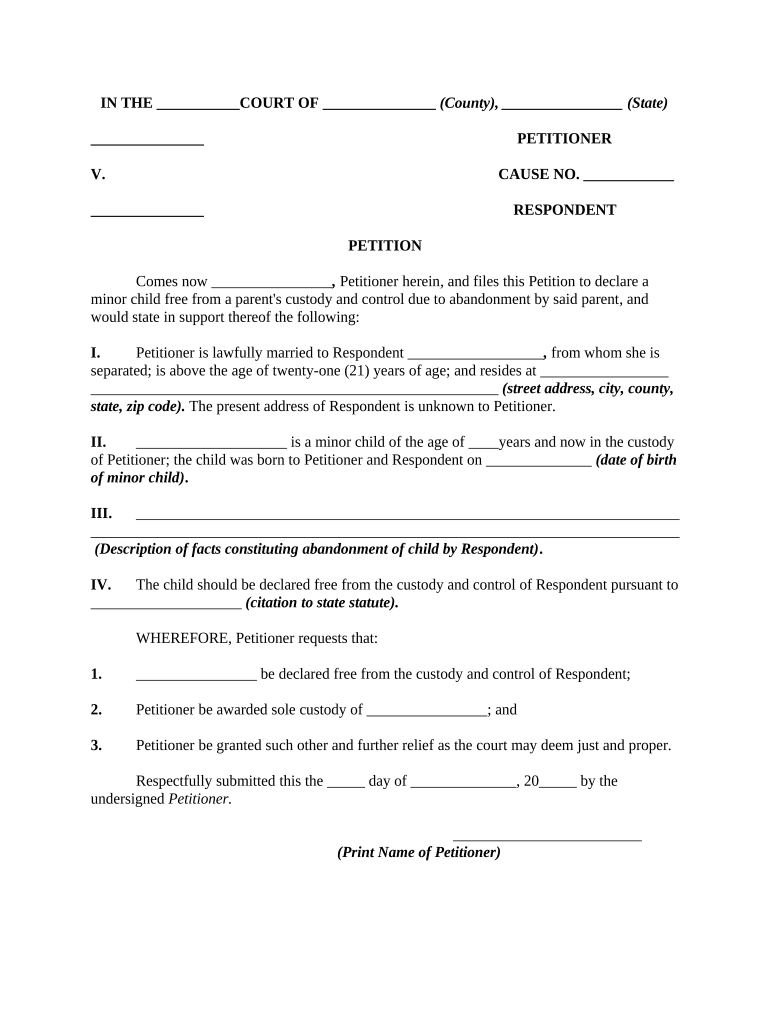
Petition to Declare Minor Free from Custody

This template is fully customizable. Edit the text, fill out the fields, and send it for signature. Give it a try!
Petition to Declare Minor Free from Custody

What the Petition to Declare Minor Free from Custody Is

The Petition to Declare Minor Free from Custody is a formal court filing used in family or juvenile court to request that a judge recognize a minor as no longer subject to the legal custody of a parent, guardian, or state agency. Reasons for filing include emancipation, transfer of guardianship, or where a minor seeks independent legal status to make personal, educational, or medical decisions. The petition states factual grounds, identifies parties, and requests specific relief; the court evaluates best interests of the minor before granting any change in custody status.

Why this Petition Matters in Custody and Guardianship Cases

Filing clarifies legal status and decision-making authority for the minor, helps establish who may consent to medical and educational matters, and creates a court record that can prevent disputes. A properly prepared petition supports timely resolution and evidence-based rulings.

Why this Petition Matters in Custody and Guardianship Cases

Who Typically Files or Responds to This Petition

Identify your role early; that determines standing, required allegations, and which court rules apply.

  • Parent or guardian seeking to relinquish custody or request a formal transfer to another adult.
  • Minor pursuing emancipation or independent legal status under state emancipation rules.
  • Third-party caregiver, relative, or proposed guardian asking the court to assume custody or guardianship.

Typical Parties and Professional Roles

Petitioner — Parent/Guardian

A parent or existing guardian who prepares and files the petition, provides factual background and supporting evidence, and is responsible for serving the respondents. The petitioner must show statutory grounds and may appear at hearings to explain why the court should modify custody or recognize emancipation.

Attorney / Guardian ad Litem

An attorney or court-appointed guardian ad litem represents the minor’s interests, investigates welfare factors, and makes recommendations to the court. Counsel typically gathers records, prepares witness statements, and may negotiate placement or supervision terms for the minor.

Key Legal and Security Considerations

ESIGN / UETA: Electronic signature legality supported
HIPAA: Medical records require protections
Notarization: State-specific notary rules apply
Audit Trail: Retention of signing metadata essential
Encryption: TLS and AES storage recommended
Record Retention: Follow federal and state periods

Consequences of an Incorrect or Incomplete Petition

Dismissal: Court may dismiss petition
Hearing Delays: Incomplete filings cause postponements
Perjury Risk: False statements can trigger penalties
Improper Venue: Wrong court can void pleadings
Service Defects: Improper service prevents action
Privacy Exposure: Sensitive data mishandled risks sanctions

Common Preparation Mistakes to Avoid

  • Filing in the wrong county or court division without verifying jurisdiction, which leads to unnecessary delays and possible dismissal.
  • Failing to include complete factual allegations and supporting documents such as school or medical records, making the petition less persuasive at the initial hearing.
  • Not serving all required parties correctly under state rules, causing hearings to be continued and extending resolution timelines.
  • Using vague or imprecise relief requests—specify the exact custody change or emancipation order you seek to avoid ambiguous rulings.

Step-by-Step: Completing the Petition

Follow these steps to prepare a clear, court-ready petition that meets procedural and evidentiary expectations.

  • 01
    Draft Petition: State parties, facts, and the precise relief requested.
  • 02
    Attach Evidence: Add school, medical, or social work records as exhibits.
  • 03
    File with Court: Submit to the appropriate family or juvenile court clerk.
  • 04
    Serve Respondents: Effectuate service per state rules and file proof.

How to Set Up an Online Filing and Review Workflow

Configure an online workflow to collect signatures, attachments, and approvals while preserving an audit trail and secure storage.

Field Configuration
Authentication Email or SMS code verification for each signer
Attachments Require supporting PDFs for medical and school records
Routing Sequential routing to petitioner, guardian ad litem, and court clerk
Notifications Automatic reminders and completion copies

Where to File, Serve, and Submit the Petition

Know the correct court and submission path before filing to avoid jurisdictional issues and delays.

  • County Family Court: File with the family or juvenile court clerk for the county of the minor's residence.
  • Clerk Filing: Clerk accepts filings in person, by mail, or via authorized e-filing portals when available.
  • Service on Parties: Serve respondents per state process: personal service, certified mail, or as the court permits.
  • Hearing Notice: File proof of service so the court schedules an initial hearing or emergency hearing if needed.

Digital Signing and eSubmission Considerations

Verify local court rules for e-filing, acceptable signature methods, and whether notarization or retention of an audit trail is required.

  • Integration: Link the eSigning platform with cloud storage and case management
  • File Formats: Use PDF or DOCX for court compatibility
  • Authentication: Use email, SMS, or stronger signer verification

Practical Tips for Accurate and Efficient Completion

Adopt consistent practices to reduce errors and speed court processing while protecting the minor's privacy and legal rights.

Verify court jurisdiction before filing
Confirm the correct county and division for juvenile or family matters; filing in the wrong court causes dismissal or transfer and delays resolution. Check local rules for filing formats and e-filing availability.
Assemble supporting records early
Collect school, medical, and social work records before filing so exhibits are organized and legible. Early documentation strengthens factual claims and can reduce continuances at hearing.
Use clear, specific relief language
Specify whether you seek emancipation, transfer of guardianship, or termination of custody and list the precise orders requested. Courts favor narrowly tailored requests tied to evidence.
Preserve privacy and redaction practices
Redact Social Security numbers and sensitive identifiers from publicly filed exhibits when permitted; file unredacted materials under seal when necessary to protect the minor.

Typical Timing and Deadlines to Expect

Timelines vary by state and case type; plan for service, response windows, and scheduling of a first hearing when you file.

Emergency Relief Request:

Court may hear same-day or within 24–72 hours for immediate harm

Service Deadline:

Serve respondents promptly; many courts expect service before first hearing

Response Period:

Respondents typically have 20–30 days to file a written answer

Initial Hearing:

Courts often schedule the first hearing within 30–60 days after filing

Appeal Window:

Limited-period appeals usually begin 30 days after final order

eSignature Platform Pricing and Capability Snapshot

Basic pricing and capability differences for common eSignature providers. signNow is listed first in the comparison per platform conventions.

signNow DocuSign Adobe Sign PandaDoc HelloSign
Starting Price $8/user/mo $15/user/mo $14/user/mo $19/user/mo $15/user/mo
Free Trial 7-day free trial Varies by plan Varies by plan Varies by plan Varies by plan
Bulk Send Yes Yes Yes Yes Yes
Audit Trail Yes Yes Yes Yes Yes
HIPAA Compliant Yes Yes Yes No No
Envelope Cap No cap 100 envelopes/user/year Varies by plan Varies by plan Varies by plan

FAQs — Common Questions About the Petition

Answers to frequent procedural and technical questions encountered when preparing and submitting this petition.


Need help? Contact support

be ready to get more
Join over 28 million airSlate SignNow users