Establishing secure connection…Loading editor…Preparing document…

Petition for Compromise

This template is fully customizable. Edit the text, fill out the fields, and send it for signature. Give it a try!
Petition for Compromise

What a Petition for Compromise Is and When it’s Used

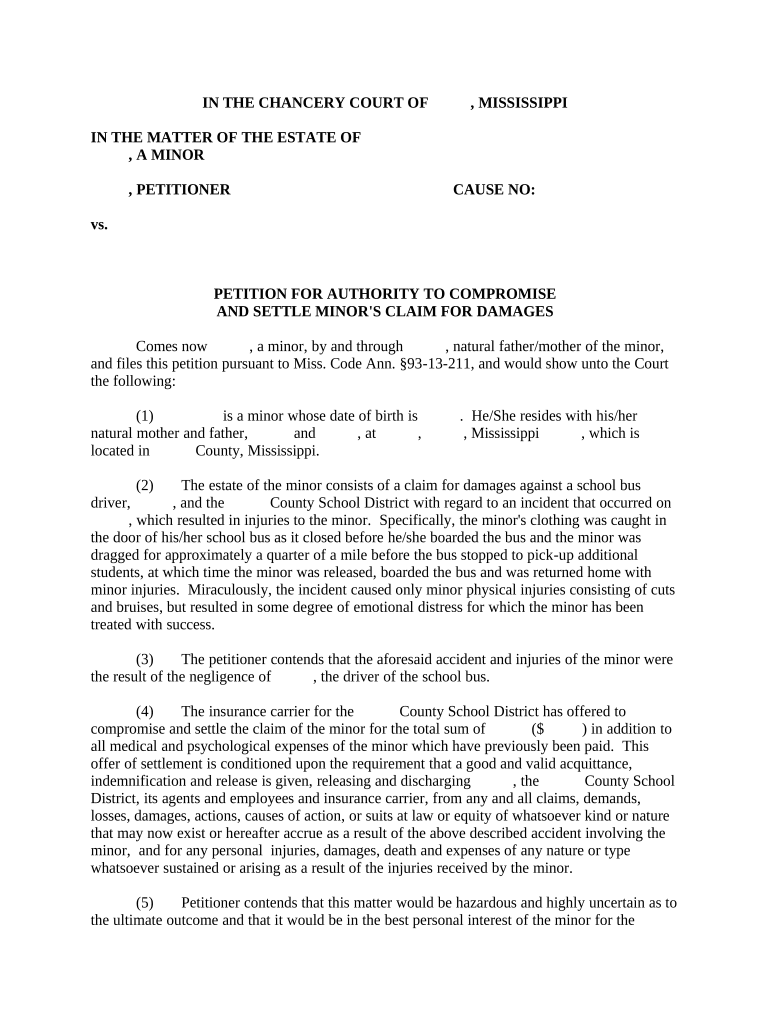
A Petition for Compromise is a formal written request submitted by a claimant or debtor to resolve a disputed obligation, claim, or debt by agreement rather than full adjudication. It frames the parties, the disputed amount or obligation, the proposed settlement terms, and the factual or legal basis supporting compromise. These petitions are used in administrative, civil, and creditor-claim contexts to seek reduced payments, alternative obligations, or dismissal of claims. The petition typically initiates negotiations, informs the respondent of proposed terms, and triggers any statutory review or approval process required by the receiving agency or court.

Why a Proper Petition for Compromise Matters

A clear, complete petition focuses negotiations, reduces litigation risk, and documents the terms that a court or agency will review for approval. Proper drafting improves the chance of an enforceable settlement and reduces delays or administrative rejection.

Why a Proper Petition for Compromise Matters

Step-by-step: Completing a Petition for Compromise

Follow these core steps to prepare a complete, compliant petition and support timely review by the recipient agency or tribunal.

  • 01
    Prepare facts: Gather account statements, invoices, and dispute history.
  • 02
    Draft terms: State proposed settlement amount and payment schedule.
  • 03
    Attach evidence: Include supporting documents and calculations.
  • 04
    Submit and follow: File with the correct office and track responses.

Who prepares and who reviews a Petition for Compromise

Typical users include claimants, debtors, counsel, and administrators who manage dispute resolution or debt settlement.

Tailor the petition to the recipient’s procedural rules and the authority that must approve compromise.

Core components of a professional Petition for Compromise

A complete petition organizes essential information so reviewers can evaluate legal, factual, and financial elements without additional requests.

Caption

Case caption or agency routing block identifying the docket, case number, or claim ID and the parties to ensure the petition is filed to the correct record and reviewer.
Background

A concise factual statement of events, dates, and prior communications that explains how the dispute arose and what actions already occurred before seeking compromise.

Legal basis

A short legal summary citing the applicable statute, regulation, or contractual provision that supports why compromise is permitted or appropriate in this case.

Offer terms

Precise settlement terms including dollar amounts, payment schedule, release language, and any conditional provisions governing acceptance or revocation.

Supporting exhibits

Numbered exhibits such as account statements, invoices, correspondence, and calculations that substantiate the offer and the petitioner’s financial position.

Authority and signature

A signed statement naming the signatory, their role or title, and confirming authority to bind the party, plus date and any notarization if required.

Essential factual and administrative data to include

Petitioner ID: Case or account number
Contact details: Address, phone
Claim totals: Original and disputed amounts
Payment terms: Offer amount and schedule
Attachments: List of exhibits
Signature info: Name and title

How to configure an online Petition for Compromise workflow

Set up fields, signing order, and evidence upload steps so reviewers receive a consistent, auditable submission.

Field Configuration
Petitioner Name Field Required text field, validation for full legal name
Offer Amount Field Numeric field with currency format and calc validation
Exhibit Upload Required PDF upload; limit file types and size
Signature Block Signer role assigned; date auto-populates

Typical routing and submission destinations

Understand where to send the petition and the usual sequence from submission to final decision.

  • Initial filing: Submit to creditor or agency claims office
  • Administrative review: Assigned examiner reviews documents
  • Negotiation: Counteroffers exchanged as applicable
  • Final disposition: Agency or court issues approval or denial

Digital submission considerations and platform requirements

Use a platform that supports secure uploads, audit trails, and the authentication level required by the recipient.

  • File formats: PDF and DOCX accepted
  • Integrations: Salesforce, NetSuite, Google Workspace
  • Security: TLS in transit; AES-256 at rest

Confirm the receiving office accepts electronic submissions and whether additional signer authentication or notarization is required before filing.

Timelines and expected processing stages

Processing time varies by court or agency; include expectations so parties can track deadlines and follow up appropriately.

Prepare and file:

Allow time to gather evidence; start at least 7–14 days before any administrative deadline.

Acknowledgment:

Many offices issue an intake acknowledgment within 7–21 days of receipt.

Review period:

Agency review commonly takes 30–180 days depending on backlog and complexity.

Negotiation window:

Expect multiple exchanges; set a target response timeframe in your petition.

Final decision:

Decision notification timing depends on authority and appeals rights.

Common mistakes that delay or derail petitions

  • Submitting incomplete exhibits or uncoupled calculations that make amounts unverifiable and trigger information requests.
  • Using informal language or unclear terms in settlement offers that leave essential obligations ambiguous.
  • Failing to confirm required notarization or witness rules for the receiving jurisdiction before submission.
  • Not documenting decision authority or signatory power, which can result in rejection or need for corrective affidavits.

Consequences of an incorrect or incomplete petition

Rejection: Petition may be administratively rejected
Delay: Processing delays and additional filings
Interest: Accrual of interest or fees
Legal cost: Increased attorney fees
Loss of rights: Statute of limitations risk
Enforcement: Risk of later enforcement action

eSignature vendor pricing and capability snapshot for petition submissions

Compare core pricing and capability indicators when choosing an eSignature provider to submit or circulate a Petition for Compromise electronically.

signNow DocuSign Adobe Sign PandaDoc HelloSign
Starting Price $8/user/mo $15/user/mo $14/user/mo $19/user/mo $15/user/mo
Free Trial 7-day trial Varies Varies Varies Varies
Bulk Send Yes Yes Yes Yes Verify
Audit Trail Yes Yes Yes Yes Yes
HIPAA Compliant Yes Yes Yes No No

Frequently asked questions about Petitions for Compromise

Answers to common questions about execution, electronic filing, signatures, and next steps when a petition is incomplete or contested.


Need help? Contact support

be ready to get more
Join over 28 million airSlate SignNow users