Establishing secure connection…Loading editor…Preparing document…

Limited Partnership Agreement

This template is fully customizable. Edit the text, fill out the fields, and send it for signature. Give it a try!
Limited Partnership Agreement

What a Limited Partnership Agreement Is

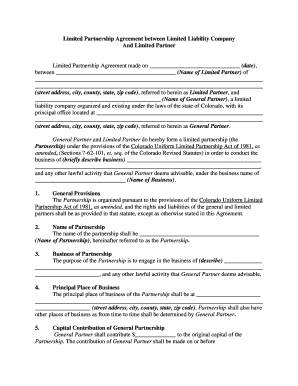
A Limited Partnership Agreement is a legal contract that defines the rights, duties, and economic interests of general and limited partners in a limited partnership. It sets management authority, capital contributions, allocation of profits and losses, transfer restrictions, admission and withdrawal procedures, dispute resolution, and dissolution mechanics. The agreement clarifies fiduciary duties for general partners while preserving limited liability for passive limited partners, and it serves as the primary record for banks, tax preparers, and courts when interpreting partner rights and obligations.

Why a Clear Agreement Matters

A well-drafted Limited Partnership Agreement reduces disputes, documents capital obligations and distributions, and protects limited partners from management liability while improving transparency for investors, banks, and tax compliance.

Why a Clear Agreement Matters

Who Typically Prepares or Signs This Agreement

Typical users include general partners, limited partners, attorneys, and corporate or administrative services that prepare or review partnership governing documents.

  • General partners — manage operations, owe fiduciary duties, and execute on behalf of the partnership.
  • Limited partners — contribute capital, receive distributions, and maintain limited liability by avoiding management actions.
  • Advisors and lenders — need the agreement for due diligence, security interests, and compliance checks.

Core Sections to Include in a Professional Agreement

A comprehensive Limited Partnership Agreement organizes governance, capital and allocation terms, transfer rules, dispute procedures, fiduciary obligations, and dissolution steps to reduce ambiguity and legal risk.

Management Structure

Specify whether general partners alone manage operations or whether limited partners retain voting rights, define authority levels, decision thresholds, and reserved matters that require supermajority consent.
Capital Contributions

Describe initial and future contribution obligations, how noncash contributions are valued, procedures for missed contributions, and remedies such as dilution or interest on past-due amounts.

Allocations & Distributions

Set profit and loss allocation rules, preferred return schedules, distribution waterfalls, and timing mechanics to ensure consistent tax reporting and investor expectations.

Transfer Restrictions

Include right of first refusal, consent requirements, buy-sell mechanisms, and admission procedures for new partners to preserve control and tax status.

Dissolution & Winding Up

Define events that trigger dissolution, winding procedures, creditor priorities, distribution order, and surviving obligations during wind-up to limit disputes.

Dispute Resolution

Specify governing law, forum selection, arbitration or mediation clauses, attorney fee allocation, and indemnities to manage conflicts predictably and efficiently.

Step-by-Step: Prepare and Execute the Agreement

Follow these sequential steps to prepare, execute, and store a Limited Partnership Agreement in compliance with state and federal rules.

  • 01
    Gather information: Collect partner names, addresses, capital amounts, and tax IDs.
  • 02
    Draft terms: Define management rights, allocations, transfers, and exit conditions.
  • 03
    Review and counsel: Have counsel review for state-specific and tax implications.
  • 04
    Sign and notarize: Execute with required signatures, witnesses, and notarization where required.

Recommended Digital Workflow Settings

Configure a consistent digital workflow to streamline approvals, obtain signatures, and preserve a compliant audit trail.

Field Configuration
Template Use a standardized master template with version control.
Signer Order Sequential or parallel signing order.
Authentication Email link, SMS code, or KBA as required.
Retention Enable encrypted storage with audit trail retention.

Typical Electronic Signing Flow

A common signing workflow moves from upload to signature placement, signer authentication, notarization if needed, and secure archival with an audit trail.

  • Upload Document: Upload final draft in PDF or DOCX format.
  • Place Fields: Add signature, date, and initial fields for each signer.
  • Authenticate Signers: Choose email, SMS, or KBA per risk profile.
  • Finalize & Store: Capture completion certificate and save encrypted copy.

Technical and Integration Considerations

Confirm file formats, signer authentication, and integrations before executing digital signing workflows for legal and operational compatibility.

  • File Types: PDF, DOCX, and common office formats supported.
  • Integrations: Salesforce, NetSuite, Microsoft 365, Google Workspace supported.
  • Authentication: Email, SMS, SSO, KBA options available.

Security and Compliance Essentials

Encryption: TLS 1.2/1.3 in transit; AES-256 at rest.
Audit Trail: Timestamps, IP, and action history retained.
HIPAA BAA: Available upon request for healthcare workflows.
21 CFR Part 11: Controls for FDA-regulated records and signatures.
ESIGN / UETA: Legal recognition of electronic signatures in the U.S.
Access Controls: Role-based permissions and two-factor options.

Key Risks and Potential Penalties

Tax Penalties: IRC §6721 fines for incorrect information returns.
I-9 Violations: Potential fines of $281–$2,789 per violation.
Notarization Errors: May delay filings or reduce enforceability.
Misstated Capital: Triggers disputes and corrective allocations.
Unauthorized Management: Limited partners risk losing liability protection.
Recordkeeping Failures: Regulatory penalties and audit exposure possible.

Common Preparation Pitfalls to Avoid

  • Using vague language for capital commitments or distributions leads to partner disputes and increases litigation risk during winding-up or insolvency.
  • Failing to specify transfer restrictions or buyout formulas can allow unintended transfers, diluting control and harming minority partners.
  • Neglecting state-specific formalities such as required notarization or witness rules may delay filing and reduce enforceability in court.
  • Inconsistent or missing tax allocation language can create IRS challenges and trigger penalties or reallocation adjustments.

eSignature Vendor Comparison for Limited Partnership Workflows

Comparison of common vendor plans and features important when executing and managing Limited Partnership Agreements; signNow is listed first per table conventions.

signNow DocuSign Adobe Sign PandaDoc HelloSign
Starting Price $8/user/mo $15/user/mo $14/user/mo $19/user/mo $15/user/mo
Free Trial 7-day free trial Varies by plan Varies by plan Varies by plan Varies by plan
Bulk Send Yes Yes Yes Yes No
Audit Trail Yes Yes Yes Yes Yes
HIPAA Compliant Yes Yes Yes No No

Frequently Asked Questions on Execution and Enforceability

Answers to common questions about executing, e-signing, notarization, amendments, and related filing issues for Limited Partnership Agreements.


Need help? Contact support

be ready to get more
Join over 28 million airSlate SignNow users