Establishing secure connection…Loading editor…Preparing document…

Petition to Change Place of Internment

This template is fully customizable. Edit the text, fill out the fields, and send it for signature. Give it a try!
Petition to Change Place of Internment

What the Petition to Change Place of Internment Is

A Petition to Change Place of Internment is a legal request filed with a court or cemetery authority to relocate human remains from one burial site to another. The petition typically explains who is requesting the move, why relocation is necessary or desired, and where the remains will be reinterred. Requirements vary by state and cemetery rules; some jurisdictions require next-of-kin consent, cemetery authorization, public health clearance, and court approval. The petition may trigger probate or estate notice procedures if the burial decision intersects with testamentary directions or competing claimant disputes.

Why this Petition Matters for Families and Executors

Filing a clear, legally compliant petition establishes authority to move remains, reduces the risk of disputes, and documents cemetery and health department approvals. Properly prepared petitions protect rights of next of kin and help courts resolve competing claims efficiently.

Why this Petition Matters for Families and Executors

Who Typically Prepares and Files the Petition

The filer should confirm standing under state law and secure any required consents, permits, or cemetery authorizations before submitting the petition.

  • Next of kin or surviving family members responsible for burial decisions.
  • Personal representative, executor, or administrator appointed under a will or probate court order.
  • Funeral home director or cemetery agent, often preparing paperwork and coordinating health clearances.

Essential Parts of a Professional Petition

A well-structured petition includes identity and authority statements, factual basis for relocation, destination details, consents, supporting permits, and a proposed court order or form of relief.

Caption

Court caption identifying the court, case number (if applicable), and parties or petitioner names.
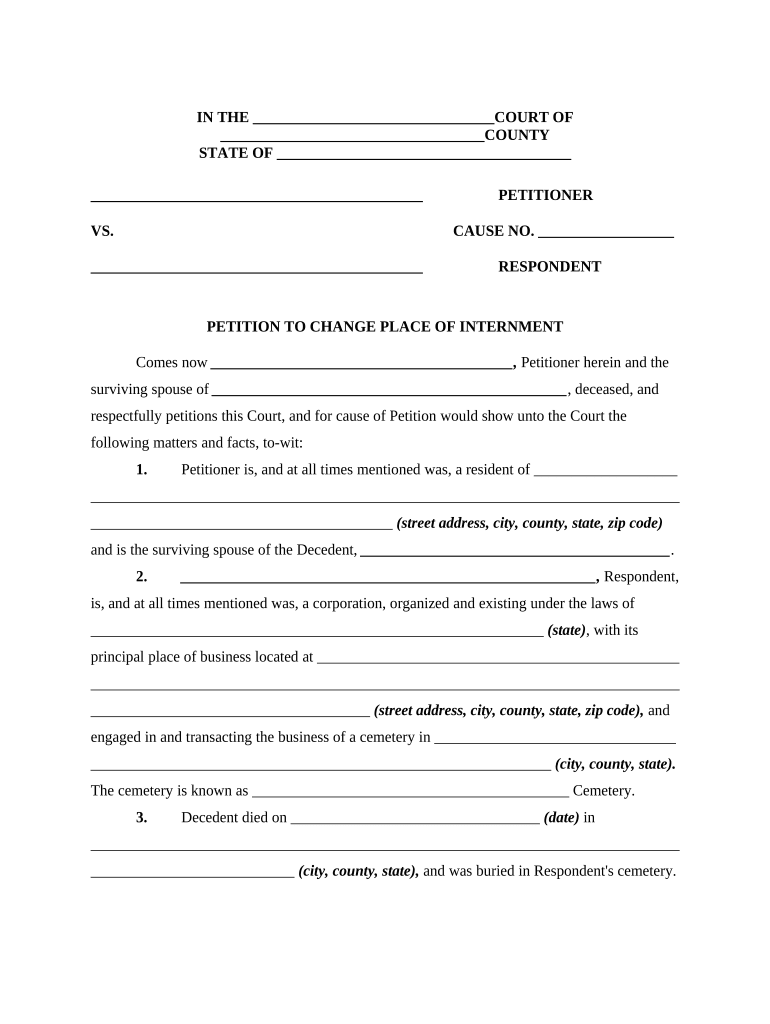
Petitioner Authority

Statement of petitioner’s relationship to the decedent and legal basis for making the request (e.g., next of kin, executor).

Statement of Facts

Clear chronology of burial, reasons for change, and any prior consents or directives about internment location.

Destination Details

Exact new burial site information, plot description, cemetery acceptance letter, and map or GPS coordinates if required.

Supporting Documentation

Death certificate, cemetery authorization, burial permits, health department clearance, and any written consents from interested persons.

Proposed Order

Draft order or decree for the judge to sign that authorizes exhumation and reinterment under specified terms.

Required Information and Documents

Decedent Name: Full legal name
Date of Death: MM/DD/YYYY
Current Internment: Cemetery name and plot
Requested Location: New cemetery or family plot
Authority to Move: Next of kin or executor
Supporting Permits: Death cert, cemetery consent

Step-by-Step: Prepare and File the Petition

Follow these steps in order to gather approvals and submit a complete petition for relocation of remains.

  • 01
    Gather Documents: Locate death certificate, cemetery records, and any will or executor appointment.
  • 02
    Obtain Cemetery Consent: Request written acceptance from the receiving cemetery and release or consent from the current cemetery.
  • 03
    Secure Health Permits: Apply for exhumation or transit permits from the local health department if required.
  • 04
    File Petition: Submit petition to the appropriate court or cemetery authority and include proposed order for signature.

Online Workflow Settings for Electronic Filing

Configure your digital workflow to collect signatures, attachments, and approvals in the right order before e-filing or printing for court.

Field Configuration
Petitioner Signature Required | Signature field with date
Cemetery Acceptance Upload Required | File attachment field (PDF)
Health Permit Upload Optional | Conditional required if jurisdiction mandates
Executor Authorization Required | Checkbox + signature if executor is not petitioner

Where to Submit the Petition and Routing Steps

The petition route depends on local rules; common destinations are probate court, county clerk, or the cemetery’s board or manager.

  • Probate Court: File if the matter affects estate administration or requires a judicial order.
  • County Clerk: Submit where county clerk processes cemetery or burial-related permits in some jurisdictions.
  • Cemetery Office: Provide cemetery consent and coordinate exhumation or reinterment scheduling.
  • Health Department: Submit for a permit or clearance when exhumation or transport crosses jurisdictions.

Digital Signing and eSubmission Requirements

When in doubt, prepare both an electronic and a paper set of the petition so you can meet hybrid filing practices and provide originals if the court requests them.

  • Document Format: Use PDF/A or a court-accepted PDF format for filings and attachments.
  • Signature Authentication: Verify accepted e-signature level (basic audit trail vs. enhanced authentication) with the filing authority.
  • File Size and Naming: Adhere to file size limits and use clear filenames to match docketing requirements.

Typical Timelines, Deadlines, and Processing Expectations

Timing depends on jurisdictional review, cemetery availability, and health permits; plan several weeks to months for complete processing.

Permit Processing Time:

2–30 business days depending on local health department workload.

Cemetery Approval:

Often 7–21 business days for acceptance and scheduling.

Court Hearing:

If required, allow 30–90 days to secure a hearing date and order.

Exhumation Scheduling:

Scheduling windows vary; expect 2–8 weeks after approvals are in place.

Interstate Transport:

If moving across state lines, allow extra time for transit permits and courier arrangements.

Common Mistakes to Avoid

  • Failing to obtain written cemetery acceptance before filing the petition.
  • Submitting incomplete supporting documents, especially the death certificate or health permits.
  • Overlooking competing claimant notices or failure to notify interested persons.
  • Using an informal signature or missing required notarization or witness steps.

Consequences of an Incorrect or Incomplete Petition

Denial or Delay: Court or cemetery refusal may delay relocation and require amendment.
Civil Disputes: Competing claimants can trigger contested hearings and increased legal costs.
Administrative Fines: Local health or cemetery authorities may impose fines for noncompliance.
Criminal Liability: Unauthorized exhumation or transport can expose parties to criminal penalties in some jurisdictions.
Void Transactions: Improper authorizations may render cemetery transfers unenforceable.
Increased Costs: Errors often lead to additional attorney, permit, and transport fees.

eSignature Vendor Comparison for Completing the Petition

Common eSignature providers differ on price, envelope caps, and compliance features. signNow appears first for neutral comparison of key plan attributes.

signNow DocuSign Adobe Sign PandaDoc HelloSign
Starting Price $8/user/mo $15/user/mo $14/user/mo $19/user/mo $15/user/mo
Free Trial 7-day free trial Trial available Trial available Trial available Trial available
Bulk Send Available on some plans Available on some plans Available on some plans Available on some plans Available on some plans
Audit Trail Yes Yes Yes Yes Yes
HIPAA Compliant Yes Yes Yes No No
Envelope Cap No cap 100 envelopes/user/year Varies by plan Varies by plan Varies by plan

Real-World Examples of Using a Petition

Two representative scenarios illustrate typical uses and outcomes when petitions are prepared correctly.

Funeral Home Coordination

A funeral director collects consent from next of kin and cemetery documents

  • Receives cemetery acceptance letter
  • The funeral home schedules exhumation, secures health permits, and the court issues the relocation order without contested hearings.

Executor Seeks Family Relocation

An executor files to move remains to a family plot after unclear burial instructions are discovered

  • Executor provides probate appointment and proof of kinship
  • The court grants the petition after notice to interested persons and documented cemetery consent.

Frequently Asked Questions

Answers to common questions about preparing, filing, and managing petitions to change place of internment.


Need help? Contact support

be ready to get more
Join over 28 million airSlate SignNow users