Governance Approval
Board resolution and shareholder vote details along with meeting minutes and authority citations; include precise language approving the liquidation plan and delegating authority to execute the wind-up.
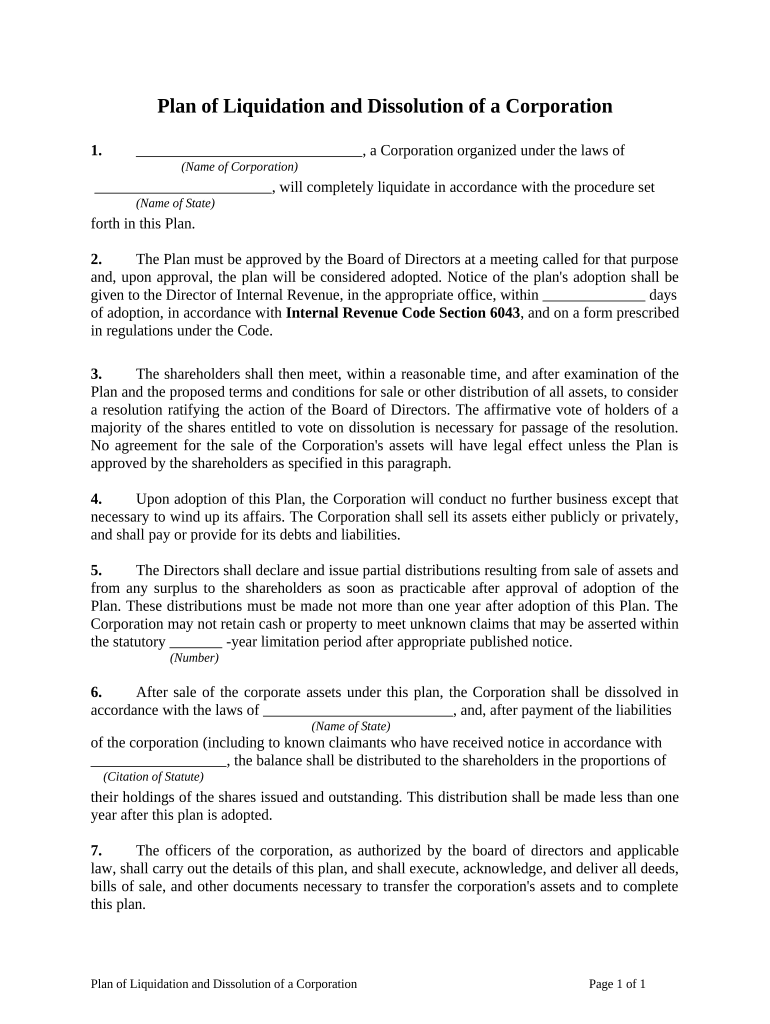
A documented liquidation plan reduces legal and financial risk by establishing procedures for creditor notice, asset valuation, tax reporting, and formal dissolution filings, helping directors meet fiduciary duties and protecting against post-dissolution claims.

The Plan of Liquidation and Dissolution is prepared and used by corporate decision-makers, professional advisers, and parties involved in winding up operations.
Accurate execution benefits stakeholders by clarifying priorities, documenting approvals, and creating a defensible record should creditors or tax authorities later challenge the dissolution.
The board chair (or authorized director) signs resolutions approving the plan, certifies that fiduciary duties were observed, and authorizes filings; this signature often triggers the official liquidation timeline and is reflected in board minutes.
A named liquidating officer or agent signs on behalf of the corporation to execute asset sales, settle claims, file dissolution paperwork, and distribute proceeds according to the plan and state law.
Board resolution and shareholder vote details along with meeting minutes and authority citations; include precise language approving the liquidation plan and delegating authority to execute the wind-up.
Method and schedule for notifying known and unknown creditors, including publication if required by state law; detail claim submission procedure and deadlines for creditor responses.
Comprehensive list of assets, valuation method, and disposition plan (sale, transfer, assignment); document who performs valuation and any appraisal reports used.
Process for identifying and paying secured and unsecured creditors, tax liens, and contingent liabilities; include escrow or holdback procedures if claims remain unresolved.
Order of priority for distributions to creditors and shareholders, calculation examples, and timing of final payouts; address fractional shares and withheld taxes.
List required state filings (articles of dissolution), tax returns, final payroll filings, and statutory retention periods for corporate records and audit trails.
| Field | Configuration |
|---|---|
| Signer Order | Sequential or parallel based on corporate approval workflow |
| Authentication | Email link, SMS code, or knowledge-based depending on document sensitivity |
| Retention | Specify retention period and export copies to secure storage |
| Notifications | Enable reminders, completion notices, and delivery of signed PDFs |
Ensure your chosen eSignature platform supports required integrations, secure storage, and legal-compliance features before e-submitting official dissolution documents.
Often immediate upon resolution; check bylaws for required notice periods
State statutes vary; some require published notice and fixed response windows
File articles of dissolution with Secretary of State per state filing rules
File final federal return by the normal due date for the tax year
Begin retention clock on the effective date for statutory retention calculations
Board resolution and shareholder approval where required, creating the formal authority to proceed.
Complete asset dispositions per the plan and prepare closing documentation for transfers.
Process creditor claims, negotiate settlements, and document resolution or reserves for contested claims.
Submit required state filings, obtain tax clearances if applicable, and publish notices where statutorily required.
Asset lists, appraisal reports, creditor claim logs, escrow agreements, and board minutes should be appended as labeled exhibits for clarity and proof.
Store the executed plan with all signatures and the audit trail in PDF/A format to preserve authenticity and long-term accessibility.
Include copies of final federal and state tax returns, supporting schedules, and any tax clearance letters or worksheets used during the wind-up.
Maintain detailed disbursement ledgers showing payee, date, method, and authorization for each distribution to support accounting and potential audits.
Smaller teams adopted remote signing for board approvals and external agreements to reduce turnaround.
Real estate operators use eSignatures for closing paperwork and investor distributions to streamline remote transactions.
| signNow | DocuSign | Adobe Sign | PandaDoc | HelloSign | |
|---|---|---|---|---|---|
| Starting Price | $8/user/mo | $15/user/mo | $14/user/mo | $19/user/mo | $15/user/mo |
| Free Trial | 7-day trial | Varies | Varies | Varies | Varies |
| Bulk Send | Yes | Yes | Yes | Yes | Yes |
| Audit Trail | Yes | Yes | Yes | Yes | Yes |
| HIPAA Compliant | Yes | Yes | Yes | No | No |