Establishing secure connection…Loading editor…Preparing document…

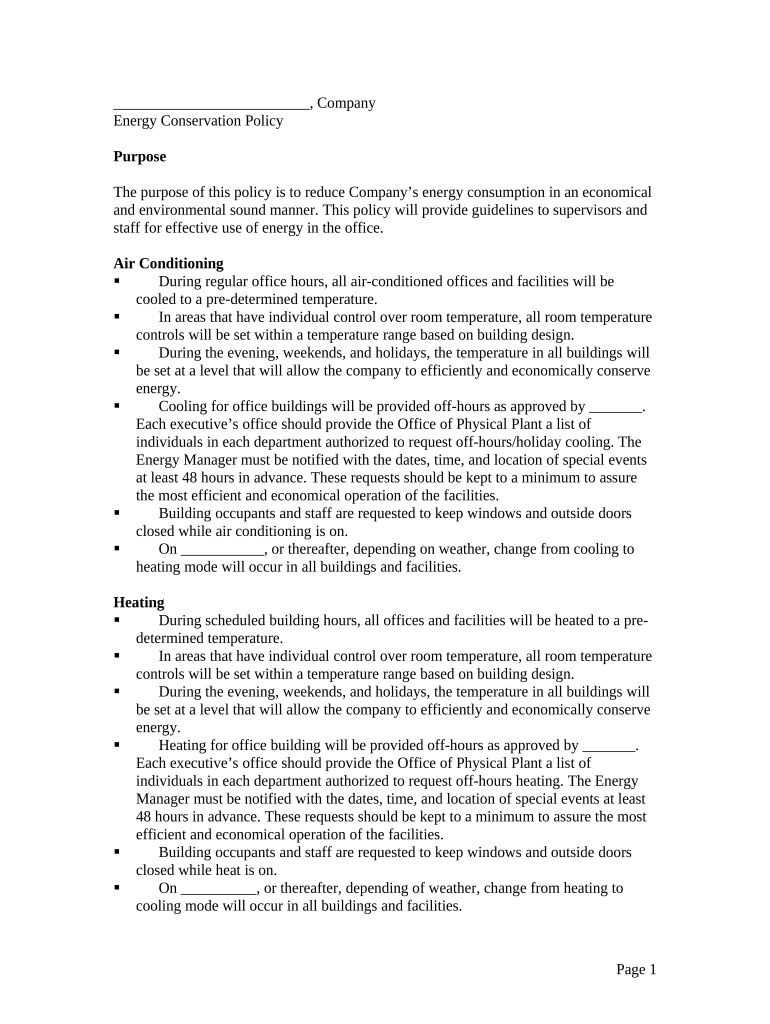
Energy Conservation Policy

This template is fully customizable. Edit the text, fill out the fields, and send it for signature. Give it a try!
Energy Conservation Policy

What an Energy Conservation Policy Is and Why It Matters

An Energy Conservation Policy is a formal organizational document that defines objectives, roles, responsibilities, and procedures to reduce energy consumption and improve efficiency across facilities and operations. It sets measurable targets, establishes monitoring and reporting practices, and integrates with procurement, maintenance, and capital planning. The policy typically covers scope (sites and systems), baseline metrics, approved reduction measures, accountability for implementation, and review cycles to ensure continuous improvement and regulatory alignment.

Purpose and Practical Benefits of an Energy Conservation Policy

A written policy centralizes goals, reduces energy waste, lowers utility costs, and supports compliance with building codes and benchmarking requirements. It clarifies responsibility, enables consistent measurement, and helps secure internal buy-in for capital improvements and behavioral change.

Purpose and Practical Benefits of an Energy Conservation Policy

Who Typically Prepares and Uses This Policy

The document supports cross-functional coordination across facilities, finance, operations, and external contractors.

  • Facilities managers and building engineers who implement operational controls and equipment schedules.
  • Sustainability or energy managers who set targets, monitor consumption, and report results.
  • Executive sponsors and procurement teams who approve budgets and capital projects aligned to policy goals.

Primary Roles Involved

Facilities Manager

A Facilities Manager oversees day-to-day building systems, schedules preventive maintenance, and implements operational measures. They document actions taken to meet policy targets and coordinate with vendors for retrofits or repairs.

Sustainability Director

A Sustainability Director defines reduction targets, analyzes energy data, secures executive support for investments, and reports progress to stakeholders and regulators. They align policy to state benchmarking and grant requirements.

Core Components Every Professional Policy Should Include

A concise policy organizes objectives, scope, responsibilities, baseline metrics, approved measures, and review procedures so implementation is auditable and repeatable.

Scope

Define covered sites, building systems (HVAC, lighting, controls), and excluded assets so application is clear and measurable across the organization.
Objectives

State concise energy reduction targets (percentage or kWh) and timelines tied to fiscal years or project phases to enable progress tracking.

Roles & Responsibilities

Assign ownership for implementation, monitoring, approval, and corrective actions so accountability is clear at each organizational level.

Baseline & Metrics

Specify baseline period, measurement units, meter locations, and reporting cadence to ensure consistent comparisons and auditability.

Approved Measures

List acceptable operational changes, retrofit types, and procurement preferences so teams follow standard criteria when reducing energy use.

Review & Revision

Require periodic review, performance audits, and a formal amendment process to adapt the policy as technology and regulations change.

Step-by-Step: Preparing and Approving the Policy

Follow a structured process to draft, review, approve, and communicate the policy so it can be implemented consistently across sites.

  • 01
    Draft Policy: Gather baseline data and draft objectives aligned to corporate goals.
  • 02
    Stakeholder Review: Circulate draft to facilities, finance, legal, and sustainability for feedback.
  • 03
    Approval: Obtain sign-off from the designated policy owner or executive sponsor.
  • 04
    Publish & Train: Distribute the signed policy and provide training to responsible teams.

How to Update or Revise the Policy

Revisions should follow a controlled process with versioning and documented approvals to preserve audit trails and legal clarity.

01

Initiate Change:

Identify need for revision and submit change request.
02

Impact Review:

Assess operational and financial impacts of proposed edits.
03

Legal Check:

Confirm regulatory alignment and contract implications.
04

Approval Flow:

Route revisions to the policy owner and executive sponsor.
05

Versioning:

Assign version number and effective date.
06

Notify:

Communicate updates to affected teams and vendors.

Customizing and Completing the Policy Online

Configure an online workflow for drafting, review, and signatures to improve traceability and reduce turnaround time.

Document Template Create a reusable template with locked sections for legal clauses.
Reviewers Set roles and sequential reviewer order for approvals.
Signature Fields Add signature, date, and title fields for each approver.
Notifications Enable email reminders and escalation for overdue approvals.
Audit Trail Capture timestamps, IPs, and change history for compliance.

Digital Signing, File Formats, and Integration Considerations

Ensure the chosen platform can produce an audit trail, enforce authentication, and retain signed records in an exportable format for audits and legal review.

  • Supported Formats: PDF, DOCX, and XLSX
  • Integrations: Salesforce, Microsoft 365, NetSuite
  • Security: TLS in transit, AES-256 at rest

Where to File and How to Route the Signed Policy

Establish a central repository and routing rules so finalized policies are accessible and preserved with audit metadata.

  • Central Repository: Store signed files in a secure, access-controlled archive.
  • Policy Owner Copy: Deliver final PDF with audit trail to the policy owner.
  • Site Teams: Share relevant sections with site operations and contractors.
  • Retention Record: Log version, effective date, and approver details.

Key Timelines and Periodic Deadlines

Define milestones and recurring dates so compliance, reporting, and review happen on schedule and responsibilities are clear.

Policy Effective Date:

Date when requirements become mandatory at covered sites

Monthly Monitoring:

Submit meter and KPI data monthly for performance checks

Quarterly Review:

Assess progress versus targets and corrective actions

Annual Audit:

Conduct yearly performance audit and update baselines

Policy Renewal:

Approve revisions annually or when materially changed

Common Mistakes to Avoid When Preparing This Policy

  • Overly broad scope that lacks site-level applicability, creating confusion during implementation and measurement.
  • Missing baseline definition or inconsistent metering, which prevents reliable comparisons and obscures true savings.
  • Unclear ownership and approvals, causing delays and lack of accountability for actions and capital requests.
  • Failure to align with state benchmarking or code requirements, leading to regulatory noncompliance and potential penalties.

Potential Risks and Consequences of an Incomplete Policy

Regulatory Noncompliance: Fines or enforcement actions
Higher Operating Costs: Lost savings from unaddressed inefficiencies
Contractual Exposure: Vendor disputes over responsibilities
Missed Grants: Ineligible for incentives tied to documented policy
Reputational Harm: Negative stakeholder perception
Audit Findings: Corrective actions and remediation costs

Practical Examples of Policy Use

These scenarios show how a policy supports measurable action and cross-team coordination.

Municipal Facilities

A city adopted a formal Energy Conservation Policy to reduce municipal building consumption by 15% over five years.

  • The policy required metering upgrades and occupant engagement programs.
  • After implementation the city documented measurable reductions, improved budgeting for retrofits, and met local benchmarking obligations for public buildings.

Commercial Portfolio

A property management firm centralized energy targets across ten buildings and set quarterly reporting.

  • Targets drove LED retrofits and control optimization.
  • With consistent monitoring and an approved procurement list, the firm realized operational savings and provided transparent performance reports to investors.

How This Policy Differs from Other Energy Documents

Compare typical documents to choose the right instrument for goals such as operational controls, strategic planning, or regulatory compliance.

Document Type Policy Management Plan
Purpose guiding rules implementation steps
Scope organization-wide project or site
Audience all staff facilities teams
Measurement high-level targets detailed kpis

eSignature Provider Comparison for Policy Approvals

Select a platform that supports secure signatures, audit trails, and integrations. Pricing and feature availability vary by vendor and plan.

signNow DocuSign Adobe Sign PandaDoc HelloSign
Starting Price $8/user/mo $15/user/mo $14/user/mo $19/user/mo $15/user/mo
Free Trial 7-day free trial Varies by plan Varies by plan Varies by plan Varies by plan
Bulk Send Yes Yes Yes Yes Varies
Audit Trail Yes Yes Yes Yes Yes
HIPAA Compliant Yes Yes Yes No No

Frequently Asked Questions and Troubleshooting

Answers to common questions about validity, signing, storage, revisions, and state differences for an Energy Conservation Policy.


Need help? Contact support

be ready to get more
Join over 28 million airSlate SignNow users