Establishing secure connection…Loading editor…Preparing document…

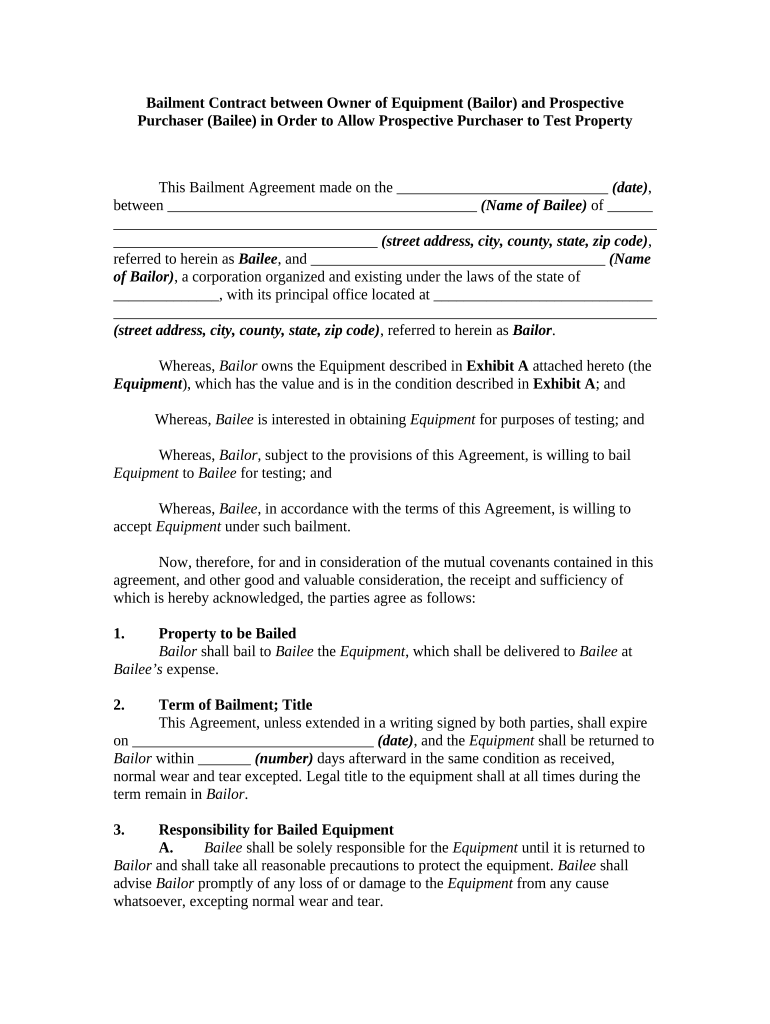
Bailment Contract for Testing Equipment

This template is fully customizable. Edit the text, fill out the fields, and send it for signature. Give it a try!
Bailment Contract for Testing Equipment

What a Bailment Contract for Testing Equipment Is and When It Applies

A Bailment Contract for Testing Equipment is a written agreement under which the owner (bailor) temporarily transfers physical custody of testing devices, instruments, or samples to another party (bailee) for inspection, calibration, or laboratory testing without transferring ownership. The contract specifies the scope of testing, permitted uses, delivery and return logistics, chain-of-custody expectations, insurance and liability allocation, and any fees or consideration. Typical uses include vendor-supplied test rigs, prototype hardware sent to third-party labs, and equipment lent between subsidiaries. Clear terms reduce disputes over damage, loss, and result ownership during the testing period.

Why a Clear Bailment Contract Matters for Testing Equipment

A precise bailment agreement minimizes operational, financial, and legal uncertainty by allocating responsibility for loss, damage, insurance, and calibration status. It protects both parties by documenting permitted testing activities, return condition, cost recovery, and handling of test data. Well-drafted clauses reduce disputes, speed disputes resolution, and preserve insurance coverage when equipment is offsite.

Why a Clear Bailment Contract Matters for Testing Equipment

Who Commonly Uses This Bailment Contract

Use this contract whenever equipment custody changes hands for discrete testing work to clarify liabilities and protect assets.

  • Manufacturers and OEMs lending prototypes or test fixtures to labs for validation and compliance testing.
  • Independent testing laboratories receiving customer equipment for diagnostic or compliance testing services.
  • Research institutions borrowing specialized instruments for short-term experiments or calibration tasks.

Typical Signers and Their Roles

Lab Director

A Lab Director signs on behalf of the testing facility and accepts responsibility for handling, secure storage, and controlled use of equipment while on site. Their signature confirms the lab will follow agreed test scope, maintain calibration records, and notify the bailor of any damage or loss promptly.

Equipment Owner

The Equipment Owner (bailor) authorizes temporary custody and sets return conditions, required documentation, and insurance coverage. Their signature establishes ownership, confirms pre-shipment condition, and binds the owner to any fee schedule or access rules included in the agreement.

Essential Security and Compliance Details to Include

Encryption: AES-256 at rest
Transport Security: TLS 1.2/1.3
Audit Trail: Signed timestamp
HIPAA Note: BAA required
Chain-of-Custody: Signed handover logs
Access Controls: Role-based access

Primary Risks and Potential Penalties

Equipment Damage: Repair or replacement costs
Loss or Theft: Full value liability
Data Breach: HIPAA or regulatory fines
Missed Returns: Late fees or accelerated remedies
Incorrect Testing: Rework and warranty exposure
Insurance Gaps: Denied claims if noncompliant

Common Preparation Errors to Avoid

  • Failing to itemize equipment serial numbers and calibration status, which creates disputes about pre-existing defects and voids warranty coverage.
  • Omitting required insurance limits or failing to require proof of coverage, exposing the owner to uncompensated loss in the event of damage.
  • Not defining permitted tests and prohibited uses, allowing bailees to perform procedures that exceed intended scope and cause harm.
  • Neglecting chain-of-custody procedures and signed handover receipts, undermining evidence of custody and complicating liability allocation.

Core Clauses Every Bailment Contract Should Contain

Include these six components to cover custody, use, liability, and end-of-term handling; each clause should be specific to the equipment and testing context.

Item List

Detailed inventory with model, serial number, and physical condition notes to avoid later disputes over pre-existing damage or missing parts.
Scope of Testing

Precise description of permitted procedures, environmental conditions, consumables allowed, and any restrictions to protect both equipment and test validity.

Insurance

Required coverages and minimum limits, certificate of insurance naming bailor as additional insured, and instructions for claim handling and subrogation.

Liability Allocation

Clear statement of who bears risk for loss, theft, damage, and incidental costs, including thresholds for deductible or repair allocation.

Return Condition

Expected condition on return, calibration re-certification obligations, inspection window, and acceptance criteria with timeframe for objections.

Data and Results

Ownership and permitted uses of test data, confidentiality obligations, and any required data sanitization before equipment return.

Step-by-Step: Completing the Bailment Contract

Follow these steps to complete the agreement accurately before sending equipment offsite.

  • 01
    Identify Parties: Enter full legal names and contact details for bailor and bailee.
  • 02
    List Equipment: Record make, model, serial number, and calibration status.
  • 03
    Set Testing Scope: Describe permitted tests, duration, and environment limits.
  • 04
    Sign and Date: All authorized signers must sign and date the document.

How the Bailment Process Typically Flows

A consistent workflow clarifies responsibilities from handover through testing to final return.

  • Request: Owner submits equipment and contract for acceptance.
  • Handover: Signed receipt documents custody transfer.
  • Testing: Bailee performs agreed tests within scope.
  • Return: Inspection and acceptance or dispute resolution.

Digital Workflow Setup for Online Completion

Configure an electronic workflow to streamline signing, authentication, and document retention.

Signer Order Sequential signing to ensure bailor approval before shipment.
Authentication Email link with optional SMS code or enhanced ID checks.
Attachments Attach calibration certificates and photos of pre-shipment condition.
Notifications Automatic reminders for pending signatures and inspection deadlines.
Recordkeeping Enable audit trail and secure storage for evidence.

Platform and Format Considerations for Electronic Execution

Ensure the selected vendor can provide a tamper-evident record and, where required, a BAA or 21 CFR Part 11 support for regulated workflows.

  • File Types: PDF and DOCX supported
  • Integrations: Connectors for NetSuite and MS 365
  • Authentication: Email, SMS, or advanced options

Key Timeframes and Deadlines to Define in the Contract

Specify concrete deadlines to avoid ambiguity on return, inspection, and dispute periods.

Testing Period Length:

Specify the testing window, e.g., 30 calendar days from delivery.

Inspection Window:

Allow 7–14 days for owner to inspect returned equipment.

Damage Notice:

Require written notice within 5 business days of discovery.

Return Shipping:

Define who arranges and pays for return shipping and timing.

Payment Due:

State due date for testing fees, e.g., Net 30 from invoice.

Milestones from Request to Equipment Return

Track these sequential milestones to manage custody, testing, and final acceptance efficiently.

01

Request Approval

Owner approves lab and signs bailment terms before shipment.

02

Shipment and Handover

Carrier delivery with signed handover receipt and photos.

03

Testing Completion

Bailee completes tests within agreed timeframe and documents results.

04

Return and Inspection

Owner inspects and either accepts or raises documented objections.

eSignature Vendor Pricing Snapshot for Executing Bailment Contracts

Compare typical starter pricing and feature indicators when selecting an eSignature vendor for contract execution; signNow appears first for parity in listed criteria.

signNow DocuSign Adobe Sign PandaDoc HelloSign
Starting Price $8/user/mo $15/user/mo $14/user/mo $19/user/mo $15/user/mo
Free Trial 7-day trial Varies Varies Varies Varies
Bulk Send Yes Yes Yes Yes No
Audit Trail Yes Yes Yes Yes Yes
HIPAA Compliant Yes Yes Yes No No

Practical Examples of Bailment Use

These short scenarios show typical applications and contract adjustments relevant to testing equipment.

Prototype Validation

A manufacturer sends a prototype to an accredited lab for CE testing

  • Lab documents calibration and provides test logs
  • The bailment required the lab to maintain insurance, return within 30 days, and provide a signed condition report to preserve warranty coverage and liability caps.

Clinical Device Testing

A hospital lends monitoring devices to a research partner

  • Devices record PHI during tests
  • The contract required a BAA, data encryption at rest, and certified device sanitization before return to prevent HIPAA exposure and ensure regulatory compliance.

Practical Tips for Accurate and Efficient Completion

Apply these best practices to reduce errors and speed processing when preparing and executing the bailment contract.

Use Detailed Inventories
Photograph equipment, note serial numbers, and record calibration certificates to create an incontrovertible pre-shipment record.
Require Proof of Insurance
Collect an up-to-date certificate showing required limits and additional-insured status before equipment ships.
Define Acceptance Criteria
Specify inspection procedures, thresholds for acceptable wear, and timelines for raising objections to avoid post-return disputes.
Preserve Audit Trails
Use an eSignature provider that captures timestamps, IP addresses, and signer identity evidence for legal defensibility.

Frequently Asked Questions About Bailment Contracts for Testing Equipment

Answers to common questions about scope, liability, signing, and evidence preservation for bailments involving testing equipment.


Need help? Contact support

be ready to get more
Join over 28 million airSlate SignNow users