Establishing secure connection…Loading editor…Preparing document…

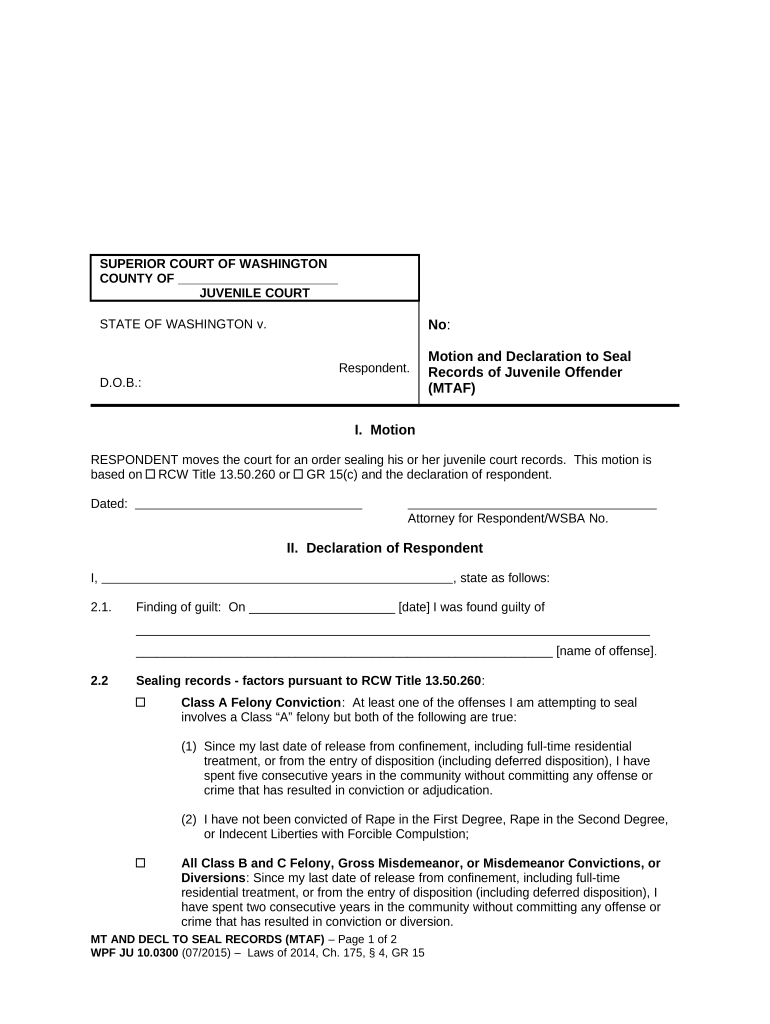
Washington Motion and Declaration to Seal Records of Juvenile Offender

This template is fully customizable. Edit the text, fill out the fields, and send it for signature. Give it a try!
Washington Motion and Declaration to Seal Records of Juvenile Offender

What this motion and declaration accomplishes

The Washington Motion and Declaration to Seal Records of Juvenile Offender is a court filing used to request that a juvenile record be closed to public access and treated as confidential. The motion identifies the juvenile case, explains why sealing is appropriate under applicable Washington statutes or court rules, and the declaration supplies sworn facts to support the request. The filing asks the juvenile court to enter an order sealing records, restricting searches, and directing agencies to limit disclosure to authorized parties only.

Why sealing juvenile records matters

Sealing protects a juvenile’s privacy, limits background-check exposure, and supports rehabilitation by restricting public access to arrest, charge, and disposition records when the court finds sealing appropriate under state law.

Why sealing juvenile records matters

Who typically files this motion and declaration

Each filer should confirm local juvenile court rules and, when necessary, consult an attorney experienced in Washington juvenile procedure.

  • Parents or guardians seeking privacy for a youth and restoration of future opportunities.
  • Defense attorneys or public defenders representing juveniles in delinquency proceedings.
  • Court-appointed advocates or social-service agencies assisting rehabilitative outcomes.

Step-by-step: preparing and filing the motion

Follow a clear sequence: gather records, complete the motion and declaration, attach exhibits, obtain any required notarization, and file with the juvenile court clerk.

  • 01
    Gather records: Collect court case file, disposition documents, and supporting evidence.
  • 02
    Draft motion: State legal basis and specific relief requested.
  • 03
    Prepare declaration: Provide sworn facts supporting sealing; attach exhibits if needed.
  • 04
    File with court: Submit to the clerk per local filing rules and obtain a filing stamp.

Digital filing and eSubmission workflow

Map an online workflow before e-filing: prepare PDF, set signature fields, choose authentication, and include exhibits as attachments.

Document format PDF/A preferred for court compatibility
Signature method Typed, drawn, or certified e-signature
Authentication Email + SMS or court-specified KBA
Attachments Exhibits combined in single PDF
Submission Upload via court e-filing portal

How electronic submission typically proceeds

E-submission follows a sender-to-court route with signature capture, optional authentication, and receipt of a stamped copy upon successful filing.

  • Prepare PDF: Assemble motion, declaration, and exhibits
  • Add signatures: Place signer and date fields
  • Authenticate signer: Use email, SMS, or court method
  • Upload to court: Submit through the court’s e-filing system

Essential elements of a professional sealing motion package

A complete filing combines legal argument, sworn facts, accurate case identifiers, supporting exhibits, proposed order language, and proof of service for interested parties.

Legal basis

Cite the specific Washington statute or juvenile rule authorizing sealing; explain how facts satisfy statutory criteria for relief.
Sworn declaration

Provide a signed, dated declaration describing rehabilitation, current circumstances, and reasons sealing serves the juvenile’s best interests.

Case identification

Include court name, case number, juvenile name, and DOB to avoid misfiling and to ensure the order applies to the correct record.

Supporting exhibits

Attach disposition paperwork, treatment records, letters of support, or certificates that substantiate claims made in the declaration.

Proposed order

Draft clear, specific sealing instructions for court entry, including agencies to notify and scope of restricted access.

Proof of service

Document how notice was provided to parties required by local rule; include certificates of mailing or electronic service receipts.

Information frequently required on the form

Court: Full court name
Case number: Exact case ID
Juvenile name: Legal name
Date of birth: MM/DD/YYYY
Relief requested: Sealing specifics
Signature: Signed and dated

Common pitfalls to avoid when preparing the motion

  • Using inconsistent names or dates between motion and case file, which can cause misfiling or administrative rejection.
  • Failing to attach critical exhibits such as disposition paperwork or treatment records that substantiate rehabilitation claims.
  • Neglecting local juvenile court notice requirements so interested parties are not informed per local rule and the motion is delayed.
  • Submitting unsigned or undated declarations; missing signature formalities commonly lead to clerk returns or rejection.

Consequences and procedural risks of an incorrect filing

Motion denial: May be denied
Record remains public: No sealing ordered
Delayed relief: Additional hearings required
Costs: Filing or attorney fees
Service failure: Nullifies filing
Appeal limits: Limited appellate remedies

Typical timing and processing expectations

Timing varies by county; allow for clerk review, scheduling of hearings, and statutory waiting periods where applicable.

Clerk review:

Processing can take 1–4 business days

Hearing schedule:

Judge may set hearing within 2–8 weeks

Notice period:

Some courts require 7–21 days’ notice to parties

Entry of order:

Order follows hearing if granted

Appeal window:

Deadlines vary by statute and rule

Key milestones in the sealing process

A sequential view of major steps and what to expect at each stage of the court’s review and final disposition.

01

Prepare and file

Assemble motion package and submit to court clerk.

02

Provide notice

Serve required parties or file a certificate of service.

03

Court hearing

Judge reviews facts and hears argument if required.

04

Order issuance

Court enters sealing order and directs record handling.

Price and capability comparison for eSignature providers

Compare starting price, free-trial availability, bulk-send capability, audit trails, HIPAA support, and envelope limits when selecting an eSignature solution.

signNow DocuSign Adobe Sign PandaDoc HelloSign
Starting Price $8/user/mo $15/user/mo $14/user/mo $19/user/mo $15/user/mo
Free Trial 7-day free trial Yes Yes Yes Yes
Bulk Send Yes Yes Yes Yes Yes
Audit Trail Yes Yes Yes Yes Yes
HIPAA Compliant Yes Yes Yes No No
Envelope Cap No cap 100 envelopes/user/year Varies Varies Varies

Frequently asked questions about filing and e-signing

Answers to common questions about eligibility, e-signature use, filing locations, supporting evidence, and timing for sealing motions.


Need help? Contact support

be ready to get more
Join over 28 million airSlate SignNow users