Establishing secure connection…Loading editor…Preparing document…

Resolution Form

This template is fully customizable. Edit the text, fill out the fields, and send it for signature. Give it a try!
Resolution Form

What a Resolution Form Is and when organizations use it

A Resolution Form records an official decision by a governing body—typically a board of directors, members, or managers—authorizing a specific action such as opening bank accounts, approving contracts, appointing officers, or leasing property. It creates an auditable corporate record that shows the decision, effective date, authorized signers, and any limits on authority. Resolution Forms are used for corporate minutes, lender or vendor requirements, and internal governance. While not usually a government filing, they may be required by banks, title companies, or counterparties as evidence of corporate authorization.

Why a clear, legally sound Resolution Form matters

A properly drafted Resolution Form reduces internal confusion, establishes legal authority for signers, and provides third parties with verifiable evidence of corporate action. It helps prevent unauthorized transactions and supports compliance with corporate bylaws and state corporation codes.

Why a clear, legally sound Resolution Form matters

Which roles typically prepare, approve, and rely on a Resolution Form

Common users include corporate officers, board members, corporate secretaries, and administrative staff responsible for governance or finance.

  • Board members and chairs who approve and vote on the action.
  • Corporate secretary or clerk who prepares and records the minutes and resolution.
  • Finance or treasury staff who need authorization for banking or payment changes.

Primary signers and their roles

Board Chair

The Board Chair typically leads the meeting where the resolution is proposed and often signs to confirm the board's vote. Their signature documents that the governing body formally considered and approved the action in accordance with bylaws.

Corporate Secretary

The Corporate Secretary prepares the written resolution, records it in the corporate minute book, and attests to its accuracy. Many banks and title companies look for the secretary's attestation when accepting a resolution as proof of authority.

Essential parts of a professional Resolution Form

A well-structured Resolution Form is concise, unambiguous, and includes signatures, dates, and witnessing or notarization when required by third parties.

Resolution Title

A short descriptive title stating the action (for example, 'Authorization to Open Bank Account') so readers immediately understand the scope and subject of the resolution.
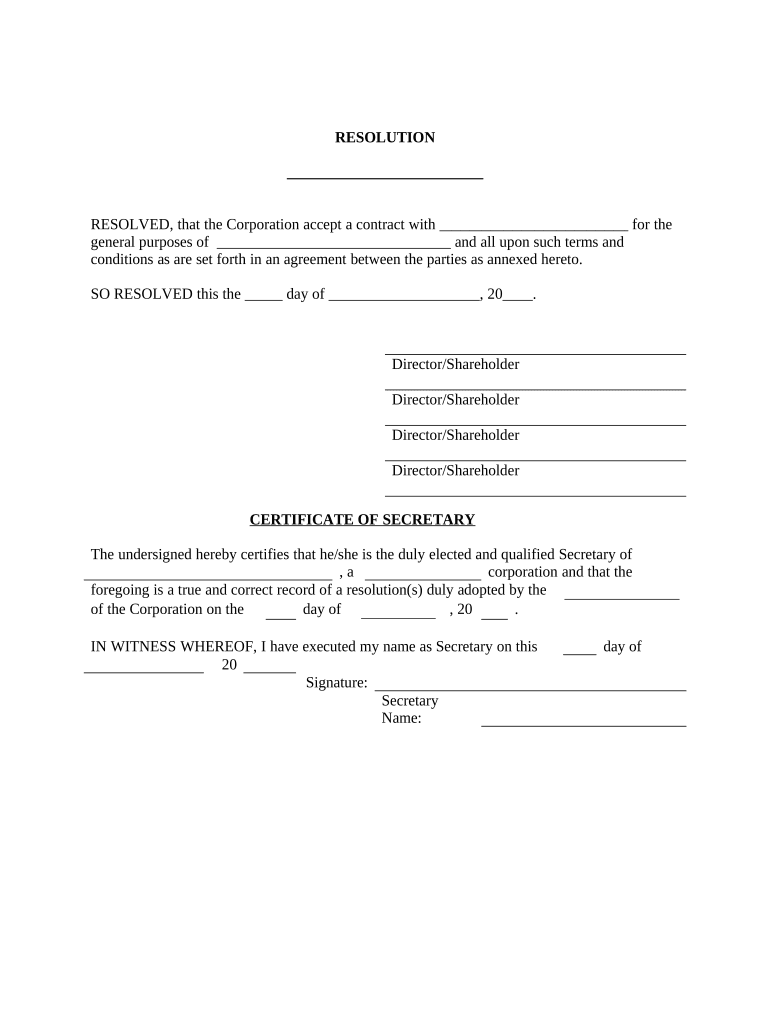
Recitals

Brief background language that explains why the resolution is proposed; recitals provide context but should avoid excessive legal narrative that could create ambiguity.

Resolved Clause

Clear operative language that states the exact authorization, including limits, monetary caps, effective date, and any conditions precedent to effectiveness.

Authorized Signers

Full legal names, titles, and an explicit statement of signing authority, including whether signatures may be provided electronically or must be notarized.

Approval Record

Date of the meeting or written consent, vote tally if applicable, and a statement that the action follows bylaws or operating agreement procedures.

Attestation and Notary

A signature block for the corporate secretary or attesting officer plus a notary block if counterparties or state law require notarization or acknowledgement.

Required information commonly captured on the form

Entity name: Exact legal name
Entity type: Corporation/LLC/Partnership
Resolution title: Short action label
Effective date: MM/DD/YYYY format
Authorized parties: Names and titles
Signature blocks: Signer name, title, date

Step-by-step: completing a Resolution Form

Follow these core steps to prepare, approve, and finalize a resolution for corporate records or third-party reliance.

  • 01
    Draft resolution: Write title, recitals, resolved clauses, and signer details.
  • 02
    Review bylaws: Confirm voting thresholds and notice requirements under bylaws or operating agreement.
  • 03
    Obtain approval: Record vote during meeting or obtain signed written consent.
  • 04
    Finalize and attest: Secretary signs, add to minute book, notarize if required.

Configuring an online completion workflow for a Resolution Form

Set up a repeatable digital workflow so the right people review, sign, and receive a final copy automatically.

Field Configuration
Signature fields Assign role-based signature placement for chair and secretary
Authentication Use email or SMS code for signer verification
Order of signing Set sequential or parallel signer order depending on governance needs
Audit trail Enable full activity log with timestamps and IP addresses

Where to file, send, and store the completed Resolution Form

After signatures are collected, route copies to internal records and to any third parties that requested evidence of authorization.

  • Corporate minute book: Store executed resolution with meeting minutes for recordkeeping.
  • Bank or lender: Provide certified copy or notarized original per bank requirements.
  • Counterparties: Send signed copy to vendors or landlords that requested authorization.
  • Electronic archive: Save PDF with audit trail in secure document management system.

Digital signing and platform needs for reliable execution

Choose an eSignature platform that provides clear audit trails, secure storage, and flexible authentication for corporate signers.

  • Authentication: Email, SMS, or stronger methods
  • Audit trail: Timestamps, IP, action log
  • Integrations: CRM and storage connections

Ensure the platform meets any third-party requirements (e.g., bank acceptance, notarial support) and that records are retained according to corporate policy and applicable law.

Timing and typical deadlines when issuing a Resolution Form

Resolution timing depends on governance procedures, third-party requirements, and whether the action must be effective immediately or after notice periods.

Meeting date:

Date the board or committee met to approve the action

Effective date:

Date authority begins, often same day as approval

Bank submission:

Provide completed resolution as requested before account changes

Record retention:

Add to minute book immediately after execution

Third-party reliance:

Some parties require notarized originals before accepting resolution

Key milestones from draft to archived record

Follow these milestones to ensure the resolution is valid, accepted by third parties, and retained correctly.

01

Draft prepared

Create the resolution and confirm recitals and operative clauses

02

Approval conducted

Hold meeting or obtain written consent as bylaws require

03

Signatures and notarization

Collect signatures and notarize if a third party requires it

04

Archive and distribute

Store an executed copy in minute book and send certified copies

Common preparation errors to avoid

  • Using an informal or ambiguous operative clause that does not state clear limits or conditions for authority.
  • Failing to confirm that the board had quorum or proper notice, which can invalidate the resolution.
  • Listing signers without titles or full legal names, causing banks or title companies to refuse acceptance.
  • Omitting attestation or notary information when a counterparty explicitly requests notarized evidence.

Risks and consequences of incorrect or missing Resolution Forms

Contract voidance: Third party may refuse or void agreements
Bank rejection: Accounts or transactions delayed
Corporate liability: Unauthorized actions risk individual liability
Regulatory issues: Noncompliance with corporate code
Operational delay: Project or financing schedules slip
Audit exposure: Lack of records complicates audits

How organizations use Resolution Forms in practice

Real-world examples show how resolutions support transactions, banking, and governance without in-person signing.

Martin Properties — Real Estate Closing

The board adopted a resolution to authorize property sale and signers.

  • The resolution named two officers with sale authority.
  • The notarized resolution satisfied the title company and allowed remote closing without multiple in-person signings, saving days of scheduling.

BIS — Vendor Contract Authority

Leadership approved a vendor contract through written consent.

  • The resolution capped approval authority at $250,000.
  • The finance team used the resolution to onboard the vendor, complete purchase orders, and satisfy internal audit requirements.

eSignature vendor comparison for executing Resolution Forms

Basic pricing and capability differences between signNow and common competitors. Confirm vendor sites for plan details and enterprise terms.

signNow DocuSign Adobe Sign PandaDoc HelloSign
Starting Price $8/user/mo $15/user/mo $14/user/mo $19/user/mo $15/user/mo
Free Trial 7-day free trial Varies by offer Varies by offer Varies by offer Varies by offer
Bulk Send Yes Yes Yes Yes No
Audit Trail Yes Yes Yes Yes Yes
HIPAA Compliant Yes Yes Yes No No

Frequently asked questions about Resolution Forms

Answers to common questions about validity, signatures, notarization, and storage to reduce execution errors and third-party rejections.


Need help? Contact support

be ready to get more
Join over 28 million airSlate SignNow users