Establishing secure connection…Loading editor…Preparing document…

Resolution to Incorporate as Nonprofit Corporation

This template is fully customizable. Edit the text, fill out the fields, and send it for signature. Give it a try!
Resolution to Incorporate as Nonprofit Corporation

What the Resolution to Incorporate as Nonprofit Corporation Is

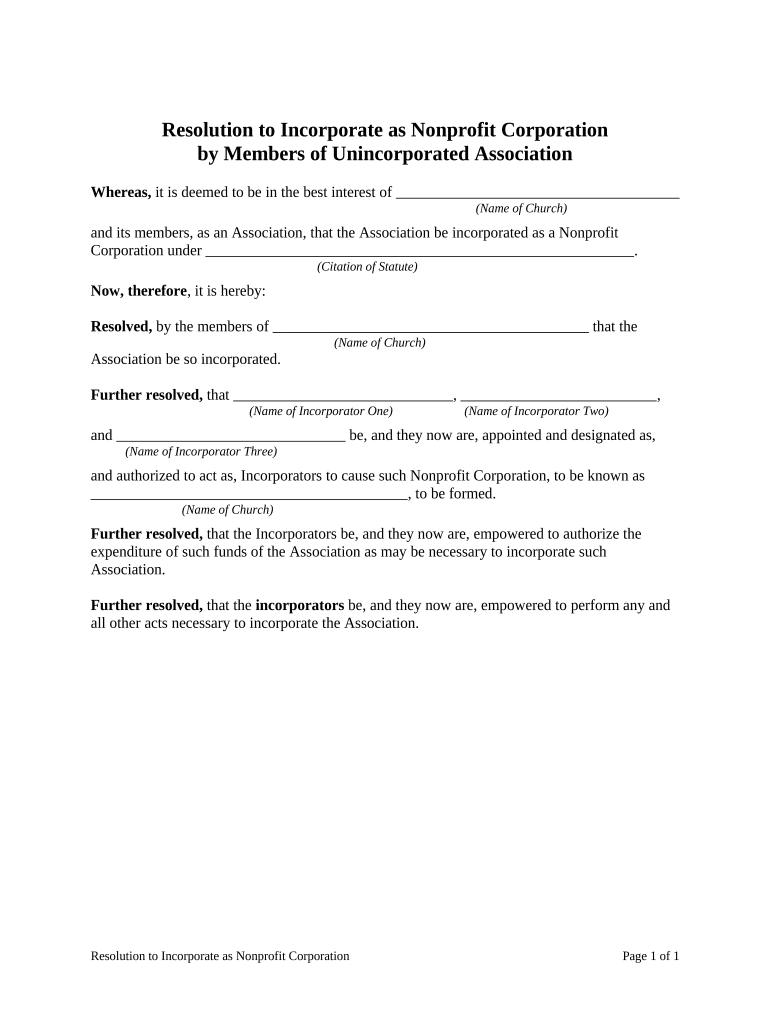
A Resolution to Incorporate as Nonprofit Corporation is a formal board action recording the decision to form a nonprofit entity under state law. It documents the board or incorporator authorization to file articles of incorporation, appoint initial directors or officers as required, and take preparatory steps such as obtaining an EIN and approving initial bylaws. The resolution creates an official record that the organization has completed internal approval steps before submitting formation paperwork to the state and other agencies and before pursuing tax-exempt status or bank accounts.

Why a Clear Resolution Matters for Incorporation

A written resolution creates a transparent internal record that the board authorized incorporation, avoids later disputes about authority, and supports filings with the state and third parties such as banks and grantors.

Why a Clear Resolution Matters for Incorporation

Who Typically Prepares and Signs This Resolution

The resolution is prepared by the incorporator, corporate counsel, or the board secretary and is adopted by the board or incorporator before filing incorporation papers.

  • Incorporators and founders who will file the articles and set initial governance.
  • Board members who must authorize formation, initial bylaws, and officer appointments.
  • Corporate counsel or nonprofit advisors preparing compliant formation documentation.

Keep a signed copy in the corporate minute book and attach it to initial corporate records, bank account applications, and tax-exemption filings.

Step-by-Step: Adopting and Using the Resolution

Follow these core steps to adopt the resolution, record it correctly, and use it when filing incorporation paperwork and opening accounts.

  • 01
    Draft: Prepare resolution language consistent with articles of incorporation and bylaws.
  • 02
    Board Action: Hold a board or incorporator meeting and record the vote in minutes.
  • 03
    Signatures: Collect required signatures and dates; notarize when state rules require.
  • 04
    Attach: File or keep a signed copy with the articles, bylaws, EIN paperwork, and corporate minute book.

Where the Resolution Fits in the Incorporation Flow

The resolution is an internal authorization step that precedes or accompanies external filings and administrative setup.

  • Board Approval: Documented authorization to form the nonprofit and to file articles.
  • File Articles: Submit certificate or articles of incorporation to the state secretary of state or equivalent office.
  • Obtain EIN: Use approved resolution language when requesting an Employer Identification Number from the IRS.
  • Open Accounts: Provide signed resolution to banks and grantors as evidence of authority.

Configuring an Online Workflow for the Resolution

Set up a simple digital workflow to collect signatures, record approval, and store the executed resolution.

Field Configuration
Signer Order Sequential signing: incorporator then board chair then secretary
Authentication Email plus SMS code for added signer attribution
Attachments Attach articles, bylaws, and minutes as supporting documents
Retention Store executed copy in secure document repository with audit trail

Technical Requirements for Electronic Adoption and Storage

Use an e-signature platform that provides an audit trail, secure storage, and exportable signed PDF copies for regulators and banks.

  • Integrations: Salesforce, Google Workspace, Microsoft 365, NetSuite
  • Formats: PDF and DOCX with embedded audit trails
  • Authentication: Email, SMS, or advanced signer authentication available

Ensure the chosen platform supports ESIGN/UETA compliance, secure encryption (TLS/AES), and retention exports for audits and tax-exempt applications.

Typical Timelines and Deadlines After Adopting the Resolution

Key filing and administrative deadlines follow adoption; plan to complete state filings, EIN application, and tax-exempt submissions promptly to preserve effective dates.

File Articles:

File articles of incorporation with the state shortly after adoption to establish legal existence

Obtain EIN:

Apply to the IRS for an EIN soon after filing to enable banking and payroll setup

Apply for 501(c)(3):

File Form 1023 or 1023-EZ for federal tax exemption; filing within 27 months can secure retroactive exemption

State Tax & Registrations:

Register for state tax exemption and charitable solicitation as required by state law

Minutes and Recordkeeping:

Record the resolution and attach signed copies to the corporate minute book immediately

Key Milestones from Resolution to Operational Nonprofit

A typical milestone sequence maps adoption to filings, registrations, and operational setup; each stage should be documented in the corporate record.

01

Adopt Resolution

Board or incorporator votes and signs the resolution authorizing formation and initial governance

02

File Incorporation Papers

Submit articles or certificate to the state secretary of state and pay required fees

03

Federal Registrations

Obtain EIN and submit tax-exempt application if applicable

04

Operational Setup

Open bank accounts, adopt bylaws, and commence authorized activities

Common Pitfalls When Preparing the Resolution

  • Using an informal or unsigned resolution that lacks a clear effective date, which can create ambiguity for banks and regulators and delay account openings.
  • Mismatched entity name between resolution and articles of incorporation, causing filing rejections or confusion with state records.
  • Failing to specify who has authority to sign checks or contracts, requiring a supplemental resolution and additional administrative steps.
  • Assuming electronic signatures are valid without confirming state RON or notarization rules when a notary or witnesses are required.

Security and Compliance Considerations for Electronic Resolutions

Encryption: TLS 1.2/1.3; AES-256 at rest
Certifications: SOC 2 Type II; ISO 27001
Regulatory: ESIGN and UETA compliance
Healthcare: HIPAA compliant with BAA required
Audit Trail: Detailed timestamps, IP, and action logs
Accessibility: WCAG 2.0 Level AA support

Consequences of an Incorrect or Missing Resolution

Filing Rejection: State filing may be returned
Bank Delays: Bank accounts may be refused
Tax Risk: Loss of retroactive tax-exempt status
Liability: Undisclosed authority can create personal liability
Grant Issues: Funders may withhold awards
Recordkeeping: Noncompliance with retention rules

eSignature Pricing and Feature Comparison for Incorporation Workflows

Compare entry-level pricing and key capabilities for common e-signature providers used to execute resolutions and formation documents; signNow is listed first per platform comparison conventions.

signNow DocuSign Adobe Sign PandaDoc HelloSign
Starting Price $8/user/mo $15/user/mo $14/user/mo $19/user/mo $15/user/mo
Free Trial 7-day free trial Varies by plan Varies by plan Varies by plan Varies by plan
Bulk Send Yes Yes Yes Yes No
Audit Trail Yes Yes Yes Yes Yes
HIPAA Compliant Yes Yes Yes No No
Envelope Cap No cap 100 envelopes/user/year Varies by plan Varies by plan Varies by plan

Frequently Asked Questions About the Resolution and Electronic Execution

Answers to common legal and practical questions about adopting, signing, and storing a Resolution to Incorporate as Nonprofit Corporation.


Need help? Contact support

be ready to get more
Join over 28 million airSlate SignNow users