Establishing secure connection…Loading editor…Preparing document…

Resume Cover Letter for University President

This template is fully customizable. Edit the text, fill out the fields, and send it for signature. Give it a try!
Resume Cover Letter for University President

What the Resume Cover Letter for University President Is

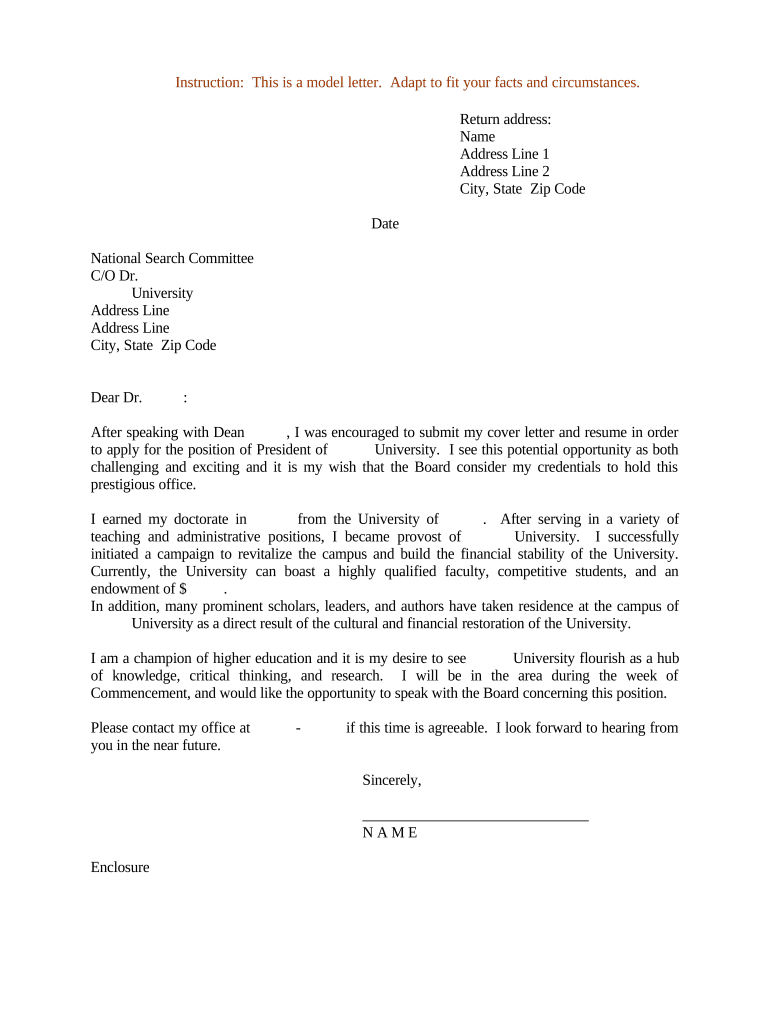
A Resume Cover Letter for University President is a formal, targeted letter accompanying an academic CV when applying for a chief executive role at a university. It summarizes leadership experience, strategic vision for the institution, and measurable achievements in fundraising, enrollment management, academic program development, and shared governance to help search committees evaluate fit quickly.

Why a Strong Cover Letter Matters in Presidential Searches

The cover letter frames your candidacy, highlights strategic priorities, and links qualifications to institutional needs. It guides reviewers to the most relevant achievements and clarifies leadership fit beyond the resume.

Why a Strong Cover Letter Matters in Presidential Searches

Who Prepares and Reviews This Document

The cover letter is prepared by applicants for university president and read by search committees, boards, and HR teams as an initial screening document.

  • Search committees and trustees — evaluate institutional fit, strategic priorities, and leadership style during preliminary screening.
  • Candidates and executive coaches — use the letter to tailor messaging and highlight high-impact accomplishments relevant to the institution.
  • University HR and presidential offices — verify required information and route documents to governing bodies for further review.

A concise, well-structured letter improves early-stage evaluation and ensures the most relevant material is reviewed first.

Core Sections to Include in a Presidential Cover Letter

A strong cover letter for a university president follows a clear structure that addresses leadership vision, measurable outcomes, and alignment with the university's mission.

Opening Paragraph

State the position you seek, how you learned of it, and a one-line summary of your candidacy that connects your background to the institution's stated priorities.
Leadership Summary

Summarize executive experience including scope of responsibility (budget, enrollment, staff size) and decision-making authority in two to three sentences.

Vision & Strategy

Describe a high-level strategic agenda aligned with the university's mission, emphasizing enrollment strategy, academic program development, fiscal sustainability, and external relations.

Key Achievements

Use quantifiable results—percent enrollment growth, fundraising totals, budget reductions, program accreditations—so reviewers can quickly assess impact.

Academic & Admin Experience

Highlight experience with faculty governance, shared governance processes, collective bargaining experience if applicable, and academic leadership roles.

Closing Statement

Conclude with availability for interview, appreciation for consideration, and clear contact details; avoid repeating the resume verbatim.

Step-by-Step: Preparing Your Cover Letter

Follow these sequential steps to assemble a concise, targeted cover letter that complements your curriculum vitae and application materials.

  • 01
    Gather Materials: Collect CV, institutional documents, strategic plans, and recent job posting details.
  • 02
    Draft Targeted Opening: Address the search committee and state your candidacy and connection to the role.
  • 03
    Quantify Achievements: Insert exact figures for fundraising, enrollment, budget, and program growth.
  • 04
    Proof and Finalize: Edit for clarity, consistency, and compliance with submission guidelines before signing.

Where and How to Submit the Cover Letter

Submission routes vary by institution. Confirm the job posting instructions and follow the requested channel precisely to ensure inclusion in the candidate pool.

  • Online Application Portal: Attach your letter and CV as PDF files per portal instructions.
  • Email to Committee: When permitted, send to the search committee contact with requested subject line and attachments.
  • Human Resources System: Upload documents to HR or talent management systems that centralize candidate files.
  • Postal Submission: Only send physical copies if the posting explicitly requests a wet-signed letter.

Customizing and Completing the Cover Letter Online

Match online configuration options to the submission requirements and select appropriate file formats and authentication settings for e-submission.

Field Configuration
Full Legal Name Auto-fill from profile or enter manually
Date Use MM/DD/YYYY format
Attachments Upload PDF for resume and letter
Signature Choose typed name, image, or e-sign per portal rules

Technical Requirements for Electronic Submission

Confirm file types, authentication methods, and any platform integrations before submitting your application to avoid technical rejection.

  • Browser Support: Use a modern browser with cookies enabled
  • File Formats: PDF is preferred for fixed formatting
  • Integrations: Check ATS or portal compatibility

Supporting Documents to Include with the Cover Letter

Provide a concise package of documents that search committees typically request to evaluate presidential candidates comprehensively.

Curriculum Vitae

A detailed CV listing academic appointments, administrative roles, publications, grants, and professional service, formatted consistently and saved as a PDF.

References

Provide 3–6 professional references with titles, institutional affiliations, and current contact information; include referees who can speak to executive leadership.

Statement of Vision

A brief one- to two-page statement articulating strategic priorities and how you would address the university's principal challenges and opportunities.

Transcripts or Credentials

Official or unofficial academic transcripts and any required certification documents if the posting requests verification of degrees.

Common Mistakes to Avoid When Preparing This Cover Letter

  • Using a generic letter that does not reference the institution's mission or strategic priorities, which reduces perceived fit.
  • Overloading the letter with CV-level detail instead of emphasizing high-level leadership outcomes and vision.
  • Failing to quantify achievements with specific metrics such as fundraising totals, enrollment percentages, or budget sizes.
  • Submitting files in non-preferred formats or with filenames that obscure applicant identity, causing administrative delays.

Consequences of Errors or Misstatements

Misrepresentation: May lead to disqualification
Missed Deadline: Application may be excluded
Name Inconsistency: Verification delays with HR
Unauthorized Disclosure: Breach of confidentiality obligations
Unsigned Document: Considered incomplete by committee
Incorrect Format: Administrative rejection possible

Real-World Examples of Digital Document Use

Executives and organizations use electronic documents and e-signatures to streamline submissions and approvals in high-level searches.

Optica Ventures

A leadership team digitized candidate packets to accelerate review cycles

  • Efficiency improved reviewer access across devices
  • "The interface is simple and easy-to-use for our team; more importantly, it is just as easy for our customers."

Martin Properties

A small executive search firm used online signing to collect documents remotely

  • Reduced turnarounds for remote candidates
  • "I can process and execute all of these documents online with 100% compliance and built-in security. Whether on mobile or working offline, I can get forms back to their necessary parties efficiently."

Practical Tips for an Accurate and Efficient Submission

Adopt these best practices to reduce errors, align with search expectations, and shorten review cycles when submitting a cover letter and supporting materials.

Tailor to the Institution
Reference the university's mission and major strategic priorities. Demonstrating specific alignment improves perceived fit and helps reviewers link your experiences to institutional needs.
Use Clear Metrics
Quantify achievements with precise figures such as percentages, dollar amounts, or headcount to make impact easily comparable across candidates.
Follow Submission Instructions
Strictly adhere to file format, naming, and portal requirements stated in the posting to prevent administrative exclusion.
Maintain Version Control
Save a dated PDF copy of the submitted materials and a record of any e-signature certificates or confirmation emails for future reference.

eSignature Vendor Comparison for Cover Letter and Candidate Workflows

Comparison of typical starting prices and feature availability for commonly used eSignature vendors. Choose based on required compliance, volume, and integrations.

signNow DocuSign Adobe Sign PandaDoc HelloSign
Starting Price $8/user/mo $15/user/mo $14/user/mo $19/user/mo $15/user/mo
Free Trial 7-day free trial, no card Varies by plan Varies by plan Varies by plan Varies by plan
Bulk Send Yes Yes Yes Yes No
Audit Trail Yes Yes Yes Yes Yes
HIPAA Compliant Yes Yes Yes No No
Envelope Cap No envelope cap 100 envelopes/user/year Varies by plan Varies by plan Varies by plan

Frequently Asked Questions

Answers to common questions about preparing, signing, and submitting a Resume Cover Letter for University President using electronic workflows.


Need help? Contact support

be ready to get more
Join over 28 million airSlate SignNow users