Establishing secure connection…Loading editor…Preparing document…

Louisiana Rule to Show Cause for Expungement

This template is fully customizable. Edit the text, fill out the fields, and send it for signature. Give it a try!
Louisiana Rule to Show Cause for Expungement

What the Louisiana Rule to Show Cause for Expungement Is

The Louisiana Rule to Show Cause for Expungement is the court filing used to ask a state court to seal or expunge arrest records, certain nonconviction records, or eligible convictions under Louisiana law. The Rule to Show Cause initiates a judicial review in the parish court where the record is maintained, summarizes the factual and legal grounds for relief, and requests a court order. The filing typically sets a hearing date, requires service on the district attorney, and attaches supporting documentation such as disposition records and certified arrest reports.

Why the Rule to Show Cause Matters for Applicants

Filing a Rule to Show Cause is the formal path to remove public access to qualifying records, which can improve employment, housing, and licensing prospects while restoring privacy and legal clarity for eligible individuals.

Why the Rule to Show Cause Matters for Applicants

Who Typically Prepares and Uses This Rule

These filings are prepared by parties who want an expungement, often with lawyer assistance when eligibility is uncertain.

  • Individuals seeking expungement of arrest records or eligible convictions; may prepare pro se or with counsel.
  • Criminal defense attorneys and public defenders who verify eligibility and draft factual affidavits and legal arguments.
  • Court clerks and district attorneys who receive service and respond to the petition per local procedures.

The filing party must follow local court rules for format, service, and supporting exhibits to avoid delays.

Representative Petitioners and Counsel

Petitioner — Individual

A person whose record is the subject of the request. The petitioner must identify the record precisely, provide disposition evidence, and attest to eligibility under Louisiana law. Pro se filers should confirm local filing fees and service requirements with the clerk of court.

Defense Counsel

An attorney representing the petitioner who prepares pleadings, gathers certified records, serves the district attorney, and argues eligibility and public interest at the hearing. Counsel typically reviews criminal history and recommends supporting exhibits to the court.

Essential Elements of a Complete Rule to Show Cause

A professional Rule to Show Cause organizes case metadata, legal grounds, supporting facts, and a clear request for relief so the court can adjudicate eligibility and issue an expungement order.

Court Caption

Full court caption and parish; include docket/case number and style exactly as assigned by the clerk to ensure accurate filing and docketing.
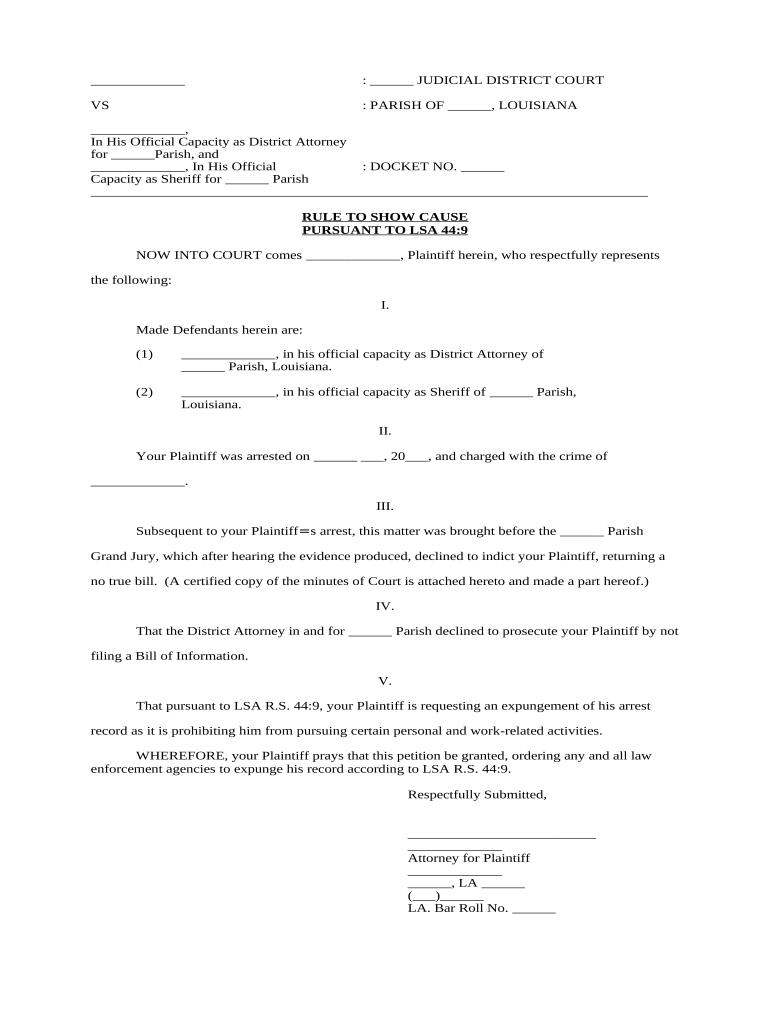
Petitioner Details

Full legal name, aliases, date of birth, last known address, and current contact information to identify the subject and permit service and notices.

Record Identification

Specify arrest date(s), charge(s), arresting agency, disposition date, and docket numbers so the court locates the exact record sought for expungement.

Grounds for Relief

State the statutory or case-law basis for expungement eligibility and cite any applicable Louisiana provisions or precedents supporting the request.

Supporting Evidence

Attach certified dispositions, arrest reports, court minutes, and letters as exhibits; identify each exhibit in the petition and the hearing record.

Requested Order

Include a proposed order or form of judgment that clearly directs agencies to seal or expunge specific records and instructs distribution to affected agencies.

Required Information Fields at a Glance

Full Name: Legal name on ID
Date of Birth: MM/DD/YYYY
Case Number: Court docket number
Arrest Date: MM/DD/YYYY
Charges: Listed offenses
Supporting Exhibits: Certified records

Risks and Consequences of Errors in the Filing

Wrong Party: May result in denial
False Statements: Potential perjury exposure
Missed Deadlines: Hearing may be continued
Improper Service: Respondent not notified
Incomplete Evidence: Court cannot rule
Incorrect Caption: Clerk may reject filing

Common Preparation Mistakes to Avoid

  • Using noncertified or uncertified copies of dispositions that the court will not accept for proof of outcome.
  • Failing to precisely identify the record by arresting agency, arrest date, and docket number, leading to misdirected orders.
  • Neglecting to serve the district attorney or using an improper method of service contrary to local rule.
  • Submitting proposed orders without clear redaction instructions for agencies, which can slow enforcement of the expungement.

Step-by-Step: How to Complete the Rule to Show Cause

Follow these core steps to prepare, file, serve, and present the Rule to Show Cause at the scheduled hearing.

  • 01
    Prepare Petition: Draft petition with caption and exhibits.
  • 02
    File With Court: Submit to clerk and pay fees.
  • 03
    Serve Parties: Serve district attorney per local rule.
  • 04
    Attend Hearing: Present evidence and proposed order.

Configuring an Electronic Filing and eSign Workflow

When completing the petition online, ensure document structure, signer order, and authentication are set so court and parties receive correct copies.

Field Configuration
Document Template Use a PDF with fillable fields for caption and exhibits.
Signer Order Petitioner signs first; counsel signs second if applicable.
Authentication Use email or SMS code for signer verification.
Delivery Method Send filed copy to clerk and DA via court-approved channel.

How Electronic Completion and Service Typically Works

Digital workflows can streamline preparation, signing, submission, and proof of service while preserving required court records and audit trails.

  • Draft: Populate template and attach exhibits.
  • Sign: Petitioner and counsel apply signatures.
  • File: Submit to the clerk or e-filing portal.
  • Serve: Provide proof of service to DA and court.

Technical Considerations for eSubmission and eSign

Ensure the platform supports secure PDF, an auditable signature trail, and outputs court-acceptable copies when filing electronically.

  • PDF Compatibility: Supports PDF/A and flattened signed PDFs
  • Audit Trail: Captures timestamps and signer attribution
  • Integrations: Exports to court e-filing or email

Confirm the court’s local e-filing and service rules before relying on electronic submission; preserve copies and audit records for retention and potential appellate review.

Timing and Scheduling Considerations

Deadlines and timelines for service, response, and hearings vary by parish and local court rules; confirm dates with the clerk to avoid default or continued hearings.

Filing Deadline:

No universal deadline; file when eligible per statute

Service Timing:

Serve district attorney per local rule typically before hearing

Response Period:

DA response times vary; check local practice

Hearing Scheduling:

Court sets hearing date after filing and service

Order Entry:

Judge issues order at hearing or by signed judgment later

Key Milestones in the Expungement Proceeding

This sequential outline lists the typical milestones from filing through order entry and enforcement.

01

Preparation

Gather certified dispositions and draft petition and exhibits.

02

Filing

File petition with the parish court and pay any fee.

03

Service

Serve the district attorney and any named agencies per rule.

04

Hearing and Order

Attend hearing; judge issues an order directing expungement if granted.

eSignature Platform Pricing and Capabilities for Filing and Signing

Compare common vendor starting prices and basic capabilities relevant to preparing, signing, and retaining a Rule to Show Cause; signNow is listed first per vendor comparison format.

signNow DocuSign Adobe Sign PandaDoc HelloSign
Starting Price $8/user/mo $15/user/mo $14/user/mo $19/user/mo $15/user/mo
Free Trial 7-day free trial, no credit card required Varies by plan Varies by plan Varies by plan Varies by plan
Bulk Send Yes (Business Premium) Yes Yes Yes No
Audit Trail Yes Yes Yes Yes Yes
HIPAA Compliant Yes Yes Yes No No
Envelope Cap No envelope cap 100 envelopes/user/year Varies by plan Varies by plan Varies by plan

Real-World Examples of Online Filing and Signature Use

These brief examples show how organizations used digital workflows to manage legal filings and signatures while preserving security and audit records.

Optica Ventures — COO

Optica streamlined petition preparation using a standardized template and digital exhibits to reduce errors.

  • The team used a secure eSign workflow for attorney approval.
  • As a result, the company reduced turnaround time and ensured consistent, auditable filings for multiple jurisdictions.

Martin Properties — Founder

Martin Properties processed client authorizations and legal documents online to avoid in-person delays.

  • They combined certified exhibits with an auditable signature trail.
  • The approach allowed remote clients to sign, preserved a clear audit trail, and simplified evidence collection for hearings.

Practical Tips for Accurate and Efficient Completion

Follow these best practices to reduce rejection risk, accelerate hearings, and ensure enforceable orders.

Verify All Identifiers
Confirm names, dates, and docket numbers against certified court records to prevent misdirected petitions and clerk rejections.
Use Certified Exhibits
Attach certified dispositions and arrest reports rather than photocopies; label each exhibit and reference it explicitly in the petition.
Follow Local Service Rules
Serve the district attorney and any required agencies using the method allowed by the parish; preserve proof of service for the hearing record.
Prepare a Proposed Order
Provide the judge with a clear, narrowly tailored proposed order that enumerates records to be sealed and the agencies to receive the signed order.

Frequently Asked Questions About the Rule to Show Cause

Answers to common questions on eligibility, filing, eSignature, and what to expect at the hearing.


Need help? Contact support

be ready to get more
Join over 28 million airSlate SignNow users