Establishing secure connection…Loading editor…Preparing document…

Letter Requesting Legal and Financial Records

This template is fully customizable. Edit the text, fill out the fields, and send it for signature. Give it a try!
Letter Requesting Legal and Financial Records

What this Letter Is and When to Use It

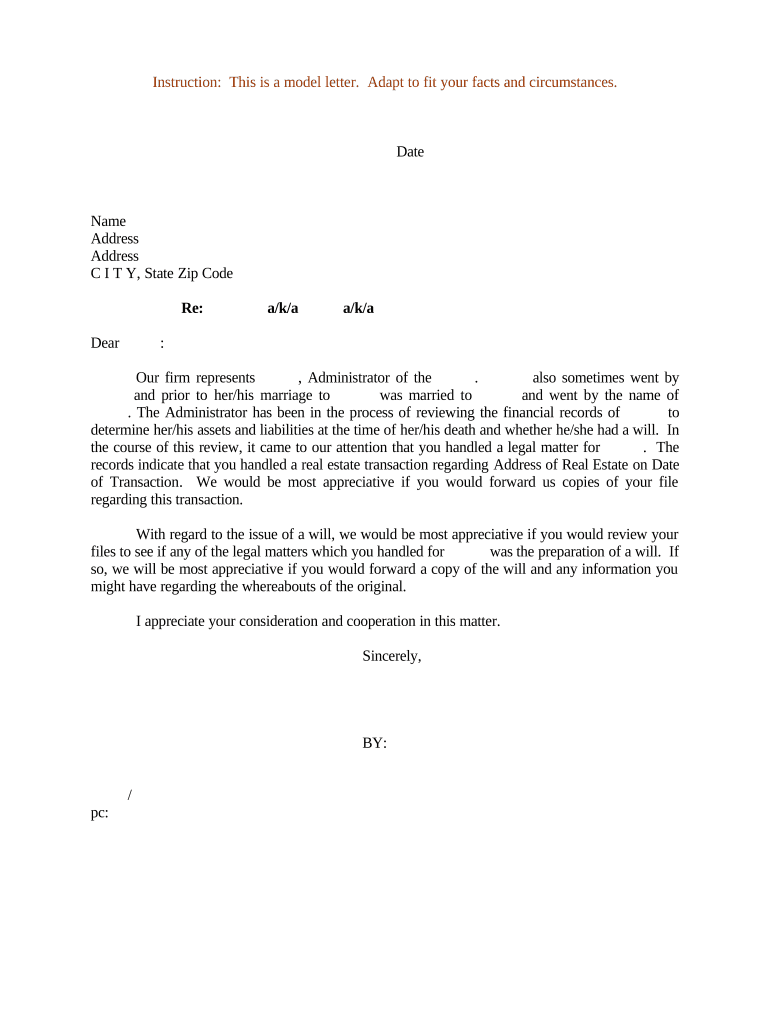
A Letter Requesting Legal and Financial Records is a written demand used to obtain documents, account statements, contracts, tax records, or custody logs from a third party, custodian, or former employee. Typical uses include litigation discovery, transaction due diligence, estate administration, compliance reviews, and tax reporting. The letter identifies the requester, specifies the records sought with date ranges and formats, states legal authority or consent where applicable, and sets a deadline and delivery method. It can be sent by mail, email, secure portal, or submitted with an eSignature to confirm consent or authorization.

Why a Clear Request Matters

A precise, documented request reduces disputes, shortens response time, and establishes a paper trail useful for courts, auditors, or regulators. Clear scope and authorization increase the likelihood of a timely, complete production while reducing the risk of spoliation or privilege disputes.

Why a Clear Request Matters

Who Typically Prepares This Letter

Common senders include legal counsel, in-house compliance or finance teams, accountants, and estate administrators; each uses slightly different language and authority.

  • Attorneys and paralegals preparing discovery or subpoena-adjacent requests to custodians.
  • Corporate finance, compliance, or internal audit teams requesting transactional records for review.
  • Accountants and tax preparers requesting tax filings, 1099s, or supporting documentation.

The letter's tone and included legal authority should match the sender's role: counsel may cite court rules, while accountants cite client authorization or tax code obligations.

Essential Sections to Include in the Letter

A professional request follows a predictable structure so recipients can respond efficiently and defensibly.

Header

Identify the requester, recipient, date, and a concise subject line so the document is immediately actionable and searchable.
Authority

State the legal basis or written authorization (client consent, court order, power of attorney) permitting the request for disclosure.

Records Sought

List documents with clear descriptions, date ranges, and account identifiers to avoid overbreadth and unnecessary follow-up.

Delivery Instructions

Specify format, secure delivery channel, and preferred file types (PDF, DOCX), plus whether digital signatures are acceptable.

Deadline

Set a reasonable compliance date and explain any expedited need, while noting potential legal consequences for noncompliance.

Signature

Include requester signature, printed name, title, and contact details; attach authorization or proof of representation when applicable.

Step-by-Step: Preparing and Sending the Letter

Follow these practical steps to create a defensible, trackable request.

  • 01
    Draft: Define scope and legal basis.
  • 02
    Attach Authorizations: Add consents or power of attorney.
  • 03
    Select Delivery: Choose secure channel and format.
  • 04
    Send and Track: Record delivery, receipt, and follow-up dates.

Where to Send or File the Request

Choose the recipient and delivery approach that aligns with legal authority and the custodian's access protocols.

  • Custodian: Send to the records custodian or department email.
  • Third-Party Vendor: Route to bank, payroll vendor, or cloud provider per their process.
  • Court Clerk: File with the clerk only when a court order is required.
  • Secure Portal: Use encrypted upload for sensitive or PHI-containing records.

Configuring an Online Request Workflow

Set up an electronic workflow so requests are consistent, auditable, and easy for recipients to fulfill.

Field Configuration
Authentication Email OTP or SMS code as default
Signature Type Accept ESIGN/UETA-compliant eSignatures
Attachments Allow PDF, DOCX, CSV uploads
Routing One-step to custodian, CC legal

Technical Considerations for eSubmission

Confirm the recipient supports the delivery method and authentication level you plan to use before sending.

  • File Formats: PDF and DOCX supported
  • Integrations: Works with common cloud storage
  • Authentication: Email OTP, SMS, or KBA

For records containing protected health information or student records, ensure the platform and workflow meet HIPAA or FERPA controls, including encryption and access logs, before transmitting.

Typical Timing and Deadlines to Set

Provide clear timing expectations so custodians can prioritize and you can document reasonable efforts to obtain records.

Standard Response Time:

Request a 14–30 day response window, depending on scope.

Expedited Requests:

Allow 5–7 business days for narrow, urgent searches.

Follow-Up Interval:

Send a polite reminder after 7–10 business days.

Preservation Notice:

Issue immediately to prevent data spoliation.

Court Deadlines:

Match production dates to any court-ordered schedule.

Common Mistakes to Avoid

  • Vague descriptions that force broad or duplicated productions and increase cost.
  • Failing to attach authorization or proof of representation, causing rejection or delay.
  • Requesting overly long date ranges rather than the minimal necessary period.
  • Not specifying secure delivery or acceptable file formats, resulting in unusable files.

Consequences of a Flawed Request

Tax Penalties: $60–$660+ per form (IRC §6721)
Spoliation Risk: Court sanctions or adverse inference
Privacy Violations: HIPAA/FERPA exposure and fines
Privilege Waiver: Overbroad disclosures can waive privilege
Contract Breach: Violation of confidentiality clauses
Authentication Failure: Rejected production for missing ID

Required Information to Include with the Request

Requestor Contact: Name, title, phone, email
Custodian ID: Custodian name and department
Authorization: Client consent or power of attorney
Record Details: Account numbers, dates, document types
Delivery Terms: Method, file format, encryption
Retention Note: Request preservation until production

Comparing eSignature Providers for Record Requests

Choose a provider that supports the authentication, audit trail, and compliance features your records demand; signNow appears first for parity with marketplace comparisons.

signNow DocuSign Adobe Sign PandaDoc HelloSign
Starting Price $8/user/mo $15/user/mo $14/user/mo $19/user/mo $15/user/mo
Free Trial Yes, 7-day trial No No Yes, limited Yes, limited
Bulk Send Yes Yes Yes Yes No
Audit Trail Yes Yes Yes Yes Yes
HIPAA Compliant Yes Yes Yes No No

Frequently Asked Questions and Practical Answers

Answers to typical questions about validity, authentication, sensitive records, and next steps when production is delayed.


Need help? Contact support

be ready to get more
Join over 28 million airSlate SignNow users