Establishing secure connection…Loading editor…Preparing document…

Letter Regarding Violations of Fair Debt Collection Practices Act

This template is fully customizable. Edit the text, fill out the fields, and send it for signature. Give it a try!
Letter Regarding Violations of Fair Debt Collection Practices Act

What the Letter Regarding Violations of the Fair Debt Collection Practices Act Is

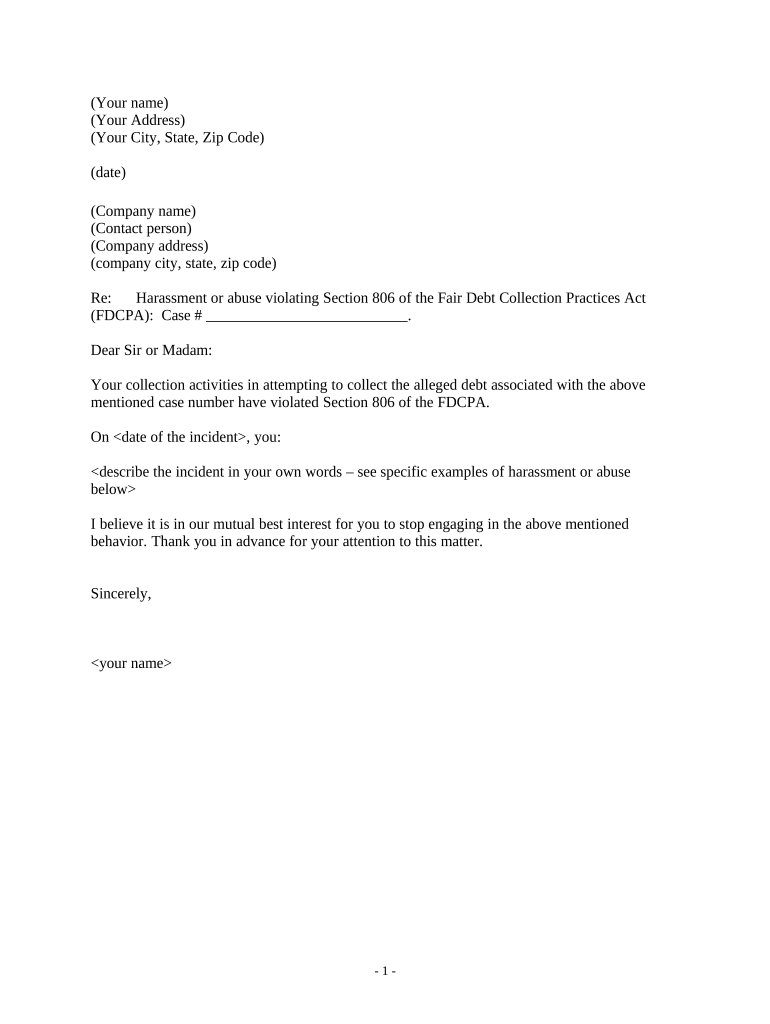
A Letter Regarding Violations of the Fair Debt Collection Practices Act documents alleged unlawful debt-collection conduct and requests corrective action or records. It identifies the collector, summarizes the conduct that allegedly violated FDCPA standards, cites the specific statutory or regulatory basis, and states the outcomes the consumer seeks, such as cessation of harassment, validation of the debt, or damages. The letter serves both as a formal notice to the collector and as a written record for dispute, regulatory complaint, or litigation if remedies are not provided.

Why a Clear FDCPA Violation Letter Matters

A precise, documented letter preserves evidence, clarifies your requested remedy, and creates a formal record that regulators or courts can review; the FDCPA provides statutory protections (15 U.S.C. §1692 et seq.) and potential remedies for willful or negligent violations.

Why a Clear FDCPA Violation Letter Matters

Who Typically Prepares and Sends This Letter

Consumers, consumer attorneys, legal aid organizations, and regulated compliance teams prepare these letters to assert rights under the FDCPA or related state statutes.

  • Individual consumers asserting unlawful collection practices and preserving records for complaints or litigation.
  • Consumer attorneys seeking statutory damages, injunctive relief, or evidence for settlement negotiations.
  • Nonprofit consumer advocates and legal clinics assisting lower-income clients with dispute and complaint filings.

The sender’s role affects wording, evidence requirements, and whether the letter is sent before administrative complaint or as part of a pre-litigation strategy.

Who Signs and Who Receives the Letter

Individual Debtor

A consumer who experienced the collection conduct signs or authorizes the letter. The consumer should state contact details, explain the experience in their own words, and sign to establish personal attribution and record of intent.

Consumer Attorney

An attorney or authorized representative may sign or send on the consumer’s behalf when authorized; include a signed limited-power or representation disclosure to show authority and ensure admissibility.

How to Complete the FDCPA Violation Letter, Step by Step

Follow these steps to create a clear, legally defensible letter that documents the alleged violations and the relief you seek.

  • 01
    Identify Parties: Enter full legal names and contact details for you and the collector.
  • 02
    Describe Conduct: Summarize dates, times, and specific actions that you allege violated the FDCPA.
  • 03
    Cite Law: Reference relevant statutes such as 15 U.S.C. §1692 and concise legal grounds.
  • 04
    State Remedies: Specify requested outcomes: cease contact, debt validation, damages, or corrective notice.

How to Configure an Online Letter Workflow

Set up the document workflow to capture signer intent, attach evidence, and preserve an audit trail for later complaint or litigation.

Field Configuration
Signer Name Field Required; prefill from user profile when possible
Date Field Use MM/DD/YYYY and auto-populate when signed
Evidence Attachment Allow uploads: call logs, screenshots, or notices
Audit Trail Enable IP, timestamp, and action logs

Where to Send the Completed Letter and What Happens Next

Choose delivery channels that create a verifiable receipt and preserve legal rights when escalating to regulators or court.

  • Direct Mail: Send via certified mail with return receipt to the collector’s compliance address.
  • Email: Send to an identified compliance or legal email and request read receipt.
  • Regulator Filings: File complaints with CFPB or state attorney general when appropriate.
  • Attorney Delivery: Attorney-sent letters often trigger faster collection-side responses and preserve privilege where applicable.

Digital Signing and eSubmission Considerations

Use an eSignature process that records signer intent, creates an audit trail, and supports document retention for regulatory review.

  • Authentication: Email/SMS OTP or advanced ID verification depending on case sensitivity
  • Audit Trail: IP, timestamps, signer actions, and certificate generation
  • Evidence Attachments: Support uploaded call logs, screenshots, and PDFs

Timelines and Deadline Expectations

Be mindful of statutory and procedural timelines for disputes, complaints, and potential litigation when preparing and sending the letter.

Debt Validation Request:

Collector must provide verification within 30 days of a timely written request

Regulatory Complaint Window:

File with CFPB or state agency promptly; check agency guidance for timing

Statute of Limitations:

State law limits for FDCPA-related claims vary; check your state statute

Preserve Evidence:

Retain call logs and correspondence immediately upon receipt

Response Expectation:

Expect an initial acknowledgement within 7–30 business days

Common Drafting Mistakes to Avoid

  • Vague descriptions of conduct without dates or identifiers that make verification impossible for the collector or regulator.
  • Including emotional or accusatory language that obscures facts and reduces credibility in regulatory or court contexts.
  • Failing to attach supporting evidence such as call logs, voicemails, or written notices that corroborate your allegations.
  • Mixing unrelated disputes or multiple account issues in a single letter, which can confuse the recipient and delay substantive response.

Consequences of an Incomplete or Incorrect Letter

Lost Evidence: Weakened legal position
Missed Deadlines: Statute of limitations risk
Regulatory Dismissal: Insufficient facts may halt investigation
Counterclaims: Collector may assert accuracy of debt
Reduced Damages: Imprecise claims limit remedies under 15 U.S.C. §1692k
Privacy Risk: Oversharing PII increases exposure

Required Information to Include in the Letter

Consumer Name: Full legal name
Contact Info: Phone and mailing address
Collector Details: Name and address
Account IDs: Reference numbers
Incident Dates: Exact event dates
Requested Remedy: Clear demand

Key Components of a Professional FDCPA Violation Letter

A professional letter is structured, factual, legally grounded, and includes attachments and a clear demand for relief; the following components improve clarity and enforceability.

Header

Sender and recipient contact information, date, and subject line that explicitly names the alleged FDCPA violation.
Statement of Facts

Chronological, concise factual narrative with dates, times, and supporting identifiers for each alleged improper communication or practice.

Legal Basis

Cite relevant federal provision (e.g., 15 U.S.C. §1692) and any state statute that applies to the conduct at issue.

Requested Relief

Specify desired actions: stop contact, validate debt, correct credit reporting, or damages.

Evidence

List and attach call logs, screenshots, voicemails, letters, or witness statements supporting the factual assertions.

Signature

Signed and dated by the consumer or authorized representative with contact information for follow-up.

Practical Tips for Accurate and Efficient Completion

Follow these best practices to ensure your letter is clear, admissible, and actionable for regulators or courts.

Be Specific and Concise
Use short factual sentences, list each incident separately, and avoid speculative or inflammatory language that detracts from credibility.
Attach Supporting Records
Include copies of call logs, transcripts, voicemails, screenshot timestamps, and any correspondence to speed validation and corroboration.
Keep a Complete Audit Trail
Log delivery attempts, tracking numbers, read receipts, and all responses to preserve a record if escalation is needed.
Check Governing Law
Confirm federal FDCPA citations and any state consumer protection laws that provide additional remedies or different procedural rules.

Real-World Examples Using a Signed, Documented Letter

These brief stories show how documented letters supported resolution or escalation to regulators when collectors failed to correct conduct.

Optica Ventures — COO

An executive received repeated calls to a wrong number

  • The company documented calls and sent a demand letter
  • The collector ceased calls and corrected records, and the clear documentation supported a regulator inquiry that closed in the consumer’s favor.

Martin Properties — Founder

A property owner faced aggressive collection calls regarding a disputed charge

  • The owner compiled call logs and sent a signed violation letter
  • The collector validated the debt was incorrect and reversed the notation, preventing escalation and preserving the owner’s credit profile.

eSignature Provider Pricing and Features for Sending an FDCPA Violation Letter

Compare entry-level pricing and feature availability for common eSignature tasks required when preparing, signing, and sending an FDCPA violation letter.

signNow DocuSign Adobe Sign PandaDoc HelloSign
Starting Price $8/user/mo $15/user/mo $14/user/mo $19/user/mo $15/user/mo
Free Trial 7-day free trial Varies by vendor Varies by vendor Varies by vendor Varies by vendor
Bulk Send Yes (plan dependent) Yes Yes Varies by plan Varies by plan
Audit Trail Yes Yes Yes Yes Yes
HIPAA Compliant Yes (BAA required) Yes (BAA options) Yes (BAA options) No No

FAQs: Common Questions About FDCPA Violation Letters and eSubmission

Answers to frequent questions about drafting, signing, submitting, and enforcing a Letter Regarding Violations of the Fair Debt Collection Practices Act.


Need help? Contact support

be ready to get more
Join over 28 million airSlate SignNow users