Establishing secure connection…Loading editor…Preparing document…

Agreement Settling Dispute Regarding Fence Maintenance

This template is fully customizable. Edit the text, fill out the fields, and send it for signature. Give it a try!
Agreement Settling Dispute Regarding Fence Maintenance

What this Agreement Covers and why it matters

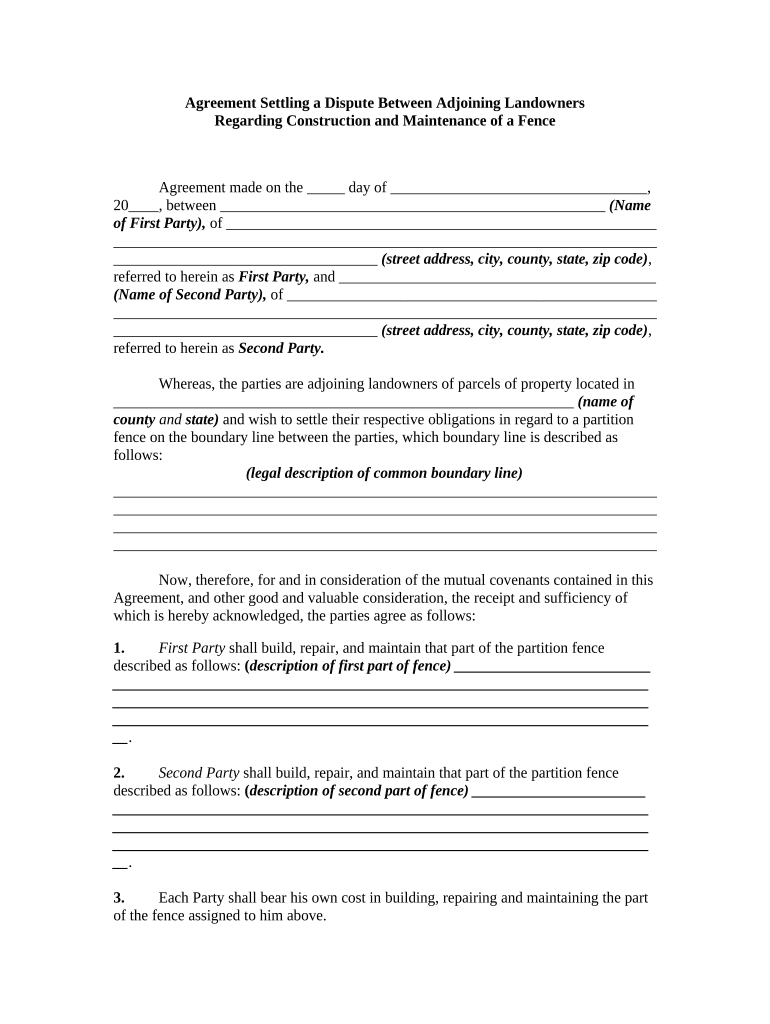
An Agreement Settling Dispute Regarding Fence Maintenance is a written contract between adjoining property owners that documents each party's responsibilities for repair, replacement, cost sharing, access, and scheduling for a shared or boundary fence. The agreement identifies the parties and the property, describes the fence location and condition, sets a maintenance schedule and payment terms, allocates liability and indemnities, and prescribes a process for resolving future disagreements. When properly signed and retained, the agreement reduces uncertainty, documents consent, and becomes an enforceable record under U.S. electronic-signature laws when executed according to ESIGN and state UETA rules.

Why parties use a fence maintenance settlement

A clear written agreement prevents recurring disputes, allocates costs fairly, and creates enforceable obligations. It preserves property values, documents consent to entry for repairs, and sets a dispute-resolution path to avoid litigation while remaining compatible with ESIGN and UETA requirements for electronic execution.

Why parties use a fence maintenance settlement

Who typically completes this agreement

Neighbors, homeowner associations, landlords, and small real estate managers commonly prepare and sign these agreements when a shared fence requires maintenance or replacement.

  • Adjoining homeowners seeking a durable cost-sharing arrangement for fence repair or replacement.
  • Property managers or landlords documenting maintenance responsibilities between tenant and owner or between co-owners.
  • Homeowners associations formalizing common-area or boundary fence obligations and assessment procedures.

Use a concise, specific agreement to reduce misunderstandings; separate exhibits (site sketch, cost estimates) improve enforceability and clarity.

Core elements to include for a professional agreement

A complete Agreement Settling Dispute Regarding Fence Maintenance should cover identity, scope, costs, timing, access and repair procedures, dispute resolution, and signature blocks so the obligations are clear and enforceable.

Parties

Full legal names and mailing addresses for each owner or manager, including a brief description of each party's interest in the adjoining property.
Fence Description

Precise location, physical description, and a simple site sketch or exhibit identifying the boundary line and the segment covered by the agreement.

Scope of Work

Detailed maintenance and repair obligations, quality standards, materials to be used, and whether replacement is full or partial.

Cost Allocation

Clear method for splitting expenses, payment deadlines, invoicing procedures, and responsibility for unexpected overruns.

Access & Timing

Advance notice requirements, acceptable hours for work, and temporary access authorizations for contractors and equipment.

Dispute Resolution

A chosen method for resolving future disputes — negotiation, mediation, arbitration, or small-claims venue — plus governing state law.

Step-by-step: complete and execute the agreement

Follow these sequential steps to draft, approve, sign, and retain a binding fence maintenance settlement between adjoining property owners.

  • 01
    Draft terms: Describe scope, costs, and schedule in plain language.
  • 02
    Attach exhibits: Include map, photos, or contractor estimates as exhibits.
  • 03
    Review and revise: All parties review; consider attorney input for complex issues.
  • 04
    Sign and retain: Sign, notarize if required, and distribute executed copies to all parties.

Typical routing and approval flow

A straightforward workflow reduces signing delays and documents consent at each stage of negotiation and execution.

  • Prepare draft: One party or counsel prepares initial agreement.
  • Exchange edits: Parties propose changes and agree on final text.
  • Sign: Parties sign physically or electronically per agreement.
  • Distribute copies: Each party receives a fully executed copy and stores it securely.

How to set up a digital workflow for this agreement

Configure a simple online signing workflow that matches your chosen authentication and notification needs while preserving an audit trail.

Field Configuration
Signature Type Electronic signature with audit trail or notarized wet signature if required.
Authentication Email verification by default; use SMS or KBA for higher assurance.
Notifications Automatic reminders at set intervals until signing completes.
Document Format PDF or DOCX for preservation and unambiguous recordkeeping.

Technical formats and integrations to consider

Choose a platform that produces tamper-evident signed PDFs and captures an audit trail for each signing event.

  • File formats: PDF, DOCX supported.
  • Integrations: Works with Google Workspace and Microsoft 365.
  • Storage options: Export to Box, Egnyte, or cloud storage.

Ensure the chosen platform meets your authentication and retention policies and supports secure export and archival of executed agreements.

Practical tips to make the agreement robust and enforceable

These best practices reduce ambiguity and reduce the risk of future disputes while making the document easier to enforce.

Use clear boundaries and exhibits
Attach a simple map or photo with the fence segment clearly marked and call out distances or landmarks; a visual exhibit prevents later boundary confusion and supports enforcement.
Specify exact cost-sharing terms
State percentages, fixed dollar amounts, or a precise method to calculate contributions. Include invoicing procedures, deadlines, and remedies for nonpayment to avoid disputes over reimbursement.
Define workmanship and materials
Set minimum material standards, acceptable contractors, and inspection criteria so both parties share expectations about quality and reduce disagreements after repairs or replacement.
Preserve amendment and notice procedures
Require written amendments with signatures and define how notices are delivered; include contact details and acceptable delivery methods for formal notices.

Common mistakes people make when preparing this agreement

  • Failing to identify the exact fence segment or relying on vague location descriptions that lead to boundary disputes later.
  • Leaving cost allocation undefined or using ambiguous terms like 'reasonable share' without a calculation or schedule.
  • Omitting permission for contractor access, which can lead to disputes or delays when repairs are necessary.
  • Not obtaining signatures from the correct legal owner or failing to notarize when local recording or evidence is required.

Short summary of legal risks and possible consequences

Unenforceable Terms: Ambiguous obligations may be unenforceable
Boundary Litigation: Disputes can escalate to costly court actions
Insurance Gaps: Failure to allocate liability may void coverage
Tax Implications: Certain reimbursements can have tax reporting consequences
Delayed Repairs: Missing timelines increase damage and costs
Double Payments: Unclear invoicing can cause duplicate charges

Key dates and deadlines to include in the agreement

Specify concrete dates and notice periods in the agreement to avoid uncertainty and to trigger enforceable obligations promptly.

Effective Date:

Insert the MM/DD/YYYY start date when obligations begin.

Maintenance Schedule:

List recurring maintenance dates or event-based triggers for action.

Payment Due Date:

State payment terms and late-payment interest or penalties.

Inspection Deadline:

Set a timeline for post-repair inspection and acceptance.

Notice Period:

Require 10–30 days' written notice before major work or dispute actions.

Milestones from negotiation to implementation

Use a milestone sequence to track the agreement lifecycle and ensure timely performance by each party.

01

Draft Approval

Parties agree on final text and attached exhibits.

02

Execution

All owners sign and date the executed agreement.

03

Notarization/Recording

Notarize or record if local law or parties require evidence.

04

Maintenance Begins

Contractor mobilizes and parties perform duties as scheduled.

Pricing snapshot for eSignature providers useful for this agreement

Review plan basics and compliance features when choosing an eSignature provider for executing a fence maintenance agreement; signNow appears first below for comparison.

signNow DocuSign Adobe Sign PandaDoc HelloSign
Starting Price $8/user/mo $15/user/mo $14/user/mo $19/user/mo $15/user/mo
Free Trial 7-day free trial Varies by plan Varies by plan Varies by plan Varies by plan
Bulk Send Yes Yes Yes Yes No
Audit Trail Yes Yes Yes Yes Yes
HIPAA Compliant Yes Yes Yes No No

Frequently asked questions about execution and enforceability

Answers to common questions about signing, notarization, and enforceability for a fence maintenance agreement under U.S. law.


Need help? Contact support

be ready to get more
Join over 28 million airSlate SignNow users