Establishing secure connection… Loading editor… Preparing document…
Navigation

Fill and Sign the Shall Be the Name Must Contain One of the Required Terms Such as Limited Form
Fill and Sign the Shall Be the Name Must Contain One of the Required Terms Such as Limited Form

How it works

Open the document and fill out all its fields.
Apply your legally-binding eSignature.
Save and invite other recipients to sign it.

Rate template

4.7
38 votes
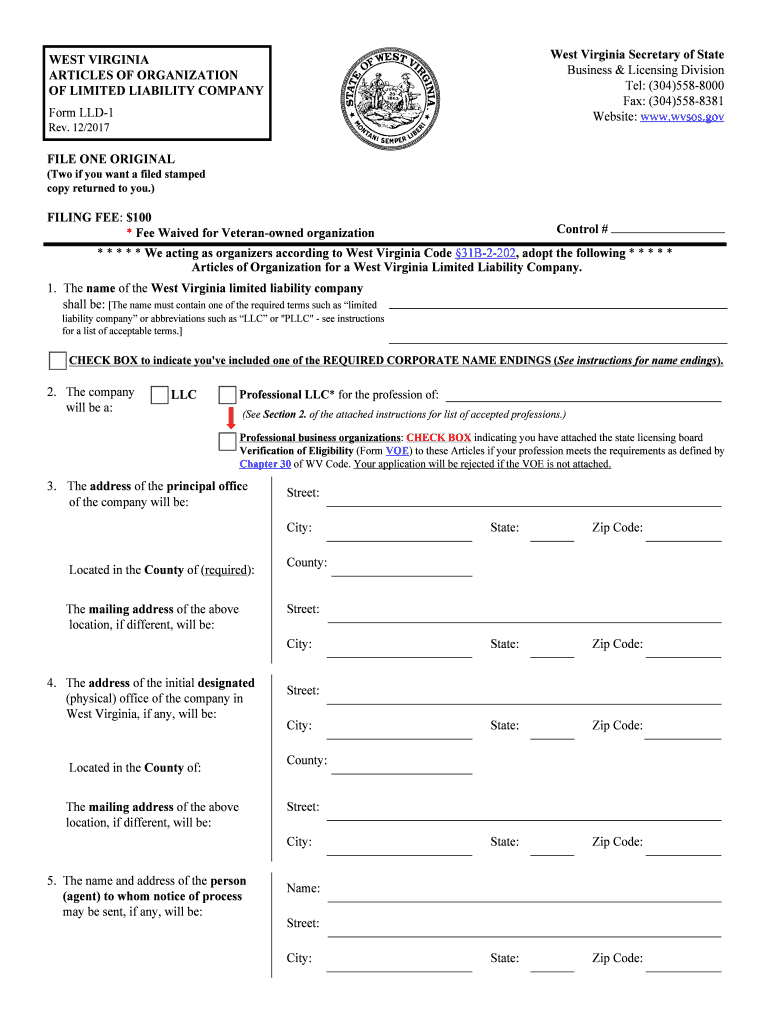
FILE ONE ORIGINAL (Two if you want a filed stamped copy returned to you.) FILING FEE: $100 * Fee Waived for Veteran-owned organization Control # * * * * * We acting as organizers according to West Virginia Code §31B-2-202 , adopt the following * * * * * Articles of Organization for a West Virginia Limited Liability Company. 1. The name of the West Virginia limited liability company shall be: [The name must contain one of the required terms such as “limited liability company” or abbreviations such as “LLC” or "PLLC" - see instructions for a list of acceptable terms.] 3 . The address of the principal offic e of the company will be: Located in the County of (required): Street: City: Street: State: Zip Code: The mailing address of the above location, if different, will be: 4. The address of the initial designated (physical) office of the company in West Virginia, if any, will be: Zip Code: State: City: Street: Zip Code: State: City: Located in the County of: Street: The mailing address of the above location, if different, will be: Zip Code: State: City: 5. The name and address of the person (agent) to whom notice of process may be sent, if any, will be: Zip Code: State: City: Street: Name: 2. The company will be a: LLC Professional LLC * for the profession of: (See Section 2. of the attached instructions for list of accepted professions.) CHECK BOX to indicate you've included one of the REQUIRED CORPORATE NAME ENDINGS ( See instructions for name endings). County: County: Professional business organizations : CHECK BOX indicating you have attached the state licensing board Verification of Eligibility (Form VOE ) to these Articles if your profession meets the requirements as defined by Chapter 30 of WV Code. Your application will be rejected if the VOE is not attached. West Virginia Secretary of State Business & Licensing Division Tel: (304)558-8000 Fax: (304)558-8381 Website: www.wvsos.gov WEST VIRGINIA ARTICLES OF ORGANIZATION OF LIMITED LIABILITY COMPANY Form LLD-1 Rev. 12/2017 13. The purpose(s) for which this limited liability company is formed is as follows: [Describe the type(s) of business activity which will be conducted, for example, “real estate,” “construction of residential and commercial buildings,” “commercial painting,” “professional practice of law" (see Section 2. for acceptable "professional" business activities). Purpose may conclude with words “…including the transaction of any or all lawful business for which corporations may be incorporated in West Virginia.”] 9. The name(s) and address(es) of the organizer(s) is (You must list at least ONE organizer.): Name No. & Street Address City State Zip Code WEST VIRGINIA ARTICLES OF ORGANIZATION OF LIMITED LIABILITY COMPANY Page 2 7. Website address of the business, if any ( ex: yourdomainname.com ): 6. E-mail address where business correspondence may be received: 10. The company will be: (required) an AT-WILL company, conducting business for an indefinite period. a TERM company, conducting business for the term of years. b. Located in how many West Virginia counties? If "Yes "... a. How many businesses? Yes No Decline to answer 8. Do you own or operate more than one business in West Virginia ?* Answer a. and b. below. 11. a. List the name(s) and address(es) of the MEMBER(S) of the company (required; Note: The application will be rejected if member information is not provided below. Attach additional pages if necessary): Member Name No. & Street Address City State Zip Code Manager Name No. & Street Address City State Zip Code MEMBER -MANAGED [ All member information must be entered under 11a. above .] MANAGER -MANAGED [ All manager information must be entered in the spaces below if selecting this management structure. Attach additional pages if necessary.] b. The company will be - CHECK ONE ( required): - Those persons who are liable in their capacity as members for all debts, obligations or liability of the company have consented in writing to the adoption of the provision or to be bound by the provision. 12. All or specified members of a limited liability company are liable in their capacity as members for all or specified debts, obliga- tions or liabilities of the company ( required): No - All debts, obligations and liabilities are those of the company. Yes 17. The requested effective date is [ Requested date may not be earlier than filing nor later than 90 days after filing in our office. ] Page 3 19. Contact and Signature Information * (See below Important Legal Notice Regarding Signature ): a. Contact person to reach in case there is a problem with filing: * Important Legal Notice Regarding Signature: Per West Virginia Code §31B-2-209 . Liability for false statement in filed record. If a record authorized or required to be filed under this chapter contains a false statement, one who suffers loss by reliance on the statement may recover damages for the loss from a person who signed the record or caused another to sign it on the person's behalf and knew the statement to be false at the time the record was signed . Important Note: This form is a public document. Please do NOT provide any personal identifiable information on this form such as social security number, bank account numbers, credit card numbers, tax identification or driver's license numbers. WEST VIRGINIA ARTICLES OF ORGANIZATION OF LIMITED LIABILITY COMPANY 16. The number of pages attached and included in these Articles is: the date and time of filing in the Secretary of State's Office. the following date and time . Phone: Date: c. Signature: Title/Capacity of signer: b. Print or type name of signer: 18. Is the organization a " veteran-owned" organization? National Personnel Records Center Military Personnel Records 1 Archives Drive St. Louis, MO 63138 Toll free: 1-86-NARA-NARA or 1-866-272-6272 Phone: 314-801-0800 www.archives.gov/veterans/military-service-records You may obtain a copy of your Veterans Affairs Form DD214 by contacting: Yes (If " Yes," attach Form DD214 ) No CHECK BOX indicating you have attached Veteran Affairs Form DD214 Effective JULY 1, 2015 , to meet the requirements for a “ veteran-owned” organization, the entity filing the registration must meet the following criteria per West Virginia Code §59-1-2a : 1. A “ veteran ” must be honorably discharged or under honorable conditions, and 2. A “ veteran-owned business ” means a business that meets one of the following criteria: o Is at least fifty-one percent (51%) unconditionally owned by one or more veterans; or o In the case of a publicly owned business, at least fifty-one percent (51%) of the stock is unconditionally owned by one or more veterans. Per WV Code 59-1-2(j) effective July 1, 2015, the registration fee is waived for entities that meet the requirements as a " veteran-owned" organization. See attached instructions to determine if the organization qualifies for this waiver. In addition, a " veteran-owned" entity will have four (4) consecutive years of Annual Report fees waived AFTER the organization's initial formation [see WV Code 59-1-2a(m) ]. 15. Other provisions which may be set forth in the operating agreement or matters not inconsistent with law: [See instructions for further information; use extra pages if necessary.] 14. Is the business a Scrap Metal Dealer? Yes [If " Yes," you must complete the Scrap Metal Dealer Registration Form (Form SMD-1 ) and proceed to Section 15.] No [Proceed to Section 15.] Reset Form Print Form INSTRUCTIONS FOR FILING ARTICLES OF ORGANIZATION BEFORE you fill out the application : The company name you select will be approved only if it is available - that is, if the name is not the same as and is distinguishable from any other name which has been reserved or filed. If you prepare LLC papers without applying for and receiving a name reservation, you do so at your own risk. A telephone check on availability of a name is not a guarantee of name availability. You may apply for a name reservation in writing, accompanied by a $15 fee made payable to the WV Secretary of State, mailed to the address shown above. Once approved, you are guaranteed exclusive use of the name for 120 days, enough time to prepare and submit the articles. If you plan to do business under any name, other than the name on your certificate of organization, you must register that trade name with the Secretary of State. Failure to do so could result in a fine or imprisonment. FILLING OUT THE APPLICATION Section 1. Enter the exact name of the company and be sure to include one of the required corporate name endings: “limited liability company,” “limited company,” or the abbreviations “L.L.C.,” “LLC,” “L.C.,” or “LC.” “Limited” may be abbreviated as “Ltd.” and “Company” may be abbreviated as “Co.” [WV Code §31B-1-105 ] Professional companies must use “professional limited liability company,” “professional L.L.C.,” “professional LLC,” “P.L.L.C.,” or “PLLC.” [WV Code §31B-13-1303 ] Section 2. LLC vs. PLLC - Check the first box unless your company qualifies as a Professional LLC. A Professional LLC may be organized only by one or more persons licensed or otherwise legally authorized to provide the same or compatible professional services or to practice together within the state. No person may be a member of the PLLC who is not licensed or otherwise legally authorized to render the professional service for which the PLLC was organized. Only the following professions listed below under the specified articles of Chapter 30 of West Virginia Code may form a PLLC. If you are a member of another profession, please contact your licensing board before attempting to establish your business as a regular LLC. Attorneys-at-law [ Article 2 ] Physicians & Podiatrists [ Article 3 ] Dentists [ Article 4 ] Optometrists [ Article 8 ] Accountants [ Article 9 ] Veterinarians [ Article 10 ] Architects [ Article 12 ] Engineers [ Article 13 ] Land Surveyors [ Article 13a ] Osteopathic Physicians and Surgeons [ Article 14 ] Chiropractors [ Article 16 ] Psychologists [ Article 21 ] Social Workers [ Article 30 ] Acupuncturists [ Article 36 ] ***Important*** For PLLC's: CHECK BOX indicating you have attached Verification of Eligibility (Form VOE) to these Articles if your profession meets the requirements as defined by Chapter 30 of the WV Code. The Secretary of State cannot complete your filing until verification is received from the appropriate State licensing board that the licenses of your members are current and in full effect. A PLLC is required to carry at all times $1 million of professional limited liability insurance [See WV Code §31B-13-1305 ]. Your application will be rejected if the VOE is not attached. Section 3. The principal office address need not be in WV, but is the principal place of business for the company. This is generally the address where all corporate documents (records) are maintained. You may change the principal office address by filing with the Secretary of State an Application to Appoint or Change Address, Agent, or Officers [ Form AAO] (fee $15). The county in which the principal office address is located is required to be listed. The principal mailing address need not be in WV, but is the principal place of business for the company. This is the address to which all correspondence from our office is mailed. You may change the principal mailing address by filing with the Secretary of State an Application to Appoint or Change Address, Agent, or Officers [Form AAO] (fee $15). Section 4 . The designated (physical) office location need not be the principal place of business. You may change the designated (physical) office by filing with the Secretary of State an Application to Appoint or Change Address, Agent, or Officers [ Form AAO] (fee $15). The county in which the designated (physical) office address is located . The mailing address of the designated (physical) office address , if different from the designated (physical) office address. Section 5. You may wish to maintain an “ agent for service of process” in West Virginia who can receive service of a summons or complaint. The agent may be an individual resident, a corporation, or another limited liability company. You may change your agent by filing with the Secretary of State an Application to Appoint or Change Address, Agent, or Officers [ Form AAO] (fee $15). Section 6. List an e-mail address (yourname@domainname.com ) where you can receive important e-mail notifications (e.g., Annual Report notices). Section 7. List the website address (domainname.com ) of the business , if any. DO NOT list a physical mailing address. Section 8. Indicate whether or not you own or operate more than one business in West Virginia . If “Yes "... a. List the total number of businesses in West Virginia in the space provided. b. List the total number of counties in West Virginia in which the businesses conduct operations. Section 9. One or more persons may organize a limited liability company. The name and address of each organizer having authority to execute instruments on behalf of the limited liability company is required. Section 10. An AT-WILL company will continue to exist until voluntarily terminated or administratively dissolved. A TERM company is one in which its members have agreed to remain members until the expiration of a term specified in the articles. If neither box is marked, or if the length of term is not specified, the company will be established as an at-will company. Section 11. a. You must list the name and address of each MEMBER having authority to execute instruments on behalf of the limited liability company (see WV Code §31B-2-203 ). b. Select the type of management structure of the limited liability company. For a MEMBER-managed company , the authority to transact business and execute instruments is in the hands of the members, and any member may act to carry on the ordinary course of the company's business as an agent of the company. If choosing MEMBER-managed, list all MEMBER information in the spaces provided under item #11a. For a MANAGER-managed company , a manager, who may or may not be a member, is an agent of the company for the purpose of its business. If choosing MANAGER-managed, list all MANAGER information in the spaces provided under this section (item #11b.). See WV Code §31B for more information about the authority of members & managers. Section 12. DO NOT check "Yes" to this question UNLESS and UNTIL you have in hand the written consent of those members who are liable for all debts, obligations and liabilities of the company agreeing to the adoption of or to be bound by this provision in the operating agreement. The liabilities may not be assigned on the belief that members will consent. Section 13. The State Tax Department requests that you describe the purposes of the limited liability company clearly to insure you receive all the necessary information about registering with the required state agencies. Please note that filing Articles of Organization alone does not qualify you to do business in West Virginia. You must obtain a business license from the West Virginia Department of Tax and Revenue, and you may be required to meet other licensing requirements to conduct the type of business you intend. Attach additional pages if necessary. Section 14. If the business activities include “ Scrap Metal Dealer”, check “Yes” and complete the Scrap Metal Dealer Registration Form (Form SMD-1) [per revised West Virginia Business Code §61-3-49-(b)(4) ] and submit with your application. Proceed to Section 15. If “ No,” proceed to Section 15. Section 15. The articles may include provisions permitted to be set forth in an operating agreement [but may not vary the non-waivable provisions of WV Code §31B-1-103(b) ] and other matters not inconsistent with law. If any provision of the operating agreement is inconsistent with the articles of organization, the articles control as to persons other than managers, members and their transferees who reasonably rely on the articles to their detriment. Section 16. List the number of attached pages to insure your complete filing is recorded. Section 17. You may accept the date of filing by the Office of Secretary of State as your effective date, or assign a future date and time when the company will be activated. If the date you give is more than 90 days after the filing date by the Secretary of State, the active date will be the 90 th day after filing. If you do not specify a time, the filing is effective at the close of business on that date. Section 18. Check the appropriate box indicating whether or not the organization is " veteran-owned." Effective JULY 1, 2015 , the following criteria must be met in order to qualify as a "veteran-owned" entity: (1) veteran must be "honorably discharged or under honorable conditions;" and (2) if a publicly- owned entity, at least fifty-one per cent (51%) of the stock must be unconditionally owned by one or more veterans [see WV Code 59-1-2a(12)-(13)(A)(B) ]. If "Yes ," you must include with this application a copy of your Veteran Affairs Form DD214 . Section 19. AN ORGANIZER MUST SIGN THE APPLICATION. Listing a contact person and phone number is optional, however listing a person to contact in case of a problem with filing may help to speed the filing process along and avoid possible rejection of the document. ANNUAL REPORT NOTICE: WV Code 59-1-2a ( see also 31B-2-211 ) requires every limited liability company [both domestic (in-state) and foreign (out-of-state)] to file an annual report and pay the annual report filing fee between January 1 and July 1 of each year following the calendar year in which the business was registered with the Office of the Secretary of State. The $25 annual report fee is waived for Veteran-owned entities for the following four (4) years after initial formation [see WV Code 59-1-2a(m) ]. Failure to file may result in revocation of the organization's legal authority to transact business in the state. Notification of the filing requirement will be sent, but the company is responsible for filing the annual report as required by WV Code. You may file the annual report online at https://onestop.wv.gov . You must register a User Account Login ID and Password to create a personal “Filing Cabinet” to file the annual report. FILING THE ARTICLES - ONE ORIGINAL REQUIRED - AND PAYING THE FEE Send an additional original if you want a filed date-stamped copy returned to you at no additional cost. The filing fee will consist of paying a registration fee. If requesting a certified copy, an additional fee of $15 per certified copy requested is required. Registration fee - $100 * Veteran-owned entity registration FEE WAIVED - $0 Registration fee * _______________ [Registration fee is waived for "veteran-owned" entity effective July 1, 2015 per WV Code 59-1-2(j) ; Be sure to attach the veteran proof of status Veteran Affairs Form DD214 $15 per certified copy: + _______________ when claiming "veteran-owned" status .] Total fee: =_______________ **** Make your checks payable to West Virginia Secretary of State . **** TEXT ALERTS : Stay up-to-date regarding filing deadlines and changes to business, charity, notary, private investigation, and security guard laws. To sign up, visit the Secretary of State online at www.wvsos.gov and select Text Alerts . Next, under the heading, “Choose SMS Subscription,” click the down arrow and select “Business and Licensing.” Then enter your ten-digit mobile phone number and your cellular carrier. Click Subscribe. This will allow you to get important information delivered right to your mobile phone. Please note, standard text messaging rates apply and you may unsubscribe at any time. TERMINATION : A limited liability company is a legal entity which can only be terminated through formal action - not by a letter or phone call. You remain liable for all taxes, assessments, fines, penalties and interest until you receive a certificate of termination from the Secretary of State. Contact us for more information. CHOOSE ONE OF THE FOLLOWING PROCESSING SERVICES: 1 EXPEDITED SERVICE (24-hour , 2-hour and 1-hour ; *Requires standard filing fee plus additional expedite fee, see below) West Virginia Secretary of State Business & Licensing Division Tel: (304) 558-8000 Fax: (304) 558-8381 Website: www.wvsos.gov Filing Submission Instructions - Business Division SUBMIT THE COMPLETED APPLICATION WITH THE CUSTOMER ORDER REQUEST FORM TO ONE OF THE OFFICES BELOW. CHOOSE EXPEDITED OR STANDARD PROCESSING SERVICE. IF NOT USING THE CUSTOMER ORDER REQUEST FORM AND YOU ARE REQUESTING EXPEDITED SERVICE, YOU MUST INCLUDE THE WORD "EXPEDITE" AND THE LEVEL OF EXPEDITED SERVICE BEING REQUESTED (24-HOUR, 2-HOUR OR 1-HOUR) IN YOUR CORRESPONDENCE. BE SURE TO INCLUDE THE CORRECT ADDITIONAL EXPEDITED FEE. THIS FEE IS IN ADDITION TO THE REGULAR FILING FEE ( SEE FEES BELOW). BUSINESS SERVICE CENTERS Standard and Expedited Filings Charleston Office One-Stop Business Center 1615 Washington Street East Charleston, WV 25311 Phone: (304) 558-8000 Fax: (304) 558-8381 Hours: Mon. - Fri. 8:30a - 5:00p EST Clarksburg Office North Central WV Business Center 200 West Main Street Clarksburg, WV 26301 Phone: (304) 367-2775 Fax: (304) 627-2243 Hours: Mon. -Fri. 9:00a - 5:00p EST IMPORTANT: READ ALL INSTRUCTIONS CAREFULLY BEFORE COMPLETING FORMS. Please follow the instructions included with the application. Failure to include any of the required information on the form may cause the filing to be rejected. All forms may be downloaded from our web site www.wvsos.gov . Rev. 9/2018 *Fee $ 25.00 $250.00 $500.00 Expedite Service 24-Hour 2-Hour 1-Hour EXPEDITED SERVICE requests may be submitted by: - E-mail to efilings@wvsos.gov - Fax - Walk in delivery 2 STANDARD PROCESSING (5-10 business days ) SUBMIT COMPLETED FILING TO ONE OF THE BUSINESS CENTERS BELOW: INCLUDE PAYMENT: Be sure to enclose the correct filing fee with your filing. If paying by credit card, be sure to include the e-Payment Authorization form with your filing. Your filing will be rejected if the payment is not included or if the e-Payment Authorization form is not included if paying by credit card. Standard filing fees apply. STANDARD PROCESSING requests may be submitted by: - E-mail to CorpFilings@wvsos.gov - Fax - Walk in delivery (drop off service only filed within 5-10 business days) Martinsburg Office Eastern Panhandle Business Center 229 E. Martin Street Martinsburg, WV 25401 Phone: (304) 356-2654 Fax: (304) 260-4360 Hours: Mon. - Fri. 9:00a - 5:00p EST READ CAREFULLY BEFORE SUBMITTING - Expedite service is NOT AVAILABLE for the following filings: West Virginia Secretary of State Business & Licensing Division Tel: (304)558-8000 Fax: (304)558-8381 Website: www.wvsos.gov Customer Order Request SUBMIT THIS COMPLETED FORM WITH YOUR FILING. Order Processing Requested *: * * * Expedite Processing Requires Additional Fees * * * Standard Processing ** 24-HOUR Expedite *** 2-HOUR Expedite 1-HOUR Expedite Name of Entity: Return filing to: (Return Address) Contact Name: Phone: Return Delivery Options: Email or Fax options do not receive a copy via mail; must be ordered separately. Email to: Fax to: Hold for Pick Up UPS: Acct # Other (explain below): (additional $500.00 fee included) (additional $25.00 fee included) (additional $250.00 fee included) FedEx: Acct # Mail to Return Address above Order Description (include items being ordered and fee breakdown): * PLEASE NOTE: Original paperwork is kept by this office. Include a copy of the original filing if you want a file stamped copy returned to you at no extra charge. Certified copy requests are an additional $15 per certified copy being requested. Total Amount: Payment Method: Cash (Do Not mail cash ) Pre-paid Acct #: Credit Card (Must attach e-Payment Authorization request form including payment information. ) Check/Money Order *"Processing" indicates the filing will be completed and registered in the Secretary of State registration database. ** Standard Processing applications received by E-MAIL or FAX must include the e-Payment Authorization form with credit card information. *** NOTE: Orders filed in person through any Secretary of State office location requesting the filing be processed will be assessed a 24-HOUR Expedite fee of $25.00 per order. (Avg. processing turnaround 5-10 business days ) Rev. 9/2018 Attach signed pre-paid slip. >> Tax Department filings including Sole Proprietorships, General Partnerships, and Associations >> Dissolution or Withdrawal of Corporation, Voluntary Association or Business Trust Email to: CorpFilings@wvsos.gov Email to: eFilings@wvsos.gov 24-hour, 2-hour and 1-hour Expedite Service Guidelines MAC WARNER Secretary of State State Capitol Building Charleston, WV 25305 Phone: (304) 558-6000 Website: www.sos.wv.gov IMPORTANT: To ensure expedited service, please mark “EXPEDITE” in a conspicuous place at the top of the service request. Please indicate method of delivery. 24-HOUR EXPEDITE SERVICE The Secretary of State offers a 24-hour expedite service on most business organization filings processed by this office. If you choose to utilize this service, please enclose with your filing the additional expedite fee. Please note that this expedite fee is in addition to the standard fee charged on each filing and/or order. You must mark the document with your “ 24-HOUR EXPEDITE” request. If using a cover letter, note that you are requesting 24-hour expedited service, and include your telephone number and return information. Each filing will be returned by U.S.P.S. regular mail unless other arrangements are made. This office does not fax confirmation of a 24-hour expedite. The fee for 24-hour handling is $25.00 in addition to the usual fee for service. Please consult our fee schedules for the appropriate fee. If you require assistance, please contact this office. Time Constraints: Under most circumstances, each filing submitted receives same day filing date and may be picked up in the office by the end of the same business day. Filings to be mailed the next business day if received by 2:00 pm of receipt date and no later than the 2nd business day if received after 2:00 pm. Expedite period begins when filing or service request is received in this office in acceptable fileable form. 2-HOUR EXPEDITE SERVICE The Secretary of State offers a 2-hour expedite service on most filings processed by this office. If you choose to utilize the 2-hour expedite service, please enclose with your filing an additional $250.00 per filing and/or order. Please note that this expedite fee is in addition to the standard fee charged on each filing and/or order. Complete and submit the 2-hour customer order instruction form. If not using our order form, state clearly in your cover letter that you are requesting 2-hour expedited service and include your telephone number and return information. Attach the order form or cover sheet to the top of your filing and submit to this office. Each filing will be returned by U.S.P.S. regular mail unless other arrangements are made. 1-HOUR EXPEDITE SERVICE The Secretary of State offers a 1-hour expedite service on most filings processed by this office. If you choose to utilize the 1-hour expedite service, please enclose with your filing an additional $500.00 per filing and/or order. Please note that this expedite fee is in addition to the standard fee charged on each filing and/or order. Complete and submit the 1-hour customer order instruction form. If not using our order form, state clearly in your cover letter that you are requesting 1-hour expedited service and include your telephone number and return information. Attach the order form or cover sheet to the top of your filing and submit to this office. Each filing will be returned by U.S.P.S. regular mail unless other arrangements are made. 1-Hour and 2-Hour Time Constraints: Each filing submitted for either 1-hour or 2-hour expedite receives same day filing date and will be acknowledged by fax or e-mail within expedite service time. Failure to indicate method of acknowledgement (fax or e-mail) or to provide a correct fax number or e-mail address may prevent the Secretary of State from acknowledging the filing of such documents. Filings may be picked up within the expedite service period. Filings to be mailed will be mailed out no later than the next business day following receipt. Expedite period begins when filing or service request is received in this office in fileable form. The Secretary of State reserves the right to extend the expedite period in times of extreme volume, staff shortages or equipment malfunction. These extensions are few and will rarely extend more than a few hours. WV Secretary of State Expedite Guidelines Effective: 8-31-17 e-Payment Authorization Credit Card Number: Card Type: Service Type: Fax Mail E-mail Visa Mastercard Discover American Express Payment Information Storage Authorization Year: Entity Name: Name as it appears on the account Billing Address City State Zip Code Telephone Ext. I authorize the Secretary of State to store this payment information for future payment transactions processed by Secretary of State: Authorized Signature X (required) (optional) Date This document contains confidential financial information and will be properly shredded after payment has been processed by this office. Electronic storage of payment information is only permitted by signed authorization below which may be retracted at any time by written request by the authorized party. Not to Exceed Amount: USD $ Date Month: V Code * * 3-digit number on back of VISA, MasterCard and Discover cards. 4-digit number on front right side of American Express card. NOTICE: For security and verification purposes, all credit card payments must include the 3- or 4-digit CVV2 code (V Code) number located on the credit card. Failure to include this code will result in the rejection of your filing or service request. Rev. 11/2017 USE BLACK INK ONLY - DO NOT HIGHLIGHT Payment by Card (card holder name and billing address required below) Credit Card Expiration Date: Amount to Charge Card: USD $ Order Information (required) Card Holder Information: Payment Authorization I authorize the Secretary of State to bill an amount not to exceed the following to be charged to the above listed account(s): Authorized Signature X West Virginia Secretary of State Business & Licensing Division Tel: (304)558-8000 Fax: (304)558-8381 Website: www.wvsos.gov Reset Form

Useful Advice for Finalizing Your ‘Shall Be The Name Must Contain One Of The Required Terms Such As Limited’ Digitally

Are you fed up with the inconvenience of managing paperwork? Discover airSlate SignNow, the premier electronic signature solution for both individuals and businesses. Bid farewell to the tedious task of printing and scanning documents. With airSlate SignNow, you can effortlessly finalize and sign documents online. Make use of the powerful features embedded in this user-friendly and affordable platform to transform your document management practices. Whether you need to sign forms or collect digital signatures, airSlate SignNow simplifies the process with just a few clicks.

Follow this detailed guide:

  1. Log into your account or sign up for a complimentary trial with our service.
  2. Click +Create to upload a file from your device, cloud storage, or our form library.
  3. Open your ‘Shall Be The Name Must Contain One Of The Required Terms Such As Limited’ in the editor.
  4. Click Me (Fill Out Now) to complete the form on your end.
  5. Add and assign fillable fields for others (if required).
  6. Continue with the Send Invite settings to request eSignatures from others.
  7. Save, print your copy, or convert it into a reusable template.

Don’t be concerned if you need to work together with your team on your Shall Be The Name Must Contain One Of The Required Terms Such As Limited or send it for notarization—our solution provides you with everything necessary to accomplish such tasks. Register with airSlate SignNow today and enhance your document management to a new standard!

Here is a list of the most common customer questions. If you can’t find an answer to your question, please don’t hesitate to reach out to us.

Need help? Contact Support

The best way to complete and sign your shall be the name must contain one of the required terms such as limited form


Save time on document management with airSlate SignNow and get your shall be the name must contain one of the required terms such as limited form eSigned quickly from anywhere with our fully compliant eSignature tool.

How to Sign a PDF Online How to Sign a PDF Online

How to complete and sign paperwork online

In the past, coping with paperwork took pretty much time and effort. But with airSlate SignNow, document management is fast and easy. Our powerful and easy-to-use eSignature solution lets you effortlessly complete and electronically sign your shall be the name must contain one of the required terms such as limited form online from any internet-connected device.

Follow the step-by-step guide to eSign your shall be the name must contain one of the required terms such as limited form template online:

  • 1.Register for a free trial with airSlate SignNow or log in to your account with password credentials or SSO authentication.
  • 2.Click Upload or Create and add a form for eSigning from your device, the cloud, or our form library.
  • 3.Click on the file name to open it in the editor and utilize the left-side toolbar to fill out all the blank fields appropriately.
  • 4.Drop the My Signature field where you need to approve your form. Provide your name, draw, or import a photo of your handwritten signature.
  • 5.Click Save and Close to accomplish modifying your completed form.

Once your shall be the name must contain one of the required terms such as limited form template is ready, download it to your device, save it to the cloud, or invite other individuals to eSign it. With airSlate SignNow, the eSigning process only takes a few clicks. Use our powerful eSignature tool wherever you are to handle your paperwork efficiently!


How to Sign a PDF Using Google Chrome How to Sign a PDF Using Google Chrome

How to fill out and sign paperwork in Google Chrome

Completing and signing paperwork is easy with the airSlate SignNow extension for Google Chrome. Installing it to your browser is a quick and effective way to manage your forms online. Sign your shall be the name must contain one of the required terms such as limited form template with a legally-binding eSignature in just a couple of clicks without switching between applications and tabs.

Follow the step-by-step guidelines to eSign your shall be the name must contain one of the required terms such as limited form in Google Chrome:

  • 1.Go to the Chrome Web Store, search for the airSlate SignNow extension for Chrome, and install it to your browser.
  • 2.Right-click on the link to a document you need to approve and choose Open in airSlate SignNow.
  • 3.Log in to your account with your credentials or Google/Facebook sign-in buttons. If you don’t have one, sign up for a free trial.
  • 4.Utilize the Edit & Sign toolbar on the left to fill out your sample, then drag and drop the My Signature option.
  • 5.Upload a picture of your handwritten signature, draw it, or simply type in your full name to eSign.
  • 6.Make sure all data is correct and click Save and Close to finish modifying your form.

Now, you can save your shall be the name must contain one of the required terms such as limited form template to your device or cloud storage, send the copy to other individuals, or invite them to eSign your form via an email request or a secure Signing Link. The airSlate SignNow extension for Google Chrome improves your document workflows with minimum effort and time. Try airSlate SignNow today!


How to Sign a PDF in Gmail How to Sign a PDF in Gmail How to Sign a PDF in Gmail

How to fill out and sign documents in Gmail

Every time you get an email containing the shall be the name must contain one of the required terms such as limited form for approval, there’s no need to print and scan a document or save and re-upload it to a different tool. There’s a better solution if you use Gmail. Try the airSlate SignNow add-on to rapidly eSign any documents right from your inbox.

Follow the step-by-step guidelines to eSign your shall be the name must contain one of the required terms such as limited form in Gmail:

  • 1.Visit the Google Workplace Marketplace and look for a airSlate SignNow add-on for Gmail.
  • 2.Install the program with a related button and grant the tool access to your Google account.
  • 3.Open an email with an attachment that needs approval and utilize the S symbol on the right panel to launch the add-on.
  • 4.Log in to your airSlate SignNow account. Select Send to Sign to forward the file to other parties for approval or click Upload to open it in the editor.
  • 5.Place the My Signature option where you need to eSign: type, draw, or import your signature.

This eSigning process saves efforts and only takes a couple of clicks. Utilize the airSlate SignNow add-on for Gmail to adjust your shall be the name must contain one of the required terms such as limited form with fillable fields, sign documents legally, and invite other parties to eSign them al without leaving your inbox. Enhance your signature workflows now!


How to Sign a PDF on a Mobile Device How to Sign a PDF on a Mobile Device How to Sign a PDF on a Mobile Device

How to complete and sign forms in a mobile browser

Need to rapidly fill out and sign your shall be the name must contain one of the required terms such as limited form on a smartphone while doing your work on the go? airSlate SignNow can help without the need to install extra software programs. Open our airSlate SignNow tool from any browser on your mobile device and add legally-binding electronic signatures on the go, 24/7.

Follow the step-by-step guide to eSign your shall be the name must contain one of the required terms such as limited form in a browser:

  • 1.Open any browser on your device and go to the www.signnow.com
  • 2.Register for an account with a free trial or log in with your password credentials or SSO authentication.
  • 3.Click Upload or Create and add a file that needs to be completed from a cloud, your device, or our form library with ready-to go templates.
  • 4.Open the form and fill out the blank fields with tools from Edit & Sign menu on the left.
  • 5.Put the My Signature area to the form, then enter your name, draw, or add your signature.

In a few easy clicks, your shall be the name must contain one of the required terms such as limited form is completed from wherever you are. Once you're done with editing, you can save the file on your device, create a reusable template for it, email it to other people, or invite them electronically sign it. Make your paperwork on the go speedy and efficient with airSlate SignNow!


How to Sign a PDF on iPhone How to Sign a PDF on iPhone

How to fill out and sign documents on iOS

In today’s business community, tasks must be completed rapidly even when you’re away from your computer. Using the airSlate SignNow app, you can organize your paperwork and sign your shall be the name must contain one of the required terms such as limited form with a legally-binding eSignature right on your iPhone or iPad. Set it up on your device to conclude agreements and manage documents from anyplace 24/7.

Follow the step-by-step guidelines to eSign your shall be the name must contain one of the required terms such as limited form on iOS devices:

  • 1.Go to the App Store, search for the airSlate SignNow app by airSlate, and set it up on your device.
  • 2.Launch the application, tap Create to add a template, and select Myself.
  • 3.Select Signature at the bottom toolbar and simply draw your signature with a finger or stylus to eSign the sample.
  • 4.Tap Done -> Save right after signing the sample.
  • 5.Tap Save or take advantage of the Make Template option to re-use this document later on.

This method is so simple your shall be the name must contain one of the required terms such as limited form is completed and signed in a few taps. The airSlate SignNow application works in the cloud so all the forms on your mobile device are kept in your account and are available whenever you need them. Use airSlate SignNow for iOS to enhance your document management and eSignature workflows!


How to Sign a PDF on Android How to Sign a PDF on Android

How to fill out and sign paperwork on Android

With airSlate SignNow, it’s easy to sign your shall be the name must contain one of the required terms such as limited form on the go. Install its mobile application for Android OS on your device and start improving eSignature workflows right on your smartphone or tablet.

Follow the step-by-step guide to eSign your shall be the name must contain one of the required terms such as limited form on Android:

  • 1.Go to Google Play, find the airSlate SignNow application from airSlate, and install it on your device.
  • 2.Sign in to your account or register it with a free trial, then add a file with a ➕ key on the bottom of you screen.
  • 3.Tap on the imported file and select Open in Editor from the dropdown menu.
  • 4.Tap on Tools tab -> Signature, then draw or type your name to electronically sign the sample. Fill out empty fields with other tools on the bottom if necessary.
  • 5.Use the ✔ key, then tap on the Save option to end up with editing.

With a user-friendly interface and full compliance with main eSignature requirements, the airSlate SignNow app is the perfect tool for signing your shall be the name must contain one of the required terms such as limited form. It even works without internet and updates all document modifications when your internet connection is restored and the tool is synced. Fill out and eSign documents, send them for approval, and generate multi-usable templates anytime and from anywhere with airSlate SignNow.

Sign up and try Shall be the name must contain one of the required terms such as limited form
  • Close deals faster
  • Improve productivity
  • Delight customers
  • Increase revenue
  • Save time & money
  • Reduce payment cycles

