Establishing secure connection…Loading editor…Preparing document…

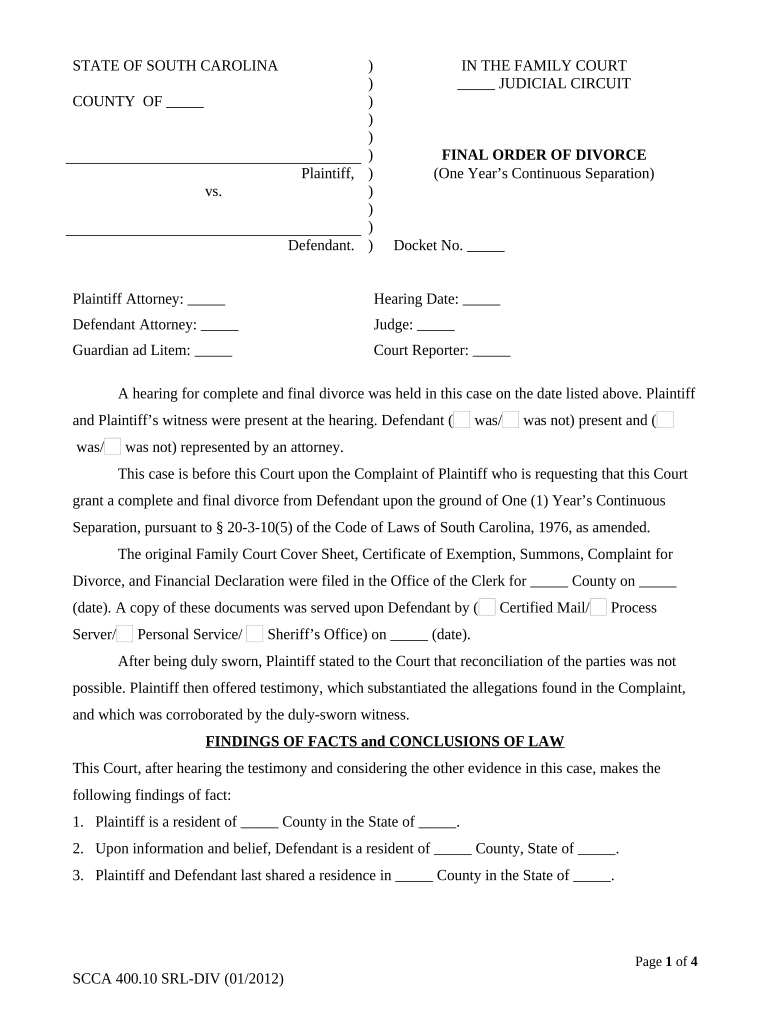
South Carolina Divorce Decree

This template is fully customizable. Edit the text, fill out the fields, and send it for signature. Give it a try!
South Carolina Divorce Decree

What the South Carolina Divorce Decree Is

The South Carolina Divorce Decree is the final court order resolving a dissolution of marriage in South Carolina. It records the court's decisions about property division, alimony (spousal support), child custody and visitation, child support, debt allocation, and any orders for legal name changes or attorney fees. Once entered and signed by a family court judge, the decree becomes a binding, enforceable judgment that governs post-divorce rights and responsibilities. Parties should review the decree for accuracy, retain a certified copy, and consult counsel about enforcement or modification options available under South Carolina law.
Why a Clear Decree Matters

A South Carolina Divorce Decree clarifies legal rights and duties after divorce, creates enforceable orders for support and custody, and establishes property division. Having a clear, correctly drafted decree reduces future disputes, supports enforcement through contempt or modification proceedings, and enables third-party compliance.

Why a Clear Decree Matters

Who Prepares, Submits, and Relies on the Decree

Family law attorneys, self-represented parties, and court clerks commonly prepare and submit divorce decrees in South Carolina jurisdictions.

  • Family law attorneys — draft terms, negotiate settlements, and ensure statutory compliance.
  • Self-represented parties — complete forms, propose terms, and file with the family court.
  • Clerks and judges — review submissions, enter the decree, and issue certified copies.

Stepwise Process to Prepare and File the Decree

Steps below outline how to prepare and submit a South Carolina Divorce Decree to family court.

  • 01
    Prepare: Gather settlement agreement, financial affidavits, and certified marriage certificate.
  • 02
    Draft: Include precise orders for custody, support, property, and debts.
  • 03
    File: Submit petition, decree draft, and supporting documents to family court clerk.
  • 04
    Serve: Provide notice and service of process per South Carolina rules.

How In-Person and Digital Completion Work

Digital and in-person pathways for completing and filing the decree are summarized below for parties and attorneys.

  • Assemble: Collect signed settlement and required supporting affidavits.
  • Sign: All parties sign; notarize if South Carolina requires.
  • Scan: Create certified PDF copies or use court's electronic filing format.
  • File: File with the family court clerk in the correct county.

Six Critical Elements to Include in a Professional Decree

The decree must be comprehensive, precise, and enforceable; the six features below indicate elements that commonly determine clarity and long-term stability.

Custody Orders

Detail legal custody allocation, physical custody schedule, decision-making authority, and contingency plans for relocation or extended absence. Include clear definitions to reduce ambiguity and provide enforcement pathways for violations.

Support Terms

State exact child support amounts, spousal support if applicable, calculation method or guideline reference, payment schedule, and remedies for missed payments including interest or wage garnishment.

Property Division

Identify assets and debts, specify division percentages or allocations, list retirement and titled asset distributions, and include tax and liability assumptions tied to each transfer.

Enforcement Provisions

Describe steps for enforcing orders, contempt remedies, fee shifting, and jurisdiction for modification. Cite statutory bases when relevant to facilitate court enforcement and post-judgment interest terms.

Health and Insurance

Specify responsibility for health insurance coverage, division of medical expenses not covered by insurance, life insurance requirements tied to support orders, and COBRA continuation language where appropriate.

Modification Terms

Set standards and procedures for future modifications, including material change thresholds, required notice, jurisdictional rules, and temporary relief options and evidentiary standards pending formal hearings.

Security and Legal Framework Notes

eSignature Law: Legally binding under ESIGN (15 U.S.C. ch. 96) and UETA.
HIPAA: HIPAA-compliant workflows require a BAA when health data is included.
Encryption: TLS 1.2/1.3 in transit; AES-256 at rest.
Certifications: SOC 2 Type II, ISO 27001, PCI DSS.
Audit Trail: Timestamps, IP addresses, and action history retained.
Accessibility: WCAG 2.0 Level AA compliant.

Potential Risks and Legal Consequences of Errors

Void Orders: Missing signatures or incorrect service may render orders void.
Contempt Risk: Failure to comply with orders can lead to contempt proceedings.
Support Liabilities: Incorrect calculations may cause arrearages and wage garnishment.
Tax Consequences: Property transfers or spousal support can affect tax reporting.
Delay Costs: Filing errors lengthen proceedings and increase attorney fees.
Enforcement Limits: Jurisdictional errors can hinder interstate recognition and enforcement.

Common Preparation Mistakes to Avoid

  • Omitting retirement accounts or hidden debts leads to unequal division and subsequent litigation to correct property allocations, increasing time and cost for both parties.
  • Using ambiguous parenting time terms or failing to address decision-making authority invites conflicts and repeated motions for clarification and enforcement in family court.
  • Failure to properly serve the other party or to file proof of service risks the decree being set aside or requiring re-service and delays.
  • Not complying with South Carolina notarization or witness requirements for attachments can invalidate parts of the decree or complicate recordation.

Suggested Digital Workflow Configuration

Configure a digital workflow for drafting, signing, and filing a South Carolina Divorce Decree electronically.

Field Configuration
Document Template Use a template with required fields and conditional child-support tables.
Signer Authentication Email plus SMS code; KBA where higher assurance is required.
Notarization Plan for in-person notarization or county-accepted alternatives; retain records.
Court Filing Export certified PDF or follow county e-filing specifications.

Platform Requirements for eSigning and Filing

For electronic signing and submission, ensure platform supports notarization, audit trails, and secure PDF export.

  • Formats: PDF and Word DOCX formats
  • Integrations: Court e-filing and case management
  • Authentication: Email, SMS, or higher assurance

eSignature Vendor Pricing and Feature Snapshot

Pricing and feature comparison for common eSignature vendors relevant to preparing and executing a South Carolina Divorce Decree.

signNow DocuSign Adobe Sign PandaDoc HelloSign
Starting Price $8/user/mo $15/user/mo $14/user/mo $19/user/mo $15/user/mo
Free Trial Yes, 7-day trial Yes Yes Yes, limited Yes, limited
Bulk Send Yes Yes Yes Yes No
Audit Trail Yes Yes Yes Yes Yes
HIPAA Compliant Yes Yes Yes No No

Frequently Asked Questions About South Carolina Divorce Decrees

Answers to common questions about execution, filing, and enforcement of divorce decrees in South Carolina follow.


Need help? Contact support

be ready to get more
Join over 28 million airSlate SignNow users