Establishing secure connection…Loading editor…Preparing document…

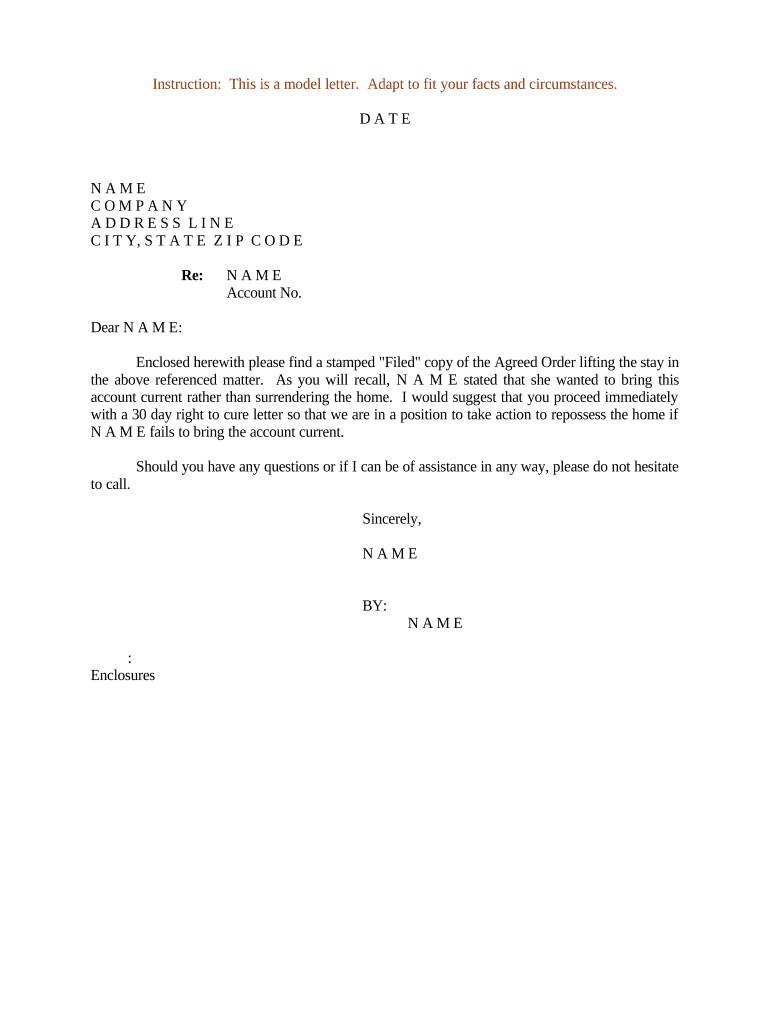
Letter Regarding Agreed Order Lifting Stay

This template is fully customizable. Edit the text, fill out the fields, and send it for signature. Give it a try!
Letter Regarding Agreed Order Lifting Stay

What the Letter Regarding Agreed Order Lifting Stay Is

The Letter Regarding Agreed Order Lifting Stay is a formal submission to the bankruptcy or district court that accompanies a proposed agreed order resolving a party’s request to lift or modify an automatic stay or similar provisional restriction. It explains who agreed, the precise relief requested, any conditions or carve-outs, and the factual and procedural basis for entry. The letter helps the clerk and judge locate the proposed order on the docket, confirms service, and documents consent or reservation of rights by the parties.

Why a Clear Agreed-Order Letter Matters

A concise letter summarizes agreed terms for the court, evidences mutual consent, and speeds entry of an agreed order while reducing the chance of clerical rejection or unnecessary hearings.

Why a Clear Agreed-Order Letter Matters

Who Typically Prepares and Uses This Letter

Typical users include debtors’ and creditor counsel, bankruptcy trustees, and stipulating parties who prepare a concise submission for court approval.

  • Bankruptcy attorneys who draft agreed orders and need to summarize negotiated relief and timelines for the judge.
  • Chapter 7 and Chapter 11 trustees reviewing stipulations before recommending entry of an agreed order to the court.
  • Creditors or secured parties consenting to relief and documenting conditions such as adequate protection or cure payments.

Core Elements Every Professional Letter Should Include

Include the following elements in the letter to ensure clarity, facilitate judicial review, and reduce the risk of objections or clerical errors when seeking entry of an agreed order lifting the stay.

Caption

Provide the full case caption, court name, and docket number at the top of the letter so the clerk can promptly associate the submission with the correct case file.
Background

Summarize the procedural history succinctly, including the origin of the stay, prior orders, and any relevant filings that explain why the agreed order is necessary.

Terms

List the precise relief terms: scope of relief, time period, carve-outs, payment or cure obligations, and any other conditions the parties agreed upon, and specify enforcement steps if obligations are not met.

Attachments

Attach the proposed agreed order, any stipulation, proof of service, relevant email consent, and redlines to document changes and avoid ambiguity for the judge, and prior communications.

Signature

Include signature blocks for counsel or authorized representatives with printed names, firm names, email addresses, dates, and bar numbers where applicable to clearly attribute consent and authority.

Service

Provide a certificate of service detailing how parties were served, including electronic service addresses and dates, to meet local rule requirements and create a compliance record.

Step-by-Step: Preparing and Submitting the Letter

A simple workflow helps ensure the letter and agreed order are complete, properly signed, served, and filed with the court and all affected parties.

  • 01
    Assemble Documents: Attach the agreed order draft, supporting stipulation, and relevant docket citations.
  • 02
    Identify Parties: List moving party, consenting creditor, trustee, and counsel with contact information.
  • 03
    Explain Terms: Summarize relief requested, carve-outs, timelines, adequate protection, and payment conditions.
  • 04
    Serve and File: Submit via court electronic filing and serve all registered creditors and parties.

Recommended Electronic Workflow Settings

Set up a reproducible electronic workflow to attach the proposed order, route for consent, capture authentication, and preserve an audit trail for the court record.

Field Configuration
Document Attach proposed order as PDF
Routing Sequential to trustee, creditor, judge's chambers
Authentication Email + SMS code or RON if required
Audit Trail Capture timestamp, IP, and signer identity

How an Agreed-Order Letter Differs from a Motion to Lift Stay

A side-by-side comparison highlights procedural and evidentiary distinctions between submitting an agreed-order letter and filing a contested motion to lift the stay.

Criteria Agreed-Order Letter Motion to Lift Stay
Filing Complexity low higher
Consent yes when executed not required
Hearing usually not required typically required
Evidence stipulation or order declarations and exhibits

Key Timing Considerations

Consider these timing points when finalizing, serving, and filing an agreed-order letter to avoid procedural delay or waiver issues.

When to file after agreement executed:

File promptly; early filing reduces chance of intervening objections.

Service deadlines and acceptable methods:

Serve registered users per local rules; include certificate of service.

Requests for expedited consideration from court:

Explain prejudice and request shortened notice; support with affidavit for urgency.

Appeal timeline and stay during appeal:

If appealed, relief may be stayed; consult appellate rules and include bond if required.

Typical clerk processing time expectations:

Routine agreed orders often signed within days; contested matters take weeks.

Practical Tips to Reduce Objections and Delays

Adopt consistent drafting and service practices to streamline entry of the agreed order and reduce the risk of procedural complications.

Use clear, concise language in the letter
Avoid legalese and lengthy recitals; present the agreed terms in numbered paragraphs, cite docket entries briefly, and attach only essential exhibits to prevent confusion and limit the court’s review to the stipulated relief.
Confirm consent evidence and attachment completeness
Attach signed stipulations, email threads reflecting consent, or counsel signatures. Include a certificate of service describing method, recipients, and dates to satisfy local rules and avoid later dispute over notice.
Check authentication and retention requirements
Confirm whether the court requires particular authentication (for example, RON, KBA, or two-factor), and preserve the audit trail, timestamps, and any RON audio-video records for the period required by local rules.
Use consistent naming and docket references
Use the identical party names, case caption, and docket numbers across the letter, proposed order, and certificate of service to prevent clerical rejections and ensure the submission is associated with the correct case file.

Common Risks and Consequences of Errors

Clerical Rejection: Incorrect caption causes clerk rejection.
Late Filing: Missed deadlines may delay relief.
Service Defect: Improper service can invalidate consent.
Name Mismatch: Differing party names create ambiguity.
Insufficient Proof: No proof of consent risks denial.
Unauthorized Signature: Signature without authority may be void.

Illustrative Examples from Practice

The short examples below show how a clear agreed-order letter can resolve disputes, avoid hearings, and produce enforceable outcomes with minimal delay.

Chapter 11 Creditor Agreement

A debtor and secured creditor in a Chapter 11 case negotiated adequate protection and agreed limited relief to pursue a foreclosure sale.

  • They filed an agreed-order letter.
  • The court entered the agreed order within a week, avoiding an evidentiary hearing. The creditor received agreed protections and the debtor preserved plan negotiations, reducing legal fees and preserving estate value.

Contested Relief Avoided

Two parties resolved a dispute over relief from the automatic stay by signing a stipulation and submitting a joint letter and proposed agreed order for the court.

  • They documented consent in the letter.
  • The clerk docketed the agreed order with a supporting certificate of service, and the parties avoided an evidentiary hearing; the settlement terms became enforceable without additional litigation expense.

Frequently Asked Questions About the Letter and Filing Process

Practical answers to common questions about preparing, signing, serving, and filing an agreed-order letter, with notes on e-signature and court practice.


Need help? Contact support

Pricing and Feature Snapshot for eSignature Solutions

A concise comparison of common eSignature pricing and capabilities useful when preparing, signing, and circulating an agreed-order letter and related court documents.

signNow DocuSign Adobe Sign PandaDoc HelloSign
Starting Price $8/user/mo $15/user/mo $14/user/mo $19/user/mo $15/user/mo
Free Trial 7-day free trial Varies Varies Varies Varies
Bulk Send Yes Yes Yes Yes Varies
Audit Trail Yes Yes Yes Yes Yes
HIPAA Compliant Yes Yes Yes No No
Envelope Cap No cap 100 envelopes/user/year Varies Varies Varies
be ready to get more
Join over 28 million airSlate SignNow users