Establishing secure connection… Loading editor… Preparing document…
Navigation

Fill and Sign the South Carolina Form
Fill and Sign the South Carolina Form

How it works

Open the document and fill out all its fields.
Apply your legally-binding eSignature.
Save and invite other recipients to sign it.

Rate template

4.6
57 votes
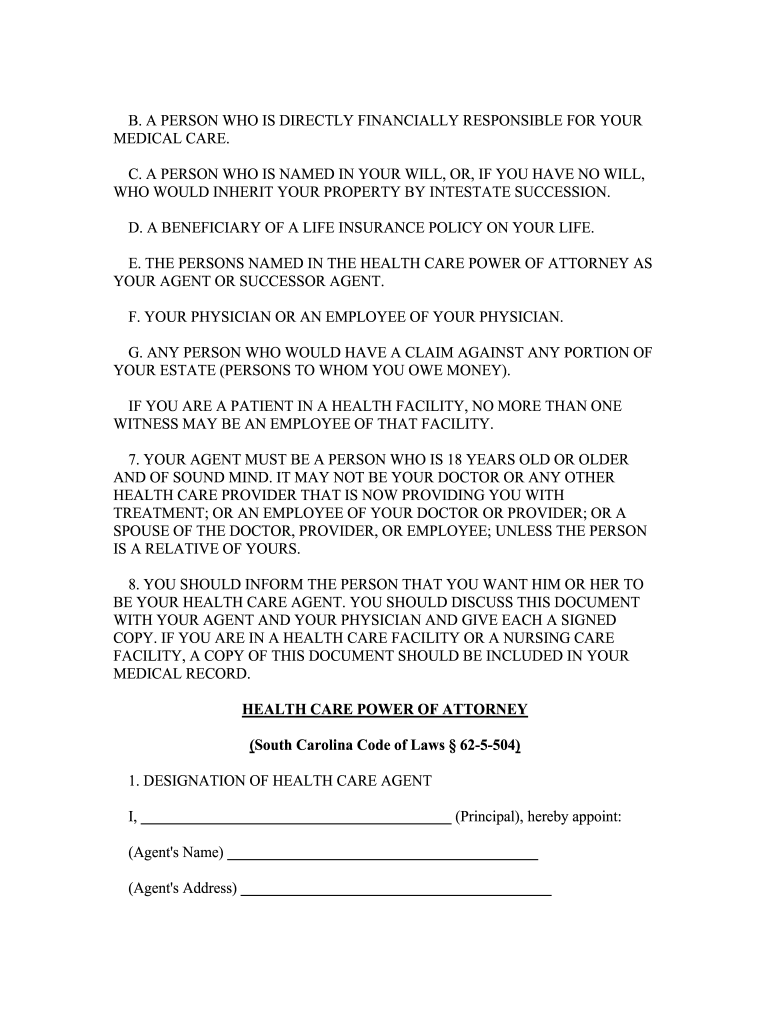
INFORMATION ABOUT THIS DOCUMENT THIS IS AN IMPORTANT LEGAL DOCUMENT. BEFORE SIGNING THIS DOCUMENT, YOU SHOULD KNOW THESE IMPORTANT FACTS: 1. THIS DOCUMENT GIVES THE PERSON YOU NAME AS YOUR AGENT THE POWER TO MAKE HEALTH CARE DECISIONS FOR YOU IF YOU CANNOT MAKE THE DECISION FOR YOURSELF. THIS POWER INCLUDES THE POWER TO MAKE DECISIONS ABOUT LIFE-SUSTAINING TREATMENT. UNLESS YOU STATE OTHERWISE, YOUR AGENT WILL HAVE THE SAME AUTHORITY TO MAKE DECISIONS ABOUT YOUR HEALTH CARE AS YOU WOULD HAVE. 2. THIS POWER IS SUBJECT TO ANY LIMITATIONS OR STATEMENTS OF YOUR DESIRES THAT YOU INCLUDE IN THIS DOCUMENT. YOU MAY STATE IN THIS DOCUMENT ANY TREATMENT YOU DO NOT DESIRE OR TREATMENT YOU WANT TO BE SURE YOU RECEIVE. YOUR AGENT WILL BE OBLIGATED TO FOLLOW YOUR INSTRUCTIONS WHEN MAKING DECISIONS ON YOUR BEHALF. YOU MAY ATTACH ADDITIONAL PAGES IF YOU NEED MORE SPACE TO COMPLETE THE STATEMENT. 3. AFTER YOU HAVE SIGNED THIS DOCUMENT, YOU HAVE THE RIGHT TO MAKE HEALTH CARE DECISIONS FOR YOURSELF IF YOU ARE MENTALLY COMPETENT TO DO SO. AFTER YOU HAVE SIGNED THIS DOCUMENT, NO TREATMENT MAY BE GIVEN TO YOU OR STOPPED OVER YOUR OBJECTION IF YOU ARE MENTALLY COMPETENT TO MAKE THAT DECISION. 4. YOU HAVE THE RIGHT TO REVOKE THIS DOCUMENT, AND TERMINATE YOUR AGENT'S AUTHORITY, BY INFORMING EITHER YOUR AGENT OR YOUR HEALTH CARE PROVIDER ORALLY OR IN WRITING. 5. IF THERE IS ANYTHING IN THIS DOCUMENT THAT YOU DO NOT UNDERSTAND, YOU SHOULD ASK A SOCIAL WORKER, LAWYER, OR OTHER PERSON TO EXPLAIN IT TO YOU. 6. THIS POWER OF ATTORNEY WILL NOT BE VALID UNLESS TWO PERSONS SIGN AS WITNESSES. EACH OF THESE PERSONS MUST EITHER WITNESS YOUR SIGNING OF THE POWER OF ATTORNEY OR WITNESS YOUR ACKNOWLEDGMENT THAT THE SIGNATURE ON THE POWER OF ATTORNEY IS YOURS. THE FOLLOWING PERSONS MAY NOT ACT AS WITNESSES: A. YOUR SPOUSE, YOUR CHILDREN, GRANDCHILDREN, AND OTHER LINEAL DESCENDANTS; YOUR PARENTS, GRANDPARENTS, AND OTHER LINEAL ANCESTORS; YOUR SIBLINGS AND THEIR LINEAL DESCENDANTS; OR A SPOUSE OF ANY OF THESE PERSONS. B. A PERSON WHO IS DIRECTLY FINANCIALLY RESPONSIBLE FOR YOUR MEDICAL CARE. C. A PERSON WHO IS NAMED IN YOUR WILL, OR, IF YOU HAVE NO WILL, WHO WOULD INHERIT YOUR PROPERTY BY INTESTATE SUCCESSION. D. A BENEFICIARY OF A LIFE INSURANCE POLICY ON YOUR LIFE. E. THE PERSONS NAMED IN THE HEALTH CARE POWER OF ATTORNEY AS YOUR AGENT OR SUCCESSOR AGENT. F. YOUR PHYSICIAN OR AN EMPLOYEE OF YOUR PHYSICIAN. G. ANY PERSON WHO WOULD HAVE A CLAIM AGAINST ANY PORTION OF YOUR ESTATE (PERSONS TO WHOM YOU OWE MONEY). IF YOU ARE A PATIENT IN A HEALTH FACILITY, NO MORE THAN ONE WITNESS MAY BE AN EMPLOYEE OF THAT FACILITY. 7. YOUR AGENT MUST BE A PERSON WHO IS 18 YEARS OLD OR OLDER AND OF SOUND MIND. IT MAY NOT BE YOUR DOCTOR OR ANY OTHER HEALTH CARE PROVIDER THAT IS NOW PROVIDING YOU WITH TREATMENT; OR AN EMPLOYEE OF YOUR DOCTOR OR PROVIDER; OR A SPOUSE OF THE DOCTOR, PROVIDER, OR EMPLOYEE; UNLESS THE PERSON IS A RELATIVE OF YOURS. 8. YOU SHOULD INFORM THE PERSON THAT YOU WANT HIM OR HER TO BE YOUR HEALTH CARE AGENT. YOU SHOULD DISCUSS THIS DOCUMENT WITH YOUR AGENT AND YOUR PHYSICIAN AND GIVE EACH A SIGNED COPY. IF YOU ARE IN A HEALTH CARE FACILITY OR A NURSING CARE FACILITY, A COPY OF THIS DOCUMENT SHOULD BE INCLUDED IN YOUR MEDICAL RECORD.HEALTH CARE POWER OF ATTORNEY (South Carolina Code of Laws § 62-5-504) 1. DESIGNATION OF HEALTH CARE AGENT I, _____________________________________ (Principal), hereby appoint: (Agent's Name) _____________________________________ (Agent's Address) _____________________________________ Telephone: home: _________________________ work : ________________________ mobile: __________________________ as my agent to make health care decisions for me as authorized in this document. Successor Agent: If an agent named by me dies, becomes legally disabled, resigns, refuses to act, becomes unavailable, or if an agent who is my spouse is divorced or separated from me, I name the following as successors to my agent, each to act alone and successively, in the order named: a. First Alternate Agent: _________________________________________________ Address: _________________________________________________ Telephone: home: _________________________ work : ________________________ mobile: __________________________ b. Second Alternate Agent: _________________________________________________ Address: _________________________________________________ Telephone: home: _________________________ work : ________________________ mobile: __________________________ Unavailability of Agent(s): If at any relevant time the agent or successor agents named here are unable or unwilling to make decisions concerning my health care, and those decisions are to be made by a guardian, by the Probate Court, or by a surrogate pursuant to the Adult Health Care Consent Act, it is my intention that the guardian, Probate Court, or surrogate make those decisions in accordance with my directions as stated in this document. 2. EFFECTIVE DATE AND DURABILITY By this document I intend to create a durable power of attorney effective upon, and only during, any period of mental incompetence, except as provided in Paragraph 3 below. 3. HIPAA AUTHORIZATION When considering or making health care decisions for me, all individually identifiable health information and medical records shall be released without restriction to my health care agent(s) and/or my alternate health care agent(s) named above including, but not limited to, (i) diagnostic, treatment, other health care, and related insurance and financial records and information associated with any past, present, or future physical or mental health condition including, but not limited to, diagnosis or treatment of HIV/AIDS, sexually transmitted disease(s), mental illness, and/or drug or alcohol abuse and (ii) any written opinion relating to my health that such health care agent(s) and/or alternate health care agent(s) may have requested. Without limiting the generality of the foregoing, this release authority applies to all health information and medical records governed by the Health Information Portability and Accountability Act of 1996 (HIPAA), 42 USC 1320d and 45 CFR 160-164; is effective whether or not I am mentally competent; has no expiration date; and shall terminate only in the event that I revoke the authority in writing and deliver it to my health care provider. 4. AGENT'S POWERS I grant to my agent full authority to make decisions for me regarding my health care. In exercising this authority, my agent shall follow my desires as stated in this document or otherwise expressed by me or known to my agent. In making any decision, my agent shall attempt to discuss the proposed decision with me to determine my desires if I am able to communicate in any way. If my agent cannot determine the choice I would want made, then my agent shall make a choice for me based upon what my agent believes to be in my best interests. My agent's authority to interpret my desires is intended to be as broad as possible, except for any limitations I may state below. Accordingly, unless specifically limited by the provisions specified below, my agent is authorized as follows: A. To consent, refuse, or withdraw consent to any and all types of medical care, treatment, surgical procedures, diagnostic procedures, medication, and the use of mechanical or other procedures that affect any bodily function, including, but not limited to, artificial respiration, nutritional support and hydration, and cardiopulmonary resuscitation; B. To authorize, or refuse to authorize, any medication or procedure intended to relieve pain, even though such use may lead to physical damage, addiction, or hasten the moment of, but not intentionally cause, my death; C. To authorize my admission to or discharge, even against medical advice, from any hospital, nursing care facility, or similar facility or service; D. To take any other action necessary to making, documenting, and assuring implementation of decisions concerning my health care, including, but not limited to, granting any waiver or release from liability required by any hospital, physician, nursing care provider, or other health care provider; signing any documents relating to refusals of treatment or the leaving of a facility against medical advice, and pursuing any legal action in my name, and at the expense of my estate to force compliance with my wishes as determined by my agent, or to seek actual or punitive damages for the failure to comply. E. The powers granted above do not include the following powers or are subject to the following rules or limitations: ________________________________________________________________ ________________________________________________________________________________________________________________________________________________________________________________________________ 5. ORGAN DONATION (INITIAL ONLY ONE) My agent may ; may not consent to the donation of all or any of my tissue or organs for purposes of transplantation. 6. EFFECT ON DECLARATION OF A DESIRE FOR A NATURAL DEATH (LIVING WILL) I understand that if I have a valid Declaration of a Desire for a Natural Death, the instructions contained in the Declaration will be given effect in any situation to which they are applicable. My agent will have authority to make decisions concerning my health care only in situations to which the Declaration does not apply. 7. STATEMENT OF DESIRES CONCERNING LIFE-SUSTAINING TREATMENT With respect to any Life-Sustaining Treatment, I direct the following: (INITIAL ONLY ONE OF THE FOLLOWING 3 PARAGRAPHS) (1) ___ GRANT OF DISCRETION TO AGENT. I do not want my life to be prolonged nor do I want life-sustaining treatment to be provided or continued if my agent believes the burdens of the treatment outweigh the expected benefits. I want my agent to consider the relief of suffering, my personal beliefs, the expense involved and the quality as well as the possible extension of my life in making decisions concerning life-sustaining treatment. OR (2) _____ DIRECTIVE TO WITHHOLD OR WITHDRAW TREATMENT. I do not want my life to be prolonged and I do not want life-sustaining treatment: a. if I have a condition that is incurable or irreversible and, without the administration of life-sustaining procedures, expected to result in death within a relatively short period of time; or b. if I am in a state of permanent unconsciousness. OR (3) ______ DIRECTIVE FOR MAXIMUM TREATMENT. I want my life to be prolonged to the greatest extent possible, within the standards of accepted medical practice, without regard to my condition, the chances I have for recovery, or the cost of the procedures. 8. STATEMENT OF DESIRES REGARDING TUBE FEEDING With respect to Nutrition and Hydration provided by means of a nasogastric tube or tube into the stomach, intestines, or veins, I wish to make clear that in situations where life-sustaining treatment is being withheld or withdrawn pursuant to Item 7, (INITIAL ONLY ONE OF THE FOLLOWING THREE PARAGRAPHS): (a) ______ GRANT OF DISCRETION TO AGENT. I do not want my life to be prolonged by tube feeding if my agent believes the burdens of tube feeding outweigh the expected benefits. I want my agent to consider the relief of suffering, my personal beliefs, the expense involved, and the quality as well as the possible extension of my life in making this decision. OR (b) _____ DIRECTIVE TO WITHHOLD OR WITHDRAW TUBE FEEDING. I do not want my life prolonged by tube feeding. OR (c) ______ DIRECTIVE FOR PROVISION OF TUBE FEEDING. I want tube feeding to be provided within the standards of accepted medical practice, without regard to my condition, the chances I have for recovery, or the cost of the procedure, and without regard to whether other forms of life-sustaining treatment are being withheld or withdrawn. IF YOU DO NOT INITIAL ANY OF THE STATEMENTS IN ITEM 8, YOUR AGENT WILL NOT HAVE AUTHORITY TO DIRECT THAT NUTRITION AND HYDRATION NECESSARY FOR COMFORT CARE OR ALLEVIATION OF PAIN BE WITHDRAWN. 9. ADMINISTRATIVE PROVISIONS A. I revoke any prior Health Care Power of Attorney and any provisions relating to health care of any other prior power of attorney. B. This power of attorney is intended to be valid in any jurisdiction in which it is presented. BY SIGNING HERE I INDICATE THAT I UNDERSTAND THE CONTENTS OF THIS DOCUMENT AND THE EFFECT OF THIS GRANT OF POWERS TO MY AGENT. I sign my name to this Health Care Power of Attorney on this day of _______________, 20 . My current home address is: ___________________________________________________ Principal's Signature: _________________________ Print Name of Principal: _________________________ I declare, on the basis of information and belief, that the person who signed or acknowledged this document (the principal) is personally known to me, that he/she signed or acknowledged this Health Care Power of Attorney in my presence, and that he/she appears to be of sound mind and under no duress, fraud, or undue influence. I am not related to the principal by blood, marriage, or adoption, either as a spouse, a lineal ancestor, descendant of the parents of the principal, or spouse of any of them. I am not directly financially responsible for the principal's medical care. I am not entitled to any portion of the principal's estate upon his decease, whether under any will or as an heir by intestate succession, nor am I the beneficiary of an insurance policy on the principal's life, nor do I have a claim against the principal's estate as of this time. I am not the principal's attending physician, nor an employee of the attending physician. No more than one witness is an employee of a health facility in which the principal is a patient. I am not appointed as Health Care Agent or Successor Health Care Agent by this document. Witness No. 1 Signature: _____________________________ Date: ___________ Print Name: _________________________ Telephone: ________ Address: _________________________________ ________________________________________ Witness No. 2 Signature: _____________________________ Date: ___________ Print Name: ___________________________ Telephone: _______ Address: ________________________________ _______________________________________ (This portion of the document is optional and is not required to create a valid health care power of attorney.) STATE OF SOUTH CAROLINA COUNTY OF ______________________ The foregoing instrument was acknowledged before me by Principal on __________________, 20 . Notary Public for South Carolina ___________________________ My Commission Expires: _________________________

Useful suggestions for finalizing your ‘South Carolina Form’ online

Are you fed up with the inconvenience of handling paperwork? Search no further than airSlate SignNow, the premier electronic signature tool for individuals and small businesses. Bid farewell to the lengthy routine of printing and scanning documents. With airSlate SignNow, you can effortlessly complete and authorize documents online. Utilize the powerful features embedded in this user-friendly and economical platform and transform your method of document administration. Whether you need to sign forms or gather signatures, airSlate SignNow takes care of it all effortlessly, needing just a few clicks.

Adhere to this detailed guide:

  1. Sign in to your account or sign up for a complimentary trial with our service.
  2. Click +Create to upload a document from your device, cloud storage, or our template collection.
  3. Open your ‘South Carolina Form’ in the editor.
  4. Click Me (Fill Out Now) to prepare the file on your end.
  5. Add and designate fillable fields for other users (if needed).
  6. Proceed with the Send Invite settings to solicit eSignatures from others.
  7. Save, print your version, or convert it into a reusable template.

Don’t fret if you need to collaborate with others on your South Carolina Form or send it for notarization—our solution includes everything necessary to accomplish such tasks. Sign up with airSlate SignNow today and enhance your document management to a new level!

Here is a list of the most common customer questions. If you can’t find an answer to your question, please don’t hesitate to reach out to us.

Need help? Contact Support

The best way to complete and sign your south carolina form

Save time on document management with airSlate SignNow and get your south carolina form eSigned quickly from anywhere with our fully compliant eSignature tool.

How to Sign a PDF Online How to Sign a PDF Online

How to complete and sign documents online

In the past, working with paperwork required pretty much time and effort. But with airSlate SignNow, document management is quick and easy. Our robust and easy-to-use eSignature solution allows you to effortlessly complete and electronically sign your south carolina form online from any internet-connected device.

Follow the step-by-step guidelines to eSign your south carolina form template online:

  • 1.Register for a free trial with airSlate SignNow or log in to your account with password credentials or SSO authorization option.
  • 2.Click Upload or Create and add a file for eSigning from your device, the cloud, or our form catalogue.
  • 3.Click on the document name to open it in the editor and use the left-side menu to complete all the blank fields properly.
  • 4.Place the My Signature field where you need to eSign your form. Provide your name, draw, or upload a photo of your regular signature.
  • 5.Click Save and Close to finish modifying your completed form.

As soon as your south carolina form template is ready, download it to your device, save it to the cloud, or invite other people to eSign it. With airSlate SignNow, the eSigning process only requires several clicks. Use our robust eSignature tool wherever you are to deal with your paperwork effectively!


How to Sign a PDF Using Google Chrome How to Sign a PDF Using Google Chrome

How to complete and sign documents in Google Chrome

Completing and signing documents is simple with the airSlate SignNow extension for Google Chrome. Installing it to your browser is a quick and effective way to deal with your paperwork online. Sign your south carolina form sample with a legally-binding eSignature in just a couple of clicks without switching between tools and tabs.

Follow the step-by-step guidelines to eSign your south carolina form template in Google Chrome:

  • 1.Navigate to the Chrome Web Store, find the airSlate SignNow extension for Chrome, and add it to your browser.
  • 2.Right-click on the link to a form you need to approve and select Open in airSlate SignNow.
  • 3.Log in to your account using your password or Google/Facebook sign-in buttons. If you don’t have one, you can start a free trial.
  • 4.Utilize the Edit & Sign menu on the left to fill out your sample, then drag and drop the My Signature field.
  • 5.Add a picture of your handwritten signature, draw it, or simply type in your full name to eSign.
  • 6.Verify all information is correct and click Save and Close to finish editing your form.

Now, you can save your south carolina form sample to your device or cloud storage, send the copy to other individuals, or invite them to eSign your form via an email request or a protected Signing Link. The airSlate SignNow extension for Google Chrome improves your document processes with minimum time and effort. Try airSlate SignNow today!


How to Sign a PDF in Gmail How to Sign a PDF in Gmail How to Sign a PDF in Gmail

How to complete and sign forms in Gmail

Every time you get an email containing the south carolina form for approval, there’s no need to print and scan a document or save and re-upload it to another program. There’s a better solution if you use Gmail. Try the airSlate SignNow add-on to quickly eSign any paperwork right from your inbox.

Follow the step-by-step guide to eSign your south carolina form in Gmail:

  • 1.Navigate to the Google Workplace Marketplace and locate a airSlate SignNow add-on for Gmail.
  • 2.Install the program with a corresponding button and grant the tool access to your Google account.
  • 3.Open an email containing an attachment that needs signing and use the S key on the right panel to launch the add-on.
  • 4.Log in to your airSlate SignNow account. Opt for Send to Sign to forward the document to other parties for approval or click Upload to open it in the editor.
  • 5.Put the My Signature option where you need to eSign: type, draw, or import your signature.

This eSigning process saves efforts and only requires a couple of clicks. Use the airSlate SignNow add-on for Gmail to adjust your south carolina form with fillable fields, sign paperwork legally, and invite other people to eSign them al without leaving your inbox. Enhance your signature workflows now!


How to Sign a PDF on a Mobile Device How to Sign a PDF on a Mobile Device How to Sign a PDF on a Mobile Device

How to fill out and sign documents in a mobile browser

Need to quickly fill out and sign your south carolina form on a smartphone while doing your work on the go? airSlate SignNow can help without needing to install additional software applications. Open our airSlate SignNow tool from any browser on your mobile device and add legally-binding electronic signatures on the go, 24/7.

Follow the step-by-step guidelines to eSign your south carolina form in a browser:

  • 1.Open any browser on your device and go to the www.signnow.com
  • 2.Register for an account with a free trial or log in with your password credentials or SSO authentication.
  • 3.Click Upload or Create and pick a file that needs to be completed from a cloud, your device, or our form collection with ready-to go templates.
  • 4.Open the form and complete the blank fields with tools from Edit & Sign menu on the left.
  • 5.Add the My Signature area to the form, then enter your name, draw, or add your signature.

In a few easy clicks, your south carolina form is completed from wherever you are. As soon as you're done with editing, you can save the document on your device, generate a reusable template for it, email it to other individuals, or ask them to eSign it. Make your paperwork on the go speedy and efficient with airSlate SignNow!


How to Sign a PDF on iPhone How to Sign a PDF on iPhone

How to fill out and sign forms on iOS

In today’s corporate environment, tasks must be accomplished rapidly even when you’re away from your computer. With the airSlate SignNow app, you can organize your paperwork and sign your south carolina form with a legally-binding eSignature right on your iPhone or iPad. Install it on your device to close deals and manage documents from just about anywhere 24/7.

Follow the step-by-step guide to eSign your south carolina form on iOS devices:

  • 1.Go to the App Store, search for the airSlate SignNow app by airSlate, and install it on your device.
  • 2.Open the application, tap Create to upload a template, and choose Myself.
  • 3.Select Signature at the bottom toolbar and simply draw your autograph with a finger or stylus to eSign the form.
  • 4.Tap Done -> Save right after signing the sample.
  • 5.Tap Save or take advantage of the Make Template option to re-use this paperwork in the future.

This process is so simple your south carolina form is completed and signed in just a couple of taps. The airSlate SignNow app works in the cloud so all the forms on your mobile device remain in your account and are available any time you need them. Use airSlate SignNow for iOS to enhance your document management and eSignature workflows!


How to Sign a PDF on Android How to Sign a PDF on Android

How to fill out and sign paperwork on Android

With airSlate SignNow, it’s easy to sign your south carolina form on the go. Install its mobile app for Android OS on your device and start enhancing eSignature workflows right on your smartphone or tablet.

Follow the step-by-step guidelines to eSign your south carolina form on Android:

  • 1.Go to Google Play, find the airSlate SignNow application from airSlate, and install it on your device.
  • 2.Sign in to your account or create it with a free trial, then import a file with a ➕ key on the bottom of you screen.
  • 3.Tap on the imported document and choose Open in Editor from the dropdown menu.
  • 4.Tap on Tools tab -> Signature, then draw or type your name to eSign the template. Complete blank fields with other tools on the bottom if necessary.
  • 5.Use the ✔ key, then tap on the Save option to end up with editing.

With an easy-to-use interface and total compliance with main eSignature standards, the airSlate SignNow application is the perfect tool for signing your south carolina form. It even operates offline and updates all document changes when your internet connection is restored and the tool is synced. Complete and eSign forms, send them for eSigning, and make multi-usable templates anytime and from anyplace with airSlate SignNow.

Sign up and try South carolina form
  • Close deals faster
  • Improve productivity
  • Delight customers
  • Increase revenue
  • Save time & money
  • Reduce payment cycles


