Establishing secure connection…Loading editor…Preparing document…

Stock Issuance Form

This template is fully customizable. Edit the text, fill out the fields, and send it for signature. Give it a try!
Stock Issuance Form

What the Stock Issuance Form Is and when it’s used

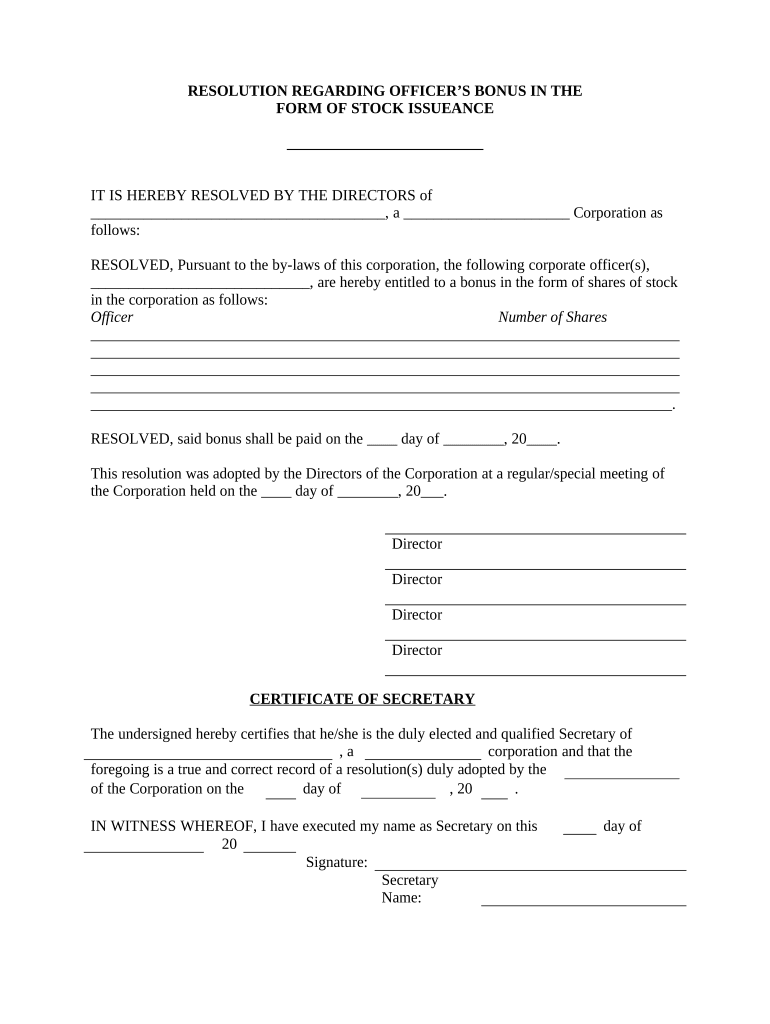
A Stock Issuance Form documents the board-approved issuance or transfer of corporate stock to a person or entity. It records the issuing company, class and number of shares, par value or stated consideration, recipient details, certificate numbers if used, and the corporate authorization that permits the issuance. The form creates the official ledger entry and supporting record for capitalization, investor ownership, and downstream tax or regulatory reporting obligations.

Why a clear Stock Issuance Form matters

A complete Stock Issuance Form preserves corporate governance, validates ownership, and creates an audit-ready record for tax and securities compliance. Accurate forms reduce disputes over share counts, limit dilution risk, and document consideration or vesting that affect tax treatment and investor rights.

Why a clear Stock Issuance Form matters

Who typically prepares and signs this form

A Stock Issuance Form is used by company officers and counsel as part of corporate recordkeeping and investor onboarding.

  • Corporate secretary or general counsel — prepares corporate minute reference and updates the stock ledger with board resolution details.
  • Founders, executives, and HR — provide recipient identity, vesting instructions, and mailing details for certificates or electronic records.
  • Investors and transfer agents — confirm consideration received, record certificate numbers, and validate signatures for stock transfer.

Parties should confirm signer authority and supporting approvals before finalizing the form to avoid later rescission or tax exposure.

Core components to include on a professional Stock Issuance Form

A well-structured form groups corporate authorization, share details, recipient information, payment or consideration, certificate identifiers, and required attestations into distinct fields for clarity and auditability.

Issuing Entity

Legal corporate name, state of incorporation, and corporate ID. Use the exact name as shown on the charter and business filings to match public records and shareholder ledgers.
Authorization Reference

Board resolution number or minutes citation authorizing issuance. Include meeting date or written consent reference so the issuance links to corporate approval.

Share Details

Class, series, number of shares, and par or stated value. Specify whether shares are issued fully paid, partially paid, or subject to vesting conditions.

Consideration

Cash amount, services rendered, conversion detail, or stock-for-stock exchange description. Be exact to determine tax consequences and capitalization table treatment.

Certificate & Ledger Entry

Stock certificate number(s) if applicable, and explicit instruction to update the corporate stock ledger with date and purchaser details.

Signatures and Attestation

Officer signatures, corporate seal where used, and signature dates. Include attesting corporate officer or secretary statement to validate the ledger entry.

Step-by-step: completing and recording a stock issuance

Follow these sequential steps to ensure corporate, tax, and securities compliance when issuing shares.

  • 01
    Confirm Authorization: Document board resolution or written consent authorizing the specific issuance.
  • 02
    Complete Form Fields: Enter entity, recipient, share class, count, consideration, and effective date.
  • 03
    Obtain Required Signatures: Authorized officer and corporate secretary attest and sign the form.
  • 04
    Update Records and Deliver: Record in stock ledger, issue certificate if applicable, and send final copies to recipient.

How electronic completion and eSubmission typically proceeds

Digital workflows reduce paper handling: upload the form, place fields, invite signers, apply authentication, and capture an audit trail for the final record.

  • Upload Document: Upload PDF or DOCX of the Stock Issuance Form into the signing platform.
  • Place Fields: Add signature, date, and text fields where recipients and officers must enter data.
  • Set Authentication: Choose email, SMS code, or stronger authentication for the signer identity.
  • Send and Record: Send request, capture signed PDF and audit trail for corporate records.

Typical digital workflow settings for stock issuance eSignatures

Configure workflow options to match required signers and security level before sending the form for signature.

Field Configuration
Document Type PDF or DOCX preferred for final signed record
Signer Order Sequential or parallel signer routing as governance requires
Authentication Email link, SMS code, or KBA where higher assurance needed
Retention Enable audit trail and long-term export for recordkeeping

Technical and integration considerations for eSigning a Stock Issuance Form

Ensure the eSignature platform supports required file formats, compliance standards, and integrations with your corporate systems.

  • File Formats: PDF, DOCX support for signed records
  • Integrations: Salesforce, NetSuite, Microsoft 365, Google Workspace
  • Authentication Options: Email, SMS, or advanced signer verification

Choose platform features that preserve an immutable audit trail and integrate with your stock ledger or ERP for automated record updates.

Security and compliance features relevant to electronic Stock Issuance Forms

Encryption: TLS 1.2/1.3; AES-256
Audit Trail: Detailed timestamps and IP logs
Certifications: SOC 2 Type II, ISO 27001
HIPAA: BAA available
ESIGN / UETA: Legal e-signature compliance
21 CFR Part 11: Support for FDA-regulated records

Key risks and potential penalties from incorrect issuances

Unauthorized Issuance: Board authority breach
Securities Violations: SEC enforcement risk
Tax Consequences: Missed IRC §83(b) deadline
Dilution Disputes: Shareholder litigation risk
Form D Noncompliance: State blue-sky penalties
Recordkeeping Failures: Audit and forensic exposure

Common mistakes to avoid when preparing a Stock Issuance Form

  • Using an informal or ambiguous description of consideration, which creates tax uncertainty and valuation disputes later.
  • Failing to link the issuance to an explicit board resolution or consent, which can invalidate the transfer under corporate law.
  • Entering the recipient name incorrectly, causing mismatches with tax reporting, bank accounts, and transfer agent records.
  • Neglecting timely tax elections such as an IRC §83(b) election within 30 days when equity is subject to restrictions.

Key dates and legal deadlines to track for a stock issuance

Several statutory and administrative deadlines may apply — track board approval, issuance date, tax elections, and regulatory filings to avoid penalties.

Board Authorization Date:

Date of resolution authorizing the specific issuance

Stock Issuance Date:

Effective ownership transfer date entered on the form

Certificate Delivery Deadline:

Date by which physical certificate or electronic evidence must be delivered

83(b) Election Deadline:

30 days from transfer for IRC §83(b) election filing

Form D Filing Window:

File Form D within 15 days after first sale if relying on Reg D

eSignature vendor pricing and feature comparison relevant to Stock Issuance Forms

Compare basic pricing and key compliance features for common eSignature platforms used to execute corporate stock issuance documents.

signNow DocuSign Adobe Sign PandaDoc HelloSign
Starting Price $8/user/mo $15/user/mo $14/user/mo $19/user/mo $15/user/mo
Free Trial Yes, 7-day Varies Varies Varies Varies
Bulk Send Yes Yes Yes Yes No
Audit Trail Yes Yes Yes Yes Yes
HIPAA Compliant Yes Yes Yes No No
Envelope Cap No cap 100 envelopes/user/year Varies Varies Varies

Frequently asked questions about Stock Issuance Forms

Answers to common practical and legal questions about completing, signing, and storing Stock Issuance Forms.


Need help? Contact support

be ready to get more
Join over 28 million airSlate SignNow users