
Fill and Sign the Subcontractor Work Order Format
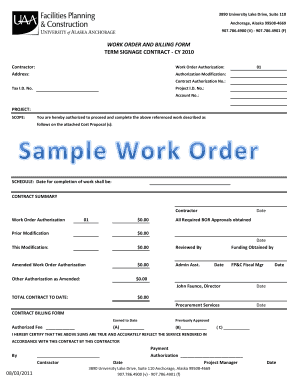
Practical advice on preparing your ‘Subcontractor Work Order Format’ online
Are you fed up with the inconvenience of managing paperwork? Look no further than airSlate SignNow, the leading electronic signature platform for individuals and businesses. Wave goodbye to the monotonous task of printing and scanning documents. With airSlate SignNow, you can effortlessly finalize and authorize paperwork online. Utilize the extensive features included in this intuitive and cost-effective platform and transform your document management strategy. Whether you need to sign forms or gather eSignatures, airSlate SignNow manages it all efficiently, needing just a few clicks.
Follow this step-by-step process:
- Log into your account or initiate a free trial with our service.
- Click +Create to upload a document from your device, cloud storage, or our template library.
- Open your ‘Subcontractor Work Order Format’ in the editor.
- Click Me (Fill Out Now) to complete the form on your end.
- Add and assign fillable fields for others (if needed).
- Continue with the Send Invite settings to request eSignatures from others.
- Save, print your version, or convert it into a reusable template.
Don’t worry if you need to collaborate with your colleagues on your Subcontractor Work Order Format or send it for notarization—our solution offers everything required to accomplish such tasks. Create an account with airSlate SignNow today and elevate your document management to new levels!
FAQs
-
What is a Subcontractor Work Order Format?
A Subcontractor Work Order Format is a structured document used to outline the details of work to be performed by a subcontractor. This format typically includes job descriptions, timelines, payment terms, and other essential information. Using a standardized format ensures clarity and helps prevent misunderstandings between contractors and subcontractors.
-
How does airSlate SignNow facilitate the creation of a Subcontractor Work Order Format?
airSlate SignNow allows users to easily create and customize a Subcontractor Work Order Format with its intuitive document editor. You can add fields for signatures, dates, and other important information to ensure all necessary components are included. This streamlines the process and saves time, allowing you to focus on your projects.
-
Can I integrate airSlate SignNow with other tools to manage my Subcontractor Work Order Format?
Yes, airSlate SignNow offers integrations with various project management and accounting software to enhance your workflow. By connecting these tools, you can automatically generate and manage your Subcontractor Work Order Format, ensuring that all your documents are in sync across platforms. This integration maximizes efficiency and reduces manual errors.
-
What are the benefits of using airSlate SignNow for Subcontractor Work Orders?
Using airSlate SignNow for your Subcontractor Work Order Format provides numerous benefits, including ease of use, cost-effectiveness, and secure e-signature capabilities. It simplifies the process of sending and receiving documents, signNowly reducing the turnaround time. Moreover, the platform ensures compliance and security for your important documents.
-
Is there a pricing plan for airSlate SignNow that is suitable for small businesses managing Subcontractor Work Orders?
Absolutely! airSlate SignNow offers flexible pricing plans designed to meet the needs of small businesses. These plans provide access to essential features for creating and managing your Subcontractor Work Order Format without breaking the bank. You can choose a plan that fits your budget while still accessing the tools you need to succeed.
-
Can I track the status of my Subcontractor Work Order Format with airSlate SignNow?
Yes, airSlate SignNow includes features that allow you to track the status of your Subcontractor Work Order Format in real-time. You can see when documents are sent, opened, and signed, providing you with complete visibility over the process. This feature helps you manage deadlines and follow up accordingly, ensuring smooth project execution.
-
What types of businesses can benefit from using a Subcontractor Work Order Format?
A Subcontractor Work Order Format is beneficial for a wide range of businesses, including construction, landscaping, and IT services. Any company that works with subcontractors can use this format to clearly define work requirements and payment terms. By utilizing airSlate SignNow, these businesses can streamline their operations and improve communication with subcontractors.
Find out other subcontractor work order format
- Close deals faster
- Improve productivity
- Delight customers
- Increase revenue
- Save time & money
- Reduce payment cycles
