Establishing secure connection…Loading editor…Preparing document…

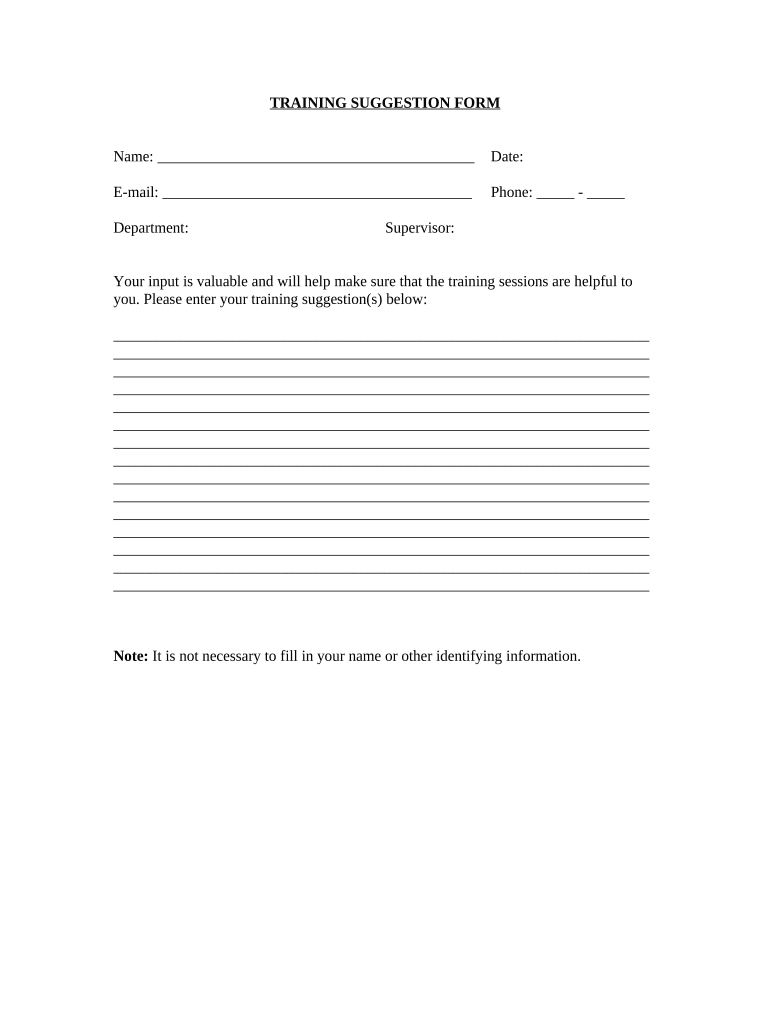
Training Suggestion Form

This template is fully customizable. Edit the text, fill out the fields, and send it for signature. Give it a try!
Training Suggestion Form

What the Training Suggestion Form Is and When to Use It

A Training Suggestion Form is an internal request used to propose new learning or upskilling activities. It captures the proposer’s contact details, the suggested topic, learning objectives, target audience, preferred delivery method, estimated duration and budget, and any supporting materials. Organizations use the form to centralize requests, prioritize training needs, and document approvals so learning and development (L&D) teams can evaluate feasibility, align with compliance requirements, and schedule sessions or courses.

Why a Structured Suggestion Process Matters

A formal Training Suggestion Form creates a consistent intake, reduces duplicate requests, and helps L&D prioritize resources. It documents rationale, links requests to business goals, and provides audit-ready records for compliance, budgeting, and workforce planning.

Why a Structured Suggestion Process Matters

Who Usually Completes and Reviews These Requests

Use clear contact information and manager approval fields so reviewers can follow up and track decisions efficiently.

  • Individual employees requesting skills development or certification opportunities.
  • Line managers recommending team-specific training or corrective coaching.
  • HR or L&D teams reviewing, prioritizing, and scheduling approved suggestions.

Essential Sections to Include on a Professional Form

A complete Training Suggestion Form guides the requester through consistent fields so reviewers can evaluate impact, cost, and scheduling without follow-up.

Requester Info

Name, job title, department, and best contact method so L&D can clarify scope or discuss scheduling with the originator.
Training Topic

A concise title and a short description of the proposed subject, including specific skills or knowledge areas to be covered.

Learning Objectives

Measurable objectives that explain what participants should know or be able to do after completing the training.

Target Audience

Specify roles, number of participants, and prerequisite skills so L&D can assess fit and delivery format.

Delivery Method

Indicate preferred formats such as virtual instructor-led, recorded eLearning, workshop, or blended delivery.

Justification & Resources

Business reason, compliance drivers, estimated budget, and links or attachments for curricula, vendor quotes, or reference materials.

Step-by-Step: From Suggestion to Scheduling

Follow these sequential steps to submit a suggestion and track its progress through review and implementation.

  • 01
    Prepare Request: Complete all required fields and attach materials before submission.
  • 02
    Submit Form: Send via the internal portal or eSubmission channel defined by HR.
  • 03
    Manager Review: Line manager reviews need and confirms support or priority level.
  • 04
    L&D Action: L&D evaluates feasibility, budgets, and schedules or procures vendors.

Configuring an Online Intake Workflow

Recommended workflow settings help automate routing, approvals, and notifications for faster processing.

Field Configuration
Notification Email to requester and manager on submission.
Approval Route Manager approval then L&D triage queue.
File Types Accept PDF, DOCX, PPTX, and ZIP attachments.
Authentication Email-based verification with optional SSO for internal users.

Delivering and Sharing the Form Securely

Ensure the system you select records time, user identity, and change history so requests remain auditable and retrievable for HR and compliance reviews.

  • Integrations: Salesforce | Microsoft 365 | Google Workspace integrations supported
  • File formats: PDF, DOCX, and HTML input/output
  • Authentication: Email verification, SSO, or MFA options

Routing and Approval Flow at a Glance

A clear routing path reduces delays and keeps requesters informed during each review stage.

  • Submitter: Completes form and uploads materials.
  • L&D Triage: Performs initial feasibility and categorization.
  • Manager Approval: Confirms business need or budget availability.
  • Schedule/Procure: L&D schedules session or engages vendor.

Typical Timelines and Response Expectations

Establish clear SLAs so requesters know when to expect acknowledgement and decisions.

Acknowledgement Window:

Confirm receipt within 3 business days of submission.

Manager Review:

Manager should respond within 5 business days.

L&D Evaluation:

Feasibility and budget review within 10 business days.

Scheduling Lead Time:

Expect 2–8 weeks before public delivery depending on scope.

Urgent Requests:

Short-turn requests may require expedited approvals and extra cost.

Common Submission Errors to Avoid

  • Vague objectives that make it impossible to measure training effectiveness and ROI.
  • Missing target audience details causing incorrect session size or inappropriate content.
  • Unrealistic duration or budget estimates that delay vendor selection or scheduling.
  • Bypassing manager approval which creates duplicate requests and budget confusion.

Risks of Incomplete or Incorrect Requests

Misaligned Delivery: Training not fit for audience
Wasted Budget: Funds spent on low-impact sessions
Compliance Gaps: Mandatory topics may be overlooked
Scheduling Conflicts: Resource double-booking occurs
Missed Deadlines: Critical training delayed
Duplicate Requests: Redundant work and confusion

Practical Examples of How Organizations Use the Form

Realistic scenarios show how completed forms translate into scheduled training or vendor engagements.

Municipal HR Intake

A city department submits a safety refresher request

  • Manager confirms 20 employees affected
  • L&D schedules a 2-hour workshop, documents budget, and retains the approval record for audit.

Corporate Upskill Request

A manager proposes a sales negotiation workshop

  • Request includes objectives and attendee list
  • L&D sources a vendor, compares two quotes, and books a virtual session within six weeks.

Practical Tips for Clear and Effective Suggestions

Follow these best practices to make your suggestion easy to evaluate and act upon.

Be Specific
Provide measurable learning objectives and clear expected outcomes so reviewers can assess impact and prioritize effectively.
Estimate Realistically
Give honest time and budget estimates; conservative figures reduce procurement delays and set accurate expectations.
Attach Supporting Materials
Include agendas, vendor brochures, or sample slides to speed evaluation and avoid follow-up questions.
Track Status
Use the intake system’s status updates to avoid duplicate submissions and to inform participants about scheduling.

Frequently Asked Questions and Troubleshooting

Answers to common questions about submission, review, and electronic handling of training suggestions.


Need help? Contact support

be ready to get more
Join over 28 million airSlate SignNow users