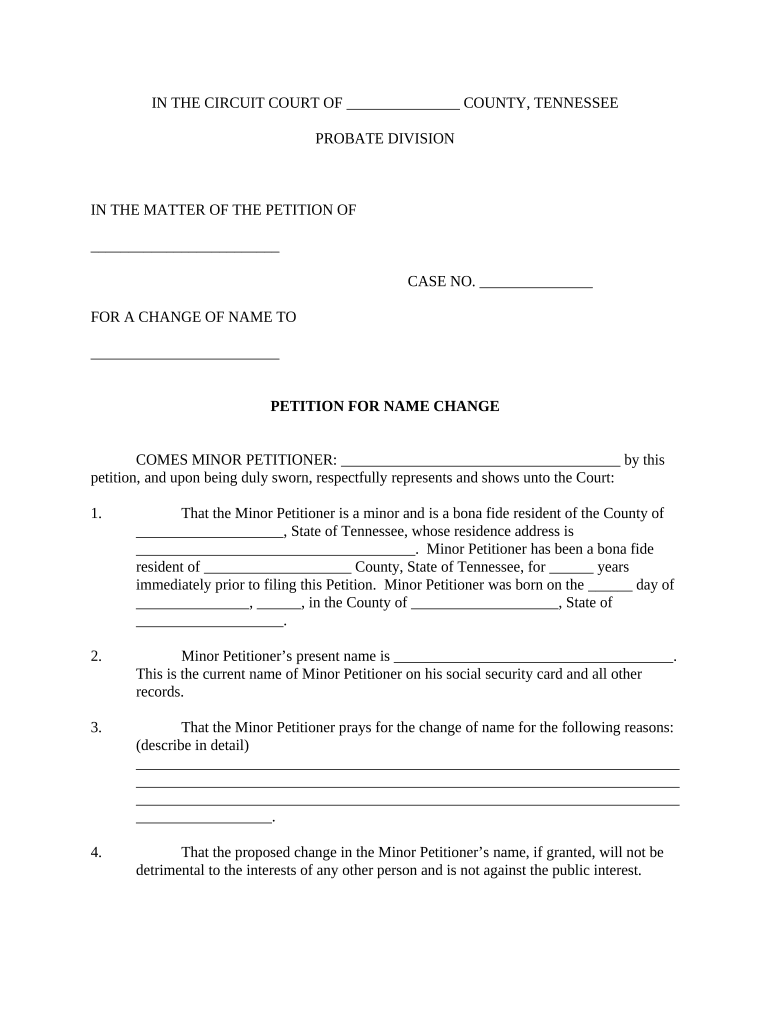
Tennessee Petition for Name Change
What the Tennessee Petition for Name Change Is
Why the Petition Matters for Individuals and Records
A properly completed petition creates the legal record required to change identity documents, update financial and health records, and ensure consistent legal recognition across institutions. It clarifies rights, prevents future disputes, and provides an official court order to present to agencies, employers, and financial institutions.
Who Commonly Files a Tennessee Name Change Petition
Typical filers include adults seeking a new name after marriage, divorce, gender transition, personal preference, or to correct errors on identification.
- Individuals changing name after marriage or divorce who need updated government IDs and records.
- Transgender or nonbinary individuals formalizing a new name for consistency with identity documents.
- Adults correcting errors or simplifying names to avoid administrative or employment issues.
Each filer’s supporting documentation and local court procedures can differ; verify county clerk requirements before submission.
Step-by-step: Completing the Tennessee Petition for Name Change
-
01Prepare Petition: Complete the court-approved petition form with full legal name and requested name.
-
02Gather Documents: Include ID, birth certificate, criminal history details if required.
-
03File With Court: Submit petition and pay filing fee at county clerk or court clerk's office.
-
04Attend Hearing: Appear at any scheduled hearing and obtain the signed decree.
How to set up a basic e-filing and signature workflow
| Field | Configuration |
|---|---|
| Signature Field | Required | Signer must sign and date |
| Date Field | Auto-fill | Use MM/DD/YYYY format |
| ID Attachment | Required | Upload scanned government ID |
| Audit Trail | Enabled | Capture IP, timestamp, actions |
Typical electronic filing and signing flow
-
Upload Document: Sender uploads petition PDF to e-filing or e-sign platform.
-
Place Fields: Add signature, date, and attachment fields where required.
-
Send to Signer: Signer receives secure link or email and authenticates.
-
File with Court: Electronically file or deliver signed order to the county clerk.
Technical considerations for digital signing and e-filing
Ensure the chosen platform supports required authentication, audit trails, and the file formats accepted by the court or county clerk.
- Authentication: Email, SMS code, or higher-strength options
- Document Formats: PDF and DOCX accepted by many courts
- Integrations: Supports cloud storage and case management
Verify the county clerk’s e-filing rules and whether the court accepts electronic signatures, notarizations, or scanned original signatures before relying on digital submission.
Common timing checkpoints to track
Filing Date:
Date you submit petition to the court; starts the process.
Publication or Notice:
If required, publish notice or serve interested parties within the timeline set by the court.
Hearing Date:
Court sets hearing date; could be several weeks later.
Decree Issued:
Judge signs final order changing the name after hearing.
Record Updates:
Use the signed decree to update IDs, Social Security, and financial accounts.
Key milestones from filing to final decree
Submit Petition
File petition and pay the clerk’s filing fee to open the case.
Provide Notice
Complete any required publication or service to interested parties.
Attend Hearing
Appear at a scheduled hearing if the judge requires testimony or verification.
Obtain Decree
Receive the signed court order that legally records your new name.
Potential risks and legal consequences
Common preparation mistakes to avoid
- Using an informal or abbreviated name that differs from ID can require corrective filings and delay the court process.
- Failing to include required attachments such as a certified birth certificate or criminal history when asked can lead to rejection.
- Neglecting to check county-specific publication or notice requirements may cause the court to postpone or deny the petition.
- Omitting signatures, dates, or notarial acknowledgements where required often triggers follow-up requests and extra fees.
Real-world examples of digital signing for legal forms
Tim Martin, Founder — Martin Properties
I can process and execute all of these documents online with 100% compliance and built-in security.
- Platform reduced manual handling for property and legal paperwork dramatically.
- This allowed timely submission of court forms and faster updates to property records while maintaining auditable proof of execution and storage.
Brian Fitzgibbons, COO — Optica Ventures LLC
The interface is simple and easy-to-use for our team; more importantly, it is just as easy for our customers.
- Ease of use shortened approval cycles.
- We avoided in-person notarization delays and maintained consistent records across HR and legal systems, improving responsiveness to court or agency requests.
Frequently asked questions about the Tennessee Petition for Name Change
-
Can I e-sign the petition?
Electronic signatures are legally valid under ESIGN and UETA for most filings if the court accepts e-filing or electronic records. Confirm the county clerk’s rules before relying on an e-signature for your submission.
-
What identification is required?
Courts typically require government-issued photo identification and may ask for a certified birth certificate or other supporting documents to verify identity. Check local clerk guidance for a definitive list.
-
Is publication always required?
Publication or notice requirements vary by county and case facts; some jurisdictions require notice to interested parties or a newspaper publication, while others do not. Confirm with the county clerk.
-
Do I need an attorney?
An attorney is not required for routine uncontested name changes, but legal counsel is recommended for contested cases, protective-order situations, or complex identity issues to avoid procedural errors.
-
How do I update Social Security and DMV records?
Use the signed court decree as proof to update Social Security, state motor vehicle records, passport, bank accounts, and other institutions. Each agency has its own process and required documents.
-
What if the court denies the petition?
If denied, the court typically explains reasons and whether re-filing or appeal is available. Common causes include incomplete paperwork, unresolved legal impediments, or lack of jurisdiction.