Establishing secure connection…Loading editor…Preparing document…

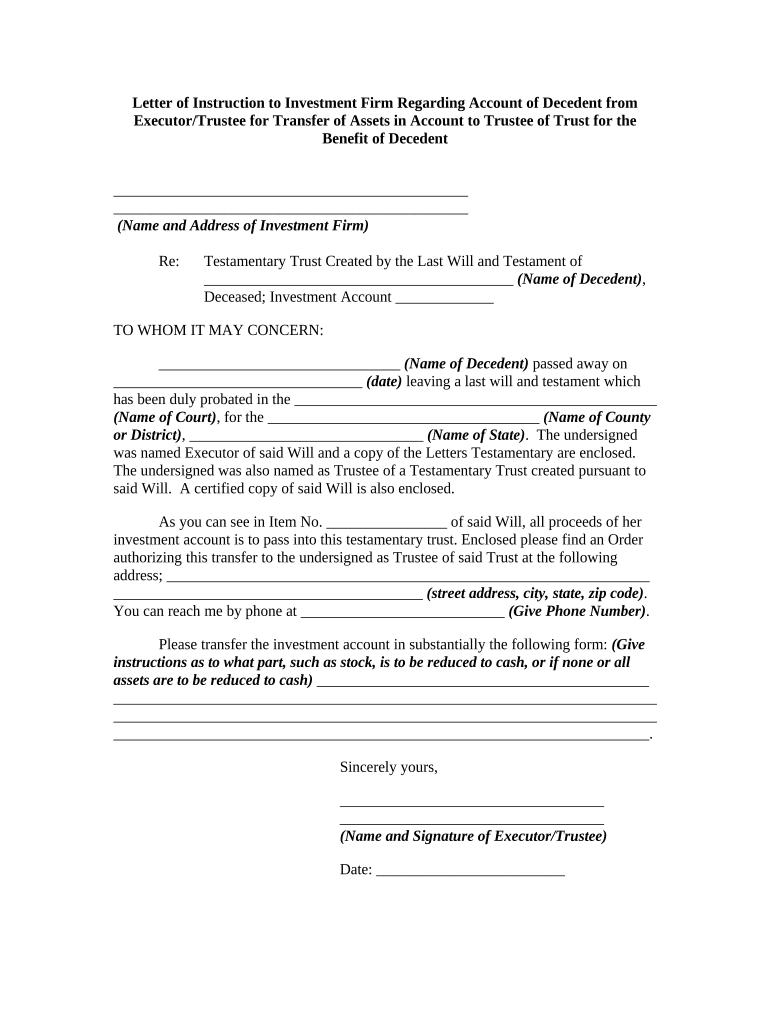
Letter of Instruction to Investment Firm Regarding Testamentary Trust

This template is fully customizable. Edit the text, fill out the fields, and send it for signature. Give it a try!
Letter of Instruction to Investment Firm Regarding Testamentary Trust

What this letter is and when it’s used

A Letter of Instruction to an Investment Firm regarding a testamentary trust is a written directive that explains how an investment account or financial assets should be handled following the settlor’s death or in connection with a testamentary trust identified in a will. It typically clarifies beneficiary designations, funding instructions, contact information for the executor or trustee, and any interim management preferences. Although not a substitute for trust or probate documents, the letter helps bridge administrative steps between the estate’s legal paperwork and the custodian’s operational processes.

Why a clear instruction letter matters for trustees and firms

A concise instruction letter reduces delays by giving custodians explicit directions for account transfer, funding, and beneficiary verification; it clarifies the relationship among the decedent, executor, and trustee and helps avoid misrouting or unnecessary account freezes.

Why a clear instruction letter matters for trustees and firms

Who prepares and relies on this letter

Use the letter as a supplement to formal trust and probate filings, not as the controlling legal instrument when conflicts arise.

  • Estate attorneys and trustees who coordinate trust funding and beneficiary instructions
  • Executors responsible for probate-related asset transfers and account access
  • Investment firms and custodians that need clear operational directions to process accounts

Key components to include in a professional instruction letter

A well-structured letter balances legal identifiers and practical directions so the firm can act quickly while preserving the estate’s legal protections.

Decedent identity

Full legal name, date of birth, and account numbers to ensure custodial systems match the correct person and prevent misidentification.
Estate contact

Name, phone, email, and mailing address for the executor or personal representative authorized to communicate with the firm.

Trust reference

Trust name, relevant will clause, or probate case number to link the instruction to the formal testamentary trust or estate file.

Beneficiary directions

Clear allocation instructions (percentages, specific assets) and whether transfers should be made in-kind or liquidated to cash.

Supporting paperwork

List required attachments such as death certificate, letters testamentary, trust instrument excerpts, and any tax or withholding forms.

Authentication note

Statement of how signatures are validated, whether notarized or executed electronically, and signer authority (executor/trustee).

Required data fields at a glance

Decedent name: Full legal name
Account number: Custodian account ID
Trust name: Exact trust designation
Executor contact: Name and phone
Death proof: Certified death certificate
Authority proof: Letters testamentary

How to complete the letter step by step

Follow these steps to make the letter actionable and compliant with custodian requirements.

  • 01
    Identify parties: List decedent, executor, trustee, and firm with contact details.
  • 02
    Specify assets: Reference account numbers and describe transfer instructions clearly.
  • 03
    Attach documents: Include certified death certificate and letters testamentary or trust excerpts.
  • 04
    Sign and authenticate: Have the authorized signer sign and follow any notary or witness rules.

How to configure an online workflow for submission

Set up an e-submission path that matches the firm’s authentication and document intake expectations.

Field Configuration
Document upload Require PDF/A or high-resolution PDF for legibility and archival
Signer authentication Use email plus SMS code or ID verification per firm policy
Required attachments Make death certificate and letters testamentary mandatory uploads
Notification routing Send copies to executor, trustee, and firm custody operations

Where to send the letter and expected routing

Deliver the letter following the custodian’s documented submission channels to ensure correct intake and tracking.

  • Primary custodian channel: Upload to the firm’s secure portal or deliver to the designated operations email address.
  • Trust operations: Copy the trust or wealth operations team to ensure handoff to trust administration specialists.
  • Legal counsel: Provide counsel with proof of submission and any firm acknowledgements.
  • Records retention: Retain a dated copy and delivery receipt for the estate file.

Distribution methods and platform requirements

Confirm the firm’s accepted formats and authentication levels before sending to avoid rejected submissions or processing delays.

  • Secure portal: Preferred for speed and audit trail
  • RON-notarized: Acceptable if firm permits remote notarization
  • Physical delivery: Use courier or certified mail for original documents

Timelines and processing expectations

Understand typical timing so the estate can plan distributions and custodial transfers effectively.

Initial acknowledgement:

Firms often acknowledge receipt within 3–10 business days of a complete submission

Document review:

Verification of death, authority, and beneficiary records may take 2–6 weeks

Account holds:

Firms may place temporary holds until letters testamentary or trust validation is complete

Transfer completion:

In-kind transfers or distributions typically complete within 2–8 weeks after all documents clear

Tax reporting:

Allow time for year-end tax adjustments and any required withholding changes

Common mistakes that cause delays

  • Omitting account numbers or providing incorrect numbers leads to routing errors and additional verification steps
  • Submitting unsigned or improperly witnessed letters when the firm requires original notarized signatures triggers rejections
  • Failing to attach certified death certificate or letters testamentary forces custodial hold and repeat submissions
  • Using ambiguous beneficiary instructions (e.g., 'all assets as needed') creates interpretation disputes and slows processing

Risks and consequences of incorrect or incomplete letters

Probate delay: Possible extended administration time
Withholding risk: Backup withholding may apply if TIN is missing
Tax reporting issues: Incorrect beneficiary data can cause 1099 reporting errors
Asset misallocation: Funds transferred to wrong account may be costly to recover
Rejected submission: Nonconforming format can force resubmission
Legal challenge: Ambiguity may trigger disputes requiring court resolution

Practical examples of how letters are used

Two common scenarios illustrate how a clear instruction letter improves outcomes during estate administration.

Executor to Custodian

An executor provided account numbers and letters testamentary to the firm

  • The firm validated the documents within two weeks
  • The clear instructions shortened custodial hold time and allowed timely in-kind transfers to the trust.

Pre-death Prepared Letter

A settlor prepared a dated instruction letter and gave it to counsel

  • The letter listed funding preferences and trustee contact information
  • Delivering that letter at death reduced ambiguity and supported an orderly transfer once probate concluded.

Practical tips for accurate and efficient completion

Adopt these practices to reduce processing time and avoid common verification problems.

Use precise identifiers
Always include exact account numbers, full legal names, and dates in MM/DD/YYYY format to prevent mismatches with custodial records.
Attach certified documents
Provide a certified death certificate and court-issued letters testamentary to meet standard fiduciary verification requirements.
Confirm custodian policy
Before submitting, verify the firm’s accepted delivery method, notarization, witness rules, and whether they accept electronic signatures.
Keep thorough records
Maintain copies of submissions, delivery receipts, and any firm acknowledgements to support later accounting and tax reporting.

Typical eSignature vendor pricing and feature snapshot for document submission

Compare common plan and feature criteria relevant to submitting authenticated letters; signNow appears first for parity across vendors.

signNow DocuSign Adobe Sign PandaDoc HelloSign
Starting Price $8/user/mo $15/user/mo $14/user/mo $19/user/mo $15/user/mo
Free Trial 7-day free trial Varies Varies Varies Varies
Bulk Send Yes (Premium tier) Yes Yes Yes No
Audit Trail Yes Yes Yes Yes Yes
HIPAA Compliant Yes Yes Yes No No

Frequently asked questions about letters of instruction and authentication

Answers to common questions on enforceability, signature methods, notarization, and updates to submitted letters.


Need help? Contact support

be ready to get more
Join over 28 million airSlate SignNow users