Establishing secure connection…Loading editor…Preparing document…

Washington Personal Representative's Deed

This template is fully customizable. Edit the text, fill out the fields, and send it for signature. Give it a try!
Washington Personal Representative's Deed

What the Washington Personal Representative's Deed Is

A Washington Personal Representative's Deed is the legal document used by an executor or personal representative to transfer real property owned by a decedent to beneficiaries or purchasers after probate authority is established. It identifies the decedent, cites the representative's court-appointed authority, describes the property by legal description, sets vesting for the transferee, and is signed, notarized, and recorded with the county auditor to update title records and permit clear conveyance of estate property.

Why this deed matters for estate transfer and title clarity

A properly prepared Personal Representative's Deed finalizes the estate's real property transfer, clears title for beneficiaries, and enables recording with the county auditor, reducing future disputes and facilitating sales.

Why this deed matters for estate transfer and title clarity

Primary users and stakeholders

Typical parties involved before, during, and after preparing the deed.

  • Personal representatives or executors managing estate administration and property conveyance after probate.
  • Probate and real estate attorneys who draft the deed, confirm authority, and advise on recording.
  • Title companies and escrow agents preparing closing packages and verifying recorded interests.

Core sections to include in a professional Personal Representative's Deed

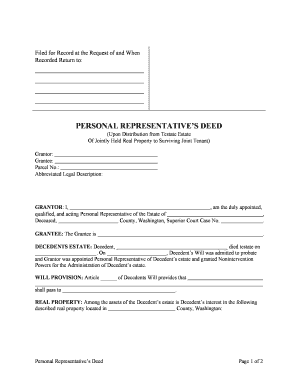
A complete deed follows a consistent structure so county recorders and title companies can process it without delays; include authority, description, vesting, and authentication elements.

Caption

Identify the probate cause, court, and personal representative capacity so the deed evidences legal authority to convey estate property to the grantee.
Granting Clause

A clear grant clause states the representative transfers and conveys all estate interest in specified property to the named grantee, using precise legal language to attach intent.

Vesting Language

Set how title will vest in the grantee (joint tenancy, tenancy in common, individual name) to avoid ambiguity in ownership and successor rights.

Legal Description

Include the full recorded legal description (lot, block, subdivision or metes and bounds) exactly as shown on prior recorded instruments to ensure accurate indexing.

Consideration

State nominal or stated consideration (e.g., love and affection, $10) as required by recorder; avoid vague phrases that could delay recording.

Acknowledgment

Provide a notary acknowledgment block for the personal representative and any required witness fields so the deed meets county recording prerequisites.

Essential information to provide on the deed

Decedent Name: Full legal name
Representative: Name and 'Personal Representative' capacity
Probate Cause No.: Court case number
Legal Description: Recorded property description
Vesting: Exact grantee names
Date of Death: MM/DD/YYYY

Step-by-step: completing the Personal Representative's Deed

Follow these steps in order to prepare, sign, and record the deed correctly.

  • 01
    Confirm authority: Obtain letters testamentary or letters of administration first.
  • 02
    Draft deed: Include legal description, vesting, and probate reference.
  • 03
    Execute and notarize: Representative signs before a notary with required authentication.
  • 04
    Record: File original deed with the county auditor where property is located.

Configuring an online completion and signing workflow

Set up authentication, notarization method, file format, and delivery so electronic preparation meets recording and title expectations.

Field Requirement | Recommended setting
Authentication Signer identity verification | Email + ID check or in-person notarization
Notarization Acknowledgment required | RON or in-person per county rules
File Format Recording copy | PDF/A with notarized signature block
Delivery Recording submission | County auditor filing and copies to title agent

Where to file and how the recording process flows

Recording the deed updates title records; follow this route from execution to final indexing.

  • Execute: Representative signs and notary acknowledges.
  • Prepare original: Assemble original deed and any recording cover sheets.
  • Record: File with the county auditor in the property's county.
  • Distribute: Provide recorded copy to title company and beneficiaries.

Sharing and digital signing: technical capabilities to consider

Choose tools that support verified signer identity, notarization workflows, PDF/A export, and secure delivery for recording.

  • Formats Supported: PDF, PDF/A, DOCX
  • Integrations: Title systems and cloud storage
  • Signer Options: Email, SMS, or notarized RON

Timelines and typical processing expectations

Timing affects title transfer, tax reporting, and claims by creditors; act promptly once you have probate authority.

When to Record:

Record as soon as letters testamentary are issued.

County Processing:

Recording often posts within 1–7 business days, depending on county volume.

Tax Reporting:

Property tax proration and assessment timelines vary by county.

RON Record Retention:

Audio-video RON sessions often retained 5–10 years per state rules.

Title Clearance:

Title companies may require additional documentation before issuing policy.

Common mistakes to avoid when preparing the deed

  • Using an informal or partial legal description that does not match prior recorded instruments, causing rejection by the county recorder.
  • Failing to attach or reference the probate court's letters testamentary, which prevents title companies from accepting the conveyance.
  • Signing without a proper notary acknowledgment or using a notary form that omits required county-specific language.
  • Listing grantee names incorrectly or omitting vesting details, producing ambiguity and title objections later.

Risks and consequences of an incorrect or defective deed

Invalid Conveyance: May cloud title
Title Objections: Title insurer delays or refusal
Court Challenges: Heir disputes or reformation actions
Tax Issues: Unintended tax liabilities
Recording Rejection: County returns defective instrument
Notary Problems: Missing acknowledgment invalidates record

How this deed differs from other post-death conveyance instruments

Compare the Personal Representative's Deed against other common conveyance instruments to choose the correct form.

Criteria Personal Representative's Deed Trustee's Deed
Source of Authority probate court letters trust document
When Used after probate appointment under trust administration
Typical Warranty limited or quitclaim may include covenants
Probate Required

Comparing eSignature vendor pricing and key features for deeds and notarization

Platform pricing and capabilities vary; signNow appears first in this comparison to show entry pricing and compliance options relevant to deed workflows.

signNow DocuSign Adobe Sign PandaDoc HelloSign
Starting Price $8/user/mo $15/user/mo $14/user/mo $19/user/mo $15/user/mo
Free Trial 7-day free trial Varies by vendor Varies by vendor Varies by vendor Varies by vendor
Bulk Send Yes Yes Yes Yes No
Audit Trail Yes Yes Yes Yes Yes
HIPAA Compliant Yes Yes Yes No No

Who has legal authority to sign the deed

Personal Representative

A court-appointed executor or administrator signs in an official capacity and should cite letters testamentary or letters of administration; the signature must be notarized and match the name on the court-issued documents to establish authority for conveyance.

Attorney-in-Fact

An agent under a valid durable power of attorney may not convey decedent property after death; only a court-appointed personal representative normally has post-death authority unless otherwise provided by law.

How to update or correct a recorded Personal Representative's Deed

Corrective steps vary by error type; follow court and county procedures to amend, re-execute, or record a corrective instrument.

01

Identify Error:

Confirm the defect and why correction is required.
02

Court Approval:

Obtain probate court permission if authority is questioned.
03

Prepare Corrective Deed:

Draft a corrective or reformation deed referencing the original instrument.
04

Execute Properly:

Have the representative sign and notarize the corrective deed.
05

Re-record:

File the corrective instrument with the county auditor.
06

Notify Parties:

Provide updated recorded copies to title insurer and beneficiaries.

Download formats and supporting document types to include

Provide the recorder with the correct original format and include supporting documents to streamline indexing and title review.

Recording Copy

Record an original paper or PDF/A copy with notary acknowledgment; county auditors require original signatures or county-accepted electronic alternatives.

Certified Probate Order

Attach a certified copy of letters testamentary or letters of administration as proof of authority when recording.

Title Report

Include a recent title commitment or report so the title company can confirm prior instruments and exceptions before issuing policy.

Affidavit of Consideration

Some counties request a separate affidavit stating the consideration and transfer details for indexing and tax purposes.

Practical tips for accurate and efficient deed preparation

Following consistent practices reduces rejections, accelerates recording, and simplifies title insurance issuance.

Use exact legal descriptions
Always copy the property legal description directly from the last recorded deed or title report to avoid mismatches and recorder rejections; abbreviated street addresses are insufficient for indexing.
Reference probate authority
Cite the probate cause number and attach or reference letters testamentary so the county and title company can confirm the representative's power to convey the property.
Coordinate with title
Work with the title or escrow company early to identify any title exceptions, endorsements, or additional documents required before recording.
Confirm notary language
Use the county's preferred acknowledgment wording and confirm whether RON is accepted; inconsistent notary blocks can result in recording refusal.

Representative scenarios where this deed is used

Real-world examples demonstrate common situations and the practical steps taken to convey estate property.

Estate Transfer to Beneficiary

A decedent owned a single-family home in King County and left it to a named beneficiary

  • The personal representative obtained letters testamentary and signed a Personal Representative's Deed
  • The deed was notarized, recorded with the county auditor, and the beneficiary received a recorded copy for title insurance and loan processing.

Sale After Probate

An estate sold estate property to a third-party buyer following probate authorization

  • The personal representative executed the deed conveying clear title to the buyer
  • Recording finalized transfer and allowed escrow to close and distribute sale proceeds per probate instructions.

Frequently asked questions about Personal Representative's Deeds

Answers to common issues and points of confusion when preparing, signing, notarizing, and recording these deeds.


Need help? Contact support

be ready to get more
Join over 28 million airSlate SignNow users