Establishing secure connection…Loading editor…Preparing document…

Nonqualified Deferred Compensation Trust Agreement

This template is fully customizable. Edit the text, fill out the fields, and send it for signature. Give it a try!
Nonqualified Deferred Compensation Trust Agreement

What this Nonqualified Deferred Compensation Trust Agreement is

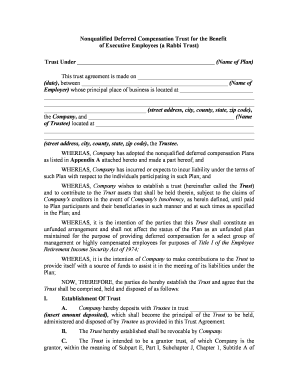
A Nonqualified Deferred Compensation Trust Agreement establishes a contractual arrangement and trust vehicle that an employer uses to set aside assets or create administrative rules for executive or key-employee deferred compensation. It documents the parties, the scope of benefits, funding mechanics, distribution events, and any forfeiture or vesting rules. Because these arrangements are typically outside qualified retirement plans, they have distinct tax and creditor implications — including Section 409A timing rules for deferral elections and distribution events — and are governed primarily by contract and applicable state law.

Why organizations adopt a deferred compensation trust

A written trust agreement clarifies who is eligible, how and when deferred amounts will be funded and paid, and the trustee’s duties. It supports executive retention and budgeting while documenting compliance with tax rules such as IRC §409A; it does not automatically create ERISA protections or insulate assets from general creditor claims.

Why organizations adopt a deferred compensation trust

Who typically prepares or signs this agreement

Common users include HR, finance, legal, and the executive participants responsible for plan administration.

  • Plan sponsors and HR teams who design and administer deferred compensation programs for executives.
  • Corporate finance and tax teams that set funding mechanics, reporting, and compliance with IRC §409A.
  • Executive participants and their counsel who review benefit terms, vesting, and distribution events.

Key components every professional agreement should include

A complete Nonqualified Deferred Compensation Trust Agreement combines contractual terms with trust mechanics to govern eligibility, funding, and payment. Below are the six elements to include and why each matters.

Parties

Identify employer, participant(s), trustee, and any plan administrator with full legal names and entity types to establish authority and responsibility for performance and notices.
Trust Purpose

State precise purpose for holding assets and providing deferred compensation so the trust’s scope is clear and enforceable under contract and trust doctrines.

Funding

Describe whether the trust will be funded (e.g., rabbi trust assets) or unfunded, explain funding mechanics, and state employer rights regarding retained control.

Vesting and Forfeiture

Define vesting schedules, service requirements, and forfeiture conditions so benefits vest only under specified events and avoid ambiguity related to termination.

Distribution Events

Specify permitted distribution events (separation from service, disability, death, fixed payment dates) and align timing with IRC §409A exceptions when applicable.

Governing Law & Taxes

Select governing state law and include tax allocation and indemnity provisions; reference compliance with IRC §409A and procedures for tax reporting and withholding.

Step-by-step: completing the agreement

Follow this sequence to prepare, review, and execute the trust agreement correctly.

  • 01
    Identify parties: Confirm legal names and capacities for employer, participant, and trustee.
  • 02
    Set benefits: Define amounts, vesting, and distribution triggers in precise language.
  • 03
    Align with tax rules: Verify elections and timing conform to IRC §409A requirements.
  • 04
    Execute and distribute: Obtain signatures, retain a signed copy, and deliver to trustee and payroll.

Digital setup for online completion and routing

Configure the digital workflow with field mapping, authentication, and routing to streamline execution and recordkeeping.

Field mapping Match PDF fields to data sources and enable conditional fields for elective clauses.
Authentication Choose signer authentication: email link, SMS code, or stronger ID verification.
Signature order Set the signing sequence: employer → trustee → participant → witness/notary if required.
Notifications Enable email reminders and completion receipts for all parties and administrators.
Storage Archive executed copies in secure document management with retention rules.

Where executed copies should be routed

Distribute the executed agreement to parties responsible for administration, recordkeeping, and tax reporting.

  • Trustee: Deliver a signed copy and any funding instructions to the named trustee.
  • Employer Records: Store an executed copy with HR and payroll records for compliance and audits.
  • Tax Advisor: Provide copies to tax counsel or payroll to ensure correct withholding/reporting.
  • Participant: Give each participant an executed, dated copy for their personal records.

Digital signing and integration considerations

Choose a platform that supports secure signatures, audit trails, and common integrations to retain a full execution record.

  • File formats: PDF and DOCX support for editable templates.
  • Integrations: Connectors for Salesforce, NetSuite, Google Workspace, and Microsoft 365.
  • Authentication: Email, SMS, or advanced signer verification options.

Timing rules and time-sensitive elections

Certain elections and distribution timing affect tax treatment; align contract language with statutory timing to avoid unintended taxation.

Deferral election timing:

Make deferral elections before the compensation becomes legally payable, per IRC §409A election timing.

Distribution scheduling:

Set fixed distribution dates or events; ad hoc distributions risk violating deferral rules.

Funding actions:

If funding trust assets, document funding date and trustee acceptance to maintain an audit trail.

Tax reporting:

Coordinate with payroll and tax counsel to report income at distribution rather than deferral where applicable.

Review cadence:

Perform annual reviews for changes in law or corporate structure that affect the plan.

Key milestones from adoption to distribution

Track these milestones to ensure the plan operates as written and remains aligned with tax and corporate governance requirements.

01

Plan Adoption

Board or authorized committee formally adopts plan documents and delegate signatory authority.

02

Participant Election

Employee files a deferral election within prescribed windows before compensation becomes payable.

03

Funding Event

Trustee receives assets and records acceptance per funding mechanics in the agreement.

04

Distribution Event

Trustee executes payments on prescribed dates or events with tax withholding as required.

Common preparation mistakes to avoid

  • Relying on vague vesting language that creates interpretation disputes during termination or change-in-control.
  • Failing to document deferral elections or timing consistent with IRC §409A, risking immediate taxation and penalties.
  • Not aligning trustee funding mechanics with corporate governance, creating conflicts over asset control and creditor claims.
  • Omitting beneficiary designations or successor trustee instructions, complicating administration after a participant’s death.

Principal legal and tax risks

409A Penalties: Taxation and penalties under IRC §409A
Creditor Claims: Trust assets may remain reachable by corporate creditors
ERISA Exposure: Unintended ERISA coverage risk if plan meets pension plan tests
Withholding Failures: Incorrect tax withholding at distribution
Execution Defects: Unsigned or late-signed instruments may be unenforceable
Beneficiary Errors: Wrong beneficiary designations complicate payouts

How this agreement differs from related instruments

Compare common document types to choose the appropriate vehicle for deferred compensation and asset handling.

Document Type Creditor Protection Tax Timing
Nonqualified Trust limited taxed at distribution
Rabbi Trust no absolute protection taxed at distribution
Unfunded Plan no protection employer obligation only
Qualified Plan erisa protections tax-deferred until distribution

eSignature solution pricing comparison for executing this agreement

Compare starting prices and key capabilities of common eSignature vendors for executing legal agreements requiring secure audit trails and optional HIPAA compliance.

signNow DocuSign Adobe Sign PandaDoc HelloSign
Starting Price $8/user/mo $15/user/mo $14/user/mo $19/user/mo $15/user/mo
Free Trial 7-day free trial Varies Varies Varies Varies
Bulk Send Yes (Premium) Yes Yes Yes Yes
Audit Trail Yes Yes Yes Yes Yes
HIPAA Compliant Yes Yes Yes No No
Envelope Cap No envelope cap 100 envelopes/user/year Varies by plan Varies by plan Varies by plan

Who can execute and bind the agreement

Plan Sponsor — CFO

The chief financial officer or authorized corporate officer typically signs for the employer; confirm corporate resolution or board authorization to bind the entity in deferred compensation matters.

Participant — Executive

Named participant signs to accept terms; if executed by counsel or agent, include written authority or power of attorney showing the signer’s capacity.

Essential data elements to record and preserve

Participant ID: Employee number or SSN last 4
EIN: Employer EIN for tax reporting
Trust Name: Formal trust designation
Deferral Amount: Agreed dollar value or percentage
Vesting: Schedule and effective dates
Distribution Terms: Events, dates, and payment method

Real-world examples of e-signed executive agreements

These customer stories illustrate how organizations used digital signing to execute legal agreements securely and consistently.

Optica Ventures — Brian Fitzgibbons

Adopted digital signatures for executive agreements to simplify execution and storage.

  • The interface is simple and easy-to-use for our team.
  • The team reported faster turnaround and easier distribution of signed documents to participants, trustees, and payroll administrators while maintaining an audit trail.

Xerox — Kodi-Marie Evans

Integrated e-sign workflows with NetSuite to route agreements for signature automatically.

  • airSlate SignNow provides us with the flexibility needed to get the right signatures on the right documents.
  • Integration reduced manual routing, ensured consistent execution, and centralized signed copies for tax and recordkeeping purposes.

Frequently asked questions about executing and enforcing the agreement

Answers below address common legal, tax, and execution questions encountered when preparing and signing Nonqualified Deferred Compensation Trust Agreements.


Need help? Contact support

be ready to get more
Join over 28 million airSlate SignNow users