Establishing secure connection…Loading editor…Preparing document…

TXDOT Right of Way Easement

This template is fully customizable. Edit the text, fill out the fields, and send it for signature. Give it a try!
TXDOT Right of Way Easement

What the TXDOT Right of Way Easement Is and when it’s used

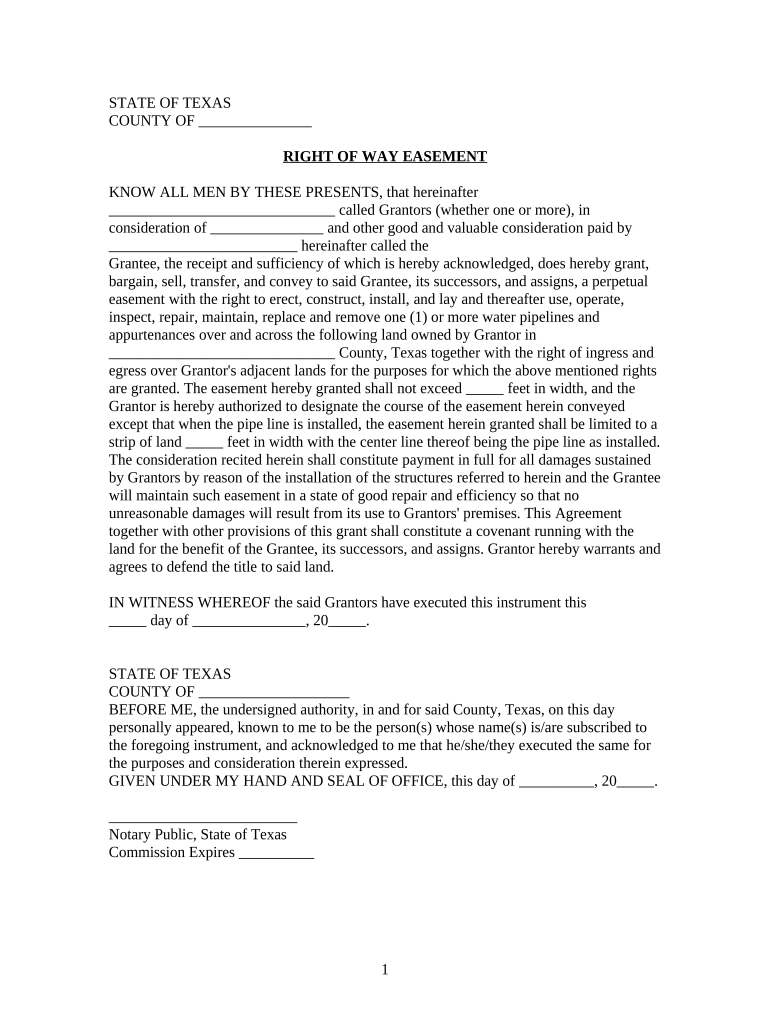
A TXDOT Right of Way Easement documents a property owner’s grant of a limited interest in land to the Texas Department of Transportation or its designee for purposes such as roadway construction, maintenance, utilities, or access. The easement typically describes the area affected, permitted uses, duration (temporary or permanent), compensation or consideration, and any restoration obligations. It is recorded in the county deed records and may require notarization, signatures from authorized property owners, and supporting plats or legal descriptions. Proper completion ensures clear title implications and protects both the landowner’s residual rights and the transportation agency’s access.

Why this easement matters for property owners and agencies

A clearly drafted TXDOT Right of Way Easement defines scope of access, limits liability, clarifies compensation, and enables county recording. It reduces future disputes about maintenance, indemnity, and permitted encroachments while preserving property owner rights outside the granted corridor.

Why this easement matters for property owners and agencies

Who typically prepares, signs, and records a TXDOT Right of Way Easement

Typical participants include the landowner, title company, TXDOT or authorized agent, and county clerk for recording. External advisors can include surveyors and attorneys.

  • Title companies and abstractors — prepare legal descriptions, verify chains of title, and attach plats or survey exhibits.
  • Property owners and their attorneys — negotiate consideration, review restrictive language, and authorize signatures.
  • TXDOT agents and right-of-way specialists — ensure the easement meets project needs and complies with internal policies and funding requirements.

Each party’s role affects what supporting documentation and approvals are required before recording; coordinate early to avoid delays.

Representative signer roles

Property Owner — Individual

The owner or owners of record must sign using the exact legal name on title. If the owner is an individual, verify identity and whether spouse or co-owners must join; corporate or trust owners require authorized signatories and proof of authority.

Corporate/Entity Signatory

When the property owner is a corporation, LLC, partnership, or trust, the signatory must be an officer or authorized agent. Provide a corporate resolution, trust certification, or power of attorney showing signature authority to avoid recording rejections.

Core elements to include in a professional easement

A complete TXDOT Right of Way Easement contains essential clauses and attachments that define rights, limits, duration, compensation, and post-work restoration obligations.

Legal description

A metes-and-bounds or plat-based description precisely identifying the easement area; attach an illustrative survey or exhibit showing bearings and distances.
Purpose and permitted uses

Clear language listing allowed activities (roadway, drainage, utilities, maintenance), and any expressly prohibited uses to prevent ambiguity.

Term and termination

State whether the easement is temporary, permanent, or conditional; include triggers for termination or reversion of rights.

Consideration

Specify monetary payment, in-kind compensation, or recording of a separate release; include the method and timing of payment if applicable.

Restoration and indemnity

Obligations for site restoration, vegetation replacement, and who bears cost for damages to remaining property; include indemnity clauses and insurance requirements.

Recording and authority

Notary block, signature lines for parties, and a certificate of authority for corporate or trustee signers; note the county recording reference and exhibit list.

Step-by-step: completing and recording the easement

Follow these steps in order to prepare an executable TXDOT Right of Way Easement and minimize rework at recording.

  • 01
    Collect title info: Obtain a current title report or deed to confirm ownership and vesting.
  • 02
    Prepare legal description: Work with a surveyor to draft or verify the metes-and-bounds or exhibit plat.
  • 03
    Draft easement: Include purpose, area, term, consideration, restoration, and recording blocks.
  • 04
    Sign, notarize, and record: Have authorized signers execute before a notary; record with the county clerk and obtain the instrument number.

How execution and submission typically flow

A standard workflow moves from title verification to drafting, approvals, execution, and final recording. Each stage has specific deliverables and responsible parties.

  • Title verification: Title company confirms ownership and encumbrances before drafting.
  • Drafting and exhibits: Surveyor prepares exhibits; attorney or agent drafts easement language.
  • Execution: Authorized signers sign in presence of notary or via authorized RON process.
  • Recording: County clerk records the signed instrument and returns a recorded copy with instrument number.

Electronic completion and signature considerations

TXDOT easements can be prepared as PDF or DOCX files and shared for signature, but recording offices often require notarized acknowledgements and an original recorded instrument.

  • File formats: Use PDF/A or flattened PDF for stable records; include high-resolution survey exhibits.
  • Authentication: Use signer authentication appropriate to risk: email plus SMS code or advanced identity proofing for remote notarization.
  • Notarization: If using RON, confirm the county and notary accept remote notarizations for recording real property instruments.

Confirm county clerk recording rules before relying solely on e-signed, notarized digital copies; in many counties a recorded paper or certified electronic submission is still required.

Typical digital workflow settings for online completion

Configure these workflow options when preparing the document for digital signing to reduce signer friction and preserve evidentiary trail.

Field Configuration
Signature fields Assign role-based signature spots and require date fields adjacent to each signature
Authentication Use email + SMS code for standard signers; enable KBA for higher-risk identity verification
Notary field Add an acknowledgment block formatted for remote or in-person notarization as required
Attachment requirement Require upload of supporting exhibits such as survey or resolution before finalizing

Security and compliance considerations for electronic easements

Encryption: TLS 1.2/1.3 in transit
Data at rest: AES-256 encryption
E-sign legal basis: ESIGN and UETA recognition in the U.S.
Audit trail: Timestamps, IP, and action history
Notary support: In-person and RON workflows
BAA availability: HIPAA BAA offered where required

Common risks and legal consequences of errors

Recording rejection: Missing notary or incorrect names can cause clerk to reject filing
Title defect: Ambiguous legal descriptions can create encumbrances or cloud title
Authority dispute: Signatures by unauthorized agents may render the instrument voidable
Compensation error: Unclear consideration terms can trigger payment disputes
Insurance gap: Lack of indemnity or insurance clauses may expose owners to liability
Notary noncompliance: RON or notarization failures risk invalidation of recording

Frequent preparation pitfalls to avoid

  • Using imprecise legal descriptions instead of surveyed exhibits; leads to boundary disputes and title issues.
  • Failing to verify signing authority for entities, trusts, or estates; causes recorded documents to be contested.
  • Assuming all counties accept RON or e-notarization for real property instruments; check local clerk rules first.
  • Omitting exhibit references or failing to attach the survey plat that defines the easement area.

eSignature vendor comparison for signing and distributing the document

Below are common vendor-level differences relevant when selecting an eSignature solution for right-of-way easements and associated documents; signNow appears first per product details.

signNow DocuSign Adobe Sign PandaDoc HelloSign
Starting Price $8/user/mo $15/user/mo $14/user/mo $19/user/mo $15/user/mo
Free Trial 7-day free trial, no card required Varies by plan Varies by plan Varies by plan Varies by plan
Bulk Send Yes (Business Premium) Yes Yes Yes Varies
Audit Trail Yes Yes Yes Yes Yes
HIPAA Compliant Yes (BAA available) Yes Yes No No

Time-sensitive tasks and typical deadlines

Track these common timing elements when negotiating, signing, and recording the easement to avoid delays and additional costs.

Title Report Age:

Obtain within 30 days to reflect current ownership and liens

Survey Timing:

Complete prior to signing; surveys commonly take 2–4 weeks

Execution Window:

Coordinate signing after all approvals; avoid late-dated effective dates

Recording:

Record promptly after execution; county may require original or certified copies

Retention:

Maintain recorded instrument and exhibits for the full easement term plus recommended retention period

Key milestones from negotiation to recorded instrument

A sequential milestone view helps coordinate responsible parties and reduce handoffs during the transaction.

01

Negotiation

Finalize scope, consideration, and draft easement language before ordering surveys

02

Survey and Exhibits

Surveyor produces plat and legal description to attach as exhibit

03

Approval and Authority

Obtain any corporate resolutions or trust certifications authorizing signature

04

Execution and Notarization

Signers execute before an authorized notary or via approved RON process

Frequently asked questions about completion, signing, and recording

Answers to common practical and legal questions about TXDOT Right of Way Easement completion, notarization, electronic signing, and recording.


Need help? Contact support

be ready to get more
Join over 28 million airSlate SignNow users