Establishing secure connection…Loading editor…Preparing document…

Utah Name Change Form

This template is fully customizable. Edit the text, fill out the fields, and send it for signature. Give it a try!
Utah Name Change Form

Overview of the Utah Name Change Form

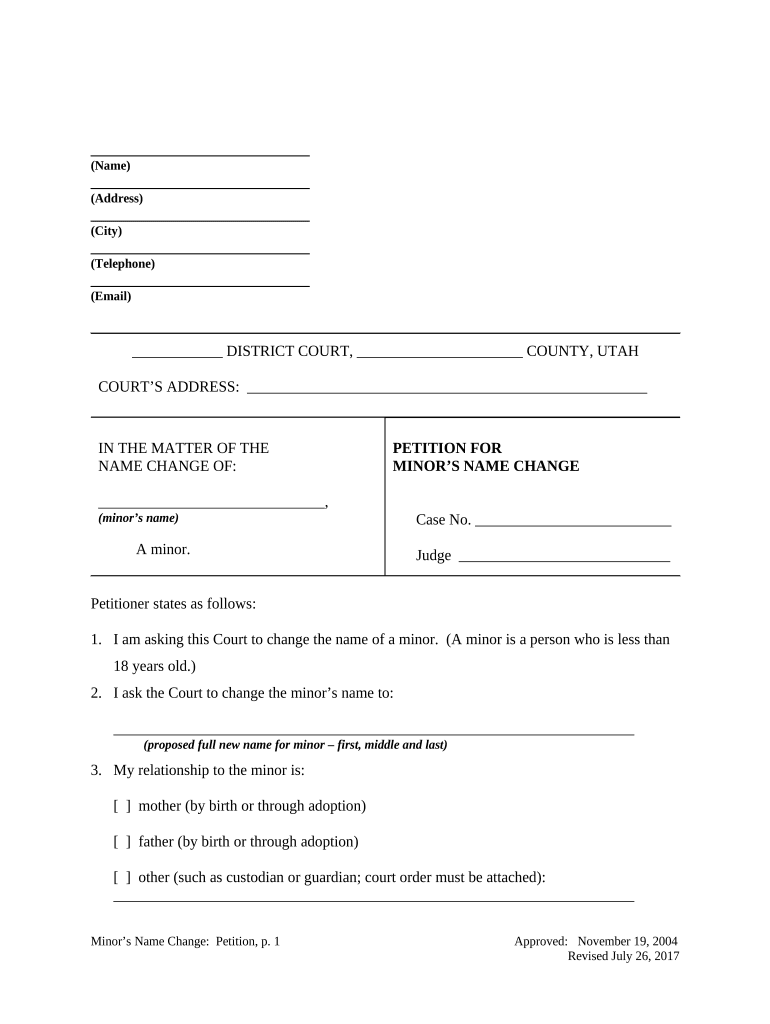
The Utah Name Change Form is the court filing used to request an official change of name for an adult or minor in Utah. The document initiates a civil petition with the district court, identifies the petitioner and proposed new name, explains reasons and legal status, and asks the court to enter an order. Completion typically requires supporting identification, proof of residency, and any required affidavits; the court will schedule a hearing or process the petition according to local rules. Final orders change legal name on government and private records once issued.

Why this form matters for legal identity

A completed Utah Name Change Form creates the legal record needed to update identity documents, social security records, and financial accounts. It provides a court-ordered basis that government agencies and private institutions rely on to accept a new name.

Why this form matters for legal identity

Who typically files the Utah Name Change Form

The form serves a range of filers who need an official, court-ordered name change.

  • Adults seeking to adopt a new legal name for personal, gender-affirming, or marriage-related reasons; requires proof of identity and residency.
  • Parents or guardians petitioning to change a minor’s name; the court may require consent or notice to other parents.
  • Attorneys or legal representatives filing on behalf of clients when additional legal issues or confidentiality orders accompany the petition.

Different procedures apply if you are changing a child’s name, have prior criminal history, or seek confidentiality; consult court clerk guidance.

Primary sections and supporting elements

A professional Utah Name Change Form contains clear petitioner details, the requested new name, legal grounds, attachments, signature blocks, and a proposed order for the judge to sign.

Petitioner

Full legal name, date of birth, contact information, and current address required so the court can identify the party requesting the change.
Request

Precise statement of current name and the exact new name requested, avoiding nicknames or ambiguous punctuation that could complicate records updates.

Grounds

Brief explanation of reasons for the change and any legal facts the court needs, such as absence of intent to defraud or evade obligations.

Attachments

Copy of government-issued ID, proof of residency, birth certificate or citizenship document, and any required consent forms for minors.

Signatures

Petitioner’s signature and date; if represented, attorney signature; notary or judicial attestation if local rules require authentication.

Proposed Order

Judge-ready order the court can sign to formalize the name change, formatted per local rules to ease docket processing.

Step-by-step: Filing a Utah Name Change petition

Follow these steps to prepare and submit the petition to the district court where you reside.

  • 01
    Prepare forms: Complete petition and proposed order accurately.
  • 02
    Gather docs: Collect ID, proof of residency, and any consents.
  • 03
    File: Submit petition to the local district court clerk and pay fees.
  • 04
    Attend hearing: Appear for the scheduled hearing or await the court’s ruling.

Typical processing flow for name change petitions

The process generally moves from petition to review, possible hearing, and then issuance of a signed court order.

  • Petition Filed: Clerk accepts the petition and records the case number.
  • Review: Court staff check completeness and supporting documents.
  • Hearing: Judge reviews facts; hearing may be required or waived.
  • Order Issued: Signed order enables updates to IDs and records.

Configuring an e-filing or digital workflow

If submitting electronically, set up fields and authentication to match court requirements and ensure reproducible records.

Field Configuration
Petitioner Name Required text field, exact-match validation recommended
Date Fields MM/DD/YYYY with calendar picker
Attachment Upload PDF preferred, include ID and proof of residency
Signature Block Signer name + date; support e-sign or notarized signatures

Digital filing and signature considerations

Ensure your e-sign platform supports signed PDFs, a detailed audit trail, and secure storage before e-submitting documents.

  • Document formats: PDF/A and DOCX supported
  • Authentication: Email or SMS code options
  • Audit Trail: Timestamps, IP, and action logs

Use a platform with compliance standards (ESIGN, UETA) and encryption at rest and in transit to ensure court and agency acceptance.

Timing and typical scheduling expectations

Expect variable timelines depending on county caseload and whether a hearing is required; plan updates to other documents after the order issues.

Filing to Review:

A few days to a few weeks depending on clerk workload

Hearing Notice:

Often scheduled 2–8 weeks after filing if required

Order Entry:

Judge signs order at hearing or after review; timing varies

Updating Records:

Allow additional weeks for agencies to process name-change requests

Appeal Window:

Any appeal follows local civil procedure deadlines

Common preparation pitfalls to avoid

  • Incomplete attachments: failing to include required ID or residency proof leads to rejection or hearing delays and may require refiling.
  • Name inconsistencies: using different spellings or initials across documents creates verification problems when updating government records.
  • Incorrect formatting: missing dates, unsigned petitions, or improper fee payments are common administrative grounds for non-acceptance.
  • Failure to notify: not serving required notices or omitting consent for minors can result in hearings or denied petitions.

Risks and legal consequences of errors

Rejection: Forms returned for correction
Delay: Extended case processing time
Fraud allegation: Potential investigation or denial
Record mismatch: Difficulty updating IDs and financial accounts
Costs: Additional filing or attorney fees
Confidentiality risk: Sensitive information exposed if protective orders omitted

eSignature vendor comparison for name-change workflows

Comparing basic vendor capabilities and pricing can help you choose an eSignature provider that supports secure signing, audit trails, and any regulatory addenda required for sensitive records.

signNow DocuSign Adobe Sign PandaDoc HelloSign
Starting Price $8/user/mo $15/user/mo $14/user/mo $19/user/mo $15/user/mo
Free Trial Yes, 7-day free trial Varies Varies Varies Varies
Bulk Send Yes Yes Yes Yes Yes
Audit Trail Yes Yes Yes Yes Yes
HIPAA Compliant Yes Yes Yes No No
Envelope Cap No cap 100 envelopes/user/year Varies Varies Varies

Frequently asked questions about the Utah Name Change Form

Answers cover filing location, e-sign acceptance, notarization, costs, and how to update other records after an order issues.


Need help? Contact support

be ready to get more
Join over 28 million airSlate SignNow users