Establishing secure connection…Loading editor…Preparing document…

Virginia Deed of Gift

This template is fully customizable. Edit the text, fill out the fields, and send it for signature. Give it a try!
Virginia Deed of Gift

What a Virginia Deed of Gift Is and when it applies

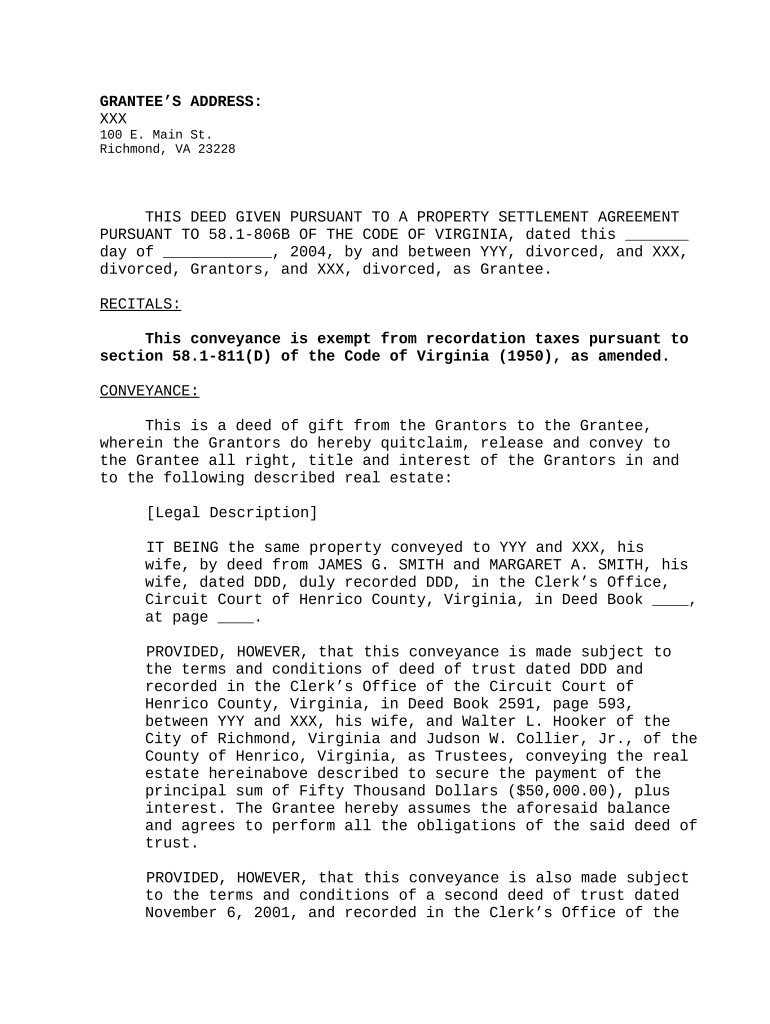
A Virginia Deed of Gift is a written instrument used to transfer ownership of real property from a donor to a donee without consideration. It typically contains a legal description of the property, identification of the parties, and language evidencing a gratuitous transfer. For real property in Virginia the deed must be signed and acknowledged before a notary and then recorded in the clerk’s office of the county or city where the property is located to provide constructive notice and affect title against third parties.

Why a Deed of Gift matters and its legal standing

A properly prepared Virginia Deed of Gift documents an unconditional transfer of property ownership, protects title, and enables recording to establish public notice. Electronic execution and recording may be used where permitted, but legal validity requires intent to transfer, consent to electronic records when used, clear attribution, and accessible retained records under the ESIGN Act (15 U.S.C. ch. 96) and state law.

Why a Deed of Gift matters and its legal standing

Who commonly prepares or signs a Deed of Gift

Each participant has distinct responsibilities: the donor must execute and acknowledge the deed, the donee should accept and confirm the legal description, and recording officials ensure the instrument meets local recording standards.

  • Property owners transferring real estate without payment, often for estate planning or family transfers.
  • Recipient individuals or entities accepting the gift and verifying title and tax implications.
  • Attorneys and title professionals who draft, review, and coordinate recording to protect legal interests.

Key signer roles

Donor — Property Owner

The donor is the legal owner transferring title. The donor must sign the deed in the presence of a notary and, where applicable, any required witnesses. Accurate identity and name matching to recorded title records prevents rejections or challenges during recording.

Donee — Recipient

The donee is the person or entity receiving title and typically accepts the conveyance. Acceptance may be explicit in the deed or by recorded acknowledgment; donees should confirm the legal description, consider title insurance, and review tax or gift reporting obligations.

Essential elements to include in a Virginia Deed of Gift

A well-formed Deed of Gift contains specific clauses and data fields that create and record an effective transfer in Virginia.

Granting Clause

Clear language transferring ownership from donor to donee, using words of conveyance such as 'grants and conveys' or explicit 'gift' language.
Legal Description

A complete legal description as recorded on chain-of-title instruments; street addresses are insufficient by themselves.

Identification of Parties

Full legal names and capacities (individual, trustee, corporate officer) with any required organizational detail for entities.

Acknowledgement

Notary acknowledgement containing the notarization block required for recordation in Virginia.

Delivery and Acceptance

Language or separate acceptance clause showing the donee's acceptance, which can affect the transfer's effectiveness.

Recording Instruction

Reference to the county clerk or circuit court clerk where the deed should be recorded and any return-to details.

Step-by-step: preparing and executing the deed

Follow these sequential steps to prepare, sign, and record a Virginia Deed of Gift accurately.

  • 01
    Confirm ownership: Obtain current deed and title report to verify the donor holds clear title.
  • 02
    Draft deed: Use the exact legal description and include gift language, parties, and recording instructions.
  • 03
    Execute before notary: Donor signs in notary presence; include required notary details and any witnesses per local rule.
  • 04
    Record instrument: File the signed, acknowledged deed with the county clerk in the jurisdiction where the property is located.

Where to file and how the recording process works

Recording the deed provides public notice and preserves priority; local clerk rules determine accepted formats and indexing procedures.

  • Local Clerk Office: Submit the original signed and acknowledged deed to the county or city circuit court clerk for recordation.
  • Recording Requirements: Clerks review formality, signature, and notary acknowledgment; missing items can cause rejection or require amendment.
  • Return Instructions: Provide a return address or cover sheet for the recorded instrument; clerks will stamp and return recorded originals as instructed.
  • Indexing and Public Notice: Once recorded the deed is indexed by grantor/grantee and becomes part of the public land records for title searches.

Customizing an online Deed of Gift workflow

Set up a digital workflow that mirrors the paper process while ensuring legal elements and notarization are included.

Field Configuration
Legal Description Required multiline text field with upload option for survey or plat
Signature Block Signer signature + date + notary placeholder
Notary Attachment Enable RON session link or physical notary upload
Recording Notes Internal field for county clerk and return-to address

Digital signing and eSubmission considerations

Ensure the chosen platform supports audit trails, secure storage, and the deliverables your county clerk accepts for efficient recording.

  • File formats: Use PDF or DOCX; PDFs should preserve margins and signatures for recording
  • Notarization support: Platform must support RON where the state permits or allow notarized PDFs for in-person acknowledgments
  • Integrations: Integrate with document storage and title systems (e.g., Box, NetSuite, Google Workspace) for auditability

Risks and consequences of defects in a Deed of Gift

Recording Rejection: Clerk may refuse recordation for improper form, missing notary, or inadequate legal description
Title Defect: Errors can create cloud on title requiring corrective deeds or quiet title litigation
Gift Tax Filing: Gifts may trigger IRS Form 709 reporting obligations for the donor; consult IRS guidance
Unintended Transfer: Ambiguous language or incorrect grantee identification can result in transfer to wrong party
Fraud or Undue Influence: Challenges alleging incapacity or coercion can result in voiding or rescission of the deed
Costs to Cure: Corrective documents, attorney time, and possible litigation can produce significant expense

Common mistakes to avoid when preparing a Deed of Gift

  • Using a street address instead of the recorded legal description can cause recording rejection or ambiguity.
  • Failing to sign or acknowledge the deed in the notary’s presence will usually invalidate recordation.
  • Omitting the correct grantee name or entity details may transfer title to the wrong person or require corrective action.
  • Neglecting to consider gift-tax reporting and professional advice can create unexpected tax liabilities for the donor.

Practical tips for accurate and efficient completion

Follow these pragmatic steps to reduce rework and ensure the deed records smoothly.

Use recorded descriptions
Copy the legal description exactly from the current deed or recorded plat to avoid boundary or identification disputes.
Coordinate with title
Obtain a current title search or title commitment when possible to catch liens, encumbrances, or required consents.
Confirm notary rules
Verify whether your county accepts RON or requires in-person acknowledgement and ensure the notary block matches local requirements.
Document acceptance
Have the donee confirm acceptance in writing or via an acceptance clause in the deed to avoid later disputes.

Typical use cases for a Virginia Deed of Gift

Real scenarios illustrate how deeds of gift are used and the practical considerations that arise in each context.

Family Transfer

A parent conveys a vacation property to an adult child to simplify estate settlement.

  • The deed states 'for love and affection'.
  • Parties arranged a title check and recorded the deed in the county clerk’s office; they consulted counsel to evaluate gift-tax filing and to confirm there were no outstanding mortgages requiring lender consent.

Charitable Conveyance

An owner donates a parcel to a nonprofit as an outright gift for conservation purposes.

  • Deed includes charitable grantee details.
  • The nonprofit required a clear legal description, acceptance language, and a title clearance review before recording and coordinating any appraisal or acknowledgment needed for donor tax records.

eSignature provider comparison for completing and routing deeds

Vendors vary by price and features important for deed workflows such as notarization support, HIPAA BAA availability, bulk send, and audit trails.

signNow DocuSign Adobe Sign PandaDoc HelloSign
Starting Price $8/user/mo $15/user/mo $14/user/mo $19/user/mo $15/user/mo
Free Trial 7-day free trial Varies by offer Varies by offer Yes, limited Yes, limited
Bulk Send Yes Yes Yes Yes No
Audit Trail Yes Yes Yes Yes Yes
HIPAA Compliant Yes Yes Yes No No

Frequently asked questions about the Virginia Deed of Gift

Answers to common procedural and legal questions encountered when preparing, signing, and recording a Deed of Gift in Virginia.


Need help? Contact support

be ready to get more
Join over 28 million airSlate SignNow users