Establishing secure connection…Loading editor…Preparing document…

Petition to Vacate Judgment Due to Failure to Acquire Jurisdiction

This template is fully customizable. Edit the text, fill out the fields, and send it for signature. Give it a try!
Petition to Vacate Judgment Due to Failure to Acquire Jurisdiction

What this Petition Is and when it applies

A Petition to Vacate Judgment Due to Failure to Acquire Jurisdiction is a court filing that asks a judge to set aside or annul a prior judgment because the court lacked proper jurisdiction when it entered the decision. The petition explains why the original proceeding did not establish personal jurisdiction over the defendant, subject-matter jurisdiction over the claim, or both, and requests relief such as vacatur, dismissal, or a hearing. Typical grounds include improper service, lack of statutory authority, or defects in the court’s territorial reach; relief depends on procedural rules in the court that entered the judgment.

Why this petition matters for parties facing an unenforceable judgment

Filing this petition preserves due process rights and can remove an unlawful judgment that impairs assets or credit. It provides a formal route to challenge jurisdictional defects without re-litigating the underlying merits, and can restore the parties to their pre-judgment positions if granted.

Why this petition matters for parties facing an unenforceable judgment

Who typically prepares and files this petition

Courts, litigants, and counsel use this petition when a post-judgment jurisdictional defect is discovered and relief is necessary to avoid enforcement.

  • Defendants seeking relief after default or post-judgment enforcement who were not properly served or lacked notice.
  • Civil litigators and defense counsel assessing procedural grounds to reopen or vacate judgments.
  • In-house legal teams or risk managers handling cross-jurisdictional enforcement and asset-protection matters.

The petition may be used by pro se litigants or by counsel; local court rules and procedural posture determine required filings and timing.

Typical signatories and preparers

Defense Attorney

An attorney who represents the party named in the original judgment; prepares legal arguments, supporting affidavits, and submits the petition under court procedure. Often explains service defects and jurisdictional law in detail, and may request evidentiary hearing to prove lack of jurisdiction.

Judgment Debtor

An individual or business against whom the judgment was entered; may file pro se or through counsel. The debtor supplies factual affidavits about service, residence, or consent and signs verification and supporting exhibits.

Core components of a professional petition

A well-crafted petition combines a clear statement of jurisdictional defects, concise legal argument, affidavits, and a proposed order to help the court act efficiently.

Caption

Complete court caption showing court name, case number, parties, and title 'Petition to Vacate Judgment Due to Failure to Acquire Jurisdiction' so the court clerks and parties immediately recognize the relief sought.
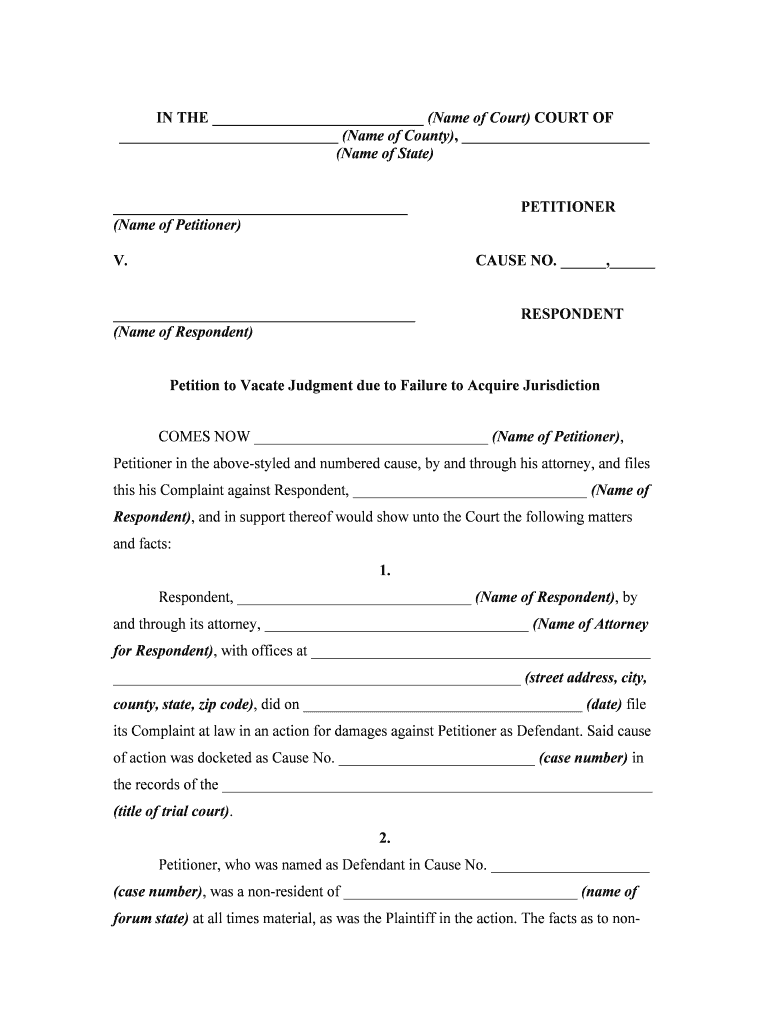
Statement of Facts

A chronological, sworn narrative of service events, appearances, and procedural steps that demonstrates how and why the court lacked jurisdiction, including dates, locations, and supporting evidence.

Legal Argument

Analysis citing applicable jurisdictional standards and controlling authority, explaining why the judgment is void or voidable and the legal basis for vacatur under the court’s procedural rules.

Supporting Affidavits

Signed declarations or affidavits from the petitioner and witnesses attesting to service defects, residency, or consent issues, accompanied by exhibits such as mail logs or return receipts.

Proposed Order

A draft order that the court can sign to vacate the judgment, which reduces clerical burden and clarifies the exact relief requested, including any stay or conditions.

Certificate of Service

Proof that the petition and exhibits were served on opposing counsel and relevant parties per court rules, describing method, date, and recipient details.

Step-by-step: completing the petition

Follow these sequential steps to assemble, verify, and submit a petition that the court can process without procedural defects.

  • 01
    Collect records: Gather judgment, service proofs, and communications relevant to jurisdiction.
  • 02
    Draft petition: Write factual statement, legal argument, and relief requested.
  • 03
    Assemble exhibits: Attach affidavits, receipts, and any supporting documentary evidence.
  • 04
    File and serve: File with the clerk and serve all parties per court rules.

How the court typically handles a petition to vacate

Understanding the court process helps set expectations for timing, hearings, and possible outcomes after filing the petition.

  • Clerk Intake: Clerk reviews filing for form and fee compliance.
  • Service Verified: Opposing counsel receives petition and files response or objection.
  • Hearing Set: Court may schedule oral argument or evidence hearing.
  • Ruling Issued: Judge grants, denies, or partially vacates judgment with written order.

Configuring a digital workflow for this petition

A streamlined digital workflow reduces errors and ensures consistent service and filing of the petition and supporting affidavits.

Field Configuration
Caption Field Pre-fill from case metadata to prevent typographical errors
Signature Block Require signer name, title, and MM/DD/YYYY date format
Affidavit Uploads Make attachments required and validate file types (PDF preferred)
Certificate of Service Auto-generate with method and timestamp fields

Digital tools and technical considerations

Use a platform that supports secure uploads, audit trails, and signer authentication when preparing court filings online.

  • File formats: Accept PDF and DOCX for court compatibility
  • Signer authentication: Email or SMS verification recommended
  • Audit trail: Record IP, timestamp, and signer actions

Ensure the platform you choose supports court filing export formats and produces a printable record for the clerk and opposing counsel.

Common pitfalls to avoid when preparing the petition

  • Relying on vague service descriptions rather than specific dates and methods, which weakens the factual basis for lack of jurisdiction claims and invites denial.
  • Failing to attach sworn affidavits or exhibits that corroborate the petitioner’s account, causing the court to treat assertions as unsupported and dismiss them.
  • Submitting improperly captioned pleadings or mismatched case numbers, which can delay docketing and may require re-filing under local rules.
  • Missing local court requirements for filing or service, such as mandatory forms, filing fees, or electronic submission formats, which can result in rejection.

Quality control tips for accurate and efficient petitions

Adopt consistent internal checks to reduce rejections and speed court acceptance.

Verify identities
Cross-check names and addresses against the original docket and government-issued IDs to eliminate mismatches.
Confirm dates
Use MM/DD/YYYY format and double-check service and filing dates against records to avoid timing disputes.
Index exhibits
Number and reference exhibits in the petition to help the court and opposing counsel locate evidence quickly.
Local rules review
Confirm county or jurisdiction-specific filing procedures and any required judicial forms before submission.

Consequences of filing an incorrect or untimely petition

Dismissal Risk: Court may deny for procedural defects
Sanctions: Court can impose fees or sanctions
Waiver Risk: Delay can waive certain defenses
Enforcement: Judgment may remain enforceable
Appeal Limitations: Lost timing may limit appellate remedies
Credibility: Inaccurate statements harm litigant credibility

Timing considerations and filing expectations

Deadlines for petitions to vacate can vary widely by jurisdiction and by whether the judgment is void or voidable; act promptly upon discovering jurisdictional defects.

Prompt Action:

File as soon as the defect is discovered to preserve relief options

Local Rule Windows:

Some courts impose short procedural windows for post-judgment motions

Relation to Appeals:

Filing while an appeal is pending may require specific motions or stays

Service Timing:

Serve opposing parties per local civil procedure rules

Court Scheduling:

Hearing dates depend on court calendar and will vary

Key milestones from discovery to decision

A typical sequence moves from investigation to filing, service, response, hearing, and final order; each stage imposes distinct tasks.

01

Investigate Grounds

Document service and jurisdictional facts before drafting the petition

02

Draft and File

Prepare petition, exhibits, and certificate of service for court filing

03

Opposition Response

Opposing parties may object or file a response in the allotted time

04

Hearing and Order

Court hears arguments and issues a ruling or schedule for additional evidence

eSignature vendor pricing comparison for petition preparation workflows

A comparison of typical starting prices and core features relevant to legal filings and secure signatures; choose a plan that meets compliance and volume needs.

signNow DocuSign Adobe Sign PandaDoc HelloSign
Starting Price $8/user/mo $15/user/mo $14/user/mo $19/user/mo $15/user/mo
Free Trial 7-day free trial Varies Varies Varies Varies
Bulk Send Yes Yes Yes Yes No
Audit Trail Yes Yes Yes Yes Yes
HIPAA Compliant Yes Yes Yes No No

Practical examples of how petitions are used

Real-world examples illustrate different factual bases and outcomes when seeking to vacate judgments for jurisdictional defects.

Property Foreclosure Case

A homeowner discovered the foreclosure judgment was entered after service by mail to an old address

  • The homeowner submitted affidavits and mailing logs
  • The court granted a hearing, found service defective, and vacated the foreclosure judgment, allowing a merits-based defense.

Out-of-State Debt Collection

A small business was defaulted in a distant forum where it had no contacts

  • The business filed a petition arguing lack of personal jurisdiction
  • The court set aside the default judgment and returned the matter to the proper jurisdiction for adjudication.

Essential information to include for accurate filing

Case Number: Exact docket identifier
Court Name: Full court title
Petitioner: Full legal name
Respondent: Full legal name
Service Dates: Specific MM/DD/YYYY dates
Signature: Signed and dated verification

Frequently asked questions about petitions to vacate for jurisdictional failure

Common procedural and practical questions with concise answers to help litigants and counsel prepare accurate petitions and anticipate court responses.


Need help? Contact support

be ready to get more
Join over 28 million airSlate SignNow users