Establishing secure connection…Loading editor…Preparing document…

Washington Private Easement for Sewer Lines

This template is fully customizable. Edit the text, fill out the fields, and send it for signature. Give it a try!
Washington Private Easement for Sewer Lines

What a Washington private easement for sewer lines covers

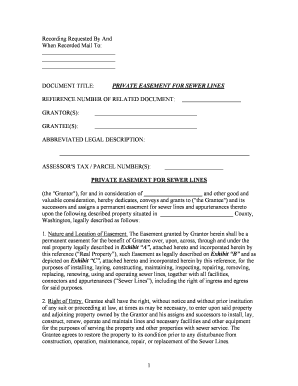
A Washington private easement for sewer lines is a recorded legal instrument that grants a specified party the right to install, access, inspect, maintain, repair, and replace sewer pipes and related infrastructure across another parcel of land. It identifies the grantor, grantee, legal description of the servient and dominant tenements, scope of use, duration, maintenance responsibilities, and any access controls. In Washington the document is typically notarized and recorded with the county auditor to provide public notice and to bind successors in title under state recording statutes.

Why a written private easement matters for sewer infrastructure

A clear, recorded easement protects both property owners and utility operators by defining rights, limits, and maintenance duties; it prevents access disputes and preserves title clarity during transfers or financing. Proper drafting reduces litigation risk and ensures compatibility with county recording requirements and local permitting.

Why a written private easement matters for sewer infrastructure

Who typically prepares and signs a private sewer easement

Parties commonly involved include property owners granting access, utility companies or local sewer districts receiving rights, surveyors preparing legal descriptions, and attorneys reviewing title and liability language.

  • Property owners granting access — negotiate scope and compensation; ensure property description accuracy and required signatures.
  • Utilities and sewer districts — confirm operational needs, maintenance access, indemnities, and insurance requirements before acceptance.
  • Title companies and lenders — require recorded easement language that is clear for underwriting and closing.

Each signer should confirm authority to bind the relevant entity and consider title review before recording to avoid conflicts with mortgages or prior encumbrances.

Step-by-step: preparing and recording the easement

Work through these steps in order to draft, execute, and record a valid Washington private easement for sewer lines.

  • 01
    Obtain title report: Order current title to identify liens, mortgages, and legal owner names.
  • 02
    Prepare legal description: Have a licensed surveyor or title company provide an accurate description and sketch.
  • 03
    Draft easement: Specify rights, obligations, maintenance, indemnity, insurance, and duration.
  • 04
    Execute and notarize: Signatures must be notarized; include corporate attestations for entities.

How the recording and notice process functions

Recording gives public notice and binds later purchasers; follow county auditor steps to complete the public record.

  • Record document: Submit the fully executed, notarized easement to the county auditor.
  • Pay fees: Pay the county recording fee and any page or indexing charges.
  • Indexing: Recorder indexes by grantor and grantee for title search visibility.
  • Certified copy: Obtain recorded copies for parties, title company, and lender files.

Common digital workflow settings for online completion

Configure an e-signature workflow to match signing order, authentication, and post-signature distribution needs.

Field Configuration
Signing order Sequential or parallel per party roles
Authentication Email link, SMS code, or KBA as needed
Notary integration RON or in-person notary step
Post-sign routing Automatic send to title company and county recorder

Digital execution and platform capabilities to consider

Choose a platform that supports notarization workflows, audit trails, secure storage, and role-based access.

  • Document formats: PDF and Word DOCX accepted
  • Integrations: Connects with title systems, Google Drive, and NetSuite
  • Security: TLS 1.2/1.3 and AES-256 encryption

Confirm the provider supports required signer authentication and provides a tamper-evident audit trail suitable for county recording and lender review.

Essential clauses for a professional sewer easement

Include these elements to make the easement clear, enforceable, and practical for long-term maintenance and access.

Grant of Easement

Describe the precise rights granted, including installation, operation, replacement, vertical and horizontal limits, and whether access includes vehicular or only pedestrian access, to avoid later disputes.
Legal Description

Provide the exact metes-and-bounds or recorded plat reference, reference to parcel tax ID, and an attached sketch so the easement is locatable and satisfies county recorder indexing requirements.

Duration and Transfer

State whether the easement is perpetual or time-limited, and clarify that it runs with the land, binding successors and assigns to ensure continuity through property transfers and financing.

Maintenance and Repair

Allocate routine maintenance responsibility, emergency repair obligations, cost-sharing, and access notice procedures to reduce future operational disputes and define response timelines.

Liability and Insurance

Include indemnity provisions, limits of liability, and minimum insurance coverage required of the grantee to protect the grantor and adjacent property owners from damage claims.

Access Protocols

Specify permitted access times, notification requirements, restoration standards after work, and any restrictions on heavy equipment to limit impact on the servient parcel and neighbors.

Security and compliance items to record

Encryption: AES-256 at rest
Transport security: TLS 1.2/1.3 in transit
Audit trail: Timestamps and IP addresses
Access controls: Role-based permissions
BAA availability: Required for health data
Certification: SOC 2 Type II available

Timing and filing expectations

Plan for turnaround times and deadlines for survey delivery, title clearance, execution, notarization, and recording.

Survey and description:

Allow 1–3 weeks depending on surveyor workload and site complexity.

Title report:

Order 3–7 business days; allow additional time for curative items.

Execution and notarization:

Schedule signings to accommodate in-person or RON requirements.

Recording turnaround:

County recording may take 1–10 business days; county backlog varies.

Post-record delivery:

Expect certified copies within 1–5 business days after recording.

Common preparation and recording pitfalls

  • Inaccurate legal descriptions: partial or informal descriptions often cause rejection by the county recorder and require re-filing, adding delay and cost.
  • Name mismatches: using informal or abbreviated owner names can create title defects and trigger lender or title company objections at closing.
  • Undefined maintenance responsibilities: vague language about repairs or cost allocation frequently leads to disputes and litigation between grantor and grantee.
  • Failure to obtain consents: omitting mortgagee or co-owner consents can render the easement unenforceable against lenders or successor owners.

Risks and legal consequences of an incorrect easement

Void or unenforceable: May be void if essential elements are missing
Title objections: Lenders may refuse to close on property with defective easements
Access disputes: Ambiguity leads to costly legal disputes
Repair liability: Unclear maintenance terms shift unexpected costs
Recording rejection: County may reject improper descriptions or signatures
Insurance gaps: Insufficient insurance requirements expose grantor to claims

eSignature vendor comparison for signing and notarization workflows

Comparison of common vendor criteria for executing and storing legal documents, with signNow listed first per platform capability and pricing references.

signNow DocuSign Adobe Sign PandaDoc HelloSign
Starting Price $8/user/mo $15/user/mo $14/user/mo $19/user/mo $15/user/mo
Free Trial 7-day free trial Varies by vendor Varies by vendor Varies by vendor Varies by vendor
Bulk Send Yes Varies by plan Varies by plan Varies by plan Varies by plan
Audit Trail Yes Yes Yes Yes Yes
HIPAA Compliant Yes (BAA) Varies by vendor Varies by vendor Varies by vendor Varies by vendor
Envelope Cap No cap 100 envelopes/user/year Varies by plan Varies by plan Varies by plan

FAQs and troubleshooting for Washington sewer easements

Answers to common questions about validity, notarization, recording, corrections, revocation, and digital signing for private sewer easements.


Need help? Contact support

be ready to get more
Join over 28 million airSlate SignNow users