Establishing secure connection…Loading editor…Preparing document…

Washington Guardianship

This template is fully customizable. Edit the text, fill out the fields, and send it for signature. Give it a try!
Washington Guardianship

What Washington guardianship is and when it applies

Washington guardianship is a court-authorized legal process to appoint a guardian to make personal care or financial decisions for a person (the proposed ward) who lacks capacity. The petition is filed in superior court, and judges may appoint a guardian of the person, guardian of the estate, or limited guardian with tailored powers. The process includes notice, evaluation of capacity, potential appointment of counsel, a hearing, and ongoing reporting or accountings if the guardian manages assets. Alternatives such as durable powers of attorney or supported decision-making are often considered first.

Why a clear guardianship petition matters

A properly prepared Washington guardianship petition protects the ward’s rights, enables timely decision-making for health and finances, and reduces the risk of contested hearings. Clear petitions speed court review and support appropriate limits on the guardian’s authority.

Why a clear guardianship petition matters

Who commonly prepares or signs guardianship petitions

Government agencies, fiduciaries, and financial institutions also interact with guardianship orders during asset transfers, benefits management, and long-term care planning.

  • Family members and close friends seeking decision-making help for an incapacitated relative
  • Attorneys specializing in elder law, probate, or guardianship matters representing petitioners or wards
  • Healthcare or social service professionals supplying medical evidence and capacity assessments

Step-by-step: preparing and filing a Washington guardianship petition

Follow these core steps to prepare a complete petition and reduce delays at the superior court.

  • 01
    Evaluate need: Confirm incapacity and explore less-restrictive alternatives before pursuing guardianship.
  • 02
    Gather evidence: Collect medical records, psychiatric evaluations, financial statements, and other supporting documents.
  • 03
    Prepare petition: Draft petition with proposed powers, bond request, and proposed guardian information.
  • 04
    File and serve: File with superior court, pay fees, and serve required notice to interested persons.

How to set up an online guardianship filing workflow

Configure templates and signer roles to streamline repeated filings and required notifications in county courts.

Field Configuration
Template Create a petition template with standard fields populated
Signers Assign petitioner, proposed guardian, and witness roles
Authentication Require email or SMS verification for remote signers
Notifications Enable automated filings and service reminders

Digital signing and e-filing considerations

If you use electronic signatures or remote notarization, keep reproducible audit trails and copies suitable for court filing and long-term retention.

  • Document formats: Use PDF/A or PDF for reliable court compatibility
  • Authentication: Strong signer authentication reduces dispute risk
  • Integrations: Connect with case management and storage systems

Typical e-sign and review flow for guardianship documents

An efficient online flow reduces turnaround and ensures complete records for the court.

  • Upload: Submit petition and exhibits as a single PDF package
  • Place fields: Add signature, initials, and date fields for each signer
  • Authenticate: Verify signers via email, SMS, or stronger methods
  • Complete: Capture signed PDF and audit trail for filing

Essential components of a professional guardianship petition

Include each component below to present a clear factual record and propose appropriate, narrowly tailored guardianship powers.

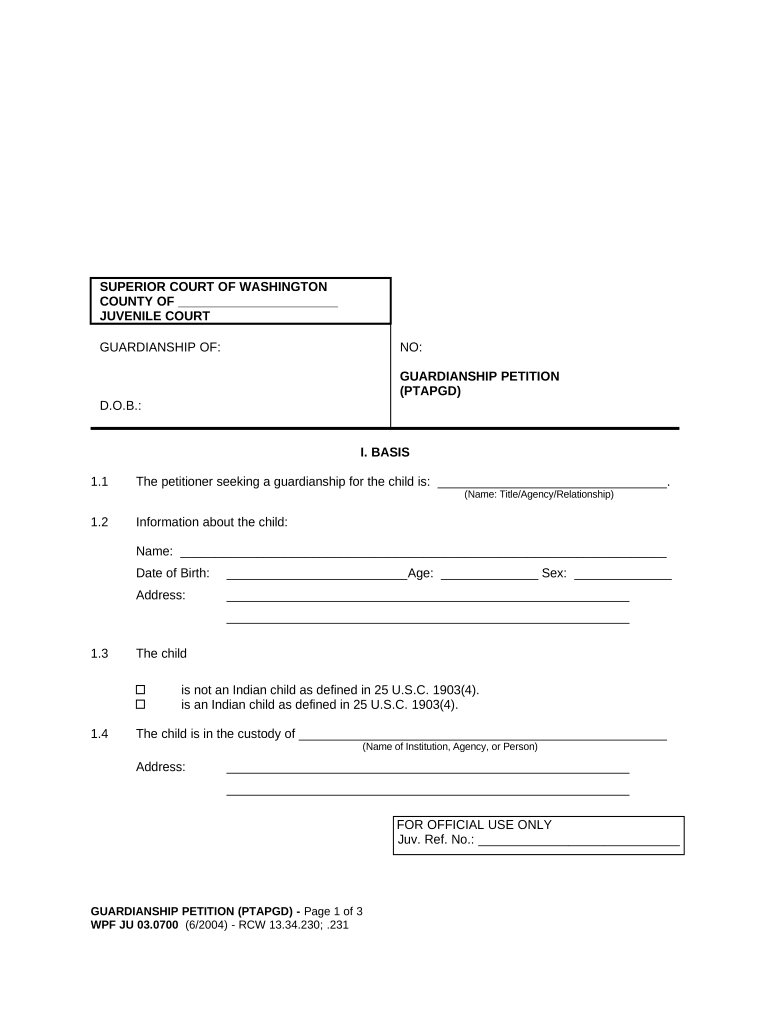
Caption and parties

Court caption, case type, petitioner and proposed ward names, addresses, and identifying details to ensure correct filing.
Statement of need

Clear factual allegations describing the ward’s incapacity, functional limitations, and why less-restrictive options are inadequate.

Medical evidence

Attach evaluations, treating provider statements, or capacity assessments that specify deficits relevant to requested powers.

Proposed guardian plan

Scope of authority requested, plans for care, financial management, and any proposed visitation or support arrangements.

Notice and service

List of persons to be served, proof of service procedures, and any statutory notice summary the court requires.

Bond and accounting

If estate powers are requested, propose bond amount and outline accounting and reporting commitments to the court.

Required supporting information and key data fields

Ward identity: Full name, DOB
Petitioner identity: Name, address
Medical evidence: Reports attached
Financial records: Bank statements
Proposed powers: List specific authorities
Service list: All interested persons

Potential risks and legal consequences of incomplete or incorrect petitions

Wrongful deprivation: Court may deny or limit guardianship
Fiduciary liability: Guardian can face civil liability for mismanagement
Criminal exposure: Fraudulent conduct can trigger criminal charges
Bond sanctions: Insufficient bond may require adjustments
Delay in care: Incomplete filings delay medical or financial decisions
Accounting orders: Court may order detailed accountings

Common mistakes that cause delays or denials

  • Missing or inconsistent names and dates between petition, exhibits, and identification documents increases court follow-up and service errors.
  • Failing to attach medical evaluations or providing vague statements about incapacity often leads to continuances or requests for additional evidence.
  • Not serving all required interested persons or failing to follow statutory notice procedures can result in default or contested proceedings.
  • Requesting overly broad powers without supporting facts or proposed oversight can prompt the court to limit the guardian’s authority.

eSignature pricing and capability snapshot for guardianship workflows

Compare starting prices and key features to evaluate eSignature options for secure signing, notary integration, and audit trails.

signNow DocuSign Adobe Sign PandaDoc HelloSign
Starting Price $8/user/mo $15/user/mo $14/user/mo $19/user/mo $15/user/mo
Free Trial 7-day free trial, no card No No Yes, limited Yes, limited
Bulk Send Yes Yes Yes Yes No
Audit Trail Yes Yes Yes Yes Yes
HIPAA Compliant Yes Yes Yes No No

Frequently asked questions about Washington guardianship filings

Answers to common procedural and e-signature questions when preparing guardianship petitions in Washington and comparable jurisdictions.


Need help? Contact support

be ready to get more
Join over 28 million airSlate SignNow users