Establishing secure connection…Loading editor…Preparing document…

Washington Guardianship Inventory

This template is fully customizable. Edit the text, fill out the fields, and send it for signature. Give it a try!
Washington Guardianship Inventory

What the Washington Guardianship Inventory Is and When It’s Used

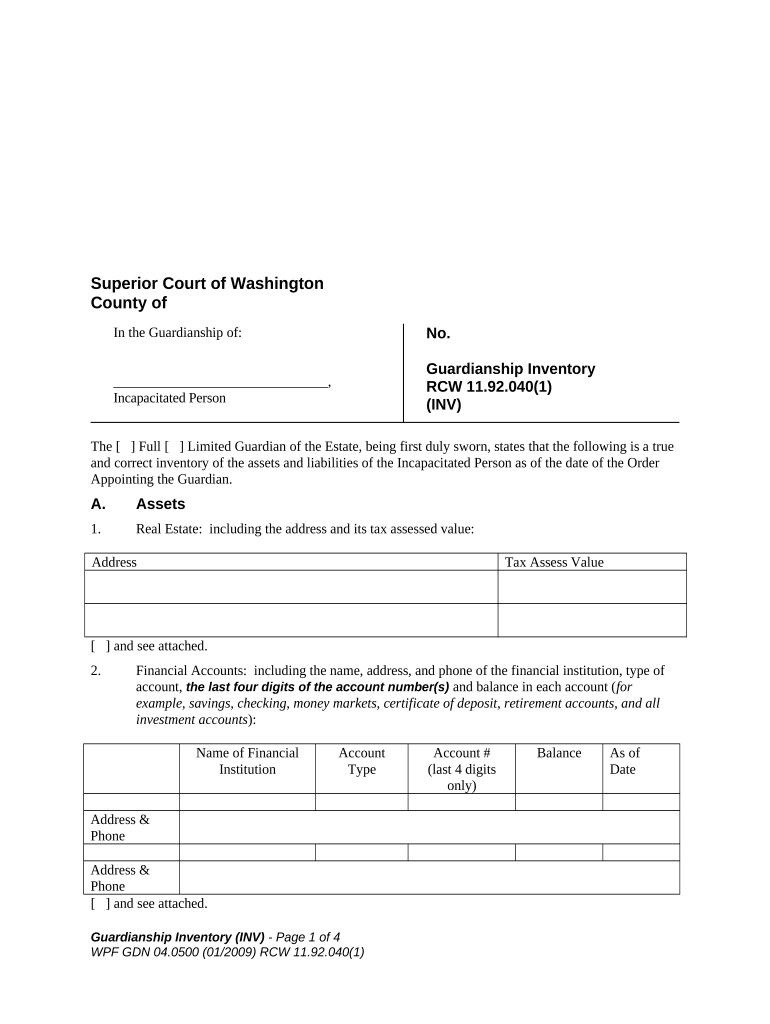
The Washington Guardianship Inventory documents a guardian’s account of the protected person's assets, liabilities, income, and living arrangements for court review. Courts typically require a detailed inventory after appointment so they can evaluate estate administration, ensure fiduciary duties are met, and set any reporting schedule. The inventory may be a court form or an attachment prepared by the guardian or attorney; accuracy and completeness help avoid court motions, surcharges, or requests for amendment.

Why a Complete Inventory Matters for the Guardian and the Court

A thorough inventory clarifies what the guardian controls and protects beneficiaries’ interests, supports transparent accounting, and reduces disputes in guardianship proceedings. Courts rely on inventories to monitor fiduciary performance and to set bond or reporting requirements.

Why a Complete Inventory Matters for the Guardian and the Court

Who Typically Prepares and Reviews the Washington Guardianship Inventory

The inventory is a legal court document: maintain copies, include supporting statements, and follow the court’s local form or scheduling instructions.

  • Court-appointed guardian preparing required court filing and accounting.
  • Guardian’s attorney drafting the inventory and attaching supporting exhibits.
  • Court clerk or probate judge reviewing inventory for sufficiency and compliance.

Stepwise Completion Process for the Inventory Form

Follow these steps in order to prepare a court-ready Washington Guardianship Inventory with supporting documentation.

  • 01
    Gather Records: Collect bank, investment, and title documents.
  • 02
    List Assets: Describe each asset and estimate value.
  • 03
    Document Liabilities: Record debts, mortgages, and due dates.
  • 04
    Attach Evidence: Include recent statements and deeds.

How to Customize and Complete the Inventory Online

Configure an online workflow to collect signer data, attach exhibits, and produce a single combined PDF for filing.

Field Configuration
Signature Block Require guardian signature and date fields.
Attachment Field Allow uploads for bank statements and deeds.
Conditional Section Show property sections only if real estate exists.
Audit Trail Enable timestamping and signer authentication.

Where to File, Send, or Submit the Completed Inventory

Determine the correct filing destination—usually the county probate or superior court that appointed the guardian—and follow local electronic or paper filing rules.

  • Court Clerk: File with the appointing county court.
  • Service: Serve required parties per court order.
  • Electronic Filing: Use the court’s e-filing portal if available.
  • Certified Copies: Request clerk-certified copies when needed.

Digital Signing and eSubmission: Platform Essentials

Verify the court accepts electronically signed inventories or whether notarization or in-court verification is required before e-filing.

  • File Formats: PDF/A and PDF export supported
  • Authentication: Email or stronger signer authentication
  • Audit Trail: Detailed timestamp and IP logging

Essential Information to Include on the Inventory

Guardian Details: Full name and contact
Protected Person: Name, DOB, and address
Asset List: All accounts and property
Liabilities: Mortgages and debts
Supporting Docs: Statements and deeds
Court Info: Case number and date

Core Components of a Professional Inventory Package

A complete package organizes account summaries, titles, supporting evidence, and a clear filing cover to help the court assess the guardian’s stewardship.

Cover Sheet

Concise case header with guardian name, protected person, court and case number, contact details, and inventory date assembled for quick clerk review.
Assets Schedule

Itemized table of bank, investment, and personal property with institution names, partial account numbers, ownership status, and current estimated values for each line item.

Real Property Exhibit

Property addresses, legal descriptions, deed references, estimated market values, outstanding mortgages, and copies of deeds or title reports where applicable.

Income Summary

Regular income sources such as benefits, pensions, Social Security, rental receipts, and a statement of anticipated income for the reporting period.

Liabilities Schedule

List creditors, balances, payment status, and documentation for secured and unsecured obligations to demonstrate accurate net asset calculation.

Supporting Attachments

Bank statements, account summaries, appraisals, tax returns, and any other documents that corroborate values and ownership claims.

Common Preparation Errors to Avoid

  • Omitting account numbers or using incorrect valuation dates, leading to follow-up court questions.
  • Failing to attach supporting statements or deeds so values cannot be verified by the court.
  • Listing assets without clarifying ownership interest or joint ownership status, which complicates administration.
  • Using inconsistent dates or formats across exhibits that cause reconciliation errors during review.

Legal Risks and Potential Consequences of an Incorrect Inventory

Court Sanctions: Financial penalties possible
Surcharge Liability: Monetary recovery for losses
Contempt: Court-ordered compliance actions
Breach Claims: Fiduciary duty disputes
Probate Delays: Extended court oversight
Tax Exposure: Incorrect reporting consequences

Typical Deadlines and Court Timelines to Expect

Timing varies by county and judge; the court’s appointment order controls exact deadlines—confirm dates in the appointment or scheduling order.

Initial Inventory Deadline:

As ordered by court (commonly 30–90 days)

Annual Reports:

Filed on schedule if court requires ongoing accounting

Updated Inventory:

When significant asset changes occur promptly report

Notice to Interested Parties:

Serve inventory per local rules and timelines

Court Hearings:

Allow time for hearings after filing

Comparing eSignature Options for Completing and Executing the Inventory

Platform capabilities and per-user pricing vary; signNow is shown first for neutral comparison of common features relevant to guardianship inventories and court filings.

signNow DocuSign Adobe Sign PandaDoc HelloSign
Starting Price $8/user/mo $15/user/mo $14/user/mo $19/user/mo $15/user/mo
Free Trial 7-day free trial Varies Varies Varies Varies
Bulk Send Yes Yes Yes Yes No
Audit Trail Yes Yes Yes Yes Yes
HIPAA Compliant Yes Yes Yes No No

Who Is Authorized to Sign the Inventory and How Roles Differ

Court-Appointed Guardian

A guardian appointed by the court signs the inventory under oath or declaration as required by local rules. The guardian’s signature attests to the inventory’s accuracy; the guardian bears fiduciary responsibility for truthful reporting and may be required to appear for verification.

Guardian’s Attorney

An attorney preparing the inventory signs only if the court requires counsel signature or if submitting on behalf of the guardian with explicit authorization. Attorneys provide legal certification but the guardian remains the party responsible for content and disclosures.

Examples: How Different Guardians Use an Inventory in Practice

Two concise scenarios illustrate practical uses of an inventory and supporting attachments during a guardianship proceeding.

Estate Attorney Example

A probate attorney assembles a consolidated inventory for a client with multiple brokerage accounts

  • Attorney attaches brokerage statements to substantiate valuations
  • The court accepted the package without hearing, shortening the review period and reducing discovery requests by providing a clear evidentiary trail.

Family Guardian Example

A family member guardian documents a single-property estate and monthly benefit income

  • Guardian includes a recent mortgage statement and benefit award letter
  • The inventory clarified cash flow, helped set a reasonable budget, and prevented later disputes about ownership and benefit receipt.

FAQs and Troubleshooting for the Washington Guardianship Inventory

Answers to common questions that arise when preparing, signing, and filing an inventory in Washington courts.


Need help? Contact support

be ready to get more
Join over 28 million airSlate SignNow users