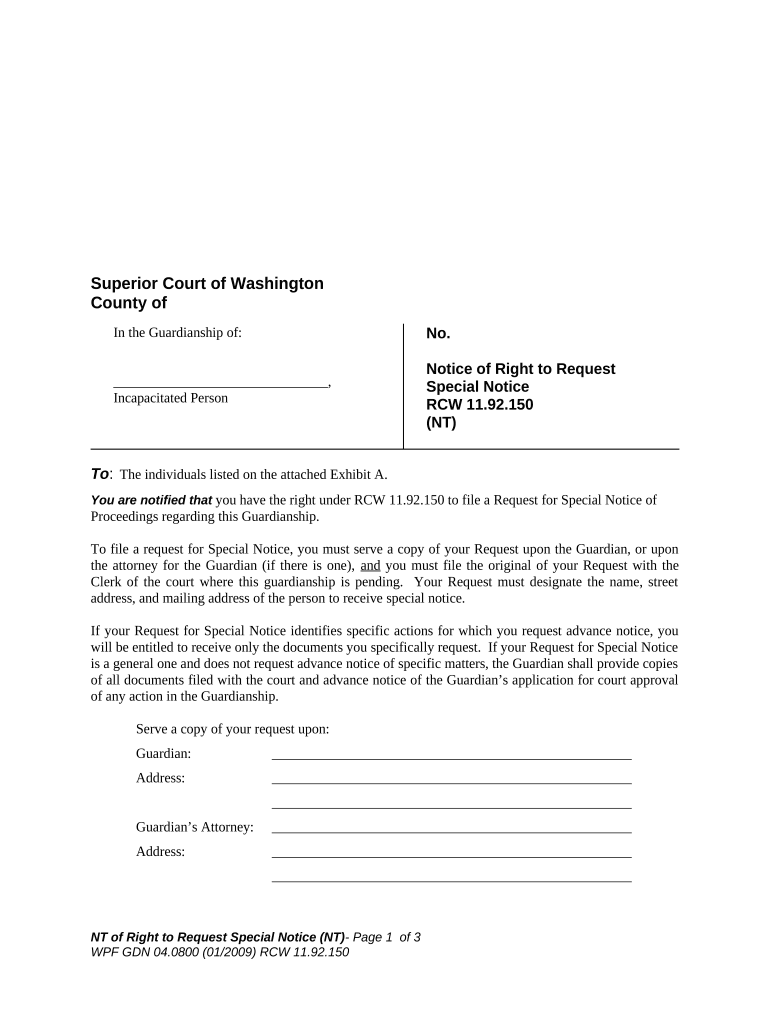
Washington Notice of Right to Request Special Notice
What the Washington Notice of Right to Request Special Notice Is
Why this Notice Matters to Property Owners and Lienholders
Completing and distributing this notice preserves statutory rights, reduces litigation risk, and documents efforts to notify parties who may be affected by sale or enforcement actions.
Who Typically Sends or Receives This Notice
Maintain copies and delivery records to demonstrate compliance; failure to document notice steps can complicate enforcement and title transfer processes.
- Mortgage servicers collecting updated contact and delivery preferences from borrowers and subordinate lienholders.
- Trustees and foreclosure agents ensuring statutory notice obligations are met before a trustee sale.
- Property owners or lien claimants who want to record an address for receipt of future enforcement notices.
Step-by-Step: Completing the Washington Notice
-
01Prepare: Gather requester and property information and confirm legal description.
-
02Complete Fields: Enter contact details, scope, and signature exactly as required.
-
03Authenticate: If using eSignature, obtain consent and capture audit trail data.
-
04Deliver: Send by statutorily approved methods and retain proof of delivery.
How Delivery and Confirmation Typically Works
-
Generate: Create a completed notice with required fields and signature.
-
Send: Transmit via certified mail, e-mail, RON notarization, or process server as applicable.
-
Confirm: Capture delivery receipts, read confirmations, or signed acknowledgements.
-
Archive: Store copies and the audit trail for the statutory retention period.
Online Workflow Settings for Electronic Completion
| Field | Configuration |
|---|---|
| Signature Type | ESIGN-compliant e-signature with timestamp |
| Authentication | Email link plus optional SMS code or KBA |
| Delivery Method | E-mail, certified mail, or RON-notarized link |
| Retention | Automated archival with audit trail and PDF export |
Technical and Platform Considerations for eDelivery
Verify the platform can produce a tamper-evident signed PDF and retain records to meet federal and state retention obligations.
- File Types: PDF and DOCX are standard and archive-friendly
- Audit Trail: IP, timestamps, and signer metadata captured
- Integrations: Connectors for CRM and document storage
Key Timing Considerations and Typical Deadlines
When to Issue:
Provide notice promptly when a trustee sale or enforcement action is scheduled
Request Window:
Allow reasonable lead time for recipients to register for special notice
Delivery Proof:
Retain delivery receipts and signed acknowledgements immediately
Response Handling:
Log and confirm any party requests for special notice when received
Record Retention:
Keep copies to satisfy statutory retention and audit needs
Typical Processing Stages from Preparation to Sale
Preparation
Assemble property and requester information and draft the notice.
Distribution
Send notices by the selected statutory methods and log delivery.
Monitoring
Track incoming requests for special notice and update records.
Finalization
Confirm all notice obligations are met before proceeding to sale.
Common Pitfalls to Avoid When Preparing the Notice
- Incomplete contact details prevent effective delivery and may void statutory notice efforts if challenged.
- Using an unsigned or improperly signed form can be treated as no notice in contested proceedings.
- Relying solely on an unreliable e-mail address without backup physical delivery increases risk of nonreceipt.
- Failing to retain delivery proofs and audit logs eliminates evidence needed to defend procedural compliance.
Consequences of an Incorrect or Missing Notice
Comparing eSignature Vendor Pricing and Capabilities
| signNow | DocuSign | Adobe Sign | PandaDoc | HelloSign | |
|---|---|---|---|---|---|
| Starting Price | $8/user/mo | $15/user/mo | $14/user/mo | $19/user/mo | $15/user/mo |
| Free Trial | 7-day free trial | Varies by vendor | Varies by vendor | Varies by vendor | Varies by vendor |
| Bulk Send | Yes | Yes | Yes | Yes | No |
| Audit Trail | Yes | Yes | Yes | Yes | Yes |
| HIPAA Compliant | Yes | Yes | Yes | No | No |
Real-World Examples of Electronic Notice Workflows
Martin Properties
A regional property manager standardized notices and reduced manual processing time.
- Implementation used mobile-ready forms and centralized templates.
- Tim Martin, Founder, reported streamlined compliance and reliable receipts across dozens of managed properties, citing improved turnaround and fewer title issues at sale.
Fertility Centers of Illinois
A healthcare organization centralized sensitive notices with secure e-sign processes.
- Workflow included HIPAA controls and audit logs.
- John Butler, Founder, emphasized the platform's security and API flexibility to link patient consent and notice records directly to clinical systems.
Practical Tips for Accurate and Efficient Completion
Frequently Asked Questions About This Notice
-
Is an electronic signature valid?
Yes. Electronic signatures are valid under the federal ESIGN Act (15 U.S.C. §7001) and UETA where adopted, provided intent, consent, attribution, and retention requirements are met.
-
Do I need a notary?
Not necessarily. Notarization requirements depend on the notice type and state statute; check Washington law or consult counsel before requiring notarization.
-
How long should I keep records?
Retain notice records for at least three years for general records and longer if tax, HIPAA, or state rules apply; HIPAA requires 6 years (45 CFR §164.530(j)).
-
What delivery methods are acceptable?
Accepted methods depend on statute: certified mail, personal service, or electronic delivery when consented to; preserve delivery proof regardless of method.
-
What happens if the address is wrong?
Incorrect addresses can result in unsuccessful service and may delay or invalidate procedural steps; verify addresses and maintain correction procedures.
-
Can I revoke a request for special notice?
Yes. Provide a signed revocation or follow the procedure specified in the notice; log the revocation and communicate it to affected parties.