Establishing secure connection… Loading editor… Preparing document…
Navigation

Fill and Sign the What in Probate Form

Fill and Sign the What in Probate Form

How it works

Open the document and fill out all its fields.
Apply your legally-binding eSignature.
Save and invite other recipients to sign it.

Rate template

4.8
51 votes
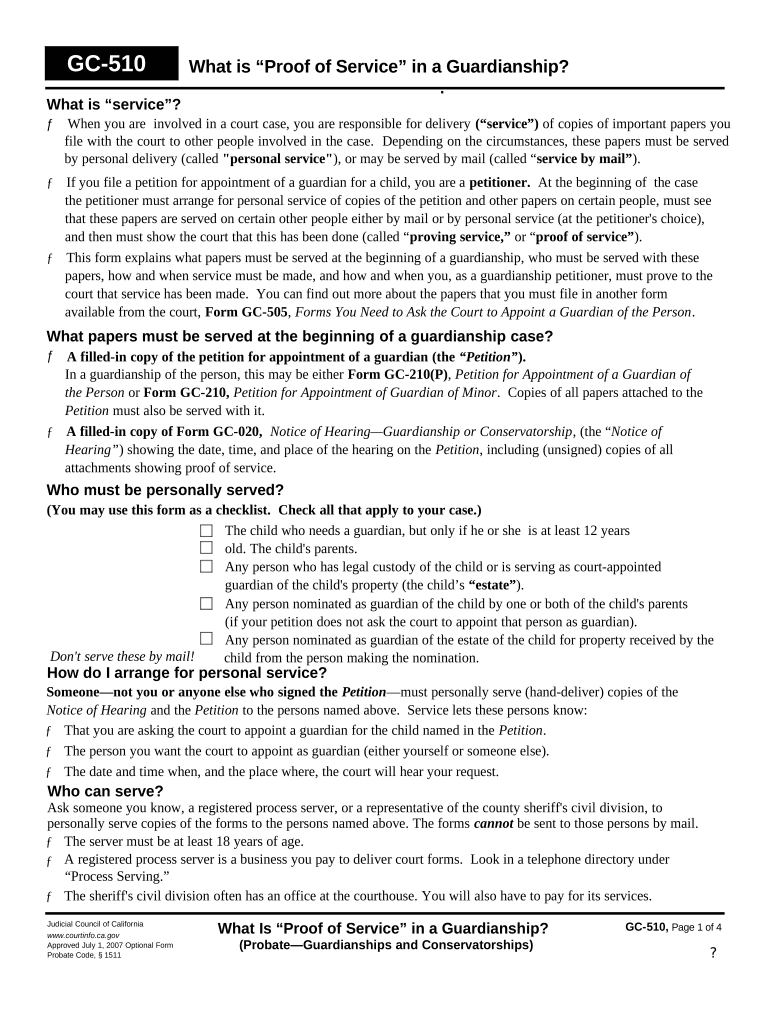
GC-510 What is “Proof of Service” in a Guardianship? . What is “service”? ƒ When you are involved in a court case, you are responsible for delivery (“service”) of copies of important papers you file with the court to other people involved in the case. Depending on the circumstances, these papers must be served by personal delivery (called "personal service" ), or may be served by mail (called “ service by mail” ). ƒ If you file a petition for appointment of a guardian for a child, you are a petitioner. At the beginning of the case the petitioner must arrange for personal service of copies of the petition and other papers on certain people, must see that these papers are served on certain other people either by mail or by personal service (at the petitioner's choice), and then must show the court that this has been done (called “ proving service,” or “ proof of service” ). ƒ This form explains what papers must be served at the beginning of a guardianship, who must be served with these papers, how and when service must be made, and how and when you, as a guardianship petitioner, must prove to the court that service has been made. You can find out more about the papers that you must file in another form available from the court, Form GC-505 , Forms You Need to Ask the Court to Appoint a Guardian of the Person . What papers must be served at the beginning of a guardianship case? ƒ A filled-in copy of the petition for appointment of a guardian (the “Petition” ). In a guardianship of the person, this may be either Form GC-210(P) , Petition for Appointment of a Guardian of the Person or Form GC-210, Petition for Appointment of Guardian of Minor . Copies of all papers attached to the Petition must also be served with it. ƒ A filled-in copy of Form GC-020, Notice of Hearing—Guardianship or Conservatorship , (the “ Notice of Hearing” ) showing the date, time, and place of the hearing on the Petition , including (unsigned) copies of all attachments showing proof of service. Who must be personally served? (You may use this form as a checklist. Check all that apply to your case.) The child who needs a guardian, but only if he or she is at least 12 years old. The child's parents. Any person who has legal custody of the child or is serving as court-appointed guardian of the child's property (the child’s “estate” ). Any person nominated as guardian of the child by one or both of the child's parents (if your petition does not ask the court to appoint that person as guardian). Any person nominated as guardian of the estate of the child for property received by the Don't serve these by mail! child from the person making the nomination. How do I arrange for personal service? Someone—not you or anyone else who signed the Petition —must personally serve (hand-deliver) copies of the Notice of Hearing and the Petition to the persons named above. Service lets these persons know: ƒ That you are asking the court to appoint a guardian for the child named in the Petition . ƒ The person you want the court to appoint as guardian (either yourself or someone else). ƒ The date and time when, and the place where, the court will hear your request. Who can serve? Ask someone you know, a registered process server, or a representative of the county sheriff's civil division, to personally serve copies of the forms to the persons named above. The forms cannot be sent to those persons by mail. ƒ The server must be at least 18 years of age. ƒ A registered process server is a business you pay to deliver court forms. Look in a telephone directory under “Process Serving.” ƒ The sheriff's civil division often has an office at the courthouse. You will also have to pay for its services. Judicial Council of California What Is “Proof of Service” in a Guardianship? GC-510, Page 1 of 4 www.courtinfo.ca.gov Approved July 1, 2007 Optional Form (Probate—Guardianships and Conservatorships) Probate Code, § 1511 ? GC-510 What Is ''Proof of Service'' in a Guardianship? How does the server personally serve the Notice of Hearing and the Petition ? Ask the server to: ƒ Walk up to each person to be served and make sure he or she is the right person. ƒ Hand each person copies of the filled-out Notice of Hearing and the Petition. ƒ Fill out and sign Form GC-020(P) , Proof of Personal Service of Notice of Hearing . If the server delivers papers to more people than can be listed on this form, ask the server to add the names of the additional people served on one or more copies of Form DE-120(PA)/GC-20(PA), Attachment to Notice of Hearing Proof of Personal Service . ƒ Give the filled-out and signed Form GC-020(P) and any attachment pages back to you. What if the person served won ’ t take the papers or tears them up? The server must attempt to make personal delivery (but peacefully!) even if the person served won't take the papers. It doesn't matter if the person tears them up or throws them down after they are handed to him or her. (A registered process server or sheriff's deputy will know how to complete a good service. If you think someone who must be personally served will try to avoid service, it is a good idea to use one of these professionals to serve that person.) Who signs the Proof of Personal Service? ƒ Only the person who serves the Notice of Hearing and the Petition can sign Form GC-020(P) . Neither you, any other petitioner, nor the person served may sign this form. ƒ If more than one person personally serves papers, each server must fill out and sign his or her own separate Form GC-020(P) showing the names of the persons he or she serves. Who may be served by mail? (You may use this form as a checklist. Check all that apply to your case.) The child's relatives listed in the child's Form GC-210(CA) , Guardianship Petition—Child Information Attachment, attached to the Petition : Grandfather (father's father) Grandmother (father's mother) Grandfather (mother's father) Grandmother (mother's mother) Brother(s) (including half-brothers) (if 12 years of age or older) Sister(s) (including half-sisters) (if 12 years of age or older) These may be served by mail! If the child has a brother or sister under the age of 12, copies of the Notice of Hearing and the Petition must be mailed to one of the following persons for him or her instead of mailing directly to the young brother or sister: The brother's or sister's parent; A court-appointed guardian of the brother or sister; or A person having legal custody of the brother or sister who lives with that brother or sister. (If a parent, guardian, or legal custodian of a brother or sister of the child involved in the case is a petitioner, service of notice to that person on behalf of the brother or sister is not necessary.) Any person having the physical care of the child who does not have legal custody of the child. If your petition requests appointment of a guardian of the person who is not related to the child, the Director of the Department of Social Services, Children’s Services Operations and Evaluation Branch, 744 P Street MS 3-34, Sacramento, CA 95814. Your court may require you to serve other persons or organizations by mail. Check your court's local rules and practices to find out if this applies to you. New July 1, 2007 What Is “Proof of Service” in a Guardianship? GC-510 , Page 2 of 4 (Probate—Guardianships and Conservatorships) ? GC-510 What Is ''Proof of Service'' in a Guardianship? Who may be served by mail ? (Continued) If the child is a patient in, or on leave from, a state hospital run by the State Departments of Mental Health or Developmental Disabilities, to the Director of that department. The address for the Director of Mental Health is 1600 Ninth Street, Room 151, Sacramento, CA 95814. The address for the Director of Developmental Disabilities is 1600 Ninth Street, Room 240, Sacramento, CA 95814, Attn.: Office of Legal Affairs. If the child has developmental disabilities and the person you want the court to appoint as guardian is: (1) not the child's natural parent; (2) a provider of services to persons with developmental disabilities or the spouse or an employee of a provider; and (3) not a public agency, to the Director of the Regional Center for the Developmentally Disabled in the child's county. ( But see When must the Notice of Hearing and the Petition be served? on page 4 of this form for a special requirement for mailing papers to a Regional Center Director.) If the child is or may be a Native American, or has Native American ancestors, there are additional mailing and other requirements that may apply to your case. These requirements are not discussed in this form. If you can get on the Internet, you can go to the California Courts Self-Help Center Web site to get more information about the special requirements for a guardianship involving a Native American child. The Web site's address is www.courtinfo.ca.gov/selfhelp/family/guardianship (English) or www.courtinfo.ca.gov/selfhelp/espanol/familia/tutela (Spanish). Who need not be served (unless the court orders otherwise)? Unless the courts orders that they be served, you do not need to arrange for service on the parents or other relatives of a child who has been relinquished to a licensed adoption agency, or the parents of a child a court has declared to be free from the parents' custody and control. How do I arrange for service by mail? Someone—not you or anyone else who signed the Petition —must do the mailing to the persons and organizations named above that are involved in your case. “Doing the mailing” means actually placing the papers in the envelopes and delivering the sealed envelopes into the possession of the U.S. Postal Service . Someone else can address the envelopes and add the postage, but the person who signs the proof of service (see below) must be able to say that he or she enclosed the papers in the envelopes and delivered the sealed envelopes to the U.S. Postal Service on a certain date at a specific place (city and state), and that the addresses on the envelopes were as they are shown in the proof of service. Who can serve by mail? ƒ The person doing the mailing must be at least 18 years of age. ƒ He or she must not be a petitioner or a proposed guardian in your case. ƒ He or she must live or be employed in the county where the mailing (deposit with the U.S. Postal Service) takes place. How does the server serve the Notice of Hearing and the Petition by mail? Ask the server to: ƒ Deposit with the US. Postal Service, with first-class postage prepaid, sealed envelopes (9" x 12" or 10" x 13" Manila envelopes are recommended) addressed to the persons or organizations listed above that apply to your case. The envelopes should contain filled-in copies of Form GC-020, Notice of Hearing—Guardianship or Conservatorship, and the Petition , including all attached pages mentioned in it. ƒ Make sure the addresses shown on the envelopes for the relatives of each child match the addresses shown for these relatives in each child's Form GC-210(CA), Guardianship Petition—Child Information Attachment. New July 1, 2007 What Is “Proof of Service” in a Guardianship? GC-510 , Page 3 of 4 (Probate—Guardianships and Conservatorships) GC-510 What Is ''Proof of Service'' in a Guardianship? How does the server serve the Notice of Hearing and the Petition by mail? (Continued) Ask the server to (continued): ƒ Fill out, date, and sign the Proof of Service on the second page of the original Form GC- 020. Don't sign that form yourself. ƒ If there are more than four persons being served by mail, continue the list of persons served by mail on one or more copies of Form DE-120(MA)/GC-020(MA) , Attachment to Notice of Hearing Proof of Service by Mail . ƒ Give the filled-out and signed original Proof of Service and all filled-out attached pages back to you. When must the Notice of Hearing and the Petition be served? ƒ When you file your Petition , the court clerk will give you a date and time when, and a courtroom or department where, the judge will hear your request for appointment of a guardian. ƒ Once you have the date, time, and place of the hearing, that information must be filled in on Form GC-020, Notice of Hearing—Guardianship or Conservatorship , and that form and the Petition, with all pages attached to it, must then be personally served or served by mail on the persons and organizations mentioned above that apply to your case. ƒ With the exception noted below, personal service and service by mail must be completed at least 15 days before the date of the hearing . ƒ If service must be made on the Director of the Regional Center for the Developmentally Disabled for the child's county, service must be completed at least 30 days before the hearing . If the child in your case is developmentally disabled and you think you may have to serve a Regional Center director, when you file your Petition you can ask the clerk for a later hearing date because you will need more time than usual to serve the Notice of Hearing and the Petition. What happens if the papers aren't served in time? If the Notice of Hearing and Petition aren't served in time, the court will have to continue (postpone) the hearing date on your petition. This will delay appointment of a guardian for the child or children involved in your case. What do I do with the completed Notice of Hearing and the attached proofs of personal service and service by mail? ƒ File with the court at least 5 days before your hearing date the original Form GC-020, Notice of Hearing— Guardianship or Conservatorship, with the filled-out and signed Proof of Service on the second page, the filled- out, signed, and attached Form GC-020(P), Proof of Personal Service of Notice of Hearing—Guardianship or Conservatorship , and all attached pages showing additional persons served. File these papers with the court as soon as you can. The 5-day period mentioned above is a minimum time period. ƒ When you file Form GC-020 , take an extra copy with you for the court to stamp, showing that the original form was filed on that day. ƒ Bring that copy with you to the hearing. New July 1, 2007 What Is “Proof of Service” in a Guardianship? GC-510 , Page 4 of 4 (Probate—Guardianships and Conservatorships)

Helpful Strategies for Finalizing Your ‘What In Probate’ Online

Are you fed up with the inconvenience of handling paperwork? Look no further than airSlate SignNow, the premier eSignature service for individuals and small to medium-sized businesses. Bid farewell to the lengthy process of printing and scanning documents. With airSlate SignNow, you can effortlessly finalize and sign documents online. Leverage the robust features embedded in this user-friendly and budget-conscious platform to transform your approach to document management. Whether you need to sign forms or collect eSignatures, airSlate SignNow simplifies everything, needing merely a few clicks.

Adhere to this step-by-step guide:

  1. Sign in to your account or enroll for a free trial with our service.
  2. Select +Create to upload a file from your device, cloud storage, or our form library.
  3. Access your ‘What In Probate’ in the editor.
  4. Click Me (Fill Out Now) to prepare the document on your end.
  5. Add and designate fillable fields for others (if required).
  6. Proceed with the Send Invite settings to request eSignatures from additional parties.
  7. Save, print your copy, or convert it into a reusable template.

No need to worry if you have to collaborate with your colleagues on your What In Probate or send it for notarization—our solution provides everything necessary to accomplish such tasks. Sign up with airSlate SignNow today and elevate your document management to a new level!

Here is a list of the most common customer questions. If you can’t find an answer to your question, please don’t hesitate to reach out to us.

Need help? Contact Support

The best way to complete and sign your what in probate form

Save time on document management with airSlate SignNow and get your what in probate form eSigned quickly from anywhere with our fully compliant eSignature tool.

How to Sign a PDF Online How to Sign a PDF Online

How to fill out and sign documents online

In the past, dealing with paperwork required pretty much time and effort. But with airSlate SignNow, document management is easy and fast. Our powerful and user-friendly eSignature solution lets you easily fill out and eSign your what in probate form online from any internet-connected device.

Follow the step-by-step guide to eSign your what in probate form template online:

  • 1.Register for a free trial with airSlate SignNow or log in to your account with password credentials or SSO authentication.
  • 2.Click Upload or Create and add a file for eSigning from your device, the cloud, or our form library.
  • 3.Click on the file name to open it in the editor and use the left-side toolbar to complete all the blank fields appropriately.
  • 4.Put the My Signature field where you need to approve your sample. Type your name, draw, or upload a photo of your regular signature.
  • 5.Click Save and Close to accomplish editing your completed document.

After your what in probate form template is ready, download it to your device, save it to the cloud, or invite other people to eSign it. With airSlate SignNow, the eSigning process only requires a couple of clicks. Use our powerful eSignature tool wherever you are to deal with your paperwork efficiently!

How to Sign a PDF Using Google Chrome How to Sign a PDF Using Google Chrome

How to fill out and sign documents in Google Chrome

Completing and signing paperwork is simple with the airSlate SignNow extension for Google Chrome. Adding it to your browser is a fast and efficient way to deal with your forms online. Sign your what in probate form sample with a legally-binding electronic signature in just a couple of clicks without switching between applications and tabs.

Follow the step-by-step guide to eSign your what in probate form in Google Chrome:

  • 1.Go to the Chrome Web Store, locate the airSlate SignNow extension for Chrome, and install it to your browser.
  • 2.Right-click on the link to a form you need to approve and choose Open in airSlate SignNow.
  • 3.Log in to your account with your password or Google/Facebook sign-in buttons. If you don’t have one, you can start a free trial.
  • 4.Utilize the Edit & Sign menu on the left to fill out your sample, then drag and drop the My Signature field.
  • 5.Insert a picture of your handwritten signature, draw it, or simply type in your full name to eSign.
  • 6.Verify all the details are correct and click Save and Close to finish modifying your paperwork.

Now, you can save your what in probate form template to your device or cloud storage, send the copy to other individuals, or invite them to eSign your document with an email request or a protected Signing Link. The airSlate SignNow extension for Google Chrome enhances your document processes with minimum time and effort. Start using airSlate SignNow today!

How to Sign a PDF in Gmail How to Sign a PDF in Gmail How to Sign a PDF in Gmail

How to complete and sign documents in Gmail

Every time you receive an email containing the what in probate form for approval, there’s no need to print and scan a document or download and re-upload it to another program. There’s a better solution if you use Gmail. Try the airSlate SignNow add-on to rapidly eSign any paperwork right from your inbox.

Follow the step-by-step guide to eSign your what in probate form in Gmail:

  • 1.Visit the Google Workplace Marketplace and find a airSlate SignNow add-on for Gmail.
  • 2.Install the program with a related button and grant the tool access to your Google account.
  • 3.Open an email containing an attached file that needs signing and use the S symbol on the right panel to launch the add-on.
  • 4.Log in to your airSlate SignNow account. Select Send to Sign to forward the file to other parties for approval or click Upload to open it in the editor.
  • 5.Place the My Signature option where you need to eSign: type, draw, or import your signature.

This eSigning process saves time and only requires a couple of clicks. Utilize the airSlate SignNow add-on for Gmail to adjust your what in probate form with fillable fields, sign documents legally, and invite other individuals to eSign them al without leaving your mailbox. Enhance your signature workflows now!

How to Sign a PDF on a Mobile Device How to Sign a PDF on a Mobile Device How to Sign a PDF on a Mobile Device

How to complete and sign documents in a mobile browser

Need to rapidly complete and sign your what in probate form on a smartphone while working on the go? airSlate SignNow can help without the need to install extra software applications. Open our airSlate SignNow tool from any browser on your mobile device and create legally-binding eSignatures on the go, 24/7.

Follow the step-by-step guide to eSign your what in probate form in a browser:

  • 1.Open any browser on your device and follow the link www.signnow.com
  • 2.Register for an account with a free trial or log in with your password credentials or SSO authentication.
  • 3.Click Upload or Create and pick a file that needs to be completed from a cloud, your device, or our form catalogue with ready-to go templates.
  • 4.Open the form and fill out the blank fields with tools from Edit & Sign menu on the left.
  • 5.Place the My Signature field to the form, then type in your name, draw, or upload your signature.

In a few easy clicks, your what in probate form is completed from wherever you are. Once you're done with editing, you can save the document on your device, create a reusable template for it, email it to other individuals, or invite them electronically sign it. Make your documents on the go prompt and efficient with airSlate SignNow!

How to Sign a PDF on iPhone How to Sign a PDF on iPhone

How to complete and sign forms on iOS

In today’s business community, tasks must be done rapidly even when you’re away from your computer. Using the airSlate SignNow application, you can organize your paperwork and approve your what in probate form with a legally-binding eSignature right on your iPhone or iPad. Install it on your device to conclude agreements and manage forms from anyplace 24/7.

Follow the step-by-step guidelines to eSign your what in probate form on iOS devices:

  • 1.Open the App Store, find the airSlate SignNow app by airSlate, and set it up on your device.
  • 2.Open the application, tap Create to add a form, and select Myself.
  • 3.Select Signature at the bottom toolbar and simply draw your autograph with a finger or stylus to eSign the sample.
  • 4.Tap Done -> Save after signing the sample.
  • 5.Tap Save or take advantage of the Make Template option to re-use this paperwork in the future.

This method is so easy your what in probate form is completed and signed in a couple of taps. The airSlate SignNow app works in the cloud so all the forms on your mobile device are kept in your account and are available whenever you need them. Use airSlate SignNow for iOS to improve your document management and eSignature workflows!

How to Sign a PDF on Android How to Sign a PDF on Android

How to complete and sign documents on Android

With airSlate SignNow, it’s easy to sign your what in probate form on the go. Install its mobile application for Android OS on your device and start improving eSignature workflows right on your smartphone or tablet.

Follow the step-by-step guidelines to eSign your what in probate form on Android:

  • 1.Navigate to Google Play, search for the airSlate SignNow app from airSlate, and install it on your device.
  • 2.Log in to your account or create it with a free trial, then import a file with a ➕ button on the bottom of you screen.
  • 3.Tap on the uploaded file and choose Open in Editor from the dropdown menu.
  • 4.Tap on Tools tab -> Signature, then draw or type your name to electronically sign the template. Complete blank fields with other tools on the bottom if required.
  • 5.Utilize the ✔ button, then tap on the Save option to finish editing.

With an intuitive interface and full compliance with major eSignature standards, the airSlate SignNow app is the best tool for signing your what in probate form. It even operates without internet and updates all document adjustments once your internet connection is restored and the tool is synced. Complete and eSign forms, send them for approval, and make multi-usable templates anytime and from anywhere with airSlate SignNow.

Sign up and try What in probate form
  • Close deals faster
  • Improve productivity
  • Delight customers
  • Increase revenue
  • Save time & money
  • Reduce payment cycles