Establishing secure connection…Loading editor…Preparing document…

Motion for Opportunity to Rehabilitate Prospective Jurors

This template is fully customizable. Edit the text, fill out the fields, and send it for signature. Give it a try!
Motion for Opportunity to Rehabilitate Prospective Jurors

What the Motion for Opportunity to Rehabilitate Prospective Jurors Is

The Motion for Opportunity to Rehabilitate Prospective Jurors is a pretrial pleading asking the court to permit targeted follow-up questioning of particular prospective jurors after voir dire. It identifies jurors of concern, summarizes the answers or circumstances that suggest bias or misunderstanding, explains why rehabilitative questioning is appropriate under controlling voir dire standards, and requests a narrowly tailored remedy such as additional questioning or a corrective instruction rather than immediate excusal. Content and timing vary by jurisdiction and local practice rules.

Why Filing this Motion Can Matter in Jury Selection

A clear Motion for Opportunity to Rehabilitate Prospective Jurors preserves issues for appeal, focuses the court on specific biases, and may avoid unnecessary excusals by requesting corrective questioning tailored to the juror’s responses.

Why Filing this Motion Can Matter in Jury Selection

Who Commonly Prepares and Uses This Motion

Typical users who file this motion include trial attorneys and parties seeking targeted juror rehabilitation before or during voir dire.

  • Defense counsel seeking to preserve jurors and avoid peremptory or cause challenges.
  • Prosecutors or government counsel requesting clarification to dismiss biased jurors.
  • Trial judges review motions to manage voir dire and ensure impartial jury selection.

Who Has Authority to File and Sign This Motion

Defense Attorney

Defense attorneys file this motion when juror answers indicate possible bias or misunderstanding; the filing sets out the factual basis, identifies the jurors, proposes specific rehabilitative questions, and requests court permission to ask those questions instead of excusing the juror.

Government Counsel

Prosecutors or government counsel use the motion selectively to clarify juror responses that may mask partiality; the filing explains why limited rehabilitative questioning is warranted while balancing trial efficiency and the defendant’s right to an impartial jury.

Essential Components of a Professional Motion for Opportunity to Rehabilitate Prospective Jurors

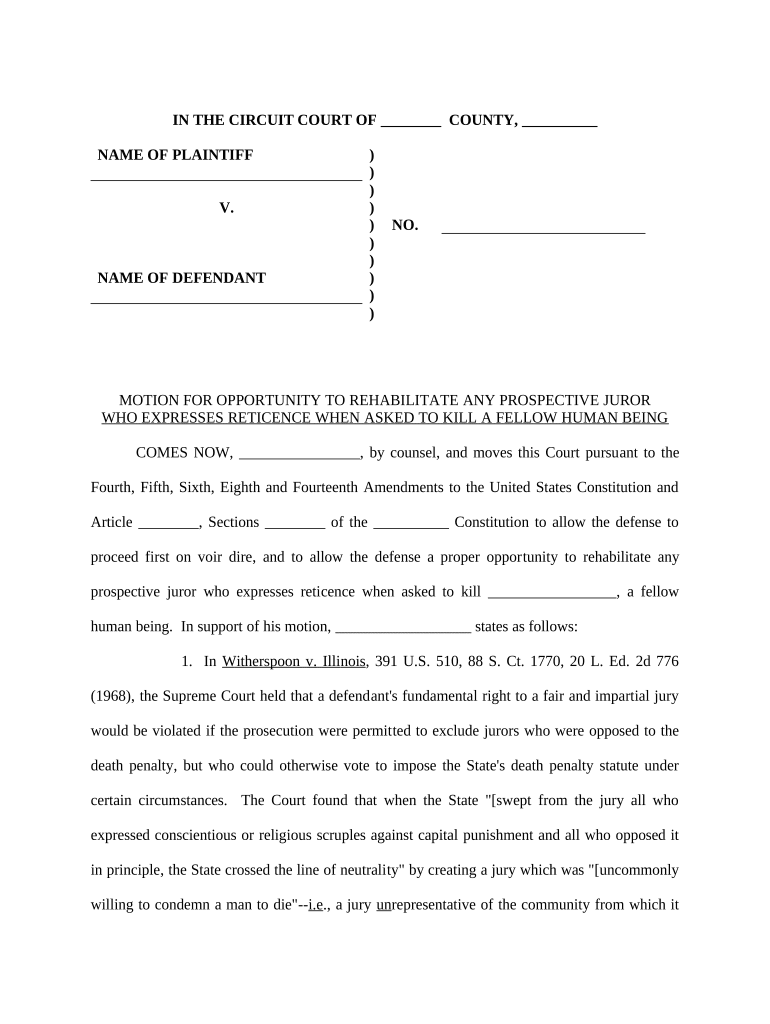
A complete motion organizes factual excerpts, identifies jurors clearly, states the legal standard, proposes precise rehabilitative questions, attaches supporting exhibits, and provides a proposed order for the court’s convenience.

Caption and Parties

Begin with the full court caption, party names, docket number, judge, and counsel contact information so the motion integrates cleanly into the official case record and clerk’s system.
Statement of Facts

Provide a concise recital of the juror responses or conduct with date, seat or juror number, and transcript or questionnaire citations where available to establish a factual basis for rehabilitation.

Legal Standard

Cite the controlling standard or local rule authorizing rehabilitative questioning, explain the burden required, and briefly show why that standard is met in the specific circumstances described.

Juror Identification

List juror numbers or seat identifiers and attach the relevant voir dire excerpts or juror questionnaires as exhibits so the judge can assess whether targeted rehabilitation is appropriate.

Proposed Questions

Provide narrowly tailored rehabilitative questions or corrective instructions the court can ask to address the issue without excusing the juror; include example phrasing to reduce ambiguity.

Proposed Order

Attach a proposed order granting the motion that specifies permitted questioning, hearing logistics, and any limits on scope, which assists the judge and streamlines courtroom procedure.

Step-by-Step: Prepare and File the Motion

Follow these steps to prepare and file a clear, timely Motion for Opportunity to Rehabilitate Prospective Jurors.

  • 01
    Identify Jurors: Record exact juror responses and identifiers.
  • 02
    Draft Motion: State facts, legal basis, and relief requested.
  • 03
    Serve Parties: Serve opposing counsel and file with clerk.
  • 04
    Schedule Hearing: Ask for prompt hearing under local rules.

How to Set Up an Online Workflow for This Motion

Configure an online workflow to prepare, sign, and file the motion while preserving the court-ready PDF and audit trail.

Field Configuration
Upload Motion Document and Exhibits PDF preferred; preserve exhibits
Add Signature and Date Fields Place signer blocks and initial fields
Set Authentication Method Email token or SMS verification
Configure Routing and Notifications Sequence: filing attorney, opposing counsel, court clerk

Where to File, Send, and Serve This Motion

This section explains typical routing and filing destinations for the motion in federal and state trial courts.

  • Court Clerk: File motion via e-filing or clerk’s office.
  • Opposing Counsel: Provide courtesy copy and service proof.
  • Judicial Chambers: Deliver proposed order and copies to chambers.
  • Record Preservation: Ensure hearing is recorded and exhibits retained.

Digital Signing, e-Filing, and Platform Considerations

Choose an e-filing and e-sign platform that supports secure PDFs, audit trails, and required signer authentication.

  • File Formats: PDF and DOCX accepted by most courts.
  • Integrations: Works with court e-filing and case management.
  • Authentication: Email, SMS, or advanced signer verification.

Key Deadlines and Timing to Watch

Key filing and response deadlines vary by jurisdiction; adhere to local rules and scheduled hearing dates.

Pretrial Motion Filing Deadline:

File before the court’s pretrial cutoff; some courts require at least 7–14 days before hearing.

Local Rule Timing Requirement:

Follow district or county local rules for motion notice periods and supporting exhibit timelines.

Service Deadline on Opposing Counsel:

Serve opposing counsel within the time specified by rule and file proof of service.

Response or Opposition Deadline:

Opposition or response typically due within local rule period, often 7–14 days.

Hearing Scheduling and Notice:

Request hearing date in filing or via clerk; confirm oral argument mode and length limits.

Milestones from Filing to Hearing

Milestones below outline the typical lifecycle from motion preparation through filing, argument, and record preservation for appeal.

01

Drafting and Review

Prepare motion, exhibits, and proposed order; obtain supervisory or co-counsel review.

02

Filing and Service

File with clerk and serve all parties; include certificate of service.

03

Hearing and Questioning

Court may permit limited voir dire or rehabilitative questioning at hearing.

04

Record and Transcription

Ensure the hearing is recorded and a transcript is ordered for appeal.

Required Information and Core Fields to Include

Case Caption: Full caption exactly as on court record.
Court and Division: Specify court name and division.
Docket Number: Enter docket or case number.
Prospective Jurors: List juror numbers or identifiers.
Grounds Stated: Concise factual basis for rehabilitation.
Relief Requested: Describe specific questioning or instruction sought.

Common Mistakes When Preparing the Motion

  • Failing to identify specific juror answers or providing only general allegations undermines the motion’s credibility and reduces the likelihood of judicially-ordered rehabilitation.
  • Submitting the motion after jury empanelment or outside local timing rules can result in waiver or outright refusal to consider rehabilitation.
  • Relying on hearsay or unrecorded bench statements without supporting exhibits or transcripts makes effective rehabilitation requests difficult to grant.
  • Overbroad requests for wholesale voir dire rather than focused rehabilitation often prompt the court to deny relief to avoid undue delay.

Risks and Consequences of an Incorrect or Late Motion

Denial of Motion: Relief denied by court.
Waiver of Objection: Failure to timely move may waive.
Sanctions: Court may impose costs.
Trial Delay: Hearing may extend trial schedule.
Appellate Limits: Record preservation affects appeal.
Mistrial Risk: Incorrect handling can trigger mistrial.

eSignature Vendor Pricing and Feature Comparison

Pricing and feature differences influence how you prepare and execute filings electronically; signNow is listed first for direct feature and price comparison.

signNow DocuSign Adobe Sign PandaDoc HelloSign
Starting Price $8/user/mo $15/user/mo $14/user/mo $19/user/mo $15/user/mo
Free Trial Yes, 7-day trial No No Yes, limited Yes, limited
Bulk Send Yes Yes Yes Yes No
Audit Trail Yes Yes Yes Yes Yes
HIPAA Compliant Yes Yes Yes No No

Real-World Examples of How the Motion Is Used

These concise case patterns show practical use and outcomes when the motion is properly framed and supported.

Defense Preservation Example

A defense attorney identified repeated juror statements suggesting bias about a party’s occupation

  • The motion supplied voir dire excerpts and proposed targeted questions
  • The judge allowed limited rehabilitative questioning, the juror clarified prior remarks, and counsel avoided a costly strike and preserved the issue on the record for appeal.

Government Clarification Example

Prosecutors filed a narrow motion after a juror expressed confusion about a legal term

  • The filing proposed corrective instruction language and a brief follow-up question
  • The court accepted the proposed correction, reducing the need to excuse the juror and keeping the panel intact.

Frequently Asked Questions About the Motion and Filing

Answers to common procedural and filing questions to reduce risk and ensure correct record creation.


Need help? Contact support

be ready to get more
Join over 28 million airSlate SignNow users