Court Caption
Full court name and county aligned with the petition; this establishes the proper venue and must match other court filings for validity and tracking.
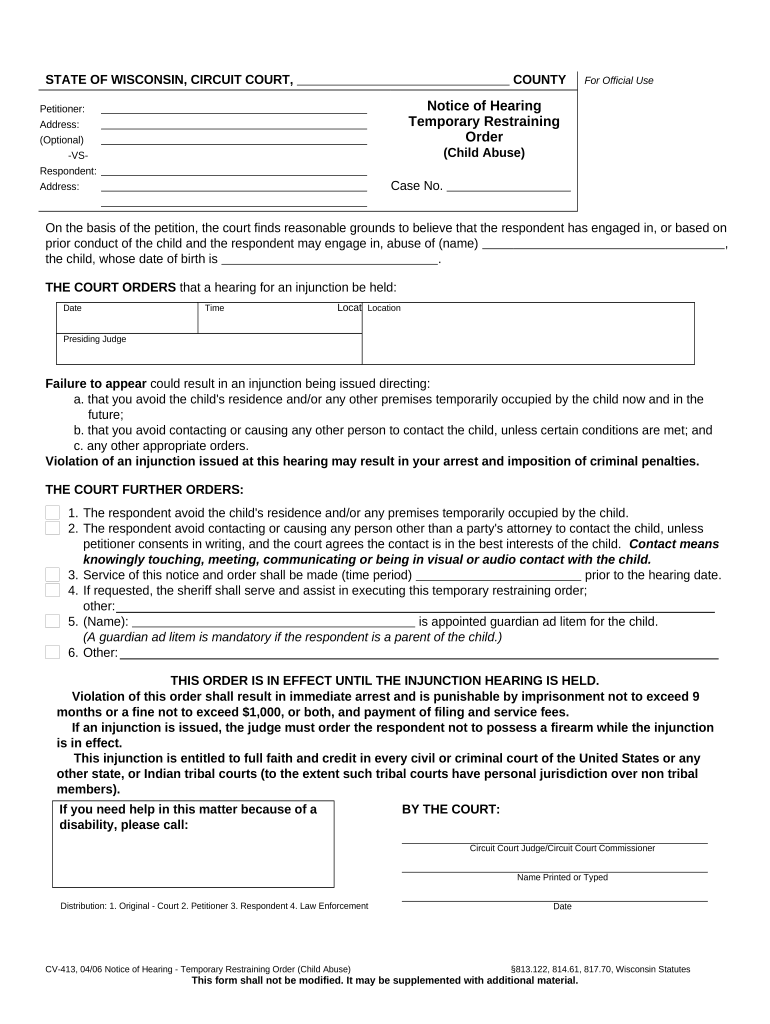
A clear, correctly completed notice preserves parties’ right to notice, prevents default outcomes, and documents official service and scheduling for the TRO hearing under Wisconsin court rules.

This notice is prepared by petitioners, their attorneys, or court clerks and served on respondents per court rules.
Proper preparation and service reduce procedural delays and support enforceable hearing outcomes.
Full court name and county aligned with the petition; this establishes the proper venue and must match other court filings for validity and tracking.
The clerk-assigned case number is essential for docketing; include it exactly as issued to avoid misfiling or administrative delay.
Date, time, and physical or virtual location clearly stated; if the hearing is expedited, mark the notice as such and include contact for remote access.
List the full legal names of petitioner, respondent, and any involved third parties so the court records and service documents align.
Describe the temporary measures sought (for example, stay-away, asset preservation) so respondents and the court understand immediate stakes.
State how service will be or was completed, include recipient, method, date, and who served to document due process steps.
| Upload Document | Add petition, notice, and exhibits as PDF files for a single package. |
|---|---|
| Place Fields | Add signature, date, and service-entry fields for petitioners and servers. |
| Signer Authentication | Select email or SMS verification depending on court requirements. |
| Notification Rules | Set automatic alerts for filing receipt and served confirmations. |
| Storage Location | Save copies to secure case folder or evidence repository. |
Use software that exports court-ready PDFs, records audit trails, and supports secure storage and access controls.
Ensure the platform meets court e-filing rules and maintains tamper-evident records for admissibility.
Courts may set hearings within days for emergency TRO requests; consult the clerk for earliest available date.
Provide service sufficiently ahead of the hearing to allow response; local rules often require immediate service or as ordered.
File affidavit or certificate of service before or at the hearing per court instruction.
A TRO is often limited to a short statutory or judicial period pending a full hearing.
File continuance motions promptly with supporting reasons if parties cannot appear.
Initiate the case by filing petition and TRO request with the clerk.
Request emergency ex parte TRO when immediate harm is alleged and notice is impracticable.
Serve the respondent and file proof of service prior to or at the hearing.
Judge holds the hearing and decides on temporary or extended relief.
| signNow | DocuSign | Adobe Sign | PandaDoc | HelloSign | |
|---|---|---|---|---|---|
| Starting Price | $8/user/mo | $15/user/mo | $14/user/mo | $19/user/mo | $15/user/mo |
| Free Trial | 7-day free trial | Varies | Varies | Varies | Varies |
| Bulk Send | Yes | Yes | Yes | Yes | No |
| Audit Trail | Yes | Yes | Yes | Yes | Yes |
| HIPAA Compliant | Yes | Yes | Yes | No | No |
| Envelope Cap | No envelope cap | 100 envelopes/user/year | Varies by plan | Varies by plan | Varies by plan |
The operations team standardized notice templates for emergency filings to reduce preparation time
NetSuite-linked workflows assembled petitions and notices automatically
An attorney of record or authorized representative signs and certifies that the notice and petition are true and complete, and that service will be or has been completed in accordance with court rules.
The individual who serves the notice signs the proof of service or affidavit, providing factual details about method, date, time, and recipient to establish jurisdictional service.