Establishing secure connection…Loading editor…Preparing document…

Wisconsin Order on Petition for Modification of Protective Placement or Protective Services

This template is fully customizable. Edit the text, fill out the fields, and send it for signature. Give it a try!
Wisconsin Order on Petition for Modification of Protective Placement or Protective Services

What this Wisconsin order is and when it applies

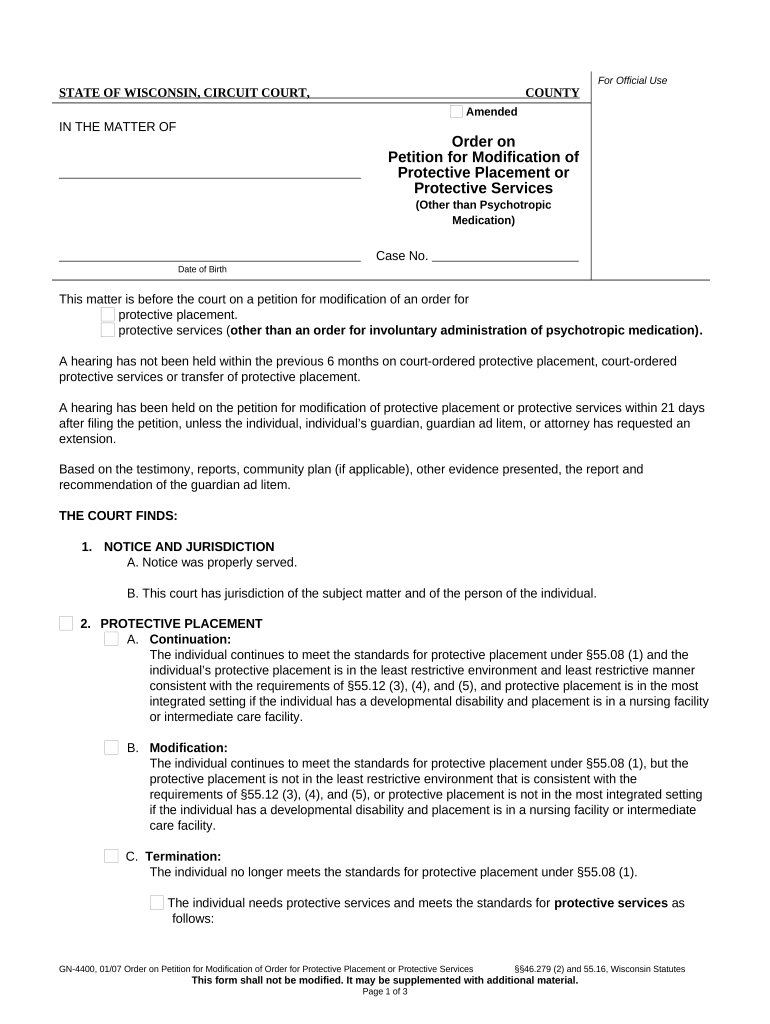
The Wisconsin Order on Petition for Modification of Protective Placement or Protective Services is a judicial document used to request changes to an existing court-authorized protective placement or to modify protective services for an adult with impaired decision-making capacity. It formalizes proposed changes — for example, a change in placement, alteration of services, or termination of placement — and initiates a court review process where evidence, medical or social reports, and notice to interested parties are considered before a judge signs an amended order.

Why filing a modification order matters

A properly completed order ensures the court has up-to-date facts, protects the adult’s rights, and documents modifications in a way the court can enforce. It preserves due process for the person subject to placement and creates a clear record for care providers, guardians, and agencies.

Why filing a modification order matters

Who typically prepares or files this petition

The petition is commonly filed by guardians, county social service agencies, treating clinicians, or attorneys representing the adult or an interested party.

  • County social services or caseworkers who manage care and seek adjustments to services or placement arrangements.
  • Court-appointed guardians or conservators seeking changes to living arrangements or limitations on services.
  • Attorneys for the adult, family members, or advocacy organizations requesting restoration, increase, or reduction of services.

Parties filing should verify standing, confirm local court rules, and attach all required supporting records before submission.

Step-by-step: prepare and submit the modification petition

Follow these core steps to prepare a clear, complete petition and route it to the appropriate court office.

  • 01
    Collect records: Assemble medical, behavioral, and service reports that justify modification.
  • 02
    Draft petition: Complete form fields and clearly state the relief requested.
  • 03
    Attach evidence: Include signed reports, affidavits, and previous orders as exhibits.
  • 04
    File and serve: Submit to the court clerk and serve all interested parties per local rules.

Configuring an online workflow for this petition

Set up an e-submission workflow to collect signatures, attach exhibits, and track service. Confirm county eFiling rules first.

Field Configuration
eFiling method Use county eFile portal or approved PDF upload
Signature type Accept stamped signatures or platform eSign per court guidance
Document attachments PDF exhibits, medical reports, and prior orders required
Notifications Generate service emails and retain proof of delivery

Where to file and how documents flow after filing

Understand the routing so filings meet court procedural and service requirements.

  • County Clerk: File the petition with the clerk in the county of the original placement.
  • Judge Review: Clerk schedules review or hearing; judge evaluates evidence and testimony.
  • Service to Parties: Serve the adult, guardian, and interested parties with filed papers and hearing notice.
  • Order Issuance: If approved, clerk enters the modified order into the case docket.

Technical considerations for eSubmission and signatures

Verify whether the receiving court and county accept electronic submissions and the type of electronic signature allowed.

  • File formats: PDF/A or flattened PDF is typically preferred
  • Authentication: Use email, SMS code, or stronger signer verification when required
  • Integration: Connect to document storage services for exhibits and audit trails

Confirm local court requirements for eFiling, signature acceptance, and any necessary notary or witness steps before relying on a given platform.

Timing and typical scheduling considerations

Court timelines and notice requirements differ by county; allow sufficient lead time for service, response, and hearing scheduling.

Filing lead time:

File early to allow clerk processing and exhibit review; 7–21 days typical.

Service notice:

Provide parties with written notice per local rules; allow statutory notice period.

Hearing scheduling:

Clerks may schedule hearings 14–60 days after filing depending on caseload.

Emergency relief:

Request expedited hearing if immediate risk to health or safety exists.

Record availability:

Allow time for clerk to enter orders and distribute signed copies.

Common preparation errors that delay processing

  • Incomplete exhibits: missing medical evaluations or unsigned reports often lead to continuances or rejections by the court.
  • Incorrect case number or names: mismatched respondent names or docket numbers create administrative confusion and delay.
  • Service failures: improper service or lack of proof of service frequently causes hearings to be postponed.
  • Vague requested relief: unspecific modification requests require additional briefing or oral testimony, lengthening the process.

Consequences of errors or omissions

Dismissal risk: Petition may be dismissed
Delay: Hearing postponed
Rights impact: Temporary rights remain unchanged
Sanctions: Court sanctions possible
Invalid order: Order unenforceable
Additional costs: Extra attorney or filing fees

Essential data elements and confidentiality notes

Case Docket: Case number
Personal Data: Full legal names
Medical Reports: Confidential health files
Signatures: Signed and dated
Service Proof: Affidavit or certificate
Order Copy: Court-signed original

Core parts of a professional modification petition package

A well-assembled petition includes structured elements the court expects; each component strengthens the factual basis for modification.

Caption

Court caption and case number that identify the case, parties, and county; this ensures documents are filed on the correct docket and linked to prior orders.
Statement of Relief

Clear, specific request describing the precise modification sought, including dates, locations, and any proposed procedural changes for supervision or services.

Factual Summary

Concise chronology and facts explaining why the change is necessary, citing incidents, evaluations, or changes in the adult’s condition.

Supporting Reports

Recent medical, psychiatric, or social service evaluations attached as exhibits to corroborate the requested modification and assist judicial fact-finding.

Service Affidavit

Proof that all required parties were served with the petition, exhibits, and hearing notice per statutory or local rule.

Proposed Order

Draft order with specific operative language the judge can sign if the court grants the requested modification.

Who can sign or approve this document

Petitioner or Attorney

The filing party or their attorney signs the petition to attest to the facts and request relief; signatures establish responsibility and permit the clerk to accept the filing.

Judge or Clerk

The judge signs the resulting order; the clerk enters the order on the docket and provides certified copies as necessary for enforcement and service.

Real-world scenarios where modifications are requested

Two typical scenarios illustrate how and why modification orders are used in practice.

County Review Request

A county caseworker documents declining health requiring a different placement

  • The point: immediate assessment supports the petition
  • The outcome often requires attaching recent medical evaluations and a proposed placement plan so the court can decide whether modification is in the adult's best interest and ensure continuity of care during transition.

Guardian Seeks Reduction

A guardian files to reduce restrictive services after improved capacity

  • The point: updated evaluations matter
  • The court typically evaluates current clinical reports and testimony, and a clear proposed order speeds judicial review and avoids unnecessary continuances.

Practical tips for accurate and efficient completion

Follow these practices to reduce rework and improve the chance of a timely hearing and order.

Assemble complete exhibits
Collect and attach all relevant medical, psychiatric, and social service records in PDF format. Redact unrelated private information, include dates, and label exhibits clearly so reviewers can verify the factual basis quickly.
Use precise language
State the requested modification in concrete terms (locations, timeframes, limits). Avoid vague phrases that force the court to ask for supplemental briefing or testimony.
Confirm service rules
Check local rules for who must be served, acceptable methods, and deadlines. File an affidavit of service promptly to avoid hearing delays or objections on procedural grounds.
Retain originals
Keep signed originals and certified copies. Maintain an organized electronic folder with a clear audit trail, service proofs, and court-stamped filings to support future enforcement or appeals.

eSignature vendor comparison for documents like this petition

Compare common vendor features and pricing when selecting an eSignature provider for court-ready petitions and supporting records.

signNow DocuSign Adobe Sign PandaDoc HelloSign
Starting Price $8/user/mo $15/user/mo $14/user/mo $19/user/mo $15/user/mo
Free Trial 7-day free trial Varies Varies Varies Varies
Bulk Send Yes Yes Yes Yes No
Audit Trail Yes Yes Yes Yes Yes
HIPAA Compliant Yes Yes Yes No No

Frequently asked questions about modification petitions

Answers to common legal and procedural questions about filing, signatures, service, and supporting evidence for modification petitions.


Need help? Contact support

be ready to get more
Join over 28 million airSlate SignNow users