Establishing secure connection… Loading editor… Preparing document…
Navigation

Fill and Sign the Without Minor Children Form
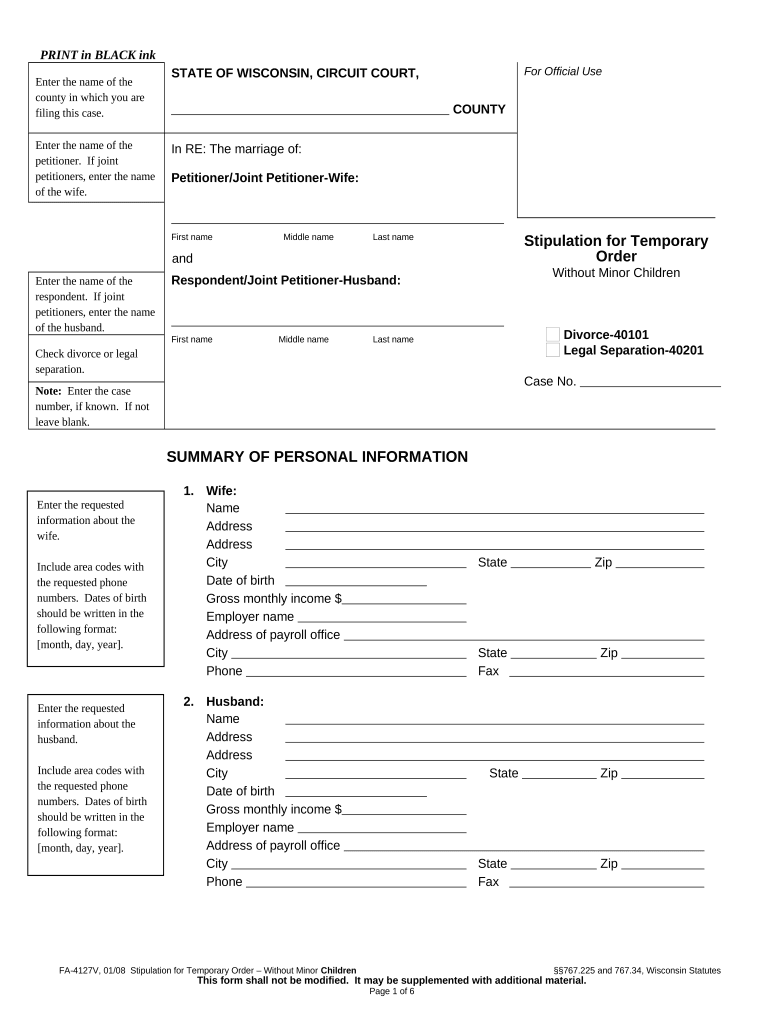
Fill and Sign the Without Minor Children Form

How it works

Open the document and fill out all its fields.
Apply your legally-binding eSignature.
Save and invite other recipients to sign it.

Rate template

4.5
49 votes
PRINT in BLACK ink Enter the name of the county in which you are filing this case. STATE OF WISCONSIN, CIRCUIT COURT,       COUNTY For Official Use Enter the name of the petitioner. If joint petitioners, enter the name of the wife. In RE: The marriage of: Petitioner/Joint Petitioner-Wife:       First name Middle name Last name and Stipulation for Temporary Order Without Minor Children D ivorce-40101 Legal Separation-40201 Case No.       Enter the name of the respondent. If joint petitioners, enter the name of the husband. Respondent/Joint Petitioner-Husband:       First name Middle name Last name Check divorce or legal separation. Note: Enter the case number, if known. If not leave blank. SUMMARY OF PERSONAL INFORMATION 1. Wife: Name       Address       Address       City       State       Zip       Date of birth       Gross monthly income $       Employer name       Address of payroll office       City       State       Zip       Phone       Fax       2. Husband: Name       Address       Address       City       State       Zip       Date of birth       Gross monthly income $       Employer name       Address of payroll office       City       State       Zip       Phone       Fax       FA-4127V, 01/08 Stipulation for Temporary Order – Without Minor Children §§767.225 and 767.34, Wisconsin Statutes This form shall not be modified. It may be supplemented with additional material. Page 1 of 6Enter the requested information about the wife. Include area codes with the requested phone numbers. Dates of birth should be written in the following format: [month, day, year]. Enter the requested information about the husband. Include area codes with the requested phone numbers. Dates of birth should be written in the following format: [month, day, year]. Stipulation for Temporary Order – Without Minor Children Page 2 of 6 Case No. ______________ STIPULATION The parties agree that the following terms be in effect until the final hearing of this action. 1. SUMMARY OF FINANCIAL AGREEMENTS A. Maintenance (spousal support) The parties agree that temporary maintenance shall be paid as follows: 1. For the Wife: a. The wife gives up her right to receive maintenance at this time. b. The husband shall pay maintenance to the wife in the amount of $       per month beginning on the first day of the month of       20       . 2. For the Husband: a. The husband gives up his right to receive maintenance at this time. b. The wife shall pay maintenance to the husband in the amount of $       per month beginning on the first day of the month of       20       . B. Payments for Maintenance shall be made to the Wisconsin Support Collections Trust Fund (WI SCTF): 1. Directly from the payer to WI SCTF ( only if self-employed ). 2. By income assignment from the payer’s employer as indicated on page 1. 3. No maintenance is to be paid at this time. C. Information about how payments are made to WI SCTF . All payments for maintenance ordered shall note the case number and the names of the parties on the face of the check, should be made payable to WI SCTF, and sent to: Wisconsin Support Collections Trust Fund Box 74400 Milwaukee, WI 53284-0400 The WI SCTF will transmit the payments to the proper persons entitled to them. Failure of an employer to pay the proper amount shall not be a defense for failure to pay the proper amount. If an employer fails to take out the correct amount for maintenance, the party paying is responsible for the full and correct amount. The party paying maintenance is responsible for payment of the annual receiving and disbursing fee to WI SCTF. 2. SUMMARY OF OTHER AGREEMENTS A . Residence: 1. The parties do not own or rent a residence together. 2. The parties do own or rent a residence together and agree that: a. The wife shall have temporary exclusive use of the residence and the husband shall leave the residence on or before       . b. The husband shall have temporary exclusive use of the residence and the wife shall leave the residence on or before       . c. Both parties agree to share the residence. d. Both parties agree to vacate and/or sell the residence by       . 3. Sale of Residence: a. The parties do not own a residence. b. The residence shall not be placed for sale at this time. c. The residence shall be placed for sale no later than       4 . Other Real Estate : One or both of the parties own additional real estate, the agreement for temporary use of which is disclosed as an attachment. a. Yes, see attached agreement. b. No FA-4127V, 01/08 Stipulation for Temporary Order – Without Minor Children §§767.225 and 767.34, Wisconsin Statutes This form shall not be modified. It may be supplemented with additional material. Page 2 of 6For A1, check a or b. If b, enter the monthly amount of maintenance and the month and year on which the payments will begin. For A2, check a or b. If b, enter the monthly amount of maintenance and the month and year on which the payments will begin. Check 1, 2, or 3. Parties may not make payments directly to each other. (See WI Stat. 767.265) Check 1 or 2. If 2, check a, b, c or d. If a , b or d enter the date [month, day, year]. For 3, check a, b, or c. If c, enter the date. For 4, check a or b. If a, attach the agreed upon arrangements. Stipulation for Temporary Order – Without Minor Children Page 3 of 6 Case No. ______________ B. Personal Property Division: The parties agree that the wife shall be awarded the temporary exclusive use of the personal property in her possession and the husband shall be awarded the temporary exclusive use of the personal property in his possession. 1. with no exceptions. 2. except for the following property: List the property that is yet to be exchanged and check if the wife or husband will have temporary use of the property until the divorce/legal separation is final. Who has possession? Wife = W Husband = H Who will have possession? Wife = W Husband = H Household Items W H W H                                                       Automobiles Year, Make, Model W H W H                         Securities: Stocks, Bonds, Mutual Funds, Commodity Accounts Name of Company & # of shares W H W H                               Checking and Savings Accounts Name of Bank or Financial Institution W H W H                         Other Personal Property Description of Asset W H W H                                           Any exchange of property shall be made by (date)       according to the following arrangements:       FA-4127V, 01/08 Stipulation for Temporary Order – Without Minor Children §§767.225 and 767.34, Wisconsin Statutes This form shall not be modified. It may be supplemented with additional material. Page 3 of 6Check 1 or 2. If 2, complete the chart on the right indicating who has and who will have possession while the case is pending . If property needs to be exchanged, enter the date [month, day, year] by which the property shall be exchanged, and describe how it will be exchanged. Stipulation for Temporary Order – Without Minor Children Page 4 of 6 Case No. ______________ C. Debts and Liabilities 1. Each of the parties shall be responsible for the following debts and liabilities: Payment for: Payment to: Paid by wife Paid by husband Shared equally Mortgage       Rent       Car 1       Car 2       Insurance-Home       Insurance-Auto       Insurance-Medical       Insurance-Life       Loans-Student       Loans-Personal       Loans-Other       Credit Card 1       Credit Card 2       Credit Card 3       Credit Card 4       Other       Other       Other       2. The parties agree and understand:  Unless otherwise agreed upon in the order, each party shall pay his or her own future monthly household expenses.  Each party assigned a debt shall be fully responsible for that obligation and shall not make any demands upon the other party concerning that debt.  Both parties are restrained from making any further debts against the credit of the other party.  Any debt incurred after the date of this order shall be the responsibility of the party who incurred it and that party shall not make any demands upon the other party concerning that debt.  Creditors are NOT bound by this agreement and that each party remains liable to creditors for all marital debts.  Any party who suffers a loss because of a failure of the other party to pay an assigned debt may enforce that obligation by an order to show cause for contempt of court. D. Incorporation of Agreement Into Temporary Order The parties agree that this stipulation shall be submitted to the court for approval and all parties request that the court make this stipulation a temporary order of the court. E. The parties agree that:  This court has jurisdiction over the marriage and the parties individually.  Both parties freely and voluntarily, without any force or coercion, enter into and sign this agreement. FA-4127V, 01/08 Stipulation for Temporary Order – Without Minor Children §§767.225 and 767.34, Wisconsin Statutes This form shall not be modified. It may be supplemented with additional material. Page 4 of 6Write the names of the creditors to whom the parties owe money. Then check the box to indicate who will temporarily make the minimum monthly payment to each creditor. Stipulation for Temporary Order – Without Minor Children Page 5 of 6 Case No. ______________  Both parties have fully disclosed all information about income, expenses, assets and debts to each other.  This agreement is based on compromise between the parties, but as a whole, is fair and reasonable.  A court may enforce the terms of this agreement through the powers of contempt of court. The wife must sign and print her name. Enter the date on which she signed her name. Note: This signature does not need to be notarized. Signature of Wife       Print or Type Name       Date The husband must sign and print his name. Enter the date on which he signed his name. Note: This signature does not need to be notarized. Signature of Husband       Print or Type Name       Date TEMPORARY ORDER 1. The agreement of the parties as set out in this stipulation is adopted by the court. 2. The parties are ordered to comply with this agreement while this divorce/legal separation action is pending unless this order is changed by a later court order. 3. The court further orders: A. Income Tax Returns . The parties agree to file their income tax returns consistent with the rules of the IRS, Wisconsin Department of Revenue, and Wisconsin’s Community Property law. B. Modification and Waiver . A modification or waiver of any of the provisions of this agreement shall be effective only if it is made in writing and is dated and signed by all parties and approved by the court. C. Restraining Order. Both parties are restrained from interfering with the personal liberty of the other, from encumbering or disposing of assets or property, and from incurring debts or credit in the name of the other party. D. Change of Employer/Address . Both parties shall notify the Clerk of Courts and the county Child Support Agency within 10 days of any change of address or change of employers. Notice shall also be sent at the same time to the other spouse unless contact is prohibited by court order. E. Failure to abide by these temporary orders is punishable as contempt of court pursuant to ch. 785 Wis. Stats. All temporary orders are made without prejudice to the rights of either party at the time of the final hearing. F. Both parties are prohibited from encumbering, concealing, damaging, destroying, transferring, selling, giving away, or removing from this state any of his, her or their property without permission of the court, or written consent of both parties, except in the usual course of business, or in order to secure necessities. FA-4127V, 01/08 Stipulation for Temporary Order – Without Minor Children §§767.225 and 767.34, Wisconsin Statutes This form shall not be modified. It may be supplemented with additional material. Page 5 of 6 Stipulation for Temporary Order – Without Minor Children Page 6 of 6 Case No. ______________ G. Neither party can disconnect any utility services or cause any other essential services of the residence of the other party to be discontinued without written consent of the parties or further order of the court. H. Each party is responsible for his or her own future uninsured medical, dental, orthodontic, hospital, psychiatric, counseling, drug and other health expenses. I. Both parties shall maintain all current beneficiaries on all life, medical, hospital, automobile, household, or other insurance and in any current wills while this action is pending. J. Pursuant to § 767.75(a) Wis. Stats., this temporary order for maintenance constitutes an assignment of all commissions, earnings, salaries, wages, pension benefits, benefits under ch. 102 or 108 Wis. Stats., and other money due or to be due in the future to the Wisconsin Support Collections Trust Fund as will be sufficient to meet the maintenance ordered here. K. Pursuant to § 767.75(2r) Wis. Stats., if maintenance is to be paid, the assignment of paragraph “j” above is effective immediately, and the employer of the party paying shall be notified of the assignment of income immediately. 4. Failure to comply with the terms of this order may result in punishment for contempt of court under ch. 785 Wis. Stats. BY THE COURT: For Court Use Only Circuit Court Judge/Circuit Court Commissioner       Print or Type Name       Date FA-4127V, 01/08 Stipulation for Temporary Order – Without Minor Children §§767.225 and 767.34, Wisconsin Statutes This form shall not be modified. It may be supplemented with additional material. Page 6 of 6

Helpful tips for setting up your ‘Without Minor Children’ online

Feeling overwhelmed by paperwork? Look no further than airSlate SignNow, the leading eSignature solution for individuals and businesses. Bid farewell to the lengthy process of printing and scanning documents. With airSlate SignNow, you can swiftly complete and sign documents online. Leverage the robust features contained within this user-friendly and cost-effective platform to transform your document management strategy. Whether you need to approve documents or gather eSignatures, airSlate SignNow simplifies the entire process, requiring just a few clicks.

Adhere to this detailed guide:

  1. Access your account or sign up for a complimentary trial of our service.
  2. Select +Create to upload a file from your device, cloud storage, or our form repository.
  3. Open your ‘Without Minor Children’ in the editor.
  4. Hit Me (Fill Out Now) to fill out the form on your end.
  5. Add and designate fillable fields for others (if needed).
  6. Continue with the Send Invite settings to solicit eSignatures from others.
  7. Download, print your version, or convert it into a reusable template.

No need to worry if you need to collaborate with your teammates on your Without Minor Children or send it for notarization—our platform provides everything you need to accomplish these tasks. Sign up with airSlate SignNow today and take your document management to the next level!

Here is a list of the most common customer questions. If you can’t find an answer to your question, please don’t hesitate to reach out to us.

Need help? Contact Support

The best way to complete and sign your without minor children form

Save time on document management with airSlate SignNow and get your without minor children form eSigned quickly from anywhere with our fully compliant eSignature tool.

How to Sign a PDF Online How to Sign a PDF Online

How to complete and sign paperwork online

In the past, working with paperwork took lots of time and effort. But with airSlate SignNow, document management is easy and fast. Our powerful and user-friendly eSignature solution enables you to effortlessly fill out and eSign your without minor children form online from any internet-connected device.

Follow the step-by-step guidelines to eSign your without minor children form template online:

  • 1.Sign up for a free trial with airSlate SignNow or log in to your account with password credentials or SSO authentication.
  • 2.Click Upload or Create and import a form for eSigning from your device, the cloud, or our form collection.
  • 3.Click on the document name to open it in the editor and use the left-side toolbar to complete all the empty areas appropriately.
  • 4.Place the My Signature field where you need to approve your form. Provide your name, draw, or import a photo of your handwritten signature.
  • 5.Click Save and Close to finish editing your completed form.

Once your without minor children form template is ready, download it to your device, save it to the cloud, or invite other parties to eSign it. With airSlate SignNow, the eSigning process only takes a few clicks. Use our powerful eSignature solution wherever you are to handle your paperwork efficiently!

How to Sign a PDF Using Google Chrome How to Sign a PDF Using Google Chrome

How to complete and sign forms in Google Chrome

Completing and signing documents is easy with the airSlate SignNow extension for Google Chrome. Installing it to your browser is a quick and efficient way to manage your paperwork online. Sign your without minor children form template with a legally-binding electronic signature in just a couple of clicks without switching between programs and tabs.

Follow the step-by-step guide to eSign your without minor children form in Google Chrome:

  • 1.Navigate to the Chrome Web Store, search for the airSlate SignNow extension for Chrome, and install it to your browser.
  • 2.Right-click on the link to a document you need to approve and choose Open in airSlate SignNow.
  • 3.Log in to your account using your password or Google/Facebook sign-in option. If you don’t have one, you can start a free trial.
  • 4.Utilize the Edit & Sign menu on the left to complete your sample, then drag and drop the My Signature option.
  • 5.Insert a picture of your handwritten signature, draw it, or simply type in your full name to eSign.
  • 6.Verify all data is correct and click Save and Close to finish modifying your paperwork.

Now, you can save your without minor children form template to your device or cloud storage, email the copy to other people, or invite them to eSign your document with an email request or a secure Signing Link. The airSlate SignNow extension for Google Chrome enhances your document workflows with minimum time and effort. Start using airSlate SignNow today!

How to Sign a PDF in Gmail How to Sign a PDF in Gmail How to Sign a PDF in Gmail

How to complete and sign forms in Gmail

When you get an email with the without minor children form for approval, there’s no need to print and scan a document or download and re-upload it to another program. There’s a better solution if you use Gmail. Try the airSlate SignNow add-on to promptly eSign any paperwork right from your inbox.

Follow the step-by-step guide to eSign your without minor children form in Gmail:

  • 1.Navigate to the Google Workplace Marketplace and look for a airSlate SignNow add-on for Gmail.
  • 2.Set up the tool with a corresponding button and grant the tool access to your Google account.
  • 3.Open an email with an attachment that needs approval and utilize the S symbol on the right sidebar to launch the add-on.
  • 4.Log in to your airSlate SignNow account. Opt for Send to Sign to forward the file to other parties for approval or click Upload to open it in the editor.
  • 5.Put the My Signature field where you need to eSign: type, draw, or upload your signature.

This eSigning process saves time and only takes a few clicks. Take advantage of the airSlate SignNow add-on for Gmail to update your without minor children form with fillable fields, sign forms legally, and invite other people to eSign them al without leaving your mailbox. Boost your signature workflows now!

How to Sign a PDF on a Mobile Device How to Sign a PDF on a Mobile Device How to Sign a PDF on a Mobile Device

How to complete and sign paperwork in a mobile browser

Need to quickly complete and sign your without minor children form on a smartphone while working on the go? airSlate SignNow can help without the need to install extra software applications. Open our airSlate SignNow tool from any browser on your mobile device and add legally-binding eSignatures on the go, 24/7.

Follow the step-by-step guide to eSign your without minor children form in a browser:

  • 1.Open any browser on your device and go to the www.signnow.com
  • 2.Create an account with a free trial or log in with your password credentials or SSO option.
  • 3.Click Upload or Create and import a file that needs to be completed from a cloud, your device, or our form catalogue with ready-to go templates.
  • 4.Open the form and fill out the empty fields with tools from Edit & Sign menu on the left.
  • 5.Place the My Signature area to the form, then type in your name, draw, or upload your signature.

In a few simple clicks, your without minor children form is completed from wherever you are. Once you're done with editing, you can save the file on your device, build a reusable template for it, email it to other individuals, or invite them electronically sign it. Make your documents on the go quick and effective with airSlate SignNow!


How to Sign a PDF on iPhone How to Sign a PDF on iPhone

How to complete and sign paperwork on iOS

In today’s corporate environment, tasks must be accomplished quickly even when you’re away from your computer. Using the airSlate SignNow application, you can organize your paperwork and sign your without minor children form with a legally-binding eSignature right on your iPhone or iPad. Install it on your device to conclude agreements and manage documents from just about anywhere 24/7.

Follow the step-by-step guide to eSign your without minor children form on iOS devices:

  • 1.Open the App Store, search for the airSlate SignNow app by airSlate, and set it up on your device.
  • 2.Open the application, tap Create to import a template, and choose Myself.
  • 3.Choose Signature at the bottom toolbar and simply draw your autograph with a finger or stylus to eSign the sample.
  • 4.Tap Done -> Save after signing the sample.
  • 5.Tap Save or utilize the Make Template option to re-use this document in the future.

This method is so simple your without minor children form is completed and signed in a couple of taps. The airSlate SignNow application works in the cloud so all the forms on your mobile device are kept in your account and are available any time you need them. Use airSlate SignNow for iOS to enhance your document management and eSignature workflows!


How to Sign a PDF on Android How to Sign a PDF on Android

How to fill out and sign paperwork on Android

With airSlate SignNow, it’s simple to sign your without minor children form on the go. Install its mobile app for Android OS on your device and start boosting eSignature workflows right on your smartphone or tablet.

Follow the step-by-step guidelines to eSign your without minor children form on Android:

  • 1.Go to Google Play, search for the airSlate SignNow application from airSlate, and install it on your device.
  • 2.Sign in to your account or create it with a free trial, then upload a file with a ➕ key on the bottom of you screen.
  • 3.Tap on the uploaded document and select Open in Editor from the dropdown menu.
  • 4.Tap on Tools tab -> Signature, then draw or type your name to eSign the template. Complete empty fields with other tools on the bottom if necessary.
  • 5.Use the ✔ key, then tap on the Save option to end up with editing.

With an easy-to-use interface and full compliance with main eSignature requirements, the airSlate SignNow application is the perfect tool for signing your without minor children form. It even operates offline and updates all record adjustments once your internet connection is restored and the tool is synced. Complete and eSign forms, send them for approval, and generate re-usable templates whenever you need and from anywhere with airSlate SignNow.

Sign up and try Without minor children form
  • Close deals faster
  • Improve productivity
  • Delight customers
  • Increase revenue
  • Save time & money
  • Reduce payment cycles







