Establishing secure connection…Loading editor…Preparing document…

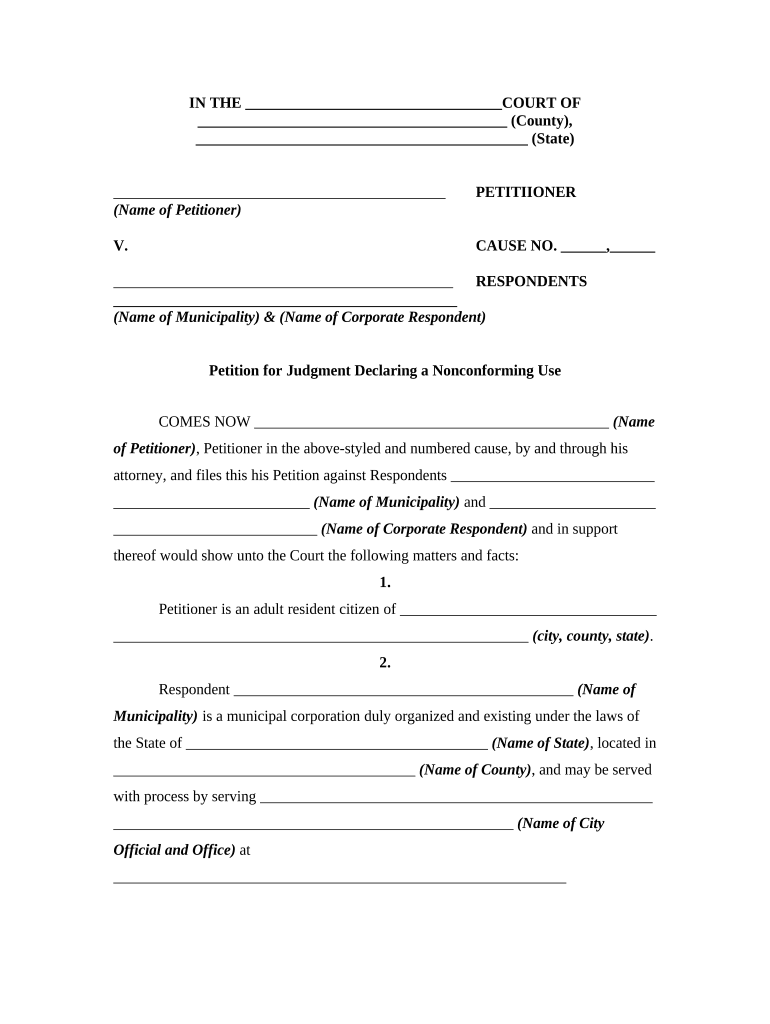
Petition for Judgment Declaring a Nonconforming Use

This template is fully customizable. Edit the text, fill out the fields, and send it for signature. Give it a try!
Petition for Judgment Declaring a Nonconforming Use

What the Petition for Judgment Declaring a Nonconforming Use Is

A Petition for Judgment Declaring a Nonconforming Use is a court filing asking a judge to recognize that an existing use of real property, which conflicts with current zoning regulations, is a lawful nonconforming use. The petition typically explains the property's history, zoning changes, continuous use since a specified date, and legal grounds for protection under local zoning ordinances or vested-rights doctrines. Courts may issue a declaratory judgment that preserves the use, limits enforcement action by municipal authorities, or defines conditions under which the use may continue.

Why this Petition Matters for Property and Zoning Rights

Use this petition to secure a judicial declaration that an existing use is protected despite later zoning changes, reducing the risk of enforcement, fines, or forced alteration. A validated nonconforming use preserves economic value and clarifies rights for property owners, lenders, and lessees while creating a documented legal basis for continued operation.

Why this Petition Matters for Property and Zoning Rights

Who Typically Prepares and Files This Petition

Local governments and planning departments may also engage with the petition during review or appeals, so coordination with counsel is advisable.

  • Property owners asserting vested or continuous use rights to avoid zoning enforcement or costly conversion.
  • Commercial tenants and landlords seeking clarity for lease enforcement, financing, or sale negotiations.
  • Land-use and zoning attorneys representing clients in administrative appeals and superior court proceedings.

Core Components of a Professional Petition for Judgment Declaring a Nonconforming Use

A complete petition organizes factual history, legal argument, and requested relief so the court can evaluate nonconforming status quickly and accurately.

Property Identification

Precise street address, legal description, parcel number, and municipality details to ensure correct venue and avoid service defects.
Statement of Use

Clear narrative of the use at issue, including start date, continuity of operation, and any material changes affecting the character of the use.

Zoning History

Chronology of zoning classifications, amendments, or variances showing how the current use predates or conflicts with present regulations.

Legal Grounds

Statutory or common-law bases for relief — vested rights, acquired rights, estoppel, or local ordinance provisions that support nonconforming status.

Evidence Summary

List of supporting exhibits (photographs, permits, tax records, leases, witness affidavits) and a concise explanation of probative value for each.

Requested Relief

Specific judgment language sought (declaration of nonconforming use, injunction relief, or a narrow ruling on permitted activities).

Step-by-Step: Preparing and Filing the Petition

Follow a structured sequence from evidence assembly to filing and service to reduce procedural challenges and preserve appellate rights.

  • 01
    Assemble Evidence: Collect permits, tax records, leases, photos, and affidavits showing continuous use.
  • 02
    Draft Petition: Describe facts, cite local ordinances, and request declaratory relief clearly.
  • 03
    File in Proper Court: Check local venue and filing requirements before submitting documents.
  • 04
    Serve Interested Parties: Serve the municipality and affected neighbors per court rules and state law.

How to Configure an Online Filing Workflow

Set up a repeatable online workflow that enforces required fields, attaches exhibits, and logs signature events for court and opponent review.

Field Configuration
Required Fields Make caption, property ID, dates mandatory
Document Attachments Ensure exhibits upload and naming conventions
Signer Roles Assign petitioner, counsel, and preparer roles
Audit Settings Enable timestamps, IP logs, and certificate generation

Where to File and How the Petition Moves Through the System

A petition typically begins in the county or state trial court with zoning jurisdiction, then proceeds through initial review, response, hearing, and judgment stages.

  • Filing Court: File with the trial court that has jurisdiction over local land use matters.
  • Initial Review: Court clerk checks caption, fees, and basic compliance with local rules.
  • Response Period: Municipality or other parties have a set time to respond or move to dismiss.
  • Hearing and Judgment: Court schedules evidentiary or declaratory hearings before entering judgment.

Digital Filing and eSubmission: Technical and Compliance Considerations

Retain original signed copies and export audit records to satisfy court or opposing-party evidentiary requests when needed.

  • File Formats: PDF/A or court-accepted PDF required for e-filing
  • Authentication: Enable email or stronger signer authentication for attribution
  • Audit Trail: Keep timestamped logs to support chain of custody

Timelines, Deadlines, and Typical Processing Expectations

Deadlines for responses, hearing scheduling, and appeals vary by jurisdiction; plan for local rules on service windows and discovery timetables.

Service Deadline:

Service typically required within days to weeks; follow local rules.

Response Time:

Defendant or municipality usually has 20–30 days to respond.

Hearing Scheduling:

Courts commonly set hearings within 4–12 weeks of filing.

Judgment Entry:

Judges may issue declaratory rulings after evidentiary hearing or briefing.

Appeal Period:

State appellate deadlines vary; often 30 days from judgment.

Common Pitfalls to Avoid When Preparing the Petition

  • Failing to document continuous use with dated evidence, which weakens the factual foundation for nonconforming status.
  • Using inconsistent party names or property identifiers that lead to service defects or misfiled records.
  • Neglecting local ordinance citations and municipal procedures, which can result in dismissal for lack of jurisdiction.
  • Omitting necessary exhibits (permits, tax records, leases) that the court relies on to determine prior lawful use.

Potential Consequences of an Inaccurate or Untimely Petition

Loss of Protection: Court denial eliminates asserted nonconforming rights
Enforcement Action: Fines, abatement, or orders to cease operation
Attorney Fees: Litigation costs shifted by statute or judgment
Evidence Exclusion: Late exhibits may be excluded at hearing
Service Defects: Improper service can void proceedings
Appeal Risk: Unfavorable rulings may be appealed at cost

Required Information Commonly Included in the Petition

Property Address: Full street address
Parcel ID: Municipal parcel number
Owner Name: Legal owner name
Date of Use: Start date of continuous use
Supporting Exhibits: Permits, deeds, photos
Requested Relief: Precise declaration sought

Practical Examples and How Courts Applied Nonconforming Use Claims

These examples illustrate common fact patterns and how evidence supports a court ruling recognizing nonconforming use.

Martin Properties

A commercial landlord documented continuous retail use since 1985 with leases and tax records.

  • The court relied on dated leases and building permits.
  • The judge entered a declaratory judgment preserving the use subject to specific operational conditions, allowing the tenant to continue without costly redesign.

Optica Ventures LLC

A mixed-use property owner assembled photographic archives, utility bills, and sworn affidavits showing an unchanged use.

  • Municipality sought abatement for alleged zoning violation.
  • The court recognized prior lawful use and limited enforcement, reducing risk of demolition or major retrofit costs for the owner.

eSignature Pricing and Capability Snapshot for Petition Workflows

Compare starting price, trial availability, bulk-send capability, audit trails, HIPAA readiness, and envelope limits to choose an eSignature provider aligned with court and evidence needs.

signNow DocuSign Adobe Sign PandaDoc HelloSign
Starting Price $8/user/mo $15/user/mo $14/user/mo $19/user/mo $15/user/mo
Free Trial 7-day trial Varies Varies Varies Varies
Bulk Send Yes Yes Yes Yes Yes
Audit Trail Yes Yes Yes Yes Yes
HIPAA Compliant Yes Yes Yes No No
Envelope Cap No cap 100 envelopes/user/year Varies Varies Varies

Frequently Asked Questions About the Petition for Judgment Declaring a Nonconforming Use

Answers to common procedural and technical questions when preparing, filing, and preserving petition records for nonconforming use claims.


Need help? Contact support

be ready to get more
Join over 28 million airSlate SignNow users