
The best PandaDoc alternatives depend on what your team actually sends. Teams that mostly need signatures should look at SignNow, Docusign, Dropbox Sign, Adobe Acrobat Sign, and Zoho Sign. Teams that build interactive sales proposals should compare Qwilr and Proposify.
Think of an eSignature platform as a digital mailroom with a notary’s logbook. It routes each document to the right people in the right order. It also records who signed, when, and from where. Proposal software adds a design studio on top of that mailroom.
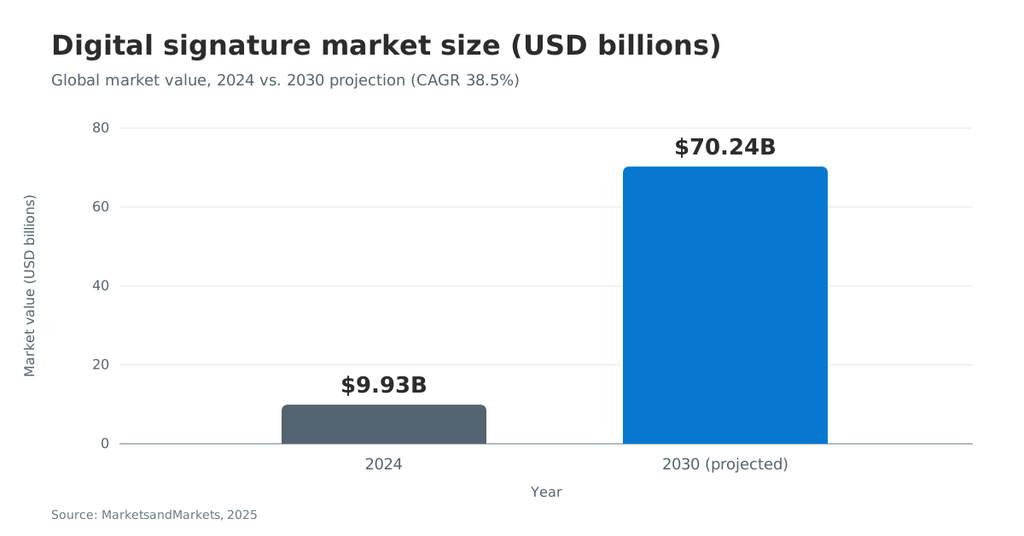
Demand for both keeps growing. Fortune Business Insights valued the digital signature market at USD 9.85 billion in 2025. This guide compares seven tools on price, limits, and plan gates checked in November 2026.
TL;DR
- PandaDoc’s Free and Starter plans cap templates at 5 and exclude CRM integrations, approval workflows, and payments.
- SignNow’s Business plan costs $8 per user per month billed annually and has no envelope cap.
- Docusign Standard and Business Pro allow 100 envelopes per user per year on annual plans.
- Dropbox Sign and Adobe Acrobat suit small teams that want simple signing or heavy PDF work.
- Zoho Sign offers a free single-user plan with 5 envelopes per month.
- Qwilr and Proposify fit sales teams that sell with interactive quotes and proposal analytics.
PandaDoc alternatives at a glance
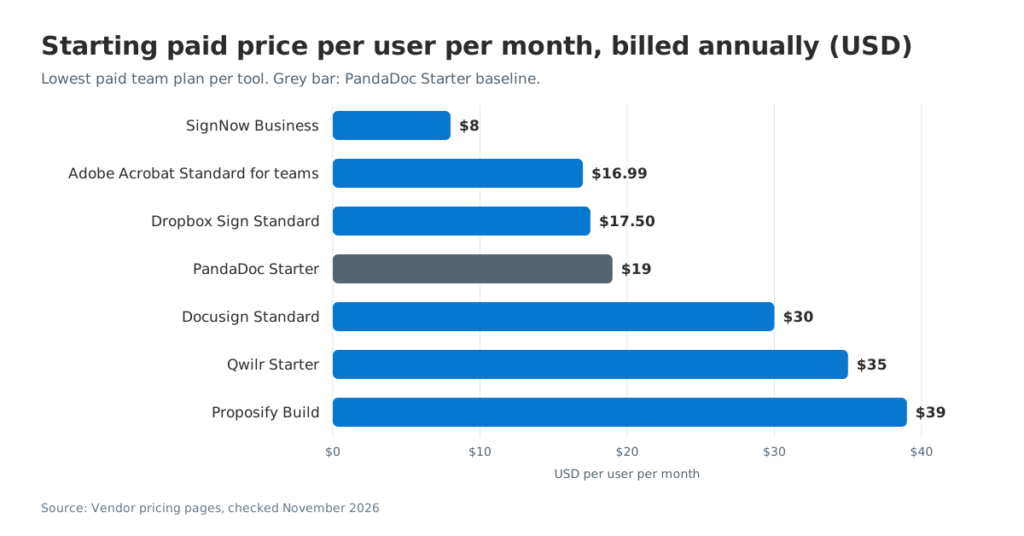
Signing-first tools cost less per seat, while proposal-first tools charge more for design and quoting features. The table lists the lowest paid team plan, billed annually. Prices come from each vendor’s pricing page in November 2026.
| Tool | Best for | Starting paid price (annual) | Free plan | Notable limit |
| SignNow | Unlimited eSignatures on a budget | $8/user/month (Business) | No (7-day free trial) | Bulk invites start on Business Premium |
| Docusign | Enterprise agreement workflows | $30/user/month (Standard) | No | 100 envelopes per user per year |
| Dropbox Sign | Simple signing for small teams | $17.50/user/month (Standard) | Yes | Standard requires 2 or more users |
| Adobe Acrobat Sign | PDF-heavy teams | US$16.99/license/month (Standard for teams) | No (free trial) | Sign is bundled with Acrobat |
| Zoho Sign | Zoho and CRM-centric teams | Per-user tiers | Yes, 5 envelopes/month | Standard allows 25 envelopes per user per month |
| Qwilr | Interactive web proposals | $35/user/month (Starter) | No (14-day trial) | 40 free documents on annual Starter |
| Proposify | Proposal governance | $39/user/month (Build) | No (14-day trial) | Approval workflows start on Grow |
If you only need a one-to-one view, SignNow’s own SignNow vs. PandaDoc comparison covers that pairing in detail.
Why teams look for a PandaDoc replacement
Most teams switch when PandaDoc’s plan structure charges for proposal features they do not use. PandaDoc remains a capable document automation platform. Its pricing, though, is built around sales proposals and content reuse.
Why it matters: the plan you need for one feature often decides the total cost.
PandaDoc’s own pricing page shows these gates as of November 2026:
- Free plan: $0, with a shared limit of 5 documents per month across the app, API, and automations.
- Template cap: Free and Starter allow up to 5 templates each.
- Starter: $19 per seat per month billed annually, with unlimited document uploads and eSignatures.
- Business: $49 per seat per month billed annually. It unlocks CRM integrations, approval workflows, a content library, pricing tables, and payment collection.
- Usage credits: bulk send and API access are optional add-ons that consume usage credits on paid plans.
- Overage: without a per-unit price in the order form, overage can reach $5 per document created.
These limits matter less for a sales team that builds quotes daily. They matter more for HR, operations, or legal teams. Those teams mainly need to send legally binding documents, track them, and store the signed copies.
PandaDoc still fits teams that use its proposal editor, interactive pricing tables, and rooms for buyer collaboration. If those features drive revenue, a signing-first tool may feel like a step back.
What PandaDoc still does well
PandaDoc combines document creation, proposal software, and eSignatures in one workspace. Its Business plan adds a content library, pricing tables, and a product catalog. Its rooms feature gives buyers a shared space for sales documents. Business includes up to 3 rooms, and Enterprise removes that limit. Sales teams that build every quote inside PandaDoc may lose these tools after a switch.
Signing-first vs. proposal-first tools
Choose the category first, then the tool. A signing-first platform starts from an existing document. A proposal-first platform starts from a blank, branded page.
Signing-first platforms
Signing-first tools focus on the signing process itself. Expect templates, signing order, reminders, audit trails, and identity verification. An electronic signature platform in this group starts from your existing PDF or Word file. Document creation tools stay simple. SignNow, Docusign, Dropbox Sign, Adobe Acrobat Sign, and Zoho Sign belong here.
Proposal-first platforms
Proposal-first tools focus on proposal creation and the buyer experience. Expect interactive quotes, content blocks, page analytics, and payment collection at acceptance. eSignatures are included but are not the main product. Qwilr and Proposify belong here.
A simple rule helps. If your documents arrive as PDFs or Word files, pick a signing-first tool. If your team designs each proposal from scratch, pick a proposal-first tool.
How we evaluated these tools
We compared each tool on the criteria that change total cost and daily effort. Prices and limits come from each vendor’s public pricing page, checked on November 8, 2026.
- Price at team scale: the lowest annual plan that supports more than one user.
- Send limits: envelope caps, document allowances, and usage credits.
- Plan gates: which plan unlocks bulk send, payments, API access, and SSO.
- Compliance: support for the ESIGN Act, eIDAS, HIPAA, and SOC 2 reporting.
- Integrations: CRM, cloud storage, and productivity apps.
We did not rank tools by review scores. Ratings change monthly and depend on reviewer mix.
The 7 best PandaDoc alternatives in 2026
Each tool below covers who it suits, key features, and pricing. It also names the main limit to check.
1. SignNow: best for unlimited eSignatures on a budget
SignNow is a signing-first platform with the lowest entry price in this list. It serves 28 million users, according to SignNow.
Pricing (billed annually): Business costs $8 per user per month. Business Premium costs $15, and Enterprise costs $30. Site License is usage-based at $1.50 per signature invite. SignNow offers a 7-day free trial without a credit card. The full breakdown sits on the SignNow pricing plans page.
Key features by plan:
- Business: unlimited templates, custom signing order, court-admissible audit trails, in-person signing, approval workflows, and SMS sending.
- Business Premium: bulk signature invites, quick invite links, template reports, and Kiosk mode.
- Enterprise: advanced signer authentication, conditional fields, formula fields, and signer attachments.
- Site License: full API access, SSO, and premium integrations such as SignNow for Salesforce and NetSuite.
SignNow places no envelope cap on documents. That contrasts with the 100-envelope yearly allowance on Docusign’s Standard plan.
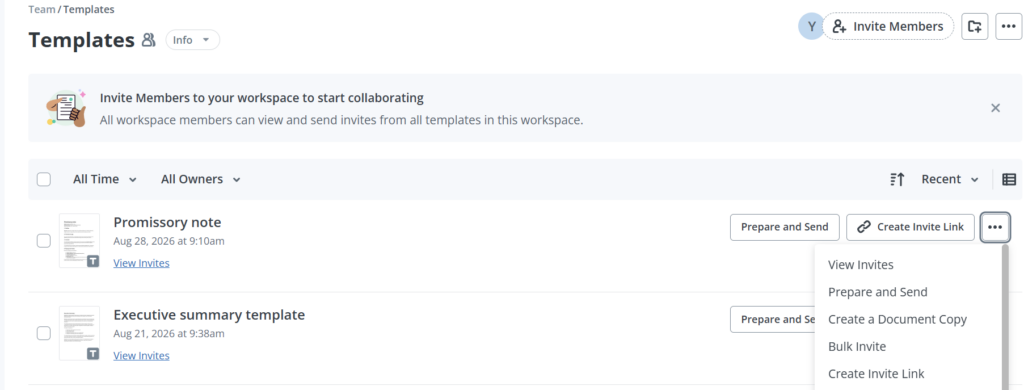
How to send one template to many recipients with Bulk Invite (Business Premium):
- Open Templates from the left sidebar.
- Open the template’s more-actions menu and select Bulk Invite.
- Add recipient emails manually, or choose Upload CSV.
- Optionally edit the invite subject, message, and branding theme.
- Click Send Invites.
The template needs at least one role without a preset email address. For packets with several files, SignNow document groups bundle them into one invite. Recipients then sign every file in a single session. This SignNow bulk invite flow suits onboarding packets, policy acknowledgments, and renewal forms.
Signers can also complete documents on phones and tablets through the SignNow mobile apps for iOS and Android. For public forms, a SignNow signing link lets anyone open and sign without an invite.
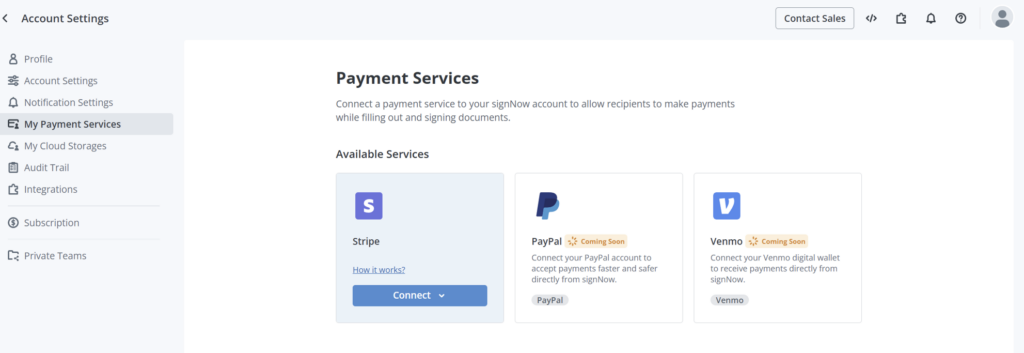
SignNow also collects payments inside signing workflows through Stripe. Go to My Account, open Payment Services under your current workspace, and click Connect on the Stripe card. The Stripe connection window lists no SignNow fees for payment collection. More detail sits on the SignNow payment collection page.
Compliance: SignNow supports the ESIGN Act and UETA, GDPR, CCPA, and PCI DSS. It holds SOC 2 Type II certification. HIPAA compliance with SignNow applies once an organization signs a Business Associate Agreement. Details are on the SignNow security and compliance page.
Tim Martin, Founder of Martin Properties, described his switch:
“I used to use Docusign, but thanks to SignNow, I can process and execute all of these documents online with 100% compliance and built-in security.”
Limit to check: SignNow is not a proposal designer. It has no interactive pricing tables or digital sales room. Teams that need document generation from CRM data can pair it with airSlate’s document generation tools.
2. Docusign: best for enterprise agreement workflows
Docusign suits large organizations with complex approvals and many connected systems.
Pricing (annual commitment): Personal costs $11 per month and includes 5 envelopes per month. Standard costs $30 per user per month, and Business Pro costs $45. Enhanced plans are quoted by sales.
Key features: Personal includes an AI-assisted summary. Standard adds shared templates, branding, delegated signing, and real-time commenting. Business Pro adds bulk send, payment collection, web forms, and API access. Enhanced plans add SSO and organization management.
Limit to check: Standard and Business Pro allow up to 100 envelopes per user per year on annual plans. Extra envelopes are billed as you go. ID verification is an add-on starting at $2.40 per attempt.
Docusign suits enterprises with legal teams, procurement rules, and many integrations. For a deeper look at the pairing, see this SignNow vs. Docusign breakdown.
3. Dropbox Sign: best for simple signing for small teams
Dropbox Sign, formerly HelloSign, offers a clean signing flow tied to Dropbox file storage.
Pricing: Essentials costs $10.05 per month billed yearly for one user. Standard costs $17.50 per user per month billed yearly for 2 or more users. Premium is quoted for 5 or more users.
Key features: unlimited signature requests, a template gallery, template links, bulk send, and SMS authentication. A free plan exists for occasional signing, and paid plans include a 30-day free trial.
Limit to check: API access is priced separately on its own page. The pricing page does not mention payment collection. Teams that need payments or proposal creation will need another tool.
Dropbox Sign suits freelancers and small agencies that already store client files in Dropbox.
4. Adobe Acrobat Sign: best for teams that live in PDFs
Adobe bundles eSignatures into Acrobat, so PDF editing and signing share one license.
Pricing: Acrobat Standard for teams costs US$16.99 per license per month. Acrobat Pro for teams costs US$23.99. Both prices apply to annual plans billed monthly. Adobe offers a free trial but no free plan.
Key features: create, edit, convert, and organize PDFs, then collect eSignatures and track responses. Acrobat Pro adds redaction, web forms, and 70+ advanced PDF tools.
Limit to check: custom enterprise pricing for Acrobat Sign Solutions is not published. Sales teams lose PandaDoc-style proposal features and pricing tables.
Acrobat makes sense when the same people edit, redact, and sign PDFs every day. One license then covers both jobs.
5. Zoho Sign: best for Zoho and CRM-centric teams
Zoho Sign fits businesses already running Zoho CRM, Zoho Books, or other Zoho apps.
Pricing and limits: the Free plan covers one user and 5 envelopes per month. Standard allows 25 envelopes per user per month. Professional and Enterprise remove envelope limits. A 14-day Enterprise trial needs no credit card. Zoho lists per-user prices for each tier on its pricing page.
Key features: Standard adds approval workflows, SMS delivery, and recipient identity checks. Enterprise adds bulk send, in-person signing, payment collection through Zoho Checkout, QES, APIs, and 21 CFR Part 11 controls.
Limit to check: several features, including bulk send, SMS, and identity checks, consume Zoho Sign credits.
6. Qwilr: best for interactive web proposals
Qwilr turns proposals into web pages with quote blocks, ROI calculators, and built-in acceptance.
Pricing: Starter costs $35 per user per month billed annually, or $49 billed monthly. Growth costs $55 per user per month with a 5-user minimum. Scale costs $75 with a 10-user minimum. Growth and Scale are annual-only plans.
Key features: all plans include eSign with an audit trail and page analytics. QwilrPay handles partial, full, or recurring payments. HubSpot, Zoho, and Pipedrive integrations start on Starter. Salesforce starts on Scale.
Limit to check: document allowances apply. Starter includes 40 free documents on annual billing, and extra documents cost $2.50 each.
7. Proposify: best for proposal governance and analytics
Proposify targets revenue teams that need consistent, approved proposals at scale.
Pricing: Build costs $39 per user per month billed annually, or $49 billed monthly. Grow costs $65 per user per month. Scale costs $107 per user per month with a $12,800 yearly platform fee that includes 10 users.
Key features: eSignatures on every plan, unlimited templates, a content library, and interactive quoting. Grow adds approval workflows, API access, and custom roles. Scale adds SSO and custom reporting.
Limit to check: Salesforce is listed as a premium add-on in the comparison table. Proposify is overkill for teams that only collect signatures on existing contracts.
Side-by-side feature comparison
The table maps the features that most often decide a switch away from PandaDoc. It lists the first plan that includes each feature.
| Feature | SignNow | Docusign | Dropbox Sign | Adobe Acrobat | Zoho Sign | Qwilr | Proposify |
| Free plan | No | No | Yes | No | Yes | No | No |
| Send limit on entry team plan | No envelope cap | 100/user/year | Unlimited requests | Not published | 25/user/month | 40 docs (annual Starter) | Plan-based |
| Bulk send | Business Premium | Business Pro | Listed (tier not stated) | Not confirmed | Enterprise | Not listed | Not listed |
| Payment collection | Yes (Stripe) | Business Pro | Not listed | Not listed | Enterprise | All plans | Yes (Stripe) |
| API access | Site License | Business Pro | Separate pricing | Not published | Enterprise | All plans (usage costs) | Grow |
| SSO | Site License | Enhanced | Not listed | Not published | Not listed | Not listed | Scale |
| Interactive pricing tables | No | Not listed | Not listed | Not listed | Not listed | Yes | Yes |
How to choose the right PandaDoc alternative
Start with the documents you send most often, then match the plan that covers them. Four questions narrow the list quickly.
- Do you design proposals or sign existing files? Proposal design points to Qwilr or Proposify. Existing files point to a signing-first tool.
- How many documents do you send per user each year? High volume favors tools without envelope caps.
- Which systems must stay connected? Check CRM, cloud storage, and ERP integrations at the plan you can afford.
- What compliance do you need? Healthcare needs HIPAA support, and life sciences may need 21 CFR Part 11 controls.
What 10 users pay per year
Seat prices add up fast at team scale. The figures below multiply each annual per-user price by 10 users and 12 months.
| Plan | Annual cost for 10 users | Send limit |
| SignNow Business | $960 | No envelope cap |
| PandaDoc Starter | $2,280 | Up to 5 templates |
| Docusign Standard | $3,600 | 1,000 envelopes in total (100 per user) |
| PandaDoc Business | $5,880 | Bulk send and API on usage credits |
A team that needs CRM integrations or approval workflows in PandaDoc must budget for Business. Some teams send more than 100 agreements per person each year. They should model Docusign overage before signing a contract.
Scenario: a five-person HR team. The team handles offer letters, onboarding packets, and policy acknowledgments for a 200-person company. It works remotely and needs signed copies stored in Google Drive. It should switch when PandaDoc’s 5-template cap blocks new forms. A signing-first tool fits better because every document starts as a Word or PDF file. In practice, the team uploads its forms as templates and adds signature fields. It then sends acknowledgments through bulk invites.
Industry examples:
- Real estate: an agent sends lease agreements from a phone between showings. Mobile signing and signing links matter more than proposal design.
- Legal services: a firm sends engagement letters to several parties in a set order. Role-based signing order and audit trails carry the most weight.
- Healthcare: a practice collects intake forms before visits. HIPAA privacy requirements make a signed BAA essential.
In the United States, eSignatures are legally binding under the ESIGN Act and state UETA adoption. In the EU, the eIDAS regulation defines simple, advanced, and qualified signatures. SignNow lists QES as a Site License add-on and also publishes eSignature legality by country.
The category keeps expanding. Fortune Business Insights projects the market to reach USD 154.52 billion by 2034.
How to migrate from PandaDoc in five steps
The steps below assume a signing-first destination such as SignNow. Plan the switch before your PandaDoc renewal date.
- Inventory your documents. List the templates you used in the past 90 days. Retire the ones nobody sends.
- Download records. Save signed PDFs and their certificates of completion from PandaDoc before your plan ends.
- Rebuild top templates. Upload each source file and place fields for every role. SignNow reusable templates keep roles, fields, and signing order together.
- Reconnect integrations. Link your CRM and cloud storage again. SignNow’s 270+ integrations streamline your work across CRM, ERP, and storage tools.
- Run a pilot send. Send one real document to a colleague and check the audit trail. Then announce the switch.
Common mistakes when switching
- Comparing list prices only. Envelope caps and usage credits can cost more than a higher seat price.
- Ignoring plan gates. Bulk send, payments, and API access often sit one tier above the entry plan.
- Skipping signer testing. Test the signing flow on mobile as well as desktop.
- Forgetting compliance paperwork. Healthcare teams need a signed BAA before sending patient data.
Teams that skip the pilot often find missing fields after the first real send. A short test with two colleagues prevents most of these issues.
Final thoughts
There’s no single best PandaDoc alternative. The right one depends on what your team sends every day. If you build polished sales proposals, Qwilr or Proposify will feel familiar. If you mostly need contracts and forms signed quickly, a simpler signing tool will save you money. SignNow starts at $8 per user per month, billed annually, with no limit on how many documents you send. Templates, signing order, and audit trails come with every plan.
Try SignNow today to get your contracts signed without paying for features you don’t use. The free trial lasts 7 days, and you don’t need a credit card.
Glossary
- Audit trail: a record of every action on a document, including names, emails, IP addresses, and timestamps.
- Bulk send: sending one template to many recipients at once, each receiving an individual copy.
- eIDAS: the EU regulation that defines simple, advanced, and qualified electronic signatures.
- Envelope: a package of one or more documents sent for signature in a single transaction.
- ESIGN Act: the 2000 US federal law that gives electronic signatures the same legal effect as handwritten ones.
- Qualified electronic signature (QES): the highest eIDAS signature level, backed by a qualified certificate and device.
- Usage credits: prepaid units some vendors charge for actions such as bulk send, SMS, or API calls.
FAQ
What is the best alternative to PandaDoc?
It depends on your workflow. For signing existing contracts at a low price, SignNow starts at $8 per user per month billed annually. For interactive sales proposals, Qwilr and Proposify are closer replacements.
Is there a free PandaDoc alternative?
Yes. Zoho Sign offers a free single-user plan with 5 envelopes per month. Dropbox Sign also offers a free plan for occasional signing. PandaDoc itself has a free plan limited to 5 documents per month.
What is cheaper than PandaDoc?
SignNow Business costs $8 per user per month billed annually. PandaDoc Starter costs $19. Adobe Acrobat Standard for teams and Dropbox Sign Standard also cost less than PandaDoc Starter.
Do I need PandaDoc if I only send documents for signature?
Usually not. PandaDoc’s strengths are proposal creation, pricing tables, and content reuse. If you only sign existing documents, a signing-first tool covers templates, signing order, and audit trails for less.
Is Docusign better than PandaDoc?
Docusign is stronger for enterprise agreement workflows and integrations. PandaDoc is stronger for proposal design. Docusign’s Standard and Business Pro plans cap envelopes at 100 per user per year on annual billing.
Are eSignatures from PandaDoc alternatives legally binding?
Yes, in the United States, if the process shows intent, consent, and a reliable record. The ESIGN Act and UETA set these rules. Check each vendor’s audit trail and certificate of completion before you switch.
Sources
- Digital Signature Market Size, Share and Industry Analysis, Fortune Business Insights, 2026
- PandaDoc pricing, PandaDoc, 2026
- Docusign eSignature plans and pricing, Docusign, 2026
- Dropbox Sign pricing, Dropbox, 2026
- Adobe Acrobat plans and pricing, Adobe, 2026
- Zoho Sign pricing, Zoho, 2026
- Qwilr pricing, Qwilr, 2026
- Proposify pricing, Proposify, 2026
- Electronic Signatures in Global and National Commerce Act, US Government Publishing Office
- eIDAS regulation, European Commission
- TL;DR
- PandaDoc alternatives at a glance
- Why teams look for a PandaDoc replacement
- Signing-first vs. proposal-first tools
- How we evaluated these tools
- The 7 best PandaDoc alternatives in 2026
- 1. SignNow: best for unlimited eSignatures on a budget
- 2. Docusign: best for enterprise agreement workflows
- 3. Dropbox Sign: best for simple signing for small teams
- 4. Adobe Acrobat Sign: best for teams that live in PDFs
- 5. Zoho Sign: best for Zoho and CRM-centric teams
- 6. Qwilr: best for interactive web proposals
- 7. Proposify: best for proposal governance and analytics
- Side-by-side feature comparison
- How to choose the right PandaDoc alternative
- How to migrate from PandaDoc in five steps
- Final thoughts
- Glossary
- FAQ
- Sources