
Quick answer: The best signature ideas combine simplicity, consistency, and personal style. Popular options include a full cursive name, initials, a first initial with a surname, an underlined signature, and a minimalist monogram. Choose a design you can reproduce easily, then use an eSignature platform like SignNow to apply it to electronic documents.
TL;DR: Quick signature ideas and tips
- Simple signature ideas: Try initials, a first initial with your surname, or a minimalist handwritten name.
- Professional signature ideas: Choose a legible, consistent style that works well on contracts, business forms, and official documents.
- Creative signature ideas: Experiment with monograms, oversized letters, underlines, or a single decorative flourish.
- Signature design tips: Keep your signature quick to write, easy to repeat, and recognizable across paper and digital documents.
- Legal considerations: A signature does not always need to be legible to be valid. Intent to sign and applicable legal requirements matter more than its appearance.
- Digital use: With SignNow, you can draw, type, or upload your signature and reuse it when signing documents electronically.
Looking for signature ideas that reflect your personality and are easy to recreate? Whether you want a professional signature for business documents, a creative handwritten design, or a minimalist style for everyday use, the right signature should feel natural and recognizable.
You don’t need elaborate lettering or perfect cursive to create a distinctive signature. A combination of initials, connected letters, underlines, or a small flourish can turn an ordinary name into a personal mark.
This guide explores 10 simple signature ideas, explains how to choose a style that suits your needs, and shows how to turn your handwritten signature into an eSignature using SignNow.
What should I write in my signature?
Your signature can include your full name, first and last initials, surname, or a stylized combination of letters. There is no single correct way to design it.
For example, someone named Jordan Martinez might choose:
- Jordan Martinez: A traditional full-name signature.
- J. Martinez: A professional and compact alternative.
- JM: A minimalist initials-based signature.
- JMartinez: A connected style with an emphasized first letter.
- Martinez: A surname-only design with an underline or flourish.
The best option depends on how frequently you sign documents, where your signature appears, and whether you prefer a formal or creative appearance.
In the United States, the Uniform Commercial Code recognizes a signature as a symbol executed or adopted with the intention of accepting a writing. Similarly, the federal ESIGN Act recognizes electronic signatures when the applicable legal requirements are met.
This means your signature does not necessarily need to be a perfectly readable version of your name.
However, banks, government agencies, and other organizations may have additional verification requirements. If you already have a signature on file, keeping your new design reasonably consistent can help avoid unnecessary questions.
How to choose the right signature style
Before experimenting with different signature ideas, consider four questions:
- Who will see your signature? Client-facing professionals may prefer a recognizable first initial or surname, while a creative professional might choose a more distinctive design.
- How often will you sign? If you sign dozens of documents every week, a short signature with fewer strokes will be more practical.
- Where will you use it? A signature that looks elegant with a pen may be difficult to reproduce using a mouse or touchscreen.
- Does it need to match an existing signature? For banking and identity verification, consistency with the signature already on file may be important.
The goal is to find a balance between appearance, readability, and ease of use.
10 simple signature ideas and examples
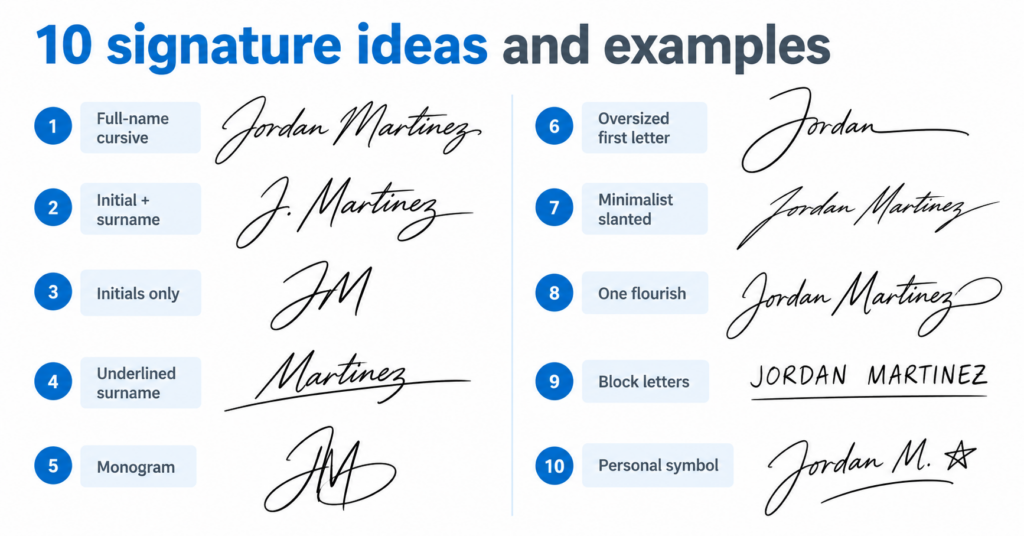
Whether you’re designing your first signature or updating an existing one, these 10 signature ideas offer inspiration for personal, professional, and electronic signing.
1. Full name in connected cursive
A full-name cursive signature is one of the most traditional and recognizable styles.
Write your first and last name using connected letters, keeping your pen movements smooth and natural. You can emphasize the first letters while simplifying the remaining characters.
Example: Jordan Martinez written in flowing cursive.
Best for: Formal documents, business agreements, professional correspondence, and personal use.
Design tip: Keep the letter height relatively consistent and avoid complicated loops that make the signature difficult to repeat.
2. First initial plus full surname
Combining your first initial with your complete surname creates a professional signature without requiring you to write your entire name.
Example: “J. Martinez” is shorter than “Jordan Martinez” but remains easy to recognize.
Best for: Business professionals, managers, real estate agents, and anyone who signs documents frequently.
Design tip: Make the first initial slightly larger than the surname to create a balanced, distinctive appearance.
3. Initials-only signature
An initials-based signature is one of the simplest options for people who prefer a fast, minimalist design.
You can use two or three letters, depending on your name. Write them separately, connect them, or experiment with different letter sizes.
Example: JM or J.M.
Best for: Internal approvals, document initialing, and short signatures.
Design tip: Add a small space or dot between letters to prevent them from merging into an unreadable mark.
Remember that initialing individual pages and signing a complete agreement may serve different purposes. Use the signature format required by the document or organization.
4. Surname with an underline
An underlined surname creates a confident, structured appearance while remaining relatively easy to write.
Start with your last name and extend the final stroke into a straight or slightly curved underline.
Best for: Professional signatures, business correspondence, and personal branding.
Design tip: Use one clean underline rather than multiple decorative strokes. This keeps the signature visually balanced and easy to reproduce.
5. Monogram signature
A monogram combines two or more initials into a single compact design.
You can overlap letters, place a smaller initial inside a larger one, or connect the characters using a shared stroke.
Example: The letters J and M can be arranged so that one letter flows into the other.
Best for: Creative professionals, designers, entrepreneurs, and people who want a distinctive personal mark.
Design tip: Experiment with several arrangements before selecting a design. A monogram should remain recognizable even at a small size.
6. Oversized first letter
This signature style emphasizes the first letter of your name while keeping the remaining characters simple.
Make the opening letter two or three times taller than the rest of the signature, then continue with smaller connected letters or a shortened surname.
Best for: Professionals who want a signature that looks distinctive without becoming overly decorative.
Design tip: Choose a letter that naturally supports a larger shape, such as J, M, L, or S.
7. Slanted minimalist signature
A minimalist signature uses fewer strokes and avoids unnecessary details.
Write your name or initials at a consistent forward angle, keeping the lettering compact and fluid.
This style can work especially well when signing on a tablet or smartphone.
Best for: Healthcare professionals, administrative teams, frequent signers, and mobile document workflows.
Design tip: Practice maintaining the same slant and spacing. Consistency matters more than elaborate lettering.
8. Signature with one flourish
A decorative flourish adds personality to an otherwise simple signature.
You might extend the final letter into a curved tail, add a small loop to the first initial, or finish with a subtle swirl.
Best for: Personal signatures, creative professionals, and people who prefer an elegant handwritten appearance.
Design tip: Limit yourself to one distinctive flourish. Too many loops can make the signature difficult to reproduce consistently.
9. Print-style block letters
Not everyone enjoys writing in cursive. A signature using printed or capital letters can be equally practical.
Write your name in neat block lettering, adjusting the size, spacing, or angle to make the design more personal.
Best for: People who prefer legibility, professionals completing forms, and anyone who finds cursive handwriting uncomfortable.
Design tip: Try slightly connecting the first and last letters or emphasizing one character to distinguish the signature from ordinary printed text.
10. Name with a small personal symbol
For a more creative signature idea, combine your name or initials with a small decorative symbol.
This might be a star, a short dash, a curved line, or another simple mark that you can reproduce easily.
Best for: Personal branding, creative work, and informal documents.
Design tip: Keep the symbol small and place it in the same position each time.
For formal transactions, avoid adding symbols that could make your signature difficult to verify or inconsistent with existing records.
Professional signature ideas for different industries
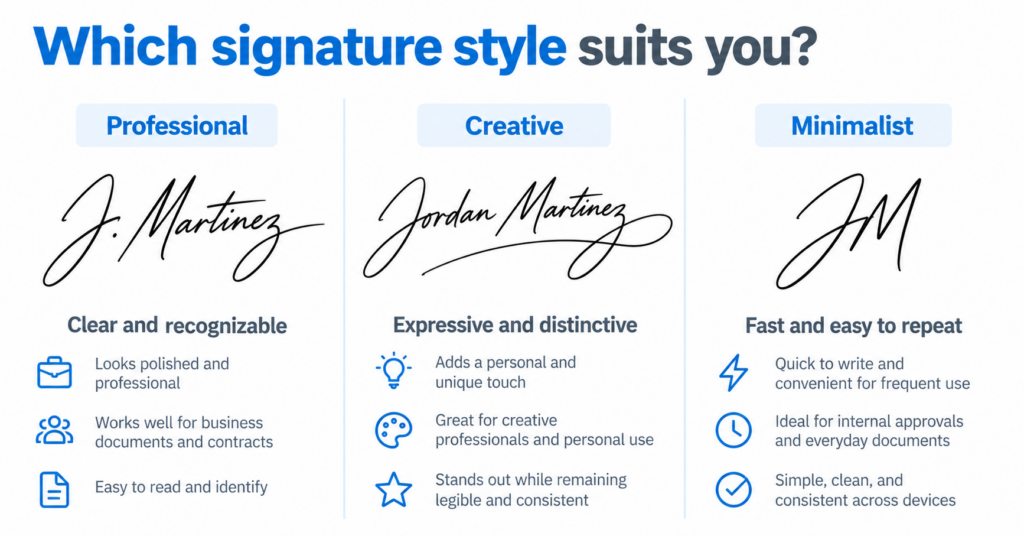
Your profession can influence the signature style you choose. Some roles benefit from clear, recognizable lettering, while others prioritize speed and convenience.
Business and sales professionals
A first initial followed by a surname creates a polished signature suitable for proposals, contracts, and client agreements.
For example, a sales manager might choose a slightly oversized initial with a connected surname.
Healthcare professionals
Healthcare workers often sign forms and approvals throughout the day. A minimalist signature or compact initials-based design may be easier to reproduce on tablets and digital forms.
Real estate agents
Real estate professionals regularly sign disclosures, agreements, and transaction documents.
A recognizable surname or full-name cursive signature can provide a consistent appearance across paperwork.
HR and administrative teams
HR professionals often work with onboarding documents, employment agreements, and internal approvals.
A simple initials-based style may be useful for initialing, while a complete signature may be preferable for formal agreements.
Creative professionals
Designers, artists, and entrepreneurs may prefer a monogram or a signature with one distinctive flourish.
These styles can express personality while remaining practical for contracts and business documents.
How to create your own signature step by step
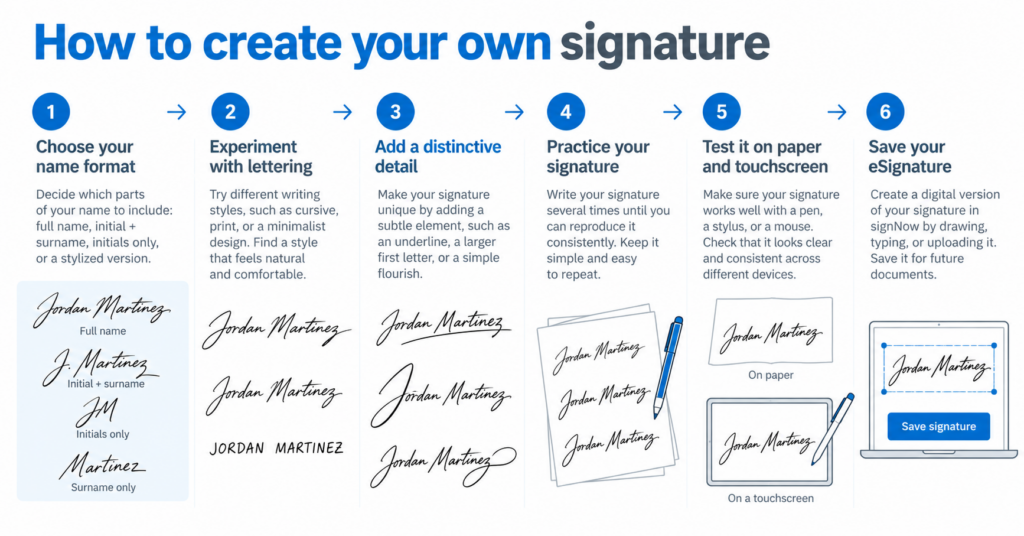
Finding inspiration is only the first step. Once you’ve explored different signature ideas, you need to turn your favorite design into a repeatable signature.
If you want to turn your favorite signature idea into a reusable design, explore our guide on how to create a handwritten signature online using typed, drawn, or uploaded signatures.
Step 1. Decide which parts of your name to include
Start by writing your full name, initials, and surname separately.
Compare how each option looks and consider which one feels most natural to write.
If you want a professional appearance, begin with your first initial and surname. For a more personal design, try your full name or a monogram.
Step 2. Experiment with lettering styles
Write your preferred name combination in several ways:
- Connected cursive
- Printed block letters
- Minimalist slanted lettering
- Large initials with smaller remaining letters
- A monogram with overlapping characters
You don’t need to master calligraphy. Focus on finding a style that suits your handwriting.
Step 3. Add one distinctive element
Choose a small detail that makes your signature recognizable.
For example, you could enlarge the first letter, underline your surname, connect two initials, or extend the final stroke into a loop.
Avoid combining too many decorative elements.
Step 4. Practice your signature repeatedly
Write your chosen design several times without looking at the previous version.
Compare the results. Are the letters, proportions, and flourishes reasonably consistent?
If the signature changes dramatically each time, simplify it.
A practical signature should become easier to reproduce with practice.
Step 5. Test it on paper and electronic devices
Try writing your signature with a pen, drawing it on a touchscreen, and creating it using an eSignature tool.
Some elaborate handwritten designs may be difficult to reproduce with a mouse or finger.
If you regularly sign documents electronically, choose a style that works across different devices.
Step 6. Save your signature for future use
Once you’ve selected a signature style, you can create an electronic version to use when signing PDFs, contracts, forms, and other documents.
For example, SignNow allows you to draw, type, or upload a signature and use it in electronic document workflows.
Once you’ve finalized your design, learn how to create an electronic signature online and save it for future documents.
How to turn your signature idea into an eSignature with SignNow
Once you’ve chosen a signature design, you can use it to sign documents electronically with SignNow.
The platform supports typed, drawn, and uploaded signatures, allowing you to select the method that best matches your preferred style.
Legally binding eSignature capabilities are included in SignNow pricing plans. You can also learn more about how SignNow electronic signatures support electronic document signing.
How to create and add your signature in SignNow
Follow these steps to sign a document yourself:
- Upload your document to SignNow and open it in editing mode.
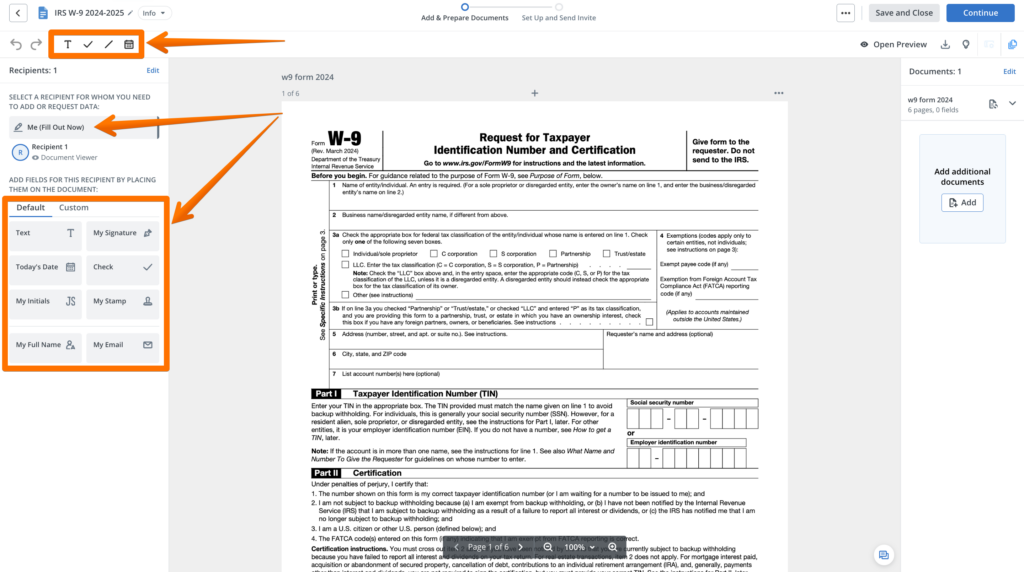
- Select Me (Fill Out Now) in the left-side panel. The Default tab provides tools such as Text, My Signature, Today’s Date, Check, My Initials, My Stamp, My Full Name, and My Email.
- Choose My Signature and click the location in the document where your signature should appear.
- Create your signature by drawing it, typing your name, or uploading an image of your handwritten signature.
- Adjust the signature’s position, size, or alignment as needed. If you prefer the look of traditional handwriting, learn how to hand sign a PDF using a mouse, trackpad, stylus, or touchscreen.
- Use My Initials if you also need to initial specific pages.
- Save the completed document.
Ready to use your new signature? Follow our step-by-step guide on how to add a signature to a PDF by typing, drawing, or uploading your preferred design.
How to choose signature types for recipients
When sending documents for signature, SignNow also allows you to control the signature methods available to recipients.
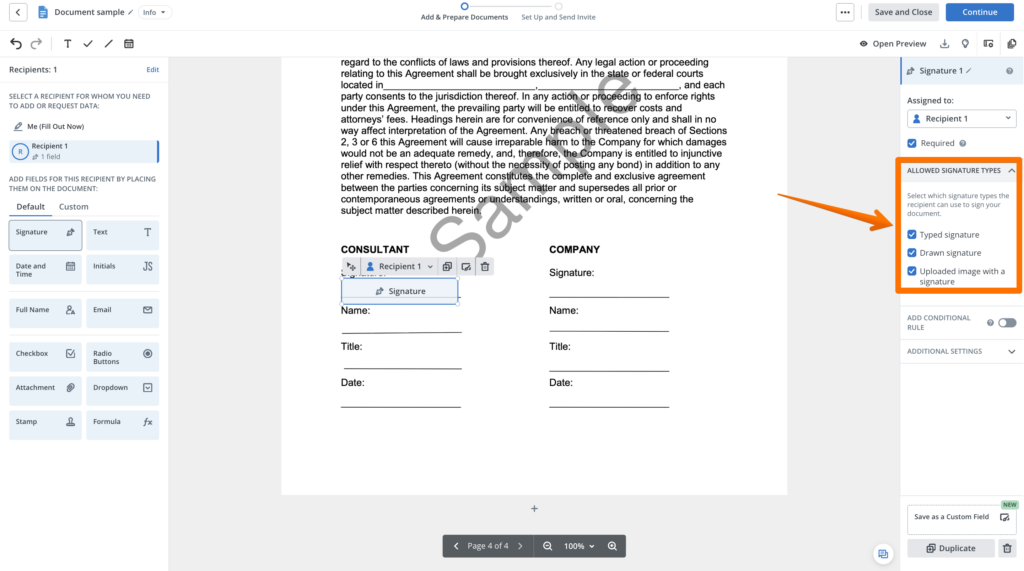
After placing a signature field, open the Allowed signature types section in the right-side panel.
Depending on your workflow, you can allow or restrict:
- Typed signature: The recipient enters their name and selects a signature style.
- Drawn signature: The recipient draws their signature using a mouse, finger, or stylus.
- Uploaded signature: The recipient uploads an image of an existing handwritten signature.
For example, you might allow drawn signatures for documents where a handwritten-style mark is preferred or typed signatures for routine internal approvals.
Administrators can also configure draw-only signatures for invitations through Organization/Workspace settings.
Explore signature fonts and styles online
If you’re unsure which signature design to choose, SignNow provides tools for experimenting with different styles.
The SignNow name sign generator lets you enter your name and explore signature font options.
You can also use the signature font generator to explore typed, drawn, and uploaded signature methods.
These tools can help you compare different signature ideas before deciding which one to use.
For people who frequently sign documents on mobile devices, the SignNow mobile app supports saved signatures and initials.
You can manage them under Account > Personal Data > Signature and Initials and select a default signature for future use.
Why use SignNow for electronic signatures?
Creating a signature is only part of an electronic document workflow. Businesses also need ways to send, track, and manage signed documents.
SignNow combines eSignature capabilities with document management features that help teams reduce manual paperwork.
For example, Nicholas Tovar, SHRM-CP, described the impact on his team’s workflow:
“SignNow has changed our workflows to be more streamlined and efficient. We saved more than 1500 pieces of paper converting to an electronic format.”
SignNow also provides an eSignature audit trail that can record information such as signer names, email addresses, IP addresses, and timestamps.
Learn more about the platform’s security controls on the SignNow security and compliance page.
Are creative signatures legally valid?
A signature does not necessarily need to look formal or include your full name to be legally valid.
In many situations, the key consideration is whether the person intended to sign or approve the document and whether the transaction satisfies applicable legal requirements.
Under the US ESIGN Act, an electronic signature may be an electronic sound, symbol, or process associated with a record and adopted with the intent to sign.
The Uniform Electronic Transactions Act (UETA) provides a related legal framework for electronic transactions in many US jurisdictions.
This means that a typed name, handwritten mark, or initials may qualify as an electronic signature when the relevant requirements are met.
However, some transactions have additional formalities, and organizations may impose their own signature verification procedures.
For more details, see SignNow’s guide to eSignature legality in the United States.
Does your signature style affect its security?
A signature’s appearance does not automatically determine how secure it is.
For example, a complicated handwritten signature may look distinctive, but an image of that signature can still be copied.
Electronic signing platforms can provide additional evidence through signer authentication, document records, and audit trails.
A digital signature is a particular technical type of electronic signature that uses cryptography to support authentication and detect document changes.
According to the NIST Digital Signature Standard (FIPS 186-5), digital signatures can help detect unauthorized modifications to data and authenticate the signatory.
In the European Union, the eIDAS framework distinguishes between simple, advanced, and qualified electronic signatures.
A qualified electronic signature has the same legal effect as a handwritten signature under EU law. Regulation (EU) 2024/1183 further updates the EU’s digital identity framework.
The main takeaway is that your signature design and the technology used to verify it serve different purposes.
Your signature style expresses your identity, while the signing process helps establish evidence of who signed and whether the document was altered.
For a closer look at certificate-based signing and document verification, read our guide on how to add a digital signature to a PDF.
Common mistakes when choosing a signature style
Even the most creative signature ideas can become impractical if they are difficult to use consistently.
Here are several mistakes to avoid.
- Adding too many flourishes. Multiple loops, underlines, and decorative strokes can make your signature slow and difficult to repeat.
- Changing your signature frequently. Significant differences between signatures may raise questions during identity verification or document reviews.
- Choosing a design that’s too complicated. A signature should be comfortable to write, especially if you sign documents regularly.
- Ignoring the signing device. A design that looks elegant on paper may be awkward to reproduce using a mouse or touchscreen.
- Assuming complexity means security. A highly stylized signature is not automatically more secure than a simple one.
- Copying someone else’s signature. Use other designs for inspiration, but develop a signature that is uniquely yours.
For most people, a simple, recognizable signature is more useful than an elaborate design that requires careful drawing every time.
Disclaimer: The information contained in this blog post is provided for general informational purposes only and does not constitute formal legal advice.
Final thoughts
The best signature ideas don’t have to be complicated. Whether you prefer elegant cursive, simple initials, a professional surname signature, or a creative monogram, choose a design that reflects your personality and is easy to reproduce. Once you’ve found your preferred style, you can use it for both handwritten and electronic documents. Ready to put your new signature to work? With SignNow, you can draw, type, or upload your signature, sign documents electronically, and streamline everyday paperwork. Start using SignNow to turn your signature idea into a practical eSignature.
Glossary
- Signature style: The visual appearance of a person’s handwritten or electronic signature, including lettering, initials, spacing, and decorative elements.
- Monogram: A design created by combining or overlapping two or more initials into a recognizable personal mark.
- eSignature: An electronic sound, symbol, or process associated with a record and adopted with the intent to sign it.
- Digital signature: A cryptographic signature created using a private key and verified using a corresponding public key to support authentication and detect changes.
- Audit trail: A record of actions associated with a document, which may include signer information, timestamps, and other evidence of the signing process.
FAQ
1. What are some good signature ideas?
Good signature ideas include writing your full name in cursive, combining your first initial with your surname, using initials only, adding an underline, or creating a minimalist monogram. Choose a style that feels natural and is easy to reproduce consistently.
2. How can I make my signature look unique?
Experiment with letter sizes, connected characters, slanted handwriting, and one decorative flourish. For example, you can enlarge the first initial or extend the final letter into a curved underline. A small, distinctive feature is often enough to personalize your signature.
3. What is the best signature style for a professional?
A first initial followed by a full surname is a popular professional signature style because it is compact and recognizable. A full-name cursive signature or a clean minimalist design can also work well for business documents.
4. Can my signature be just my initials?
Yes. Initials can function as a signature when adopted with the intent to sign and when applicable legal requirements are met. However, some organizations may require a full signature or one that matches their existing records.
5. How do I create a signature for my name online?
You can use an online signature generator to experiment with different fonts and styles. For example, the SignNow name sign generator lets you enter your name and explore signature designs. You can then create a typed, drawn, or uploaded eSignature for electronic documents.
6. Does my eSignature need to match my handwritten signature?
For most electronic transactions, an exact visual match is not generally required by law. However, maintaining a recognizable signature style can help with consistency, and individual organizations may have additional verification requirements.
7. Can I use a creative signature on legal documents?
A creative signature may be legally valid if it satisfies the applicable requirements, including intent to sign. However, some documents or institutions have specific signature rules. For important transactions, check the requirements before using an unconventional design.
Sources
- 15 U.S.C. § 7006 — Definitions (ESIGN Act), Cornell Law School
- UCC § 1-201 — General Definitions, Cornell Law School
- NIST FIPS 186-5 — Digital Signature Standard
- Uniform Electronic Transactions Act
- Regulation (EU) 2024/1183 — eIDAS 2
- Legality of electronic signatures in the European Union — SignNow
- SignNow security and compliance
- What should I write in my signature?
- 10 simple signature ideas and examples
- Professional signature ideas for different industries
- How to create your own signature step by step
- How to turn your signature idea into an eSignature with SignNow
- Are creative signatures legally valid?
- Common mistakes when choosing a signature style
- Final thoughts
- Glossary
- FAQ
- 1. What are some good signature ideas?
- 2. How can I make my signature look unique?
- 3. What is the best signature style for a professional?
- 4. Can my signature be just my initials?
- 5. How do I create a signature for my name online?
- 6. Does my eSignature need to match my handwritten signature?
- 7. Can I use a creative signature on legal documents?
- Sources
