
Quick answer: You can add a digital signature to a PDF with a certificate-based tool or a cloud eSignature platform, and which one fits depends on whether you’re signing a single document or running a repeatable business workflow. The two terms get used interchangeably even though they rely on different technologies, which is part of why searches for this topic turn up such mixed advice.
TL;DR
- A digital signature uses cryptography to verify signer identity and detect tampering; an electronic signature is the broader legal category that records consent, and some platforms apply both.
- In the U.S., electronic and digital signatures on a PDF are legally recognized under the ESIGN Act and UETA. The EU relies on eIDAS, which defines three assurance tiers.
- With SignNow, the core flow is four steps: upload the PDF, create your signature, place it and any other fields, then send or download.
- Signature creation supports drawing, typing, or uploading an image. None of the three affects legal validity, the audit trail does.
- A certificate-based digital signature (QES) option is available as a Site License add-on for teams that need it.
- Before relying on a signed PDF, check its audit trail and certificate of completion for signer identity, timestamp, and whether the document changed after signing.
This guide covers a complete, product-grounded path for adding a signature to a PDF, the legal rules that make it count, and how to check an existing signature before you rely on it.
Digital signature vs. electronic signature: What’s the difference
A digital signature is a cryptographic method that verifies signer identity and detects tampering; an electronic signature is a broader legal category that records consent to a document, and it doesn’t require cryptography on its own. The distinction matters because most everyday business documents, from HR paperwork to sales contracts, only need the legal weight of an electronic signature, while some regulated or high-assurance documents call for the added verification a digital signature provides.
Cloud eSignature platforms complicate the picture in a useful way: they can apply a verifiable digital signature layer on top of the standard eSignature audit trail, without a separate certificate purchase from a third-party certificate authority. On SignNow, a SignNow digital signature certificate is available as a Site License add-on, alongside the standard signing flow described below.
The market reflects how much of this activity has shifted online. Fortune Business Insights valued the global digital signature market at $9.85 billion in 2025, projecting growth to $154.52 billion by 2034.

Think of it this way: a digital signature works like a tamper-evident seal with a verified name attached, while an electronic signature works like signing a delivery tablet. Both count as consent under the law, but only one carries a cryptographic seal that proves the document hasn’t changed since it was signed.
Are digitally signed PDF documents legally binding?
Yes. In the U.S., electronic and digital signatures on a PDF carry the same legal standing as a handwritten signature under the ESIGN Act and the state-level UETA, provided the signer intended to sign and the record can be retained. In the EU and UK, eIDAS recognizes three tiers: Simple Electronic Signatures for routine approvals, Advanced Electronic Signatures that are uniquely linked to the signer, and Qualified Electronic Signatures, which carry the same legal weight as a handwritten signature in any EU court.
What determines whether a specific document will hold up is less about the signature style and more about the platform behind it: whether it keeps an audit trail, verifies signer identity appropriately for the document’s risk level, and meets relevant compliance certifications such as SignNow SOC 2 compliance. Legal teams weigh this directly when choosing a platform:
“We felt most comfortable investing with SignNow given their SOC 2 certification and strict focus on ESIGN and UETA act compliance. Deploying SignNow across all functions of our growing organization and within critical Office 365 environments has simplified our entire workflow.”
— Dan Rotelli, CEO, BIS (legal services provider)
How to add digital signature to PDF with SignNow
To add a digital signature to a PDF, you need the source file, a signing tool, and, if you’re sending it to other people, a plan that covers your signer count and field types.
- The PDF itself, saved locally or in a connected cloud drive.
- A browser or the SignNow mobile app — no separate software installation required.
- A plan that matches your workflow. SignNow’s Business plan covers single and sequential signing; SignNow bulk send and payment requests require the Business Premium plan.
A construction firm routing a subcontractor agreement for signature before work begins on-site is a typical case for this flow: one document, a handful of signers, and a record of exactly who signed and when.
Step 1: Upload your PDF form
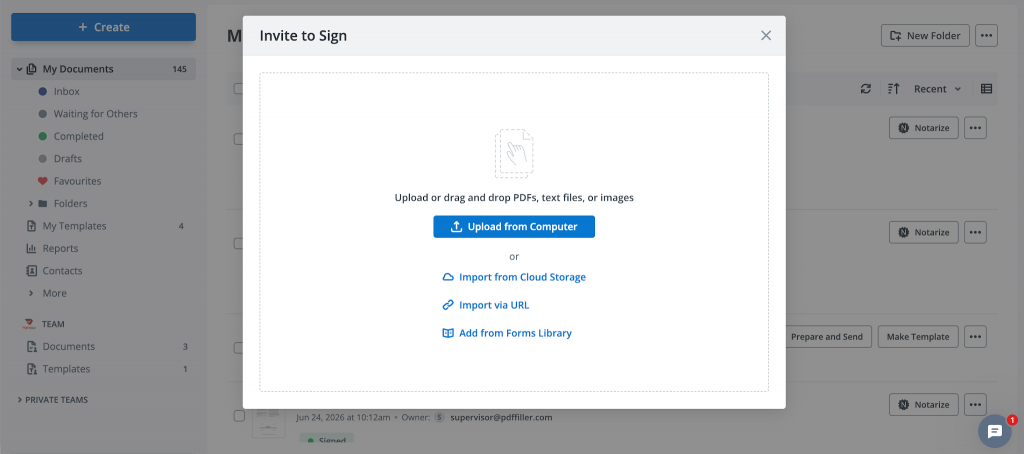
Sign in and upload the PDF from your device or a connected cloud drive.
- Log in to your account and go to the dashboard.
- Click + Create -> Invite to Sign, and select the file source: your device, cloud storage, or Forms Library.
- Choose the PDF you want to sign. Word documents and several other common formats are also supported.
- Wait for the document to open in the editor.
Most teams keep source files in a shared drive rather than a local folder, since SignNow cloud storage integrations pull the document in directly without a manual download-and-reupload step.
Learn more about how to electronically sign a PDF document in 2026.
Step 2: Create your signature
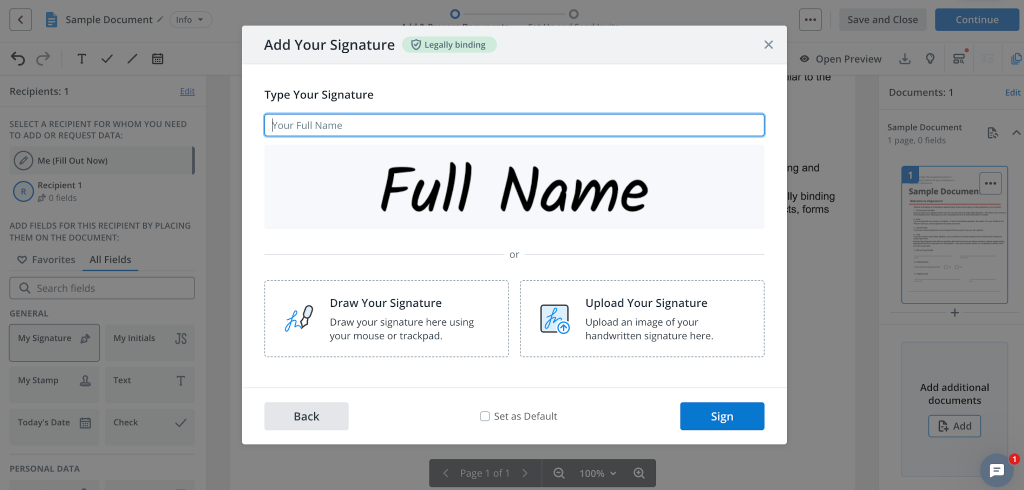
Select My Signature in the document editor and choose to draw, type, or upload an image of your signature.
- With the document open in the editor, select Me (Fill Out Now) -> My Signature. Drag the Signature field onto the document
- Choose one of three creation methods to create your eSignature: draw it with your mouse or trackpad, type your name in a signature font, or upload an image of your handwritten signature.
- Review the preview.
- Click Sign to add your signature to the page.
None of the three methods changes how legally sound the result is. What makes a signature verifiable is the record behind it, the timestamp, the signer’s identity, and whether the document changed afterward, not whether the signature looks handwritten.
Step 3: Set up your signature and add other fields
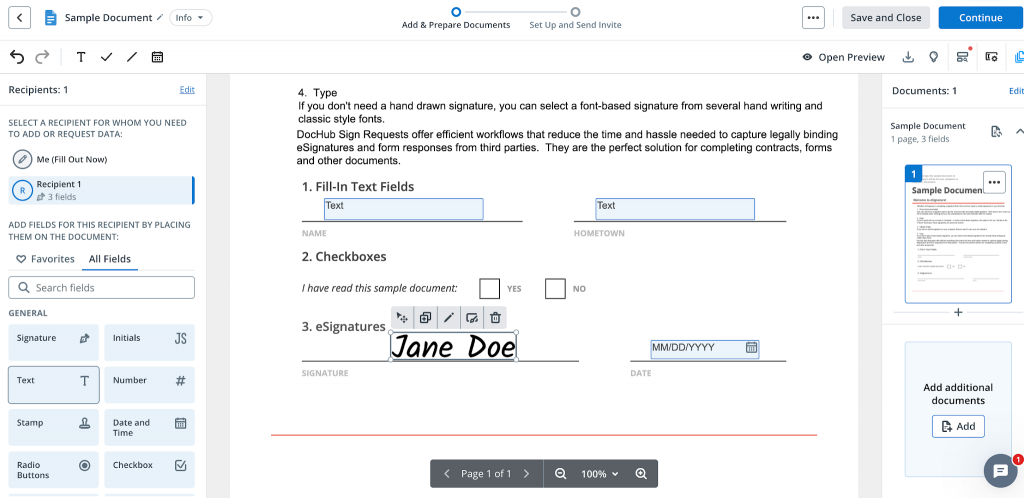
Adjust the position and size of the Signature field, then add any date, initial, or text fields the document needs before sending.
- Drag the signature you created onto the correct spot on the page and configure the Signature field size.
- Add a date field next to it if the document requires one.
- Add any text or initial fields for other required entries.
- For documents with more than one signer, assign each field to a specific recipient using the SignNow signing order setting, which controls who signs first.
- Confirm every required field is placed before moving to the next step.
Step 4: Send or download the signed PDF
Click Continue to route the document to other signers, or click Save and Close to finish and download it yourself.
- If you’re the only signer, click Save and Close, then download the completed PDF.
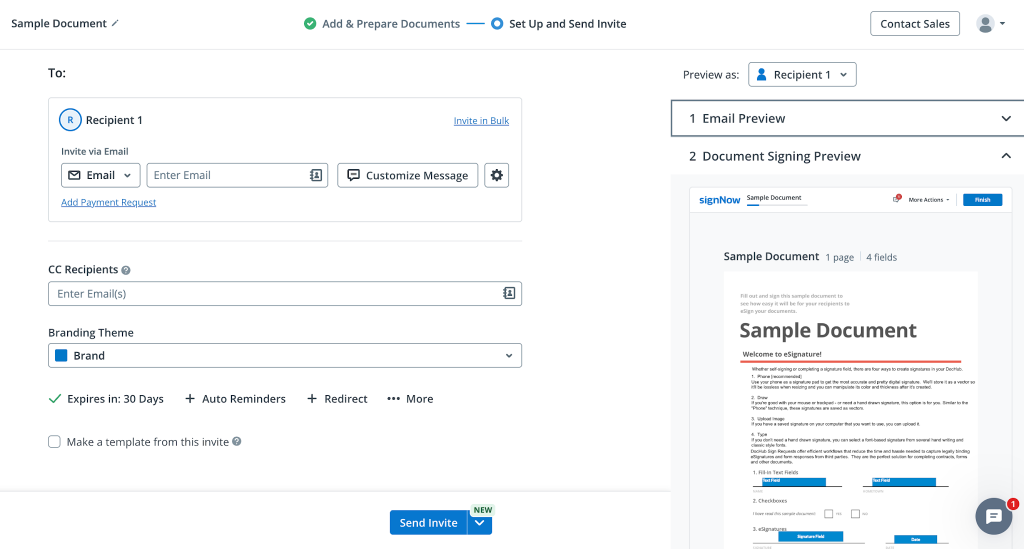
- If others need to sign, select Continue, enter each recipient’s name and email address, and set the signing order if there’s more than one.
- Choose how to deliver it: send by email, schedule send, or invite via link. For repeat use cases, the SignNow signing links option lets you share one URL instead of sending individual invites.
- Track progress from the dashboard until every recipient has signed.
- Once complete, the finished PDF includes a certificate of completion and an audit trail documenting each signing action.
How to verify a digital signature on a PDF
Open the signed PDF and check the signature panel or certificate of completion for signer identity, timestamp, and whether the document has changed since signing.
Look for three things before relying on a signed document in a dispute, audit, or compliance review: the signer’s name and email address, the timestamp and IP address recorded at the moment of signing, and an indicator that the document body hasn’t been altered since that signature was applied. The SignNow audit trail records all three, along with every action taken on the document from upload to completion. Who needs to check this: anyone relying on the document later, not just the person who sent it, and it matters most before the document is used as evidence rather than at the time it’s signed.
Every document signed in SignNow is backed by a trusted digital certificate issued by airSlate, verified through Adobe’s certificate authority. This certificate confirms that the document has not been altered since signing and that each signature is authentic and legally valid.
Learn more about SignNow’s security, compliance, and data protection, including eSignature audit trail, Qualified Electronic Signature, and Adobe certificate, and certifications and regulations.
Common mistakes to avoid
- Treating “digital” and “electronic” as identical terms. They describe different technology, and conflating them leads to picking the wrong tool for a document that needs stronger identity verification.
- Assuming a certificate purchase is always required. Cloud eSignature platforms can apply a verifiable digital signature without a separate certificate authority purchase for most business use cases.
- Skipping stronger identity checks on high-risk documents. Enabling SignNow two-factor authentication for financial or legal documents adds a verification step beyond a typed or drawn name.
- Not checking the audit trail before relying on a document. A signature that looks valid on screen can still be worth confirming against the recorded timestamp and signer details, particularly for older files.
Disclaimer: The information contained in this blog post is provided for general informational purposes only and does not constitute formal legal advice.
Final thoughts
Whether you’re signing a single agreement or managing high-volume document workflows, adding a digital signature to a PDF doesn’t have to be complicated. The most important step is choosing a signing solution that provides the right level of security, identity verification, and a complete audit trail for your use case.
With SignNow, you can upload a PDF, create a legally recognized electronic signature in minutes, route documents for approval, and track every signing event from one secure workspace. Teams that need higher assurance can also add certificate-based digital signatures through SignNow’s Qualified Electronic Signature (QES) capabilities.
Start your SignNow free trial today to sign PDFs online, automate approvals, and securely manage every document from one platform.
Glossary
- Audit trail: A record of every action taken on a document, including who viewed, signed, or edited it, and when.
- Digital certificate: A credential issued by a certificate authority that cryptographically links a signature to a verified identity.
- Digital signature: A cryptographic method that verifies signer identity and detects changes to a signed document.
- eIDAS assurance level: One of three EU signature tiers — Simple, Advanced, or Qualified — each with a different level of identity verification.
- Electronic signature: Any method that records a signer’s consent to a document, with or without cryptography.
- PKI (public key infrastructure): The system of certificates and keys that certificate-based digital signatures rely on to verify identity.
FAQ
1. Can I add a digital signature to a PDF for free?
Most eSignature platforms, including SignNow, offer a free trial that covers document upload, signature creation, and single-document signing without a purchase commitment.
2. What’s the difference between a digital signature and an electronic signature?
A digital signature uses cryptography to verify identity and detect tampering; an electronic signature is the broader legal category covering any method that records a signer’s consent, with or without cryptography.
3. Is a digitally signed PDF legally binding?
Yes, in the U.S. under the ESIGN Act and UETA, and in the EU and UK under eIDAS, provided the signing method matches the document’s required assurance level.
4. How can I tell if a PDF’s digital signature is valid?
Check the document’s audit trail or certificate of completion for the signer’s identity, the timestamp of signing, and confirmation that the document hasn’t been altered since.
5. Can I add a digital signature to a PDF on my phone?
Yes. SignNow mobile apps for iOS and Android support uploading, signing, and sending documents, including offline signing that syncs once the device reconnects.
6. Do I need Adobe Acrobat to digitally sign a PDF?
No. Certificate-based tools like Adobe Acrobat are one option, but cloud eSignature platforms provide an alternative path that doesn’t require installing separate software or managing a certificate.
