
You hand sign a PDF by drawing your signature straight into the file. A mouse, trackpad, stylus or fingertip moves the line. A signature field holds it. Nothing gets printed, and nothing gets scanned back in.
Two different jobs hide behind the same search request “hand sign a PDF”. One is signing a PDF on your own device. The other is getting a PDF hand signed by a client or a new hire. The steps diverge early, so this guide keeps them apart. It is written for the people who do both. HR, legal, recruiting, real estate and finance teams need it most. So does any freelancer or client sent a contract by email.
Below: how the three signature methods differ, and the click path for each job. Then what makes a handwritten mark hold up. You can e sign PDFs online in any browser, with no installation required. SignNow, as an electronic signature platform covers all of it.
TL;DR
- Hand signing a PDF means drawing your own signature into a signature field in the digital file. No printout is involved.
- Three input methods exist. Draw when the document should read as hand-signed. Type when speed matters. Upload a photo only when one specific wet-ink mark is required.
- To sign a PDF you hold in SignNow: click “Me (Fill out Now)” in the editor. Pick the signature field, click the spot, then draw.
- To sign a PDF someone sent you: click “View Document” in the email, then press “Start”. At the signature field, choose “Draw it using your touchpad or mouse”, then click “Finish”.
- Legality does not depend on how the drawing looks. Under 15 U.S.C. § 7006(5), the test is intent to sign.
- The drawing carries less evidentiary weight than the record around it. Timestamps, signer authentication, and an audit trail decide disputes.
What hand signing a PDF actually means
Hand signing a PDF means applying a drawn signature to the file itself. The signature becomes part of the document. The result is a signed file you can send on. No paper version exists at any point.
Think of the PDF as a form with a reserved box. The box is a signature field. Your drawing goes inside it, at the size and position the field sets. Software then writes the drawing into the page.
Readers arrive using several phrases. “Hand sign a PDF” and “manually sign a PDF” describe one action. So does “sign a PDF by hand digitally”. So does “draw signature on PDF”. The wording varies. The mechanics do not.
How online PDF signing works and why it matters
Who does it: anyone who owns or receives a PDF needing a signature. What it produces: a signed PDF, plus a record of the signing event on a proper platform. When it holds up: when the signer intended to sign, and the platform can show who and when. Where: in a browser, so you can sign a PDF online without installing anything. Field placement depends on whether you or the sender prepared the document.
Spending on this category is climbing. Grand View Research values the digital signature market at USD 9.4 billion in 2026. It forecasts USD 121.0 billion by 2033, a 43.9% compound annual growth rate.
Handwritten electronic signature vs digital signature
These terms describe different things. An electronic signature, or e-signature, is the mark plus the person’s intent. A digital signature is cryptography that seals a file using a certificate.
A drawn signature is an electronic signature. It may sit inside a document that a digital signature protects. The drawing itself is not the cryptography. The ESIGN Act signature definition covers “an electronic sound, symbol, or process” adopted with the intent to sign.
That distinction matters when a counterparty asks for a “digital signature”. Sometimes they mean any electronic signature. Sometimes they mean certificate-based signing. Ask which one before sending the file back.
One boundary is worth stating plainly. QES, the qualified signature tier defined under EU law, is not included in the standard SignNow plans. Its SignNow security and compliance coverage spans SOC 2 Type II, GDPR, PCI DSS, and CCPA.
Draw, type, or upload: choosing a signature method
Draw when the document should look hand signed. Type when you want the fastest route. Upload an image only when a specific existing wet-ink signature has to appear.
Why it matters
The three methods are legally equivalent in most US transactions. They are not equivalent as evidence. A signature captured live sits inside a timestamped record. An uploaded picture does not.
| Method | How it is made | Best for | Weak point |
| Draw | Trace the line with a stylus, fingertip, trackpad or mouse | Contracts and anything that should read as hand signed | Line quality drops badly on a trackpad |
| Type | Enter your name, pick a script typeface | Internal approvals and high-volume signing | Looks generated, because it is |
| Upload an image | Photograph or scan a wet-ink signature, then upload it | Cases needing one exact existing mark | Portable picture with no signing record |
| Camera capture | Sign on paper, capture it with a device camera | Getting a genuine wet-ink line into a file | Lighting and shadow degrade the result |
Input device changes the result more than people expect. A stylus on a tablet comes closest to pen on paper. A fingertip works well at a larger scale. A trackpad produces a shaky, angular line. A mouse is the worst of the four.
If the drawn line looks wrong, the fix is usually scale. Draw larger than feels natural. The field shrinks the image on placement, and shrinking hides small wobbles. A drawn electronic signature made at full canvas width lands cleaner in the field. Where speed beats appearance, save a default signature setting once and reuse it. Most tools offer all three methods. A PDF reader such as Adobe Acrobat keeps them in its Fill & Sign tool, and so does a browser-based PDF editor.
How to hand sign a PDF you already have
Signing your own PDF takes one pass through the editor. You add the signature field yourself. No sender has prepared the document for you.
The flow to add a handwritten signature in SignNow
- Upload the PDF into your SignNow document editor by clicking + Create > Upload
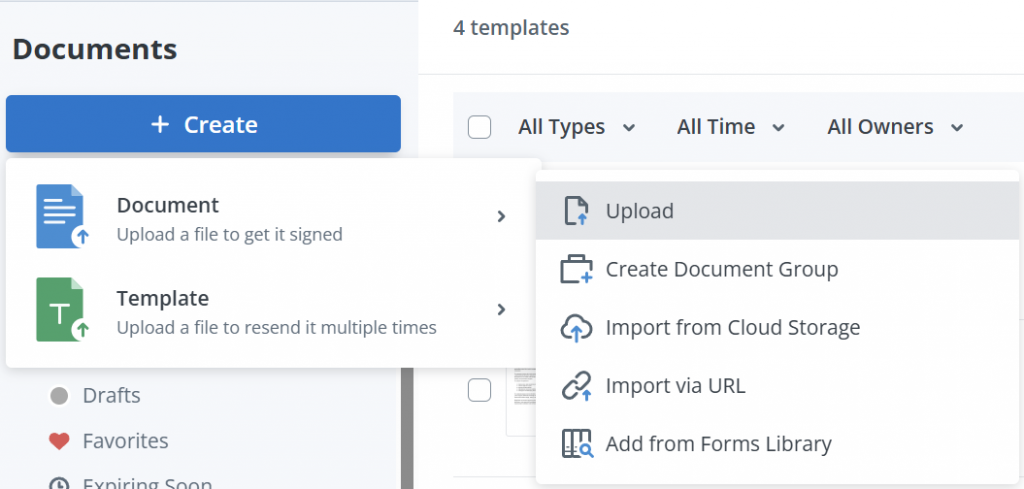
2. Open the document in editing mode.
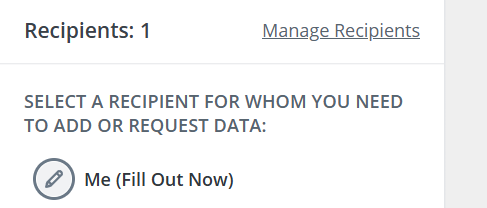
3. Click “Me (Fill out Now)” on the left-side panel. This opens the fields you can fill yourself.
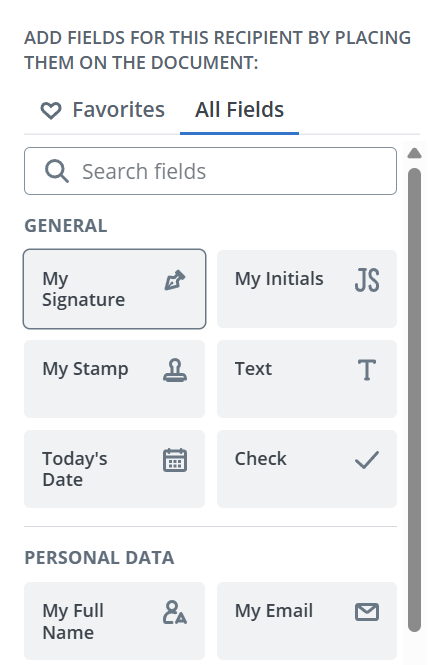
4. Select the My signature field. The same panel also offers initials, stamp, today’s date, text, check, full name, and email.
5. Click on the document where the field should sit.
6. If you already have a saved drawn signature or its image, choose it for completing the field.
7. If you don’t have a saved handwritten signature, go to the Draw tab.
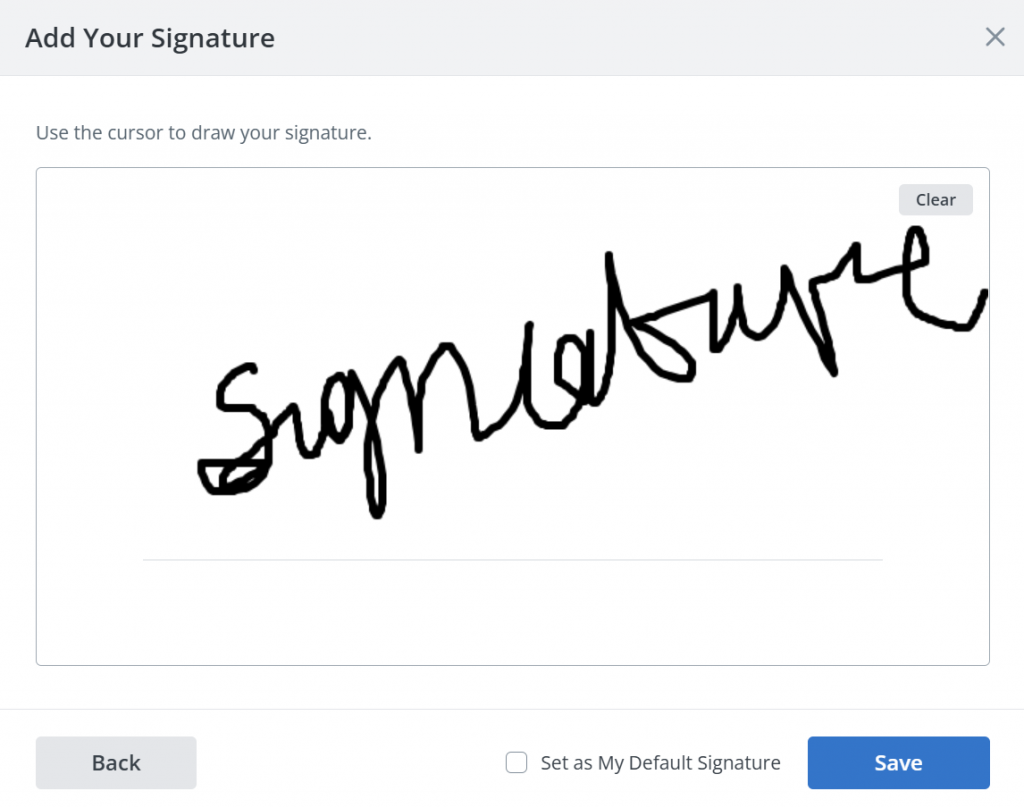
8. Draw your signature, then confirm it.
9. Adjust the result. Drag to reposition, or use the formatting bar for font size, colour and alignment.
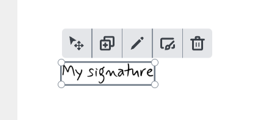
10. Save the signed file by clicking Save and close.

Most PDFs arrive with nothing to click. That is normal, and it is the step competing guides skip. Two paths solve it. Place a signature field manually, as in step 5. Or let automatic fields detection scan the document and propose form fields. The second path saves real time on long PDF forms.
Self-signing sits in the Business plan at $8 per user per month, billed annually. All SignNow pricing plans include unlimited users at no extra cost.
How to hand sign a PDF someone sent you
When a PDF arrives for signature, the sender has already placed the fields. Your job is to fill them and finish. You prepare nothing. The whole signing process runs in a browser, including a mobile browser.
SignNow’s flow of signing a received PDF document with a handwritten signature:
- Click “View Document” in the email notification.
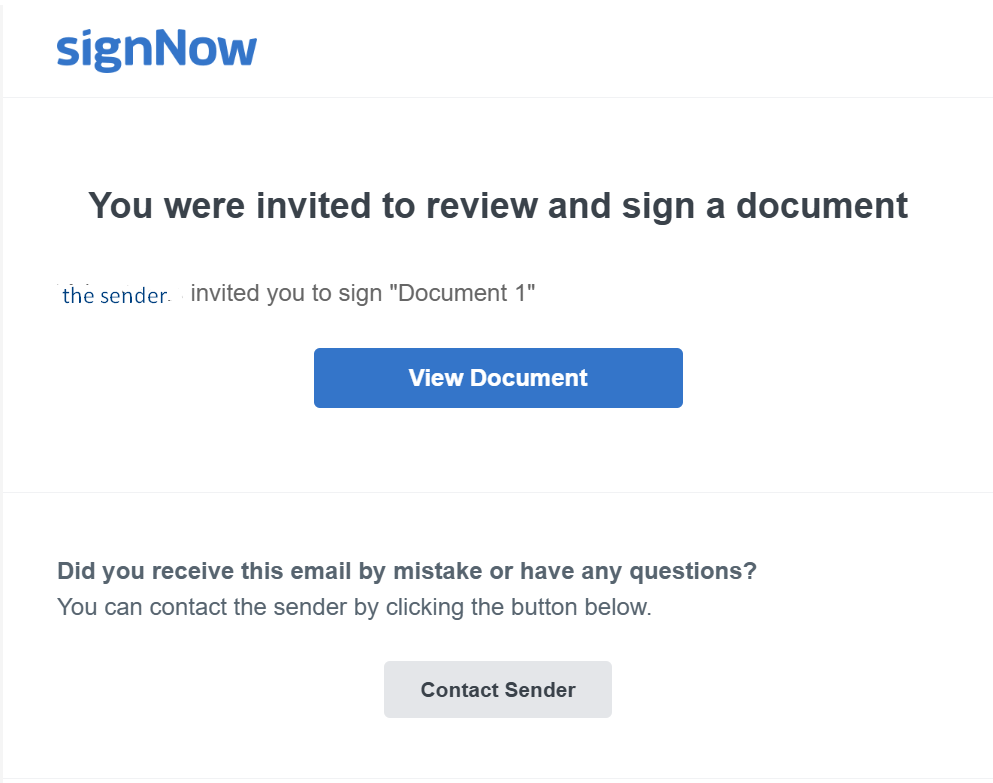
2. Begin filling. Three routes work: the orange “Start” button on the left, the “Start Filling” button at the bottom, or the first field itself.
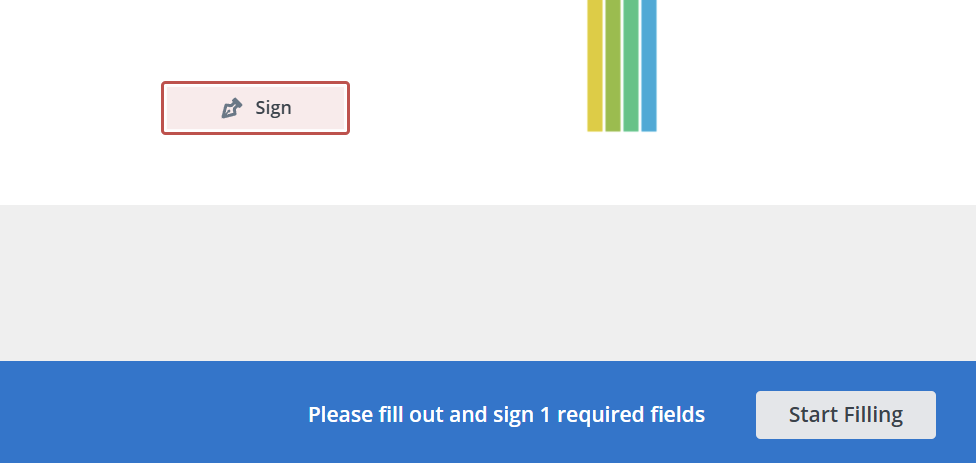
3. Move through the document with “Next Field” or “Fill In”. Clicking a field works too, and so does pressing Tab.
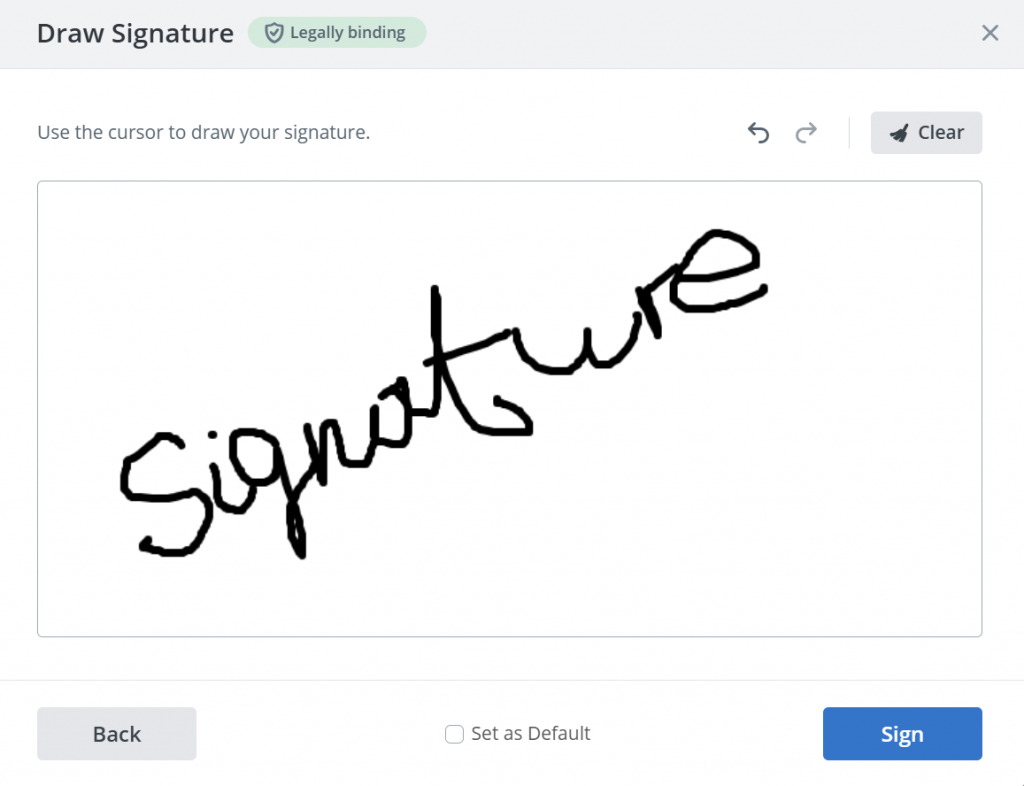
4. At the signature field, a popup offers three methods. Choose “Draw it using your touchpad or mouse” to hand sign, just the same way you add your signature to your own document.
5. Draw the signature, then select “Sign” to confirm.
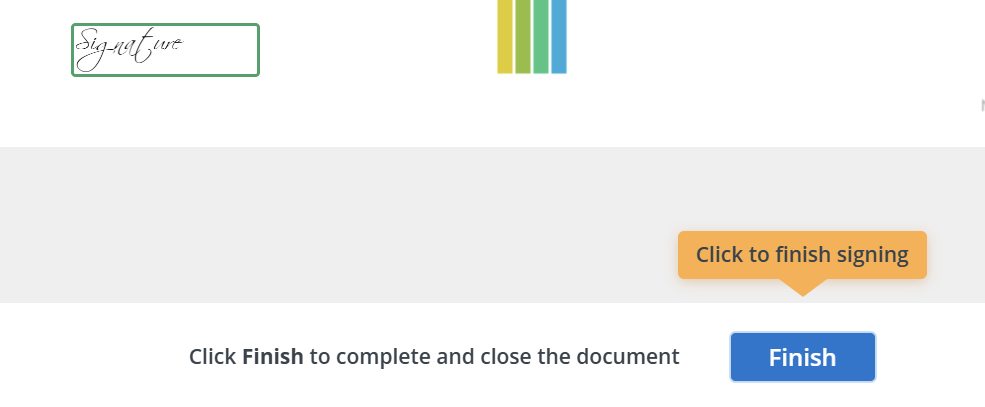
5. Click “Finish” once every required field is complete.
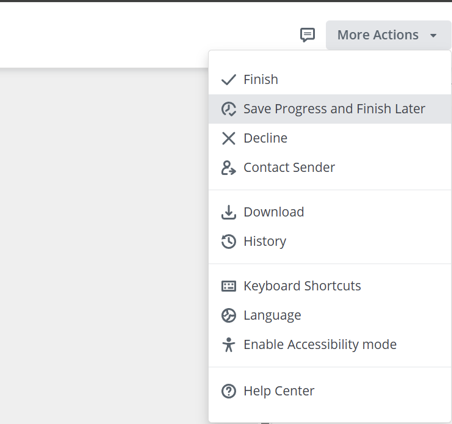
Long documents need not be finished in one sitting. Select “More Actions” at the top right, then “Save Progress and Finish Later”. The Help Center notes one limitation: the option is unavailable for guest invite links.
Signing is not the only response available. A recipient can decline to sign a document instead. SignNow records a reason for the decline. That keeps the refusal inside the audit record rather than in a separate email thread.
How to draw a signature on a phone or tablet
A touchscreen is the best surface for hand signing a PDF. Your hand moves the way it moves on paper. No trackpad reproduces that.
Different devices, the same flow with SignNow
The mobile flow mirrors the desktop one. Open the document in the SignNow app for iOS or Android. Tap through the fields using the “Next” buttons. At the signature field the same three creation methods appear. Draw with a fingertip or stylus, confirm, then finish.
Two mobile details are easy to miss. Offline mode lets you keep working without an internet connection, and the file syncs on reconnect. You can also build reusable templates on the mobile device. Both sit in the SignNow mobile apps rather than a separate product. We have a blog post comparing apps for mobile signing. See it for more context.
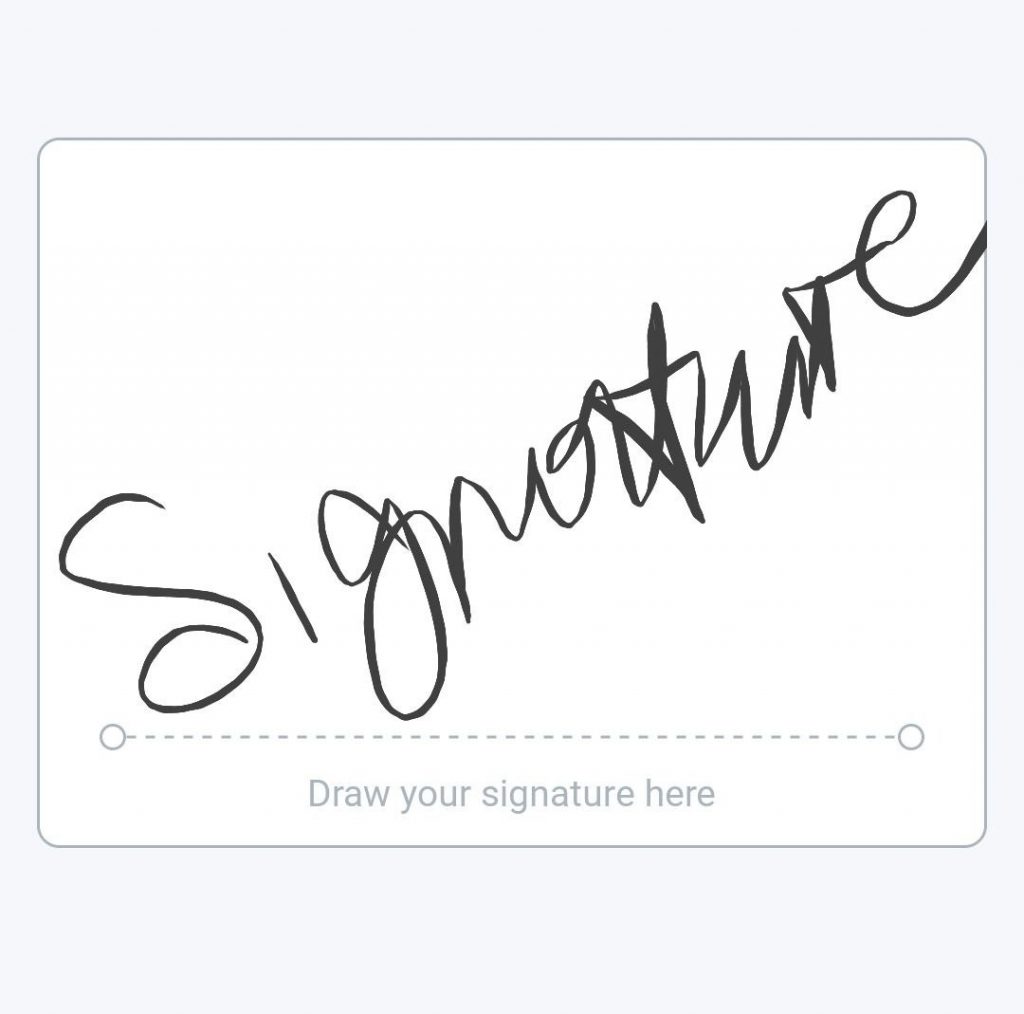
Draw bigger than the field suggests. Use the full width of the canvas, even on a small screen. The signature scales down on placement, and the reduction smooths the unsteady parts.
What makes a hand-drawn signature legally binding
In the United States, the drawing is not what creates the binding effect. Intent is. A wobbly mouse line and a careful stylus signature stand on the same footing.
The statute is direct about electronic form. Under 15 U.S.C. § 7001, a signature, contract or other record in a covered transaction “may not be denied legal effect, validity, or enforceability solely because it is in electronic form”. Subsection (a)(2) extends that protection to contracts formed using an electronic signature.
Debunking the common myth
The definition sets the real test. Section 7006(5) describes an electronic signature as a sound, symbol or process attached to a record and “executed or adopted by a person with the intent to sign the record”. Intent decides. The look of the mark carries no independent legal weight. Visual likeness to your passport signature is not part of the test.
This is why one common belief is wrong. Printing a PDF, signing it in ink, and scanning it back does not produce a stronger document. The ESIGN Act draws no such distinction. The scan loses information because it carries no timestamp and no session record.
State law covers transactions outside interstate commerce. The Uniform Electronic Transactions Act is the state-level counterpart, drafted by the Uniform Law Commission. Rules still vary, so check electronic signature laws by state before relying on one. Requirements differ by country too. SignNow maintains eSignature legality by country pages for more than 30 jurisdictions.
Where a drawn signature sits under eIDAS
EU law sorts electronic signatures into three tiers. A drawn signature sits in the first one.
The eIDAS Article 3 definitions set the ladder out precisely. Article 3(10) defines an electronic signature as “data in electronic form which is attached to or logically associated with other data in electronic form and which is used by the signatory to sign”. Article 3(11) defines an advanced electronic signature as one meeting the requirements of Article 26. Article 3(12) defines a qualified signature as an advanced one, created by a qualified signature creation device and based on a qualified certificate.
A hand-drawn mark in a signing session is a simple electronic signature, or SES. The SignNow Business plan includes eIDAS SES. QES is not included in the standard plans. A transaction that legally requires a qualified signature needs a different instrument. Most commercial agreements do not require one.
What the audit trail has to show
The signature is the visible part. The record behind it does the work if anyone questions the document.
A signing session captures data the drawing cannot carry. Signature history and audit trail entries log each action against the document. Timestamps mark when each signature was applied. Document history retention keeps the sequence. Access management settings control who could reach the file.
Several controls strengthen that record. Two-factor signer authentication checks the signer’s identity before they reach the fields. A locked signing date prevents backdating. Field validation stops malformed entries. Court-admissible audit trails are listed in the Business plan. The evidence layer needs no upgrade.
Regulated work depends on this record rather than on the signature image. SOC 2 Type II and GDPR compliance sit in the base plan. HIPAA compliance is enabled once an organization signs a business associate agreement. 21 CFR Part 11 compliance for FDA-regulated documentation is a Site License add-on, as is HIPAA via BAA.
Why a pasted signature image is the weakest option
An image of your signature is a picture. Pictures can be copied, moved, and placed on documents you never saw.
Three problems come with the method. A signature image inside a shared PDF can be extracted and reapplied elsewhere. The image arrives with no timestamp, no IP record, and no identity check. Flattening a PDF merges the signature into the page image. That discards the signature layer and the verification data with it.
None of this makes an uploaded image invalid. It makes the image weak as evidence. The statutory test still turns on intent. Intent is easier to demonstrate when a platform recorded the signing moment.
The alternative costs nothing extra. Draw the signature inside a signing session rather than pasting a file into a page. The line looks the same to a reader. The record behind it does not.
Common mistakes to avoid
- Drawing too small. The field scales the image down, so a small drawing becomes a smudge. Use the full canvas.
- Signing a flattened copy. Once a PDF is flattened, the signature layer is gone. Sign the live document first.
- Treating the emailed file as the record. An attachment is a copy. Keep the signed document and its audit trail in the platform.
- Reusing one signature image across unrelated documents. Convenient, and the reason an extracted image is a real risk. Redraw in-session instead.
- Skipping authentication on high-value agreements. Anyone with the link can otherwise sign. Add signer verification where the amount justifies it.
- Leaving invites open indefinitely. Use document expiration settings so an unsigned invite closes on a known date.
How teams hand sign PDFs by industry
Hand signing looks different depending on what the document does. Five patterns recur across the 20+ industries SignNow serves.
In HR, an offer letter and an onboarding pack go out together. The new hire signs both from a phone before the start date. One HR practitioner, Nicholas Tovar (SHRM-CP), reports the volume effect: “SignNow has changed our workflows to be more streamlined and efficient. We saved more than 1500 pieces of paper converting to an electronic format.” HR onboarding documents tend to be templated. That makes reusable fields worth the setup.
In healthcare, intake and consent forms need a signature before the appointment. Mark Dombeck (Ph.D) describes the shift: “When COVID-19 occurred we converted to 100% teletherapy within a week. Now I am doing that intake contract work via SignNow and it has simplified the workflow.” HIPAA coverage depends on the Business Associate Agreement.
An legal services example
In legal work, an engagement letter goes to a client who may be signing on a train. Paralegals route it through a signing order so the supervising attorney signs last. In real estate, a disclosure packet runs to dozens of pages. Agents lean on automatic field detection for the initials fields. In finance, account opening forms pair a drawn signature with identity verification. SignNow industry solutions group these patterns by sector.
Paper has not left these workflows. AIIM and Deep Analysis surveyed 600 large US and European organizations in May 2025. Every respondent organization had revenue above $10 million and more than 500 employees. The intelligent document processing survey found 61% of document processes still involve paper. Another 48% of respondents expect their paper use to increase. Half named reduced processing time as the biggest benefit of automating those processes.
Conclusion
Hand signing a PDF is two decisions. First the method. Draw when the document should read as hand signed. Type for speed. Upload an image only for one exact wet-ink mark. Then the place. A mark drawn inside a tracked signing session carries a timestamp and an audit trail.
Get started with SignNow to draw your signature and send the same PDF out for signature without leaving the browser. The Business plan starts at $8 per user per month, billed annually. The free trial runs 7 days and needs no credit card.
Key terms
- Handwritten electronic signature. A signature drawn by hand into a digital document, using a stylus, fingertip, trackpad, or mouse.
- Electronic signature. Under 15 U.S.C. § 7006(5), an electronic sound, symbol, or process attached to a record and adopted by a person with the intent to sign it.
- Digital signature. A cryptographic mechanism that uses a certificate to seal a document and reveal later tampering. Distinct from the visible mark.
- Signature field. The defined area in a document that holds a signature. It sets the position and scale of the applied mark.
- Signing session. The tracked interaction in which a recipient opens, fills, and completes a document. The session produces the evidence record.
- Audit trail. The log of actions taken against a document: who acted, what they did, and when. Court-admissible audit trails are included in the SignNow Business plan.
- Flattening. Merging a PDF’s layers into a single page image. It removes the signature layer and the verification data stored with it.
- Simple electronic signature (SES). The base tier under eIDAS Article 3(10). A hand-drawn signature belongs here, below advanced and qualified signatures.
FAQ
How do I hand sign a PDF document?
Open the PDF in a signing tool, place or select a signature field, then draw into it. In SignNow, click “Me (Fill out Now)” and choose the signature field. Click the spot on the page and draw. Save the file once the fields are complete.
Is a hand-drawn signature on a PDF legally binding?
In US interstate commerce, yes, subject to the statutory test. 15 U.S.C. § 7001 prevents a record from being denied legal effect solely because it is electronic. Section 7006(5) requires that the signer adopted the mark with intent to sign. Appearance is not part of the test.
How do I manually sign a PDF without printing it?
Use a signature field in the digital file. Drawing with a stylus, fingertip, trackpad or mouse replaces the pen. Printing and scanning adds steps. It also removes the timestamp and session record a platform would capture.
Can I draw my signature on a PDF on my phone?
Yes. The SignNow apps for iOS and Android offer the same draw option as the desktop editor. A fingertip or stylus matches pen on paper more closely than a trackpad. Offline mode keeps this working without a connection.
What is the difference between a handwritten electronic signature and a digital signature?
A handwritten electronic signature is the drawn mark plus the signer’s intent. A digital signature is certificate-based cryptography that seals the file and reveals tampering. A drawn signature can sit inside a digitally signed document. The two remain separate mechanisms.
How do I add a signature to a PDF that has no signature field?
Add the field yourself. In the editor, click “Me (Fill out Now)” and select the signature field. Then click the position on the page. On long forms, automatic field detection proposes fields from the layout. That is faster than placing each one by hand.
Can someone copy my drawn signature out of a signed PDF?
A flat signature image can be extracted by anyone holding the file. That is why an uploaded picture is the weakest method. A signature applied inside a tracked session is tied to a timestamped record, which an extracted image cannot reproduce.
How do I send a PDF to someone else to hand sign?
Upload the file and choose “Prepare and Send”. Enter each signer’s email, then place a signature field per signer with “Start adding fields”. Click “SAVE AND INVITE”. Add a signing order if sequence matters, and reminders if people tend to stall. The invite then carries the fields you placed.
Sources
- 15 U.S. Code § 7001, General rule of validity (Cornell Legal Information Institute)
- Definition of electronic signature, 15 U.S.C. § 7006(5) (Cornell LII)
- Regulation (EU) No 910/2014, consolidated text of 18 October 2024 (EUR-Lex)
- eIDAS Article 26, requirements for advanced electronic signatures (EUR-Lex)
- Electronic Transactions Act, Uniform Law Commission
- Digital Signature Market Size and Share Report 2026-2033 (Grand View Research)
- Market Momentum Index: IDP Survey 2025 (AIIM and Deep Analysis)
- Sign Your Document via Me (Fill Out Now), SignNow Help Center
- TL;DR
- What hand signing a PDF actually means
- Draw, type, or upload: choosing a signature method
- How to hand sign a PDF you already have
- How to hand sign a PDF someone sent you
- How to draw a signature on a phone or tablet
- What makes a hand-drawn signature legally binding
- Debunking the common myth
- What the audit trail has to show
- Why a pasted signature image is the weakest option
- Common mistakes to avoid
- How teams hand sign PDFs by industry
- Conclusion
- Key terms
- FAQ
- How do I hand sign a PDF document?
- Is a hand-drawn signature on a PDF legally binding?
- How do I manually sign a PDF without printing it?
- Can I draw my signature on a PDF on my phone?
- What is the difference between a handwritten electronic signature and a digital signature?
- How do I add a signature to a PDF that has no signature field?
- Can someone copy my drawn signature out of a signed PDF?
- How do I send a PDF to someone else to hand sign?
- Sources
