Customer Bill Format for Businesses with SignNow

Empower your team to effortlessly send and eSign documents with our easy-to-use and cost-effective solution. Experience enhanced efficiency and professionalism in billing today.

Award-winning eSignature solution

What a customer bill format for businesses is and why it matters

A customer bill format for businesses defines the structure, fields, and presentation a company uses to invoice customers for products or services. It typically includes business and customer contact details, invoice number, itemized charges, taxes, payment terms, due date, and remittance instructions. Standardizing the format improves clarity for customers, speeds reconciliation for accounting teams, and supports automated processing by billing systems. When paired with an eSignature-capable workflow, the format can also accept approvals and acknowledgments while preserving an auditable record for compliance and dispute resolution.

Benefits of a consistent customer bill format for businesses

A well-designed bill format reduces payment errors, shortens collections cycles, and supports automated workflows by providing predictable field placement for extraction and validation across systems.

Benefits of a consistent customer bill format for businesses

Common billing challenges addressed by a standard format

  • Inconsistent field placement causes delays in automated data extraction and manual reconciliation tasks across teams and systems.
  • Missing or unclear payment terms and remittance instructions increase disputes and slow down collections from customers.
  • Improper tax or line-item detail leads to audit exposure and incorrect reporting across accounting and tax filings.
  • Multiple invoice versions and manual edits create duplicate charges and inconsistent records between seller and buyer.

Representative user roles for bill format workflows

Billing Manager

Responsible for creating and maintaining invoice templates, ensuring tax and remittance fields are accurate, and coordinating with accounting to enforce format standards across customer segments.

Small Business Owner

Uses a streamlined bill layout to issue invoices quickly, collect electronic payments, and reconcile cash flow without a large accounts receivable team.

Which teams and organizations rely on standardized bill formats

Accounts receivable, billing operations, and finance teams commonly adopt a uniform bill format to ensure accurate invoicing and efficient collections.

  • Small businesses and startups managing recurring billing and subscription invoices.
  • Mid-market finance teams integrating invoices with ERP and accounting systems.
  • Enterprises enforcing compliance and audit trails across decentralized billing units.

Standardized formats also help customer support and procurement teams resolve disputes faster and provide consistent documentation for audits.

Essential features for effective customer bill format for businesses

A robust billing format is supported by platform features that enable automation, secure delivery, and audit-ready records for businesses of all sizes.

Template Builder

Drag-and-drop template tools let administrators create reusable invoice layouts with required fields, conditional logic, and placeholders for dynamic line items to ensure consistency across customer segments.


Data Merge

Automated data merging imports customer and transaction details from CRMs or ERPs into invoice templates to reduce manual entry and prevent mismatches between systems.

Bulk Send

Send the same invoice format to many recipients at once while preserving individualized fields and tracking status per recipient for efficient mass billing cycles.

Audit Trail

Immutable logs capture who created, modified, signed, and accessed each invoice with timestamps, supporting dispute resolution and regulatory audits.

Payment Links

Embed secure payment links in the invoice that map to the exact invoice amount and terms, reducing friction and reconciliation work for accounting teams.

Approvals Workflow

Configurable sequential or parallel approval flows ensure charges over thresholds receive sign-off before invoices are issued to customers.

be ready to get more

Choose a better solution

Integration and template features that streamline billing

Integrations and template controls minimize manual work and keep bill formats consistent across document sources and storage services.

Google Docs integration

Directly convert Google Docs invoice templates into fillable, signable documents with field mapping, preserving formatting and enabling collaborative editing before finalization.

CRM synchronization

Two-way sync with CRM systems like Salesforce or HubSpot populates customer and contract data into invoice templates and updates records after invoice issuance.

Cloud storage connectors

Save finalized invoices automatically to providers such as Dropbox, Box, or Google Drive using folder rules and retention policies for easy retrieval.

Custom document templates

Create multiple invoice templates per business unit with conditional fields and branding so each customer receives the appropriate format without manual adjustments.
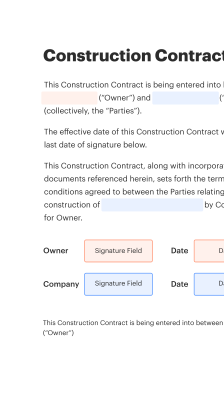
How a standardized bill format functions in an electronic workflow

This sequence shows how a formatted invoice moves through creation, approval, delivery, and archival in a digital environment.

  • Create invoice: Populate template with transaction data.
  • Authorize: Finance approves charges and taxes.
  • Deliver: Send to customer via email or portal.
  • Archive: Store signed copy with audit trail.
Collect signatures
24x
faster
Reduce costs by
$30
per document
Save up to
40h
per employee / month

Quick setup steps to implement a customer bill format for businesses

Follow these core steps to standardize and deploy a bill format that supports automation, clarity, and compliance.

  • 01
    Define fields: List mandatory and optional invoice fields.
  • 02
    Design layout: Arrange fields for readability and extraction.
  • 03
    Test integration: Validate with accounting and CRM systems.
  • 04
    Deploy and monitor: Roll out templates and track exceptions.
be ready to get more

Why choose airSlate SignNow

  • Free 7-day trial. Choose the plan you need and try it risk-free.
  • Honest pricing for full-featured plans. airSlate SignNow offers subscription plans with no overages or hidden fees at renewal.
  • Enterprise-grade security. airSlate SignNow helps you comply with global security standards.
illustrations signature

Recommended workflow settings to support billing automation

Configure these workflow settings to ensure invoices follow consistent approval, delivery, and retention procedures.

Setting Name and Default Configuration Default configuration value for each workflow setting
Reminder Frequency for Overdue Invoices 48 hours
Approval Chain for High-Value Bills Sequential two-step approval
Bulk Send Limit per Batch 2,000 invoices
Retention Duration for Signed Invoices 7 years
Notification Method for Failed Deliveries Email and admin alert

Supported devices and technical requirements for billing workflows

Billing templates and signing workflows should be tested across common desktop browsers, mobile devices, and native apps to ensure consistent rendering and interaction.

  • Desktop browsers: Chrome, Edge, Safari supported
  • Mobile apps: iOS and Android native apps
  • Minimum versions: Modern browser versions required

Ensure server-side integrations support TLS 1.2+, and confirm any mobile app offline signing or storage policies meet your organization's security and retention requirements before production rollout.

Security controls to protect billing documents

Transport encryption: TLS 1.2+ enforced
At-rest encryption: AES-256 encrypted storage
Access controls: Role-based permissions
Authentication options: MFA and SSO
Document watermarking: Custom visible watermarks supported
Audit logging: Comprehensive activity logs

Industry examples using a standard customer bill format

Two practical use cases show how a consistent bill format improves collections and compliance across sectors.

Healthcare clinic billing

A community clinic standardized patient invoices with clear CPT codes and insurer fields to reduce denials and manual corrections

  • Integration with claims and patient portals for automated status updates
  • Faster reconciliation and fewer re-submissions to payers

Resulting in reduced denial rates and faster reimbursement cycles for the clinic.

SaaS subscription billing

A mid-market SaaS provider adopted a template capturing subscription SKU, billing period, and proration details for each customer

  • Template supports CSV export for accounting and automated receipts
  • Customers receive predictable, itemized charges and clearer renewal terms

Leading to lower support tickets and improved on-time payments.

Best practices for secure and accurate customer bill format for businesses

Practical recommendations to reduce errors, maintain compliance, and speed up invoice processing across teams and systems.

Standardize mandatory fields and formatting
Define and enforce a canonical set of required fields (payer name, invoice number, date, itemization, tax details, payment terms) to ensure downstream systems reliably parse and reconcile invoices.
Use templates with conditional logic
Implement conditional fields to accommodate different customer types and tax rules without creating separate templates for each scenario, reducing template sprawl and maintenance overhead.
Enable audit trails and retention policies
Keep immutable logs of invoice creation, edits, signatures, and access while applying retention policies that meet accounting and regulatory requirements such as IRS and state recordkeeping rules.
Validate integrations and test end-to-end
Run integrated tests from order entry to payment reconciliation, including notifications and failed-delivery handling, to catch mapping errors before they affect live invoicing cycles.

FAQs and troubleshooting when adopting a customer bill format for businesses

Answers to common questions and fixes encountered during design, delivery, and acceptance of standardized billing documents.

Feature compliance: signNow compared to major eSignature providers

A concise feature availability comparison for core billing and invoice signing capabilities across leading vendors.

Feature or Criteria for Comparison signNow (Recommended) DocuSign Adobe Sign
Template merging across billing documents
Bulk Send for mass invoices Limited
Native CRM integrations
Audit trail with tamper evidence
be ready to get more

Get legally-binding signatures now!

Risks and penalties from improper billing formats

Payment delays: Lost revenue
Regulatory fines: Compliance exposure
Customer disputes: Chargebacks
Audit failures: Penalties
Data breaches: Liability
Duplicate invoicing: Reputational harm

Pricing and plan snapshot for invoice signing solutions

High-level plan and pricing notes for vendors commonly used to deliver electronic invoices and signatures for businesses.

Plan or Feature signNow (Featured) DocuSign Adobe Sign Dropbox Sign PandaDoc
Entry-level monthly price Business Essentials $8/user monthly Personal $10 monthly Acrobat Sign $14.99 monthly Standard $12 monthly Individual $19 monthly
Business tier highlights Team management and bulk send Advanced fields and templates Enterprise controls and Adobe ecosystem Simple API and Dropbox integration Document analytics and templates
Enterprise capabilities SAML SSO and dedicated support Advanced admin and compliance Enterprise workflows and integrations SSO and enterprise API SSO and custom onboarding
Signature and API limits High-volume API with scalable plans Tiered API allowances Enterprise API available Developer API with limits API on higher tiers
Designed use cases SMB and mid-market e-signing Broad enterprise adoption Creative and document workflows SMB collaboration and signatures Sales proposals and contracts
walmart logo
exonMobil logo
apple logo
comcast logo
facebook logo
FedEx logo
be ready to get more

Get legally-binding signatures now!