Establishing secure connection…Loading editor…Preparing document…

Motion Form

This template is fully customizable. Edit the text, fill out the fields, and send it for signature. Give it a try!
Motion Form

What a Motion Form Is and when it’s used

A Motion Form is a court filing used to ask a judge for a specific ruling or procedural action within an active case. Typical motions request relief such as continuances, sanctions, discovery orders, dismissal, summary judgment, or emergency interim relief. A properly completed Motion Form includes the court caption, case number, title of the motion, clear statement of the relief requested, legal grounds, a concise factual summary, and any supporting exhibits or affidavits. The form must be filed with the clerk and served on other parties according to court and local rules.

Why a clear Motion Form matters

A precise Motion Form creates a record of the request, frames the legal issues for the judge, and triggers deadlines for opposition and hearings. Clear motions reduce risk of dismissal, speed judicial review, and help courts schedule appropriate relief.

Why a clear Motion Form matters

Who prepares and files Motion Forms

Attorneys and self-represented litigants commonly prepare motions; clerks and court staff process them.

  • Attorneys and law firms — Draft legal argument, attach exhibits, and certify service.
  • Self-represented litigants — Prepare concise factual statement and follow local filing rules.
  • Paralegals / Court clerks — Verify signature blocks, payment, and e-filing acceptance.

Core parts of a professional Motion Form

A Motion Form should follow court formatting, present relief succinctly, and include supporting evidence and a proper signature block to meet local rules.

Caption

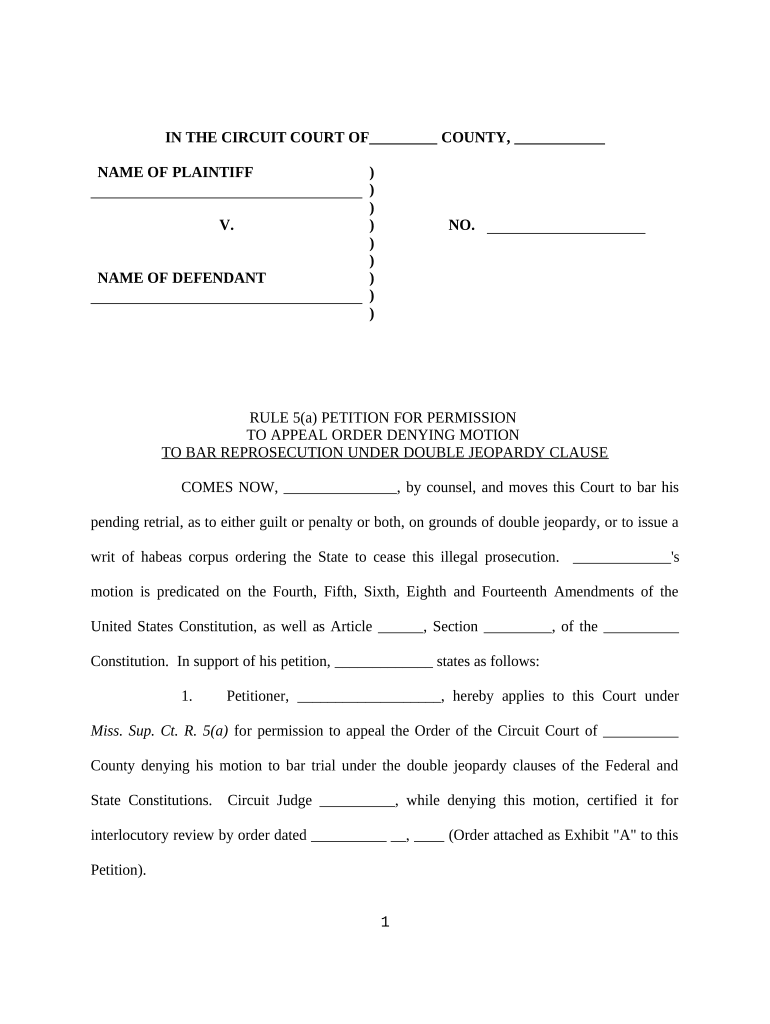
Court name, party names, and case number formatted per local rules so the clerk and judge can identify the file immediately.
Title

Short title stating the motion type, for example 'Defendant’s Motion to Dismiss' or 'Ex Parte Motion for Temporary Restraining Order.'

Statement of Relief

One- or two-sentence statement at the start that plainly states the exact action requested from the court.

Grounds

Legal and factual bases supporting the request; cite statutes, rules, or case law briefly and attach authorities when appropriate.

Exhibits

Numbered exhibits and sworn affidavits attached as single searchable PDF to support factual assertions.

Signature Block

Name, bar number (if applicable), firm, address, phone, email, and date; include signature and printed name for each filer.

Step-by-step: preparing and filing a Motion Form

Follow these sequential steps to assemble, file, and serve a Motion Form that meets court expectations.

  • 01
    Draft: Prepare caption, title, relief, grounds, and short factual statement.
  • 02
    Attach: Combine exhibits, sworn declarations, and proposed order into one PDF.
  • 03
    Sign: Sign in the signature block and complete service certification.
  • 04
    File and Serve: E-file via court portal or deliver to clerk and serve opposing parties.

Where the Motion Form goes and what happens next

After filing, the court logs the motion, sets deadlines, and may schedule a hearing or rule on the papers without oral argument.

  • Submit: Upload or deliver the motion to the court filing system following local formatting rules.
  • Docketing: Clerk assigns a docket entry and case event; this starts opposition and scheduling timelines.
  • Service: Provide proof of service to opposing parties as required by local rules.
  • Adjudication: Court may grant, deny, or schedule a hearing based on papers and any timely opposition.

Typical eFiling and service settings for Motion Forms

Configure filing and service settings to match court portal requirements and local rules before uploading documents.

Field Configuration
eFiling Portal Select the court’s eFile portal (PACER, state eFile) and set account credentials.
Service Method Choose e-service, email, or personal service per local rule; attach certificate of service.
File Format Upload a single searchable PDF for the motion and separate PDF exhibits when required.
Proposed Order Include a separate proposed order file named by event type.

Technical considerations for digital Motion Forms

Confirm accepted file types, e-filing credentials, and signature methods before submitting to the court.

  • Supported Formats: PDF, PDF/A, DOCX where courts permit; prefer PDF/A for long-term archival.
  • Integrations: Common integrations include PACER, state eFile portals, and document management systems.
  • Authentication: E-filings may require user account, two-factor authentication, or court-issued credentials.

Common mistakes that cause motion rejections or delays

  • Incorrect captioning or case number: filing under the wrong case or incorrect case number leads to misdocketing and potential rejection.
  • Missing proof of service: failing to attach a properly completed certificate of service commonly results in the court refusing to accept the motion.
  • Unsupported file format or unsearchable exhibits: scanned, non-searchable PDFs or incorrect file types are often rejected by e-filing portals.
  • Improper signature or missing dates: unsigned motions or missing signature dates can render a filing incomplete and subject to cure or dismissal.

Security and compliance considerations for electronic motions

In transit: TLS 1.2/1.3 encryption
At rest: AES-256 encryption
HIPAA: BAA available where required
SOC 2: SOC 2 Type II certified
21 CFR Part 11: Compliant features supported
ISO: ISO 27001 certified

Consequences of errors on a Motion Form

Motion denied: Case outcome affected
Sanctions: Possible FRCP 11 sanctions
Late filing: Relief may be time-barred
Service defect: Opposition may be excused
Lost hearing: Scheduling impacted
Record gap: Appeal issues later

Typical timelines and notice obligations for motions

Deadlines vary by court and motion type; confirm local rules and standing orders for specific timing and required notice periods.

Opposition deadline:

Often 7–14 days before hearing; varies by rule and motion type.

Reply deadline:

Usually 3–5 days after opposition filing; some courts allow longer.

Hearing notice:

Courts commonly require scheduling notice; timing differs by jurisdiction.

Ex parte relief:

Emergency motions must show immediate harm and frequently require separate procedure.

Service timing:

Proof-of-service date triggers deadlines for opposition and replies.

Comparing common eSignature options for filing and signing Motion Forms

Select an eSignature provider that supports required compliance, bulk workflows, and the file formats accepted by courts and document management systems.

signNow DocuSign Adobe Sign PandaDoc HelloSign
Starting Price $8/user/mo $15/user/mo $14/user/mo $19/user/mo $15/user/mo
Free Trial 7-day free trial Varies Varies Varies Varies
Bulk Send Yes Yes Yes Yes No
Audit Trail Yes Yes Yes Yes Yes
HIPAA Compliant Yes Yes Yes No No
Envelope Cap No cap 100 envelopes/user/year Varies Varies Varies

Frequently asked questions about Motion Forms and eSubmission

Answers address common legal and technical issues when preparing, signing, and filing motions; check local court rules for controlling requirements.


Need help? Contact support

be ready to get more
Join over 28 million airSlate SignNow users