Establishing secure connection…Loading editor…Preparing document…

Accident Injury Report

This template is fully customizable. Edit the text, fill out the fields, and send it for signature. Give it a try!
Accident Injury Report

What the Accident Injury Report Is and Why It Exists

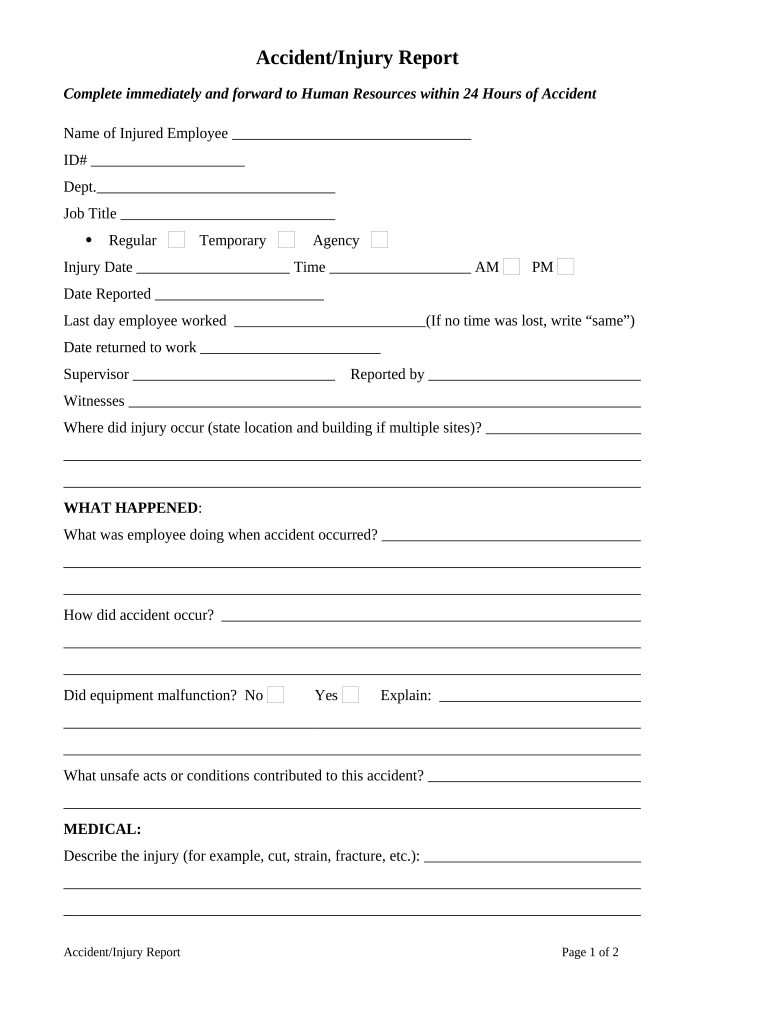
An Accident Injury Report documents the facts, injuries, witnesses, and immediate actions following a workplace, public, or vehicular accident. It records the event date, time, location, parties involved, and initial medical observations so employers, insurers, and investigators can evaluate liability, initiate claims, and meet regulatory reporting requirements.

Why a Complete Accident Injury Report Matters

A clear, timely report preserves evidence, supports workers' compensation and insurance claims, reduces dispute risk, and helps meet regulatory reporting duties; accurate documentation also aids incident prevention and internal safety reviews.

Why a Complete Accident Injury Report Matters

Who Typically Prepares and Reviews These Reports

Later reviewers can include regulatory inspectors, legal counsel, and risk managers using the report as a primary source for decisions.

  • Supervisors and managers complete the initial factual report and notify HR or safety teams.
  • Occupational health clinicians document injuries, treatment given, and recommended follow-up.
  • Insurers and claims adjusters use the report to open and evaluate insurance or workers' compensation claims.

Essential Sections Every Professional Accident Injury Report Should Include

A professional report groups information logically so reviewers can assess cause, responsibility, and next steps without ambiguity. Use structured fields for facts, injuries, witness statements, and corrective actions.

Incident Details

Date, time, precise location, weather or lighting conditions, and description of what occurred using objective, chronological language and observable facts only.
People Involved

Full legal names, job titles or roles, contact information, employee ID, and relationship to the incident (victim, witness, responder) for follow-up and attribution.

Injury Description

Specific injuries observed, body parts affected, pain level if recorded, first aid or medical treatment provided, and whether emergency services were called.

Witness Statements

Short, direct witness accounts with names, contact details, and time-stamped statements recorded separately to preserve credibility and reduce coaching risk.

Immediate Actions

Steps taken at the scene such as first aid, equipment shutdown, area cordon, photographic evidence collection, and any notifications made.

Corrective Follow-up

Recommended corrective actions, interim controls, assignment of responsible parties, and target dates for implementation and review to prevent recurrence.

Step-by-Step: Complete an Accident Injury Report Quickly and Correctly

Follow a clear sequence to capture accurate facts, secure evidence, and trigger notifications without delay.

  • 01
    Secure Scene: Ensure safety and stabilize injured persons before documenting the scene.
  • 02
    Record Facts: Enter date, time, location, equipment involved, and objective observations immediately.
  • 03
    Collect Evidence: Take photos, note environmental conditions, and gather witness names and statements.
  • 04
    Notify Parties: Inform HR, safety officer, and insurer per company protocol and regulatory notice windows.

How to Configure an Electronic Accident Report Workflow

Configure fields, notifications, and routing so each incident triggers the correct approvals and records automatically.

Field Configuration
Incident Date Auto-validate MM/DD/YYYY; required field
Reporter Contact Require phone and email; conditional on role
Injury Severity Dropdown triggers notifications for high-severity events
Routing Auto-send to HR, safety, and insurer based on severity

Where an Completed Report Goes and Who Sees It

Understanding downstream handling ensures privacy, compliance, and timely claims processing.

  • Internal Records: Saved to the employer safety file and HR system for retention.
  • Medical Providers: Shared with treating clinicians if consent and HIPAA rules permit.
  • Insurer Submission: Forwarded to workers' comp or liability insurers to open claims.
  • Regulatory Filing: Escalated to OSHA or state agencies when reporting thresholds are met.

Technical Considerations for Digital Completion and eSubmission

Ensure the platform meets applicable compliance standards and that access controls limit sensitive health information to authorized reviewers.

  • Document Formats: PDF, DOCX, or HTML accepted
  • Integrations: Supports Salesforce, NetSuite, Google Workspace
  • Authentication: Email, SMS, or advanced signer verification

Key Reporting Deadlines and Time Expectations

Timely reporting reduces regulatory risk and preserves claim rights; follow internal and external deadlines depending on injury severity.

Report to Supervisor:

Immediately or as soon as safely possible after the incident

Employer Recordkeeping:

Enter into internal system within 24–72 hours per company policy

OSHA Reporting Thresholds:

Fatalities and severe injuries may require reporting under 29 CFR §1904.39

Workers' Comp Notice:

Notify insurer as soon as claim information is available

State Agency Filing:

Certain states require written reports within 7–30 days

Common Preparation Mistakes to Avoid

  • Delaying documentation until later leads to inconsistent facts and weakened credibility in claims.
  • Using vague language or opinions rather than objective observations undermines investigatory value.
  • Failing to collect witness contact details makes later verification difficult or impossible.
  • Not following privacy rules when sharing medical information risks HIPAA violations and penalties.

Consequences of Incomplete or Incorrect Reports

Regulatory Fines: Civil penalties from OSHA or state agencies
Claim Denial: Workers' comp or insurer may deny benefits
Legal Exposure: Increased liability in civil suits
Operational Risk: Unresolved hazards can cause repeat incidents
Data Breach Risk: Improper handling of health data triggers penalties
Reputational Harm: Stakeholder trust diminishes after mishandled incidents

eSignature Vendor Comparison for Accident Injury Reports

Select an eSignature provider that supports required security, audit trails, and industry compliance; vendor pricing models and feature sets vary across plans and tiers.

signNow DocuSign Adobe Sign PandaDoc HelloSign
Starting Price $8/user/mo $15/user/mo $14/user/mo $19/user/mo $15/user/mo
Free Trial 7-day free trial Varies Varies Varies Varies
Bulk Send Yes (premium tier) Yes Yes Yes No
Audit Trail Yes Yes Yes Yes Yes
HIPAA Compliant Yes Yes Yes No No

Real-World Examples of How Reports Are Used

These scenarios show typical uses of an Accident Injury Report across workplace and public incidents.

Workplace Slip-and-Fall

A warehouse worker slipped on spilled liquid and reported immediate pain in the wrist

  • Supervisor documented time, footwear, and lighting
  • The completed report and photos enabled timely workers' compensation intake, corrective floor-cleaning procedures, and a safety briefing to prevent recurrence.

Motor Vehicle Collision

A delivery driver was involved in a minor collision while on duty and completed the report on a mobile device

  • Photos and witness names were captured at the scene
  • Insurance used the timestamped, signed report to process loss payment and arrange medical evaluation without disputed facts.

Frequently Asked Questions About Accident Injury Reports

Answers to common questions about timing, legal validity, signatures, and sharing help maintain compliance and avoid common pitfalls.


Need help? Contact support

be ready to get more
Join over 28 million airSlate SignNow users