Establishing secure connection…Loading editor…Preparing document…

Act of Donation Form

This template is fully customizable. Edit the text, fill out the fields, and send it for signature. Give it a try!
Act of Donation Form

What the Act of Donation Form Is and when it’s used

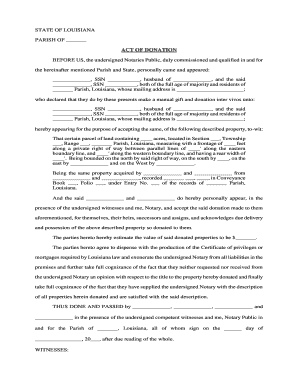
An Act of Donation Form documents a donor’s intentional transfer of property, assets, or rights to a recipient without monetary consideration. It records the donor’s identity, a clear description of donated items, the effective date, and any conditions or reserved rights. Used for personal property, charitable gifts, and sometimes real estate transfers, the form creates an auditable record of intent and acceptance and may require notarization or witnesses depending on the asset type and state law.

Why a formal Act of Donation Form matters legally

A completed Act of Donation Form creates clear evidence of the donor’s intent, reduces disputes, and supports title transfer or charitable receipt documentation. Electronic signatures are generally enforceable under the ESIGN Act (15 U.S.C. ch. 96) and UETA, subject to statutory exceptions.

Why a formal Act of Donation Form matters legally

Who typically completes and receives this form

Organizations and individuals use the Act of Donation Form to record transfers where proof of intent and chain of custody matter.

  • Donors and grantors preparing a gift or conveyance of tangible or intangible assets, needing a written record to protect against later disputes.
  • Recipient organizations such as charities, museums, or private donees that require documentation for acceptance, inventory, and tax records.
  • Legal, title, and estate professionals verifying transfer authority, preparing recording packages, or supporting tax filings and probate matters.

Core elements that make a professional Act of Donation Form

A complete form balances concise description with legal safeguards: identify parties, describe property, state effective dates, and include signature and acceptance language tailored to the asset class.

Donor Identity

Full legal name, government ID reference, and contact information so the donor can be uniquely identified and matched to other records or title documents.
Recipient Details

Full legal name of the receiving person or organization, tax ID for charities, and designated contact to accept and acknowledge delivery of the donated items.

Property Description

Clear, specific description (serial numbers, VIN, legal property description, or itemized list) that supports transfer of title and avoids ambiguous or vague descriptions.

Consideration Clause

Statement that the transfer is gratuitous (no monetary consideration) or, if nominal consideration exists, a short record of its nature to prevent misunderstanding.

Effective Date

Exact date when ownership passes; it governs tax reporting, custody changes, and any conditions precedent to transfer.

Signatures and Acceptance

Donor signature, recipient acceptance language, and any notarization or witness blocks required by the governing state or asset type.

Stepwise process to complete and finalize the Act of Donation Form

Follow these sequential steps to prepare, execute, and preserve a valid donation record.

  • 01
    Prepare the draft: Assemble party details, property description, and any required attachments before filling fields.
  • 02
    Verify identity: Confirm donor identity using ID or remote identity-proofing where permitted.
  • 03
    Sign and notarize: Execute signatures; complete notary/witness blocks if state or asset type requires them.
  • 04
    Deliver and record: Provide signed copies to recipient, record with county recorder if real property, and retain originals securely.

How to set up an online workflow for this form

Configure an e-sign workflow that enforces required fields, conditional notary blocks, and automatic delivery to recipients and recordkeepers.

Field Configuration
Signature Field Require full signature and date; set as mandatory to complete the form.
Effective Date Field Auto-validate MM/DD/YYYY; default to today if left blank with manual override.
Notary Block Conditionally display when 'Notary required' checkbox is selected by the sender.
Attachment Field Allow PDF or DOCX uploads for supporting titles, photos, or appraisals.

Where to send and how the form is routed

A clear routing plan ensures the donation is accepted, documented, and recorded where required.

  • Send to Recipient: Deliver signed copy and acceptance acknowledgement to the receiving party.
  • County Recorder: If real property, prepare recording package for the county recorder’s office.
  • Recipient Records: Store signed form in the recipient’s official records and inventory system.
  • Tax Records: Retain a copy for donor and recipient tax documentation and gift tax reporting if applicable.

Deadlines and time-sensitive steps to track

Identify statutory deadlines and typical timing to avoid filing or tax penalties associated with donations.

Recording real property:

Record promptly with county recorder to perfect title; timing varies by county and state.

Gift tax return:

File Form 709 by April 15 following the tax year of the gift, when required.

Notary or witness timing:

Signatures should be dated and notarized contemporaneously to avoid later disputes.

Recipient acknowledgement:

Obtain written acceptance at or shortly after transfer for charity valuation and audit records.

Document retention:

Retain originals according to retention rules in the custody and records section below.

Key milestones from draft to recorded transfer

A typical milestone sequence helps track completion, acceptance, and official recording steps.

01

Draft Completed

All parties confirm details and attachments before execution.

02

Identity Verified

Donor identity proofing and recipient acceptance are confirmed.

03

Execution

Signatures, notarization, and witness acknowledgements completed.

04

Recording and Archival

Real estate recorded if required and documents archived for retention.

Common mistakes to avoid when preparing the Act of Donation Form

  • Using incomplete or informal property descriptions that prevent title transfer or accurate inventory.
  • Mismatched names between donor ID, deed, and form, which can delay recording or acceptance.
  • Failing to determine whether state law requires witnesses or notarization before execution.
  • Neglecting to obtain recipient acceptance or evidence of delivery, which can invite later disputes.

Primary risks and legal consequences of an incorrect form

Gift-Tax Exposure: Potential Form 709 liabilities
Transfer Invalidity: Title defects or voided conveyance
Probate Challenge: Estate disputes over testamentary intent
Recording Rejection: County recorder refusals
Tax Deduction Loss: Charitable deduction denied
Fraud Allegations: Civil or criminal exposure

Security and compliance controls for electronic Acts of Donation

Encryption: TLS 1.2/1.3 in transit; AES-256 at rest
Access Controls: Role-based access and SSO options
Audit Trail: Tamper-evident logs with timestamps and IP
Regulatory Standards: ESIGN and UETA compliant
Health Data: HIPAA support available with BAA
Certifications: SOC 2 Type II and ISO 27001

Representative eSignature pricing and capability comparison

Compare starting prices and common capabilities among mainstream e-signature providers; signNow appears first in the list per vendor convention.

signNow DocuSign Adobe Sign PandaDoc HelloSign
Starting Price $8/user/mo $15/user/mo $14/user/mo $19/user/mo $15/user/mo
Free Trial 7-day free trial Varies Varies Varies Varies
Bulk Send Yes Varies Varies Varies Varies
Audit Trail Yes Yes Yes Yes Yes
HIPAA Compliant Yes Yes Yes No No
Envelope Cap No envelope cap 100 envelopes/user/year Varies Varies Varies

Digital signing options and file formats

Choose a platform that supports standard file formats, conditional fields, and appropriate signer authentication for legal enforceability.

  • File Formats: PDF, DOCX supported
  • Integrations: Connects with Salesforce, NetSuite, Google Workspace
  • Authentication: Email, SMS, KBA, or advanced methods

Ensure the chosen platform can produce an audit trail, preserve records, and meet any industry-specific compliance such as HIPAA or 21 CFR Part 11.

Frequently asked questions about using the Act of Donation Form

Answers to common practical and legal questions when preparing, signing, and recording donation documents.


Need help? Contact support

be ready to get more
Join over 28 million airSlate SignNow users