Establishing secure connection…Loading editor…Preparing document…

Temporary Easement Form

This template is fully customizable. Edit the text, fill out the fields, and send it for signature. Give it a try!
Temporary Easement Form

What a Temporary Easement Form Is and when it’s used

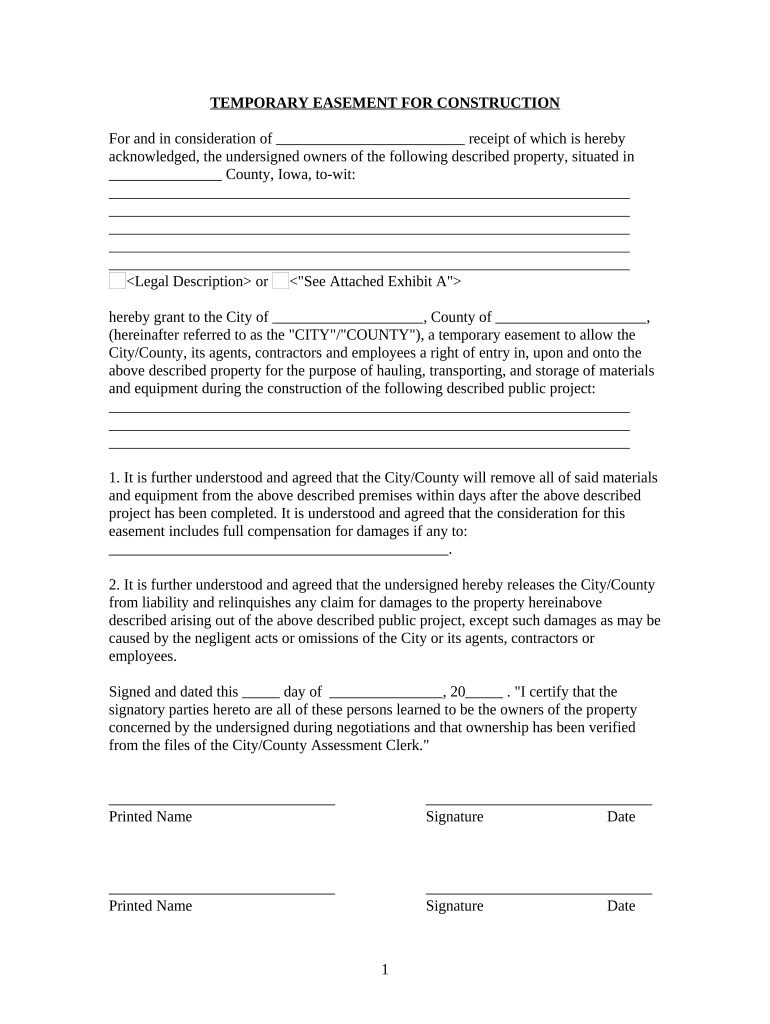
A Temporary Easement Form is a written agreement that grants a party limited, time‑bound rights to enter, use, or cross private property for a specified purpose such as construction access, utilities, survey work, or staging. The document defines the easement area by legal description or map, sets the duration, states any consideration or fees, allocates restoration and liability responsibilities, and identifies who may perform the permitted activities. Proper execution, notarization (where required), and recording with the county recorder protect both grantor and grantee and create public notice.

Why a clear Temporary Easement Form matters

A well‑drafted Temporary Easement Form limits disputes, clarifies restoration and liability, preserves access for time‑limited work, and creates public notice when recorded.

Why a clear Temporary Easement Form matters

Typical parties and stakeholders for temporary easements

Who commonly completes or signs these forms before work begins.

  • Property owners and landowners who grant limited access rights for a defined purpose and duration.
  • Municipalities, utilities, and infrastructure contractors needing temporary access for installations, repairs, or surveys.
  • Developers, general contractors, and subcontractors who require site access or staging areas during a project.

These stakeholders should coordinate legal, insurance, recording, and restoration obligations before granting or accepting a temporary easement.

Step-by-step: completing a Temporary Easement Form

Follow these steps in order to prepare, execute, and finalize a temporary easement with clarity and enforceability.

  • 01
    Prepare documents: Gather title info, surveys, and maps that define the easement area.
  • 02
    Identify parties: List grantor, grantee, agents, and any lender or lienholder parties.
  • 03
    Define terms: Specify permitted uses, start/end dates, daily access times, and limits.
  • 04
    Execute formally: Sign, notarize if required, record with county recorder, and distribute copies.

Essential elements to include in a professional temporary easement

A comprehensive form protects both parties and eases recording and enforcement; include these core clauses and exhibits.

Description

Precise legal description and attached exhibit map showing limits of the temporary easement area and reference points for surveying.
Term and access

Clear start and end dates, permitted access times, any renewal provisions, and conditions that trigger early termination.

Permitted uses

List allowed activities (e.g., construction access, temporary staging, utilities work) and expressly prohibit other uses.

Consideration

State monetary payment or non‑monetary consideration; specify payment timing, invoicing, and tax responsibility if applicable.

Restoration and damages

Obligate grantee to restore disturbed areas to pre‑work condition; set inspection rights and remediation timelines.

Insurance and indemnity

Require liability insurance limits, naming the owner as additional insured and describing indemnification for property damage.

Required form fields at a glance

Grantor name: Full legal name
Grantee name: Full legal name
Legal description: Metes-and-bounds or lot/block
Effective date: MM/DD/YYYY format
Consideration: Amount or description
Signatures: Signer name, title, and date

Customizing and completing the form online

Online tools let you place fields, require authentication, enable remote notarization, and export signed records for recording.

Field Setting
Document template Upload PDF or Word; preserve exhibits and maps
Signature placement Drag-and-drop signature, initials, and date fields
Authentication Email, SMS code, or KBA per risk tolerance
Notary / RON Enable remote notarization where state law permits

Where to file and who to notify after execution

After execution, follow local filing and notice steps so the easement is effective against third parties and lenders.

  • County recorder: Record the executed instrument to provide public notice of the easement.
  • Grantee copy: Deliver a fully executed recorded copy to the grantee for on-site use.
  • Lender notification: Provide copies to mortgagees if required by loan documents or title commitments.
  • Project records: Retain original executed and recorded instruments with project files and title records.

Secure distribution options and platform needs

Choose channels that preserve document integrity and chain of custody when sharing executed easements.

  • Email PDF: Send encrypted attachments for quick delivery
  • Cloud storage: Store in secure folders with limited access
  • eSignature integration: Use platforms that integrate with CRM and document storage

Ensure recipients can view the recorded instrument and that your chosen platform provides an audit trail and tamper-evident signed copy.

Timelines, recording expectations, and processing notes

Timing affects priority, enforceability, and insurance; follow county and contract deadlines promptly.

Execution date:

Sign and notarize on or before the effective date

Recording timeline:

Record promptly; county recording times vary by jurisdiction

Contract response:

Allow sufficient lead time for insurer and lender approvals

Start of access:

Begin work only after required copies and permits are in place

Restoration deadline:

Define restoration completion date and inspection window

Key milestones from negotiation to closeout

Track these milestones to maintain compliance, protect title, and confirm restoration obligations are met.

01

Negotiation and survey

Agree scope and attach survey exhibits defining the easement limits.

02

Execution and notarization

All parties sign and, if required, obtain notarization or remote notarization.

03

Recording and notice

File with county recorder and distribute recorded copies to stakeholders.

04

Restoration and completion

Grantee restores property; grantor inspects and documents final acceptance.

Common preparation mistakes to avoid

  • Using imprecise property descriptions that differ from recorded deeds or surveys, causing recording rejections or title disputes.
  • Omitting explicit restoration or remediation obligations, which leaves scope and timing for repair open to dispute and cost overruns.
  • Failing to obtain proper signatures, notarizations, or witness statements required by the county or state, undermining enforceability.
  • Not notifying or obtaining consent from affected lienholders or easement holders, risking later claims or injunctions.

Consequences of incorrect or incomplete temporary easements

Unrecorded interest: No public notice
Enforceability risk: Signature or form defects
Restoration liability: Costly remediation obligations
Insurance exposure: Insufficient coverage limits
Title complications: Conflicts with existing encumbrances
Regulatory fines: Violations of access or environmental rules

Typical eSignature plan comparisons relevant to easement workflows

Compare starting price and core capabilities for signing, bulk sending, audit trails, and HIPAA support when evaluating eSignature vendors.

signNow DocuSign Adobe Sign PandaDoc HelloSign
Starting Price $8/user/mo $15/user/mo $14/user/mo $19/user/mo $15/user/mo
Free Trial 7-day free trial Varies by vendor Varies by vendor Varies by vendor Varies by vendor
Bulk Send Yes Yes Yes Yes No
Audit Trail Yes Yes Yes Yes Yes
HIPAA Compliant Yes Yes Yes No No
Envelope Cap No cap 100 envelopes/user/year Varies by plan Varies by plan Varies by plan

Frequently asked questions about Temporary Easement Forms and e-signatures

Answers to common legal, recording, and electronic signing questions encountered when preparing temporary easements.


Need help? Contact support

be ready to get more
Join over 28 million airSlate SignNow users