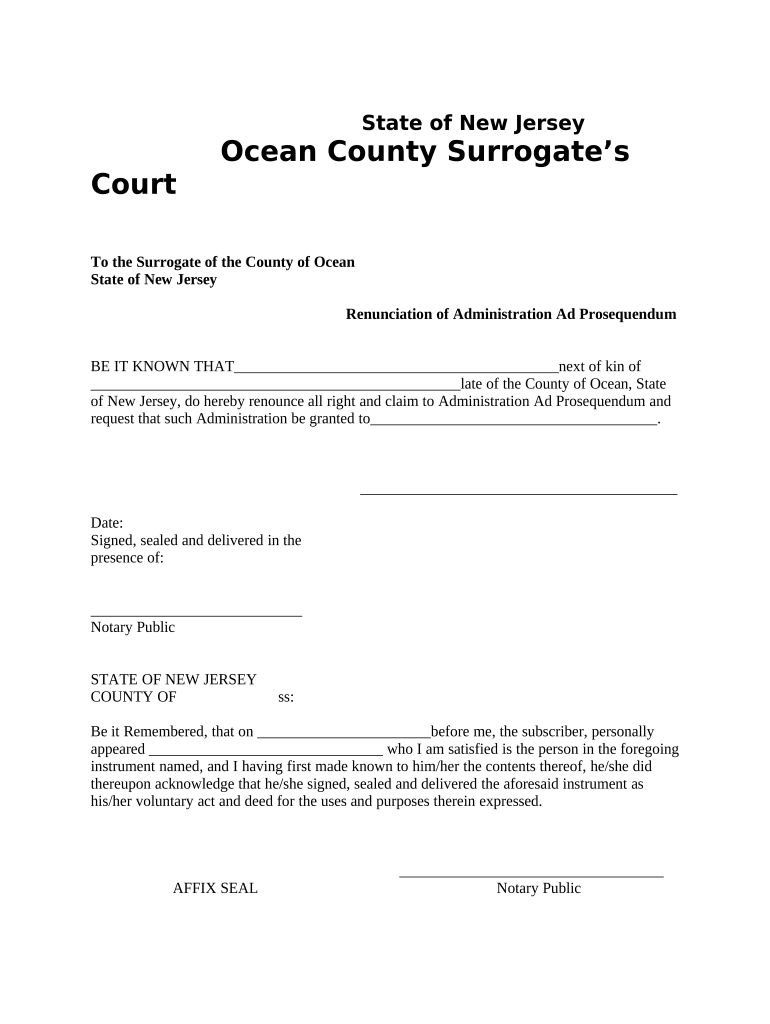
New Jersey Renunciation of Administration Ad Prosequendum
What the New Jersey Renunciation of Administration Ad Prosequendum Is
Why a Formal Renunciation Matters in Probate
A signed renunciation prevents confusion about authority, helps the court appoint an available and willing administrator, and avoids delays that can increase estate administration costs and creditor notice issues.
Typical Parties Involved and How They Use This Form
This form is used by persons entitled to serve as an administrator, potential administrators, attorneys, and beneficiaries who need a clear chain of authority.
- Estate beneficiaries and heirs who prefer a different administrator than the person named by intestacy or nomination
- Designated or nominated administrators who decline to serve and wish to formalize that decision for the court
- Probate attorneys preparing estate files and ensuring a clean record for Surrogate’s Court review
Courts rely on a clear renunciation to issue letters to the proper person; accurate execution reduces the risk of contested appointments.
Step-by-Step: Completing the Renunciation
-
01Gather documents: Obtain the death certificate and any existing probate filings.
-
02Complete form: Fill all required fields and review for accuracy.
-
03Execute with authentication: Sign before a notary or follow state RON rules if available.
-
04File with court: Submit to the county Surrogate’s Court and retain a conformed copy.
Where to File and How the Court Processes It
-
Local Surrogate’s Court: File in the county of the decedent’s domicile.
-
Clerk review: Court clerk checks form completeness and attachments.
-
Entry on docket: Renunciation becomes part of the public probate record.
-
Appointment outcome: Court may issue letters to the next eligible administrator.
How to Set Up a Digital Completion Workflow
| Field | Configuration |
|---|---|
| Signer Order | Single signer first; witness or attorney second if required |
| Authentication | Email + SMS code or government ID verification |
| Notarization | In-person notary or authorized RON session |
| Final PDF | Flattened, audit-trail attached, printable for filing |
Technical Considerations for eSigning and eFiling
Choose a platform that produces court-acceptable PDFs, strong audit trails, and supports the chosen signer authentication method.
- PDF output: Produces PDF/A with audit trail
- Authentication: Email, SMS, or ID proofing
- Notarization support: In-person or RON capability
Ensure the platform’s export includes a certificate of completion and that the file can be printed or saved for the Surrogate’s Court record.
Key Risks and Consequences of Errors
Practical Tips for Accurate and Efficient Completion
Examples: How Organizations Use Renunciations in Practice
Brian Fitzgibbons — Optica Ventures LLC
A corporate nominee declined probate administration to avoid conflict of interest and filed a renunciation to that effect.
- The court reappointed a willing family member quickly.
- The clear renunciation reduced contested proceedings and allowed timely asset distribution, minimizing additional attorney fees for all parties involved.
Tim Martin — Martin Properties
A named administrator for a real estate portfolio renounced due to out-of-state obligations.
- Another qualified administrator accepted appointment.
- The formal renunciation ensured the Surrogate’s Court issued letters to the successor promptly, preventing delays in property management and mortgage payments.
How This Form Differs from Similar Probate Documents
| Document Type | Renunciation | Resignation | Disclaimer |
|---|---|---|---|
| Purpose | decline appointment | relinquish active role | refuse property interest |
| Typical Effect | court appoints successor | court appoints replacement | asset passes without acceptance |
| Notarization | often required | often required | often not required |
| Filing Location | surrogate’s court | surrogate’s court | depends on asset |
eSignature Vendor Pricing and Feature Comparison
| signNow | DocuSign | Adobe Sign | PandaDoc | HelloSign | |
|---|---|---|---|---|---|
| Starting Price | $8/user/mo | $15/user/mo | $14/user/mo | $19/user/mo | $15/user/mo |
| Free Trial | 7-day free trial | No | No | Yes, limited | Yes, limited |
| Bulk Send | Yes | Yes | Yes | Yes | No |
| Audit Trail | Yes | Yes | Yes | Yes | Yes |
| HIPAA Compliant | Yes | Yes | Yes | No | No |
Deadlines and Typical Processing Expectations
Execute promptly:
Sign and authenticate before letters are issued to prevent conflicting appointments
File with Surrogate:
Submit to county Surrogate’s Court where decedent resided
Court review:
Clerk reviews completeness; may request corrections
Processing time:
Processing varies by county and caseload
Retain receipt:
Obtain conformed copy for estate records
Key Milestones from Decision to Court Acceptance
Decision to Renounce
Signer decides not to serve and notifies interested parties
Form Execution
Signer completes and authenticates renunciation
Filing with Surrogate
Submit the executed document and attachments to the county court
Court Entry
Surrogate’s Court files the renunciation on the estate docket
Common Questions and Practical Answers
-
Who can sign a renunciation?
Any person who has the legal right or eligibility to serve as administrator may sign a renunciation. If the signer lacks standing, the court will evaluate whether the document affects appointment rights.
-
Is notarization required in New Jersey?
County practice commonly requires notarization for probate filings; confirm with the local Surrogate’s Court. If using remote notarization, verify the county accepts RON sessions.
-
Can the renunciation be e-signed?
Electronic signatures are generally permitted under the ESIGN Act (15 U.S.C. ch. 96) and UETA where adopted, but courts and counties may impose specific authentication or notarization requirements.
-
How do I attach supporting documents?
Include certified death certificate and any prior filings when you submit the renunciation. Courts typically require attachments to be legible, certified where applicable, and referenced on the cover or filing sheet.
-
Can the renunciation be revoked later?
Revocation depends on timing and court rules; once the court acts on the renunciation and issues letters, post-appointment revocation is often limited and may require a court motion.
-
What if the court rejects the form?
If the Surrogate’s Court returns the form for defects, correct the identified issues promptly, re-execute any required authentication, and refile with an explanatory cover letter or corrected attachments.